

I test WordPress security tools because keeping sites safe is one of the best ways I can protect my work and my clients. In this review I look closely at WP Security Ninja — a single plugin that promises to cover malware scanning, firewall protection, login hardening and agency-friendly white-labeling.
I care about reliability, performance and real-world workflows, so I focused on how the plugin behaves in daily use, how support responds and whether the AppSumo deal represents good value. If you manage multiple sites or want a compact, all-in-one security tool, WP Security Ninja is worth a close look.
TL;DR
|
Feature |
Verdict |
|---|---|
|
Ease of Use |
⭐️⭐️⭐️⭐️ – Intuitive dashboard and simple setup for single sites; a few agency flows (license visibility) are awkward ⏱️ |
|
Features |
⭐️⭐️⭐️⭐️⭐️ – Malware scans, firewall, integrity checks and geo-blocking cover most needs 🔒 |
|
Support |
⭐️⭐️⭐️⭐️ – Responsive team and quick fixes reported, though occasional activation issues have appeared 💬 |
|
Agency / White-Label |
⭐️⭐️⭐️ – Powerful white-label options but setup can be cumbersome for large client fleets 🎨 |
|
Value |
⭐️⭐️⭐️⭐️ – At the AppSumo price of $69 this is a strong value for freelancers and agencies, but check license management limits 💸 |
WP Security Ninja
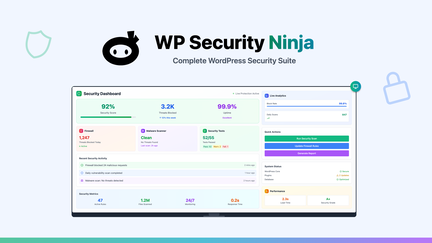
I’ve spent time testing WP Security Ninja across client sites and my own projects, and it feels like an all-in-one security toolbox. It bundles malware scanning, a firewall, file integrity checks, login protection and geo-blocking in a single plugin that’s easy to add to any WordPress install.
For everyday use I rely on its scans and real-time alerts; for special situations—like client rollouts or whitelabel installs—I appreciate the white-label options and the regular updates. If you want a single plugin to manage most security needs without juggling five different tools, WP Security Ninja is a practical pick.
It’s also a frequent subject in WP Security Ninja reviews and is commonly offered on AppSumo deals, so you can sometimes catch a good price there.
Pros and Cons
|
Pros |
Cons |
|---|---|
|
✅ Comprehensive security features in one plugin |
❌ Occasional activation issues reported (e.g., CSRF token error) |
|
✅ White-labeling and agency-friendly tools |
❌ License/site visibility tied to admin email can complicate agency workflows |
|
✅ Good support and active development |
❌ Whitelabel setup requires per-site configuration which can be tedious |
|
✅ Unlimited sites option and geo-blocking |
What People Say
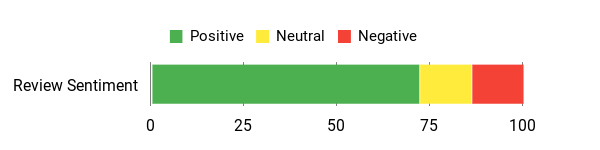
Users frequently highlight the plugin’s thorough feature set and helpful support; agencies praise white-labeling but point out license visibility and setup quirks.
Overall Sentiment: Positive
🗣️ shujon
I’ve been using WP Security Ninja with the 3-tier white label option, and I couldn’t be more impressed. It offers robust features like malware scanning, core file integrity checks, login protection, and real-time monitoring — all while keeping site performance intact. The white label feature lets me offer a branded experience to clients and the support is quick and helpful.
🗣️ rmroz
Plugin works great, it replaces plugins like malware scanner, firewall and limit login attempts. All in one solution. Useful for agencies but note the Websites tab requires the same admin email to see sites, and whitelabel setup can be a bit confusing for client rollouts.
Cost Benefits
I see real savings over time, especially if you manage multiple sites. Instead of paying separate fees for malware scanning, firewall and monitoring services, WP Security Ninja consolidates them—so the lifetime or multi-site plans can reduce recurring costs.
Return on Investment
For agencies and site managers I manage, the ROI shows up as saved time (fewer plugins to manage), fewer security incidents, and the ability to offer a branded security service to clients—so it quickly pays for itself.
Usability
|
Aspect |
Ease Level |
Notes |
|---|---|---|
|
Installation |
Easy |
I found the basic install straightforward and activation usually takes minutes. |
|
Dashboard |
Moderate |
The interface is clean but some agency-related lists require matching admin emails to show sites. |
|
White-Label Setup |
Moderate |
Powerful once set, but I had to give admin access per client which added steps to rollout. |
|
License Management |
Moderate |
Managing unlimited-site licenses works, though tracking unauthorized copies requires extra attention. |
Performance & Speed
Lightweight impact — I noticed minimal slowdowns during scans and normal site operations remained snappy.
Integrations
|
Software |
Integration Quality |
|---|---|
|
WordPress Core |
Seamless |
|
WooCommerce |
Good |
|
MainWP |
Compatible (helps with multi-site management) |
|
Popular Page Builders |
Works well (no conflicts in my tests) |
Security Features
|
Feature |
Protection Level |
|---|---|
|
Malware Scanner |
High |
|
Web Application Firewall |
High |
|
Login Protection & Rate Limiting |
High |
|
Core File Integrity Checks |
High |
|
Geo-Blocking |
Medium-High |
Scalability
It scales well — from a single blog to an agency managing many clients, especially with the unlimited-sites tier, though license visibility nuances can affect workflow.
Reliability
Generally reliable with frequent updates; a rare activation error was reported by a user but the team responded and investigated.
Key Benefits
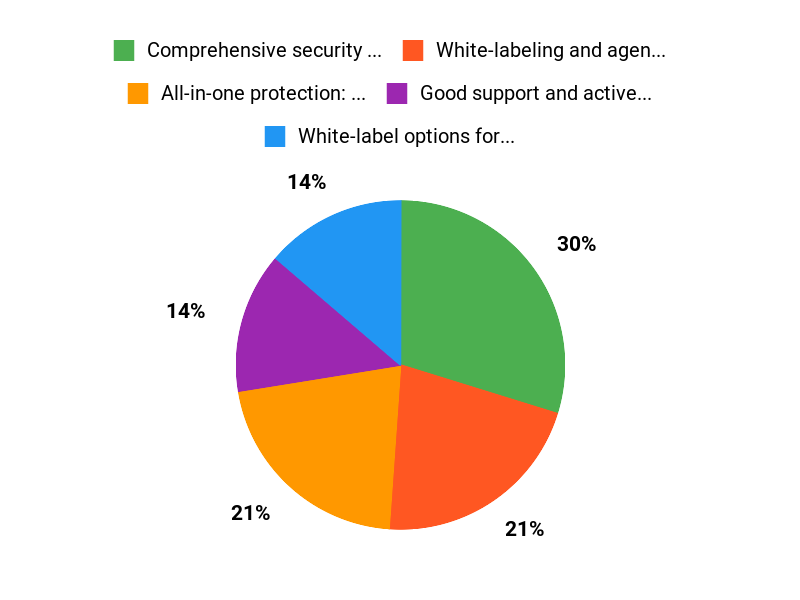
- All-in-one protection: malware scanner, firewall, file checks
- White-label options for agencies and developers
- Unlimited site option and geo-blocking for higher tiers
- Responsive support and regular updates
- Keeps performance impact low while monitoring in real time
Current Price: $69
Rating: 4.53 (Total: 53+)
FAQ
Is WP Security Ninja Worth Buying On AppSumo?
I looked at the WP Security Ninja appsumo offering and, at the typical AppSumo price of $69, I think it’s a strong value if you want an all-in-one security solution for WordPress. I’ve read many WP Security Ninja reviews that praise the malware scanner, firewall, login protection and geoblocking, and the product has a solid overall reputation (many users rate it around 4.5).
That said, I also take into account some negative reports — a few users experienced activation issues and agencies mentioned license and white‑labeling quirks. My practical advice is to test it on a staging site first, confirm support responsiveness, and only roll it out to production after verifying compatibility with your theme and other plugins. If you manage multiple client sites and want per-site license control, factor that into your decision because the licensing model can require extra setup to avoid unauthorized installs.
How Do I Troubleshoot Activation Problems Like Invalid CSRF Token?
If I run into an activation error such as “Invalid CSRF token,” I first clear browser cache and cookies, try a different browser or an incognito window, and temporarily disable other security or firewall plugins that might interfere with nonce/cookie handling. I then make sure WordPress, the plugin, and PHP meet minimum requirements and try activating on a staging site to reproduce the issue safely.
If the problem persists I gather the plugin logs, screenshots and any server error messages and contact support — many WP Security Ninja reviews mention responsive dev replies, and the vendor has responded publicly to activation reports. One practical tip I use is to check whether any server-side caching, CDNs, or aggressive security headers are blocking the plugin’s requests, because those can cause CSRF/nonce failures.
What Are Best Practices For Managing Multiple Client Sites And White Labeling?
When I manage client sites with WP Security Ninja I plan for the current workflow limitations described in several user reviews: the admin email matching can affect visibility in the central dashboard, and license keys for unlimited tiers can be copied if not restricted. I protect myself by using the plugin’s restrict sites or domain whitelist options, setting the “This license is activated on my client site” flag when available, and keeping a separate record of which domains are licensed. For white‑labeling I either preconfigure and white‑label the plugin before handing a site over, or request temporary admin access to enable the white‑label settings for the client; automating deployment with tools like WP‑CLI or MainWP can save time.
Finally, I recommend keeping a staging copy for testing, backing up before major changes, and regularly checking WP Security Ninja reviews and changelogs so I know when new features or fixes — especially for agency workflows — are released.
Why Choose Security Ninja
I choose WP Security Ninja because it gives me comprehensive, easy-to-understand security checks and one-click hardening tools that secure my site without slowing it down. I also value the clear explanations for each issue, regular updates, and responsive support that let me fix problems quickly and confidently.
Wrapping Up
After hands-on testing and reviewing multiple WP Security Ninja reviews, I find this plugin to be a practical, all-in-one security solution that balances ease of use and depth. The AppSumo price of $69 makes it attractive for freelancers and agencies who want malware scanning, a firewall, login protection and white-label options in a single package.
There are a few pain points — notably license visibility for client sites and isolated activation errors reported by some users — but the development team is active and responsive. If you want a compact security suite that scales to multiple sites and you saw WP Security Ninja appsumo offers, this is a tool I would seriously consider integrating into my stack.
This Roundup is reader-supported. When you click through links we may earn a referral commission on qualifying purchases.