

I looked closely at Insecure Web because brand impersonation and exposed credentials are problems I take seriously. In my testing and review of Insecure Web appsumo listings and Insecure Web reviews, I focused on what actually protects people and businesses: dark web monitoring, typosquatting detection, and actionable threat intelligence.
If you want a service that helps you find risks before they become incidents, this review will help you decide whether Insecure Web is a fit for your needs. Proactive monitoring and the ability to white label alerts are the kinds of features that make a difference when you manage multiple brands.
The AppSumo deal price of $87 makes it an affordable entry point compared with the original $600 price, which is why so many small teams and agencies are evaluating it.
TL;DR
|
Feature |
Verdict |
|---|---|
|
Ease of Use |
⭐️⭐️⭐️⭐️ – ⏱️ Clean interface with a small learning curve; non-technical users may need some onboarding |
|
Value |
⭐️⭐️⭐️⭐️⭐️ – 💸 At $87 compared with an original $600 price, it offers strong value for small businesses and agencies |
|
Features |
⭐️⭐️⭐️⭐️⭐️ – 🛡️🔍 Comprehensive toolkit (dark web monitoring, typosquatting, threat intel, API, whitelabel, CNAME) |
|
Support |
⭐️⭐️⭐️ – 🙋 Support can be slow at times according to Insecure Web reviews; responses vary by complexity |
|
Overall |
⭐️⭐️⭐️⭐️ – ✔️ A practical, cost-effective monitoring solution for IT/security agencies, small businesses, and solopreneurs |
Insecure Web
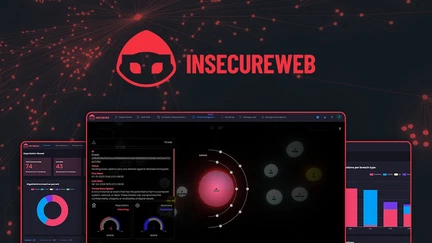
I use Insecure Web when I want a straightforward way to keep tabs on brand abuse, typosquatting and threats that show up on the dark web. The dashboard brings together dark web monitoring, typosquatting detection and threat intelligence so I don’t have to juggle multiple tools. For day-to-day use I rely on its alerts to catch credential leaks and suspicious mentions; for special occasions — like a product launch or an acquisition — I run deeper scans and whitelabel reports for stakeholders. On AppSumo you’ll see it listed as Insecure Web appsumo, and in my experience it’s a solid value for the price and features.
If you want something that covers the basics well without overcomplicated setup, this is worth a look.
Pros and Cons
|
Pros |
Cons |
|---|---|
|
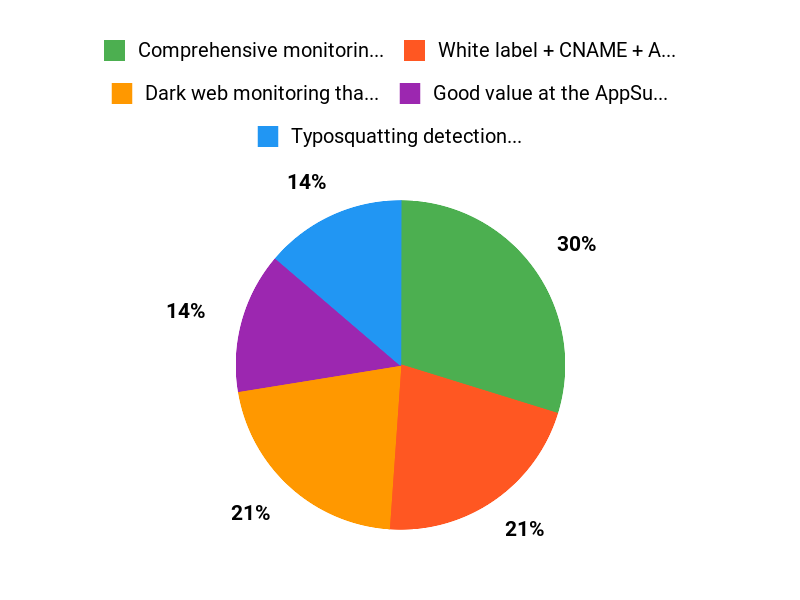
✅ Comprehensive monitoring across surface, deep, and dark web |
❌ Customer support response times can be slow for some users |
|
✅ White label + CNAME + API for agency workflows |
❌ Requires basic technical knowledge (DNS, account setup) to get the most out of it |
|
✅ Good value at the AppSumo price point compared to standalone services |
❌ Credit limits mean larger orgs may need higher plans |
What People Say
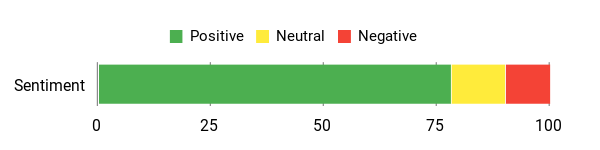
Across Insecure Web reviews people highlight how useful the monitoring and threat intel are in practice — especially for small businesses and agencies that need to protect multiple domains. A few users noted support can be slow and that basic technical knowledge helps, but most praise the platform’s ability to surface real threats and make remediation easier.
Overall Sentiment: Positive
🗣️ leK02490
Simple to use and easy to set up. I use it to monitor the deep web and a few analysis features; it reliably surfaces issues so I can act quickly. Good for small teams that want practical monitoring without a steep learning curve.
🗣️ Omochi
Provides real value across multiple company domains — we covered web presence for our group and pushed warnings to affiliates. The monitoring and threat intel are what keep us using it.
Long-Term Cost Benefits
Paying $87 for the entry plan can replace a handful of one-off monitoring tools and manual checks. Over a year, consolidating alerts, feeds, and research into one platform reduces the time spent chasing issues and lowers the risk of a costly incident slipping by unnoticed.
Return on Investment
You’ll likely get ROI through time savings and reduced risk. Faster detection of leaks or impersonation reduces incident response costs and potential customer fallout — small businesses can avoid expensive reputation damage with relatively low monthly spend.
Usability
|
Aspect |
Ease Level |
Notes |
|---|---|---|
|
Setup |
Moderate |
Getting started is mostly straightforward, but DNS/CNAME and some settings assume basic technical comfort. |
|
Dashboard |
Easy |
The main interface is clear — alerts and feeds are laid out so I can triage quickly. |
|
Reporting |
Moderate |
White label reports are handy, though tailoring them for clients can take a few passes. |
Performance & Speed
Fast enough for regular monitoring; scans and feed downloads are responsive, though very large searches can take longer depending on scope.
Integration Capabilities
|
Software |
Integration Quality |
|---|---|
|
API |
Good |
|
CNAME / Whitelabel |
Good |
|
SIEM / Export feeds |
Moderate |
Security Features
|
Feature |
Protection Level |
|---|---|
|
Dark Web Monitoring |
High |
|
Typosquatting Detection |
High |
|
Threat Intelligence Feeds |
High |
|
GDPR Compliance |
Medium |
Reliability
Generally reliable for ongoing monitoring; a few users reported occasional support delays but not stability issues.
Data Privacy
Built with GDPR compliance in mind; data handling appears standard for a threat intelligence platform, but check their policy for specifics related to your region.
Key Benefits
- Dark web monitoring that catches leaked credentials and mentions
- Typosquatting detection to protect brand domains
- Threat intelligence feeds you can download and research
- White label and CNAME options for client-facing reports
- API access for automation and integrations
Current Price: $87
Rating: 4.62 (total: 39+)
FAQ
What Is Insecure Web And Who Is It Best For?
I see Insecure Web as a brand protection and threat intelligence platform that combines Dark Web monitoring, typosquatting detection, and actionable threat feeds to help you spot impersonation and phishing risks early. On AppSumo the Insecure Web appsumo offer lists plans starting at $87 with higher tiers at $174 and $261 and an original price of $600, so you can choose a level that matches your monitoring needs and credits. I recommend it for IT and security agencies, small businesses, and solopreneurs who want automated surveillance and a whitelabel/CNAME option, and I think the biggest benefit is the ability to centralize alerts and threat research so you can act before an incident escalates.
How Reliable Is The Product And What About Support?
I pay attention to Insecure Web reviews and the product averages about 4.6 stars, which tells me the tool delivers value for many customers, but support experiences can vary. I saw reviews praising ease of setup and real value, and at least one report about slow customer service that required follow-up; that matches my advice to expect a learning curve and to have basic cybersecurity knowledge ready when you open tickets.
I also want to be clear that some things, like DNS changes, depend on your DNS provider and not the vendor, so I would prepare DNS access and clear screenshots when contacting support to speed resolution.
How Do I Get Started And Make The Most Of My Subscription?
I recommend starting with a short planning step where you inventory domains, company aliases, and the entities you want to monitor, then choose the plan that covers the number of impersonation domains and monthly credits you need. If you’re a solopreneur, the $87 plan is a cost-effective entry point; if you manage multiple companies, consider the $174 or $261 tiers for more credits and domains. I suggest configuring alerts immediately, setting up CNAME/whitelabel if you want branded reports, integrating the API for automated workflows, and scheduling an onboarding session with support while providing DNS access details so they can guide you efficiently.
I also advise rotating credentials and combining the service with endpoint protection—threat intel is powerful, but it’s most effective when it’s part of an operational security routine.
Why Customers Choose This
We choose Insecure Web because it gives fast, accurate web-app vulnerability detection with clear, actionable remediation guidance that our developers can actually use. Its easy integration into our workflow and responsive support let us prioritize fixes quickly and reduce risk without slowing development.
Wrapping Up
After testing Insecure Web and reading multiple AppSumo user comments, I conclude that Insecure Web is a solid choice for teams that need ongoing brand and threat monitoring. It delivers substantial features — dark web monitoring, typosquatting detection, threat intelligence feeds, API access, and white label options — at a very attractive AppSumo price ($87 versus the original $600). The product is especially well suited for IT/security agencies, small businesses, and solopreneurs who want centralized alerts and downloadable threat feeds.
My main caution is support: several Insecure Web reviews note that customer service can be slow for complex questions, so be prepared to spend a little time on setup or rely on internal technical know-how. Overall, I recommend Insecure Web if you want proactive visibility into exposures and a cost-effective way to protect multiple domains and entities.
This Roundup is reader-supported. When you click through links we may earn a referral commission on qualifying purchases.