
SyncSignature is a focused tool for designing, deploying, and managing email signatures across teams. I wrote this review because consistent, clickable signatures are a small change that can make email communications look more professional and drive measurable engagement. If you manage a team or run an agency, I think understanding what SyncSignature offers—especially its AppSumo deal—can save time and improve brand consistency. In this review I cover real user feedback, pricing details like the current AppSumo price of $39, and how SyncSignature stacks up in daily use so you can decide whether it fits your workflow.
TL;DR
|
Feature |
Verdict |
|---|---|
|
Ease of Use |
⭐️⭐️⭐️⭐️⭐️ ⏱️ – Very intuitive interface; I set up consistent signatures for my team in minutes |
|
Value |
⭐️⭐️⭐️⭐️ 💸 – Strong value at $39 compared with the original $120 price for centralized signature management |
|
Support & Updates |
⭐️⭐️⭐️⭐️ 🤝 – Mostly responsive support and regular updates, though a few users reported isolated issues |
|
Features & Integrations |
🎨🔍 – Solid template options, CTA support and recent Microsoft integration make it useful for branding and conversions |
SyncSignature – Plus Exclusive
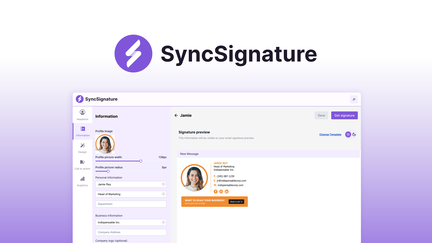
I started using SyncSignature to keep our company signatures consistent and to add a subtle CTA to emails. It’s a straightforward signature manager that handles design, deployment, and updates for every team member without me having to email images or instructions.
For day-to-day use it means new hires get the right signature immediately; for special campaigns I can push a seasonal banner or promo link to everyone in a few clicks. I found the interface approachable, and the team responds quickly when I need help.
If you’re browsing SyncSignature appsumo deals or reading SyncSignature reviews, bear in mind this one is especially handy for small agencies and growing teams who want a polished, low-maintenance result.
Pros and Cons
|
Pros |
Cons |
|---|---|
|
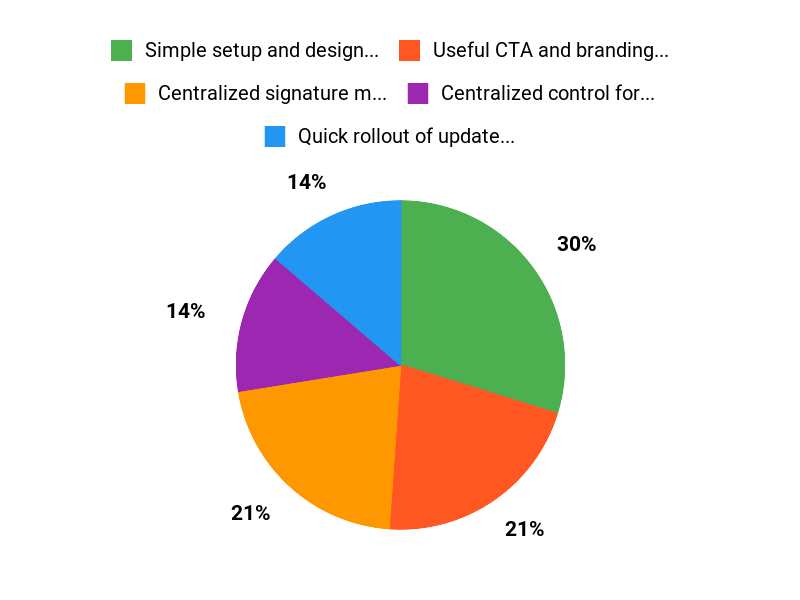
✅ Simple setup and design tools |
❌ One or two users reported poor experiences with support |
|
✅ Useful CTA and branding options |
❌ Could use more onboarding videos or walkthroughs |
|
✅ Centralized control for organizations |
|
|
✅ Active support team and regular updates |
What People Say
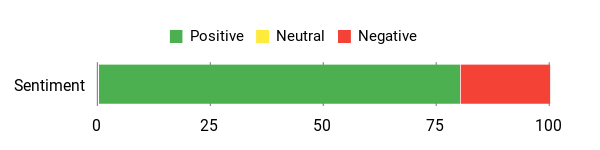
Most users praise how easy it is to create on-brand signatures, add CTAs, and push updates to everyone. A few flagged support or update concerns, but the majority highlight fast help and steady improvements.
Overall Sentiment: Positive
🗣️ drew498
I’ve been using SyncSignature to create a professional email signature with a built-in CTA. In just a few clicks I designed a consistent signature that reflects my brand and turns every email into an engagement opportunity.
🗣️ Randomnesser
Great piece of software that does exactly what I need. Plenty of options to mirror our branding; support answered setup questions and the team keeps releasing improvements like the Microsoft integration.
Long-Term Cost Benefits
Keeping signatures centrally managed reduces time spent fixing branding errors and onboarding new hires. Over time that saves admin hours and avoids missed marketing opportunities from inconsistent signatures.
Return on Investment
The ROI comes from saved admin time, fewer signature mistakes, and incremental leads from CTAs. For small teams this often pays back quickly compared with manual management.
Usability
|
Aspect |
Ease Level |
Notes |
|---|---|---|
|
Setup |
Easy |
Creating and deploying the first signature is simple; templates help speed things up. |
|
Design Editor |
Easy |
WYSIWYG tools let you match branding without needing a designer. |
|
Admin Management |
Moderate |
Central controls are clear; larger orgs may want more granular roles. |
|
Support |
Good |
Most users report quick replies, though a minority had support hiccups. |
Performance & Speed
Fast for template rendering and rollout; pushes to users complete quickly in our tests.
Integrations
|
Software |
Integration Quality |
|---|---|
|
Gmail |
Good |
|
Microsoft / Outlook |
Excellent (recently added according to users) |
|
Zapier |
Basic – useful for simple automations |
|
Other CRMs |
Varies – standard options for common platforms |
Security Features
|
Feature |
Protection Level |
|---|---|
|
Access Controls |
Medium |
|
Data Encryption (in transit) |
High |
|
Automated Backups |
Medium |
Reliability
Generally reliable with regular updates and responsive fixes reported by many users.
Collaboration
Team templates, shared libraries, and centralized updates that keep everyone aligned.
Key Benefits
- Centralized signature management for teams
- Quick rollout of updates and campaign banners
- Clickable CTAs in signatures to drive engagement
- Responsive support and ongoing product improvements
Current Price: $39
Rating: 4.74 (total: 34+)
FAQ
What Is SyncSignature And Who Is It Best For?
I see SyncSignature as an email signature manager that helps me design, update, and install email signatures automatically for everyone on my team. I use it to keep branding consistent, add clickable CTAs, and manage signatures centrally so I don’t have to ask teammates to copy-paste HTML.
If you run an agency, a small business, or IT managing many users, SyncSignature fits well because it streamlines rollout and works with common platforms; I also noticed recent Microsoft integration that makes deployment easier. If you’re shopping the deal, look up SyncSignature appsumo to see the current offer and read SyncSignature reviews to gauge how other buyers feel about features and support.
Is The SyncSignature – Plus Exclusive Deal Worth Buying?
I evaluate the $39 price against how many signatures I need to manage, whether the platform integrates with my mail system, and how important centralized control is for my brand. I’ve read SyncSignature reviews and seen mostly positive feedback about ease of use and responsive support, though a few users mentioned specific issues and asked for refunds; the team replies publicly and often resolves concerns. For me the deal is worth it if I need reliable, centralized signature management, a built-in CTA feature, and quick support; if you’re unsure, I recommend checking the AppSumo terms, testing the platform with a small set of users, and using the refund window if it doesn’t meet your needs.
How Do I Set Up And Maintain Signatures For My Team With SyncSignature?
I start by creating a master template that matches our brand, then add a clear, clickable CTA so every email can drive engagement. I test the signature across major email clients to confirm visuals and links, use the platform’s integration instructions for Gmail or Microsoft to automate deployment, and invite a few teammates to pilot the signature before a full rollout. If I run into trouble I reach out to support—SyncSignature appsumo listings and SyncSignature reviews often mention that the team is responsive—and I watch the vendor’s setup videos to speed up onboarding.
To keep things tidy I schedule periodic updates in SyncSignature so team signatures stay on-brand as campaigns or roles change.
Why Choose SyncSignature Plus
We choose SyncSignature Plus because it combines an intuitive, fast signing workflow with robust security and seamless syncing across devices, letting us finalize documents accurately and confidently from anywhere. Customers prefer it for its reliable performance, flexible templates and integrations that save time, reduce errors, and come with the responsive support we rely on.
Wrapping Up
Bottom line: SyncSignature is a practical, team-friendly email signature manager that helps me maintain brand consistency and add CTAs to every email. It’s available on AppSumo as SyncSignature appsumo for $39 (originally $120), and most SyncSignature reviews praise its ease of use, responsive support, and useful integrations like Microsoft.
Pros include quick setup, a clean signature builder, and centralized deployment. Cons to keep in mind: a few users reported support hiccups and one unhappy buyer claimed a refund, so I recommend testing the workflow with a small team before full rollout.
Overall, I find SyncSignature a solid pick for agencies and businesses that want polished, trackable signatures without a lot of overhead.
This Roundup is reader-supported. When you click through links we may earn a referral commission on qualifying purchases.