
Nexter WP is an all-in-one WordPress toolkit that promises faster sites, fewer plugins, and more productive page building. I wrote this review because I know many people — freelancers, agency leads, and solo site owners — want to spend less time wrestling with plugin conflicts and more time building.
In this review I look at real Nexter WP reviews, the AppSumo offering (Nexter WP appsumo), pricing ($49), and what you can realistically expect in speed, blocks, templates, and support. If you build WordPress sites, knowing whether Nexter saves you time and reduces complexity matters, and I walk through the trade-offs so you can decide quickly whether it fits your workflow.
TL;DR
|
Feature |
Verdict |
|---|---|
|
Ease of Use |
⭐️⭐️⭐️⭐️ – 🎨 A friendly Gutenberg-first approach that becomes intuitive after a short learning curve. |
|
Performance |
⭐️⭐️⭐️⭐️ – ⏱️ Noticeable speed improvements versus plugin-heavy setups; good for small to medium sites. |
|
Value |
⭐️⭐️⭐️⭐️⭐️ – 💸 At $49 on AppSumo, it’s a strong value if you want to replace multiple plugins and speed up build time. |
|
Support & Docs |
⭐️⭐️⭐️ – 🔍 Responsive support but mixed feedback about beginner onboarding and the clarity of documentation. |
|
Blocks & Customization |
⭐️⭐️⭐️⭐️ – 🎨 90+ blocks and templates offer breadth, though some blocks need deeper customization and WooCommerce coverage. |
Nexter WP
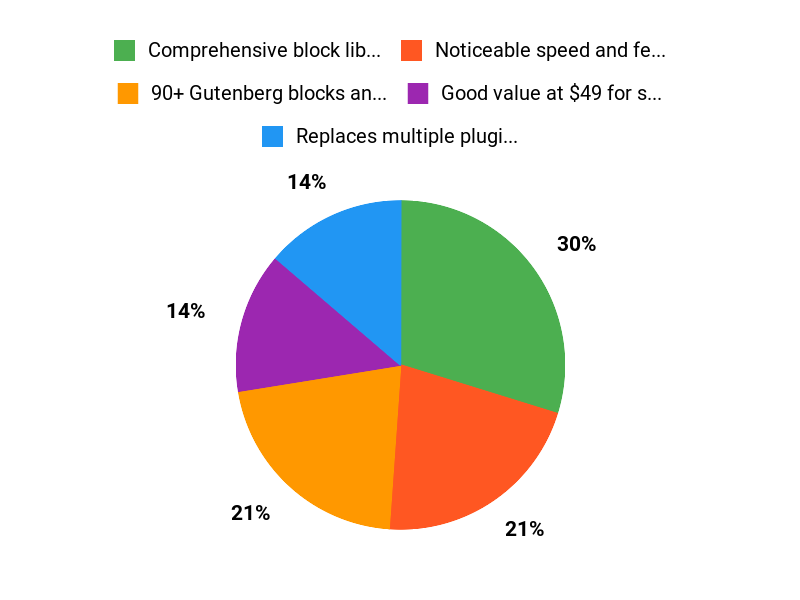
I’ve been using Nexter WP for a few weeks and it feels like a tidy toolkit for building fast WordPress sites without juggling a dozen plugins. It bundles 90+ Gutenberg blocks, templates and extensions so I can assemble landing pages, agency sites or simple shops faster. For everyday work I use it to replace multiple small plugins — that alone cuts down maintenance and compatibility headaches. For special projects I lean on the pre-built blocks and templates to prototype landing pages or client sites quickly.
On AppSumo (Nexter WP appsumo) the price is attractive for solo sites and small teams, and reading Nexter WP reviews shows a pattern: great speed and support, plus a learning curve around documentation and some WooCommerce bits. If you want a practical, cost-conscious toolkit that accelerates site builds, I’d recommend giving Nexter a try and testing it on a staging site first.
Pros and Cons
|
Pros |
Cons |
|---|---|
|
✅ Comprehensive block library (90+ blocks) |
❌ Documentation and beginner onboarding can be confusing |
|
✅ Noticeable speed and fewer plugin conflicts |
❌ Some blocks lack advanced customization |
|
✅ Good value at $49 for small projects |
❌ WooCommerce and dynamic content support need improvement |
|
✅ Active developer response to feedback |
What People Say
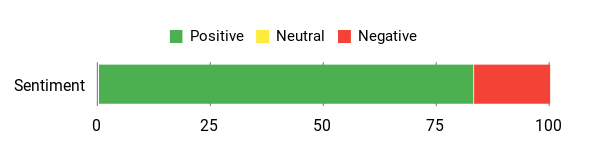
Users consistently praise Nexter WP for speed, the breadth of blocks, and support responsiveness. Agencies highlight time savings and reduced plugin dependency. Common notes: some blocks need deeper customization, WooCommerce features are limited, and documentation/onboarding could be clearer.
Overall Sentiment: Positive
🗣️ Rupalshah
I replaced about six plugins with Nexter and noticed better speed and simpler maintenance. The 90+ blocks and templates made building pages straightforward once I got the hang of it, and support was responsive when I needed help.
🗣️ digitalmandar
As an agency handling hundreds of sites, Nexter reduced plugin bloat and sped up builds. Performance improved across client sites and the toolkit saved our team time, though WooCommerce blocks could use more depth.
Long-Term Cost Benefits
Because Nexter WP replaces several single-purpose plugins, you can save on plugin licenses and reduce time spent on updates and conflict debugging. For small sites a one-time $49 investment often pays off within a few months by cutting recurring plugin costs and development hours.
Return on Investment
If you build multiple client sites, the time saved on setup and maintenance plus fewer plugin subscriptions makes the ROI strong. Agencies report faster turnarounds and reduced maintenance overhead, turning the $49 entry price into recurring billable time saved.
Usability
|
Aspect |
Ease Level |
Notes |
|---|---|---|
|
Onboarding |
Moderate |
Plenty of tutorials claimed, but beginners may find the documentation scattered; a guided start would help. |
|
Block Customization |
Easy to Moderate |
Many pre-made blocks speed workflow, though some need deeper styling options for advanced designs. |
|
Templates |
Easy |
Ready-made templates make prototyping quick; good for landing pages and simple sites. |
|
Support |
Easy |
Developers are responsive and receptive to feedback, according to user reports. |
Performance & Speed
Users note faster load times after switching to Nexter WP compared to prior setups. It reduces plugin overhead and feels optimized for simple to medium sites, though ultra-high performance pages may still need additional tuning.
Integrations
|
Software |
Integration Quality |
|---|---|
|
WordPress Core / Gutenberg |
Good |
|
WooCommerce |
Limited – Needs More Features |
|
Advanced Custom Fields (ACF) / SCF |
Partial – Dynamic content support is limited |
|
Page Builders (Elementor) |
Moderate – Can co-exist, but not a direct replacement for builder-specific widgets |
Security Features
|
Feature |
Protection Level |
|---|---|
|
Regular Updates |
Good |
|
Compatibility Focus |
Moderate |
|
Reduced Plugin Surface |
Improves security (fewer third-party plugins) |
Reliability
Overall reliable with active development and prompt support replies. A few users reported friction with documentation, but feature stability and updates are consistent.
Learning Curve
There is a noticeable learning curve for beginners, especially if you’re new to Gutenberg. Once familiar, the toolkit is straightforward. Users suggest clearer getting-started guides to ease the first few hours.
Key Benefits
- 90+ Gutenberg blocks and templates
- Replaces multiple plugins to reduce maintenance
- Improves site speed and performance
- Responsive support and active development
- Affordable entry price at $49
Current Price: $49
Rating: 4.72 (total: 46+)
FAQ
Is Nexter WP Worth Buying?
I see this question a lot, and my short answer is yes for many users and agencies, but with a couple of caveats. From what I’ve seen and from Nexter WP reviews, the toolkit delivers strong value: it includes 90+ blocks, templates, and extensions that can replace several plugins and speed up site builds.
On AppSumo the introductory price is $49, which makes it a compelling buy if you want an all-in-one Gutenberg solution rather than buying multiple paid plugins. That said, the learning curve and some documentation gaps have been called out in reviews, so I recommend budgeting a little time to learn the interface and relying on support if you get stuck.
If you run an agency or build many sites, I think Nexter WP can save you hours per project and reduce plugin overhead; if you’re a total beginner who wants instant, hand-holding onboarding, be aware you might need more patience up front.
What Are The Main Strengths And Limitations I Should Know About?
I’ll be blunt: the strengths are speed, fewer plugin conflicts, and a feature-rich block library that can make building sites faster and cleaner. Many people mention in Nexter WP reviews that it replaced multiple plugins and improved performance, and the development team is responsive to feedback.
On the limitations side, I’ve noticed a learning curve with Gutenberg-based block kits, some blocks have limited customization today, and WooCommerce or certain dynamic content scenarios still need more polish. If you grabbed Nexter WP appsumo or are considering it, treat it as a powerful toolkit that will get better over time; plan for a short onboarding period, test critical blocks on a staging site, and keep an eye on updates and the roadmap for planned improvements.
How Do I Get Started Fast And Troubleshoot Common Issues?
When I help people get up to speed I tell them to start on a staging site, import a template that closely matches the layout you want, and then edit blocks one at a time so you learn how each setting affects output. If something breaks or a block feels limited, I contact support or use the AppSumo thread—the Nexter WP appsumo community and the vendor support are responsive and often create quick fixes or guidance.
For documentation gaps I recommend asking for a short screencast or specific tutorial from support, since the team has shown they’ll produce targeted resources when users report repeat issues. Finally, if you rely on dynamic data or WooCommerce, test those flows early and keep backups; I’ve found early testing prevents surprises in client projects.
Why Choose Nexter WP
We choose Nexter WP because its incredibly easy to set up and customize, delivers fast page loads and responsive designs, and includes strong SEO and security features out of the box. Customers also prefer it for the reliable support and regular updates that keep sites running smoothly and future-proofed.
Wrapping Up
Bottom line: I see Nexter as a sensible, cost-effective toolkit for people who build many WordPress sites and want to reduce plugin bloat. For $49 on AppSumo, Nexter WP appsumo gives you 90+ blocks, templates, and performance-focused features that can replace several plugins and speed up development. The user experience improves once you work through a short learning curve, and many Nexter WP reviews praise the responsive support and time savings.
The main drawbacks I noticed are onboarding documentation gaps for absolute beginners and some limits in block customization and WooCommerce coverage. If you value quicker builds and fewer moving parts, Nexter is worth trying; if you need deep, production-level WooCommerce or fully custom block behaviors today, you should confirm those gaps before migrating.
This Roundup is reader-supported. When you click through links we may earn a referral commission on qualifying purchases.