
I tested ScreenToVideo because I wanted a single tool that lets me record, edit, and share screen recordings without jumping between multiple apps. This review focuses on what matters to creators: ease of use, editing power, stability, and value.
I’ll walk you through why ScreenToVideo can speed up your workflow, who it helps most, and what to watch out for when considering the ScreenToVideo appsumo deal at $59.
TL;DR
|
Feature |
Verdict |
|---|---|
|
Ease of Use |
⭐️⭐️⭐️⭐️⭐️ ⏱️ – Very intuitive recorder and editor; quick to learn even if you’re new to video tools |
|
Editing Features |
⭐️⭐️⭐️⭐️ 🎨 – Strong built-in tools like AI silence removal, captions, and blur effects that let me polish videos fast |
|
Stability & Reliability |
⭐️⭐️⭐️ 🔍 – Mixed reports: generally good but some users experience frame skipping, black screens after edits, or export hangs |
|
Value |
⭐️⭐️⭐️⭐️ 💸 – Lifetime license for $59 on AppSumo is compelling for creators who want a one-time purchase |
|
Support & Updates |
⭐️⭐️⭐️⭐️ 🤝 – Developer replies are prompt and the app is updated regularly, though complex bugs may require user troubleshooting |
ScreenToVideo
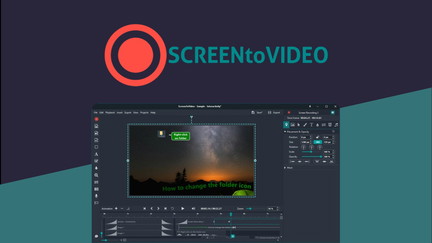
I’ve been using ScreenToVideo for a mix of quick how-tos and longer walkthroughs, and it hits a sweet spot between power and simplicity. It records a full screen, a window, or a custom area, captures system audio and webcam, and adds AI tools like silence removal and blur effects so my clips look cleaner without extra effort. For daily use I rely on it to make short tutorial clips, social media snippets, and quick fixes; for special projects I use the editor’s captions, speed controls, and hardware-accelerated export to produce longer lessons. If you shop on ScreenToVideo appsumo deals, the lifetime access price is a big draw — I recommend it for creators who want strong editing features without a subscription, but be aware some users report export or trimming bugs so save often.
Pros and Cons
|
Pros |
Cons |
|---|---|
|
✅ Intuitive recorder + editor in one app |
❌ Some users report trimming or export bugs (black screens) |
|
✅ AI tools (silence removal, blur) speed up edits |
❌ Frame skipping and hangs on longer recordings reported |
|
✅ Lifetime access deal via ScreenToVideo appsumo |
❌ Windows-only — no macOS or Linux builds |
|
✅ Quick exports and common format support |
What People Say
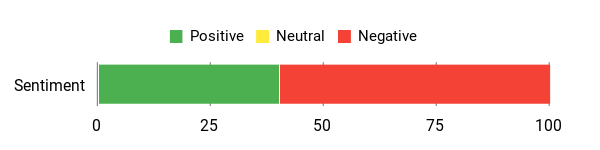
People praise ScreenToVideo for being easy to use and feature-rich — many mention ditching heavier tools like OBS and enjoying the editor’s speed. At the same time, multiple reviewers report stability issues like black screens after edits, skipping frames, or export hangs, so the experience can vary.
Overall Sentiment: Negative
🗣️ gramir
It is my go-to tool to record and edit videos — easy to handle, has a lot of powerful features and is updated on a regular basis.
🗣️ creative.kira
No more OBS Studio for desktop screen recording. Easy to download and use, with quick editing to capture, crop and get creating.
Cost Savings
Buying the lifetime license at $59 (often offered on ScreenToVideo appsumo) avoids recurring subscription fees. Compared to the original price of $119, it’s a one-time investment that keeps getting updates and support.
ROI
If you make even a few professional videos a month, you quickly recoup the $59 price in time saved versus juggling separate recording and editing tools. Faster edits and fewer tools to master translate to better output with less time.
Usability
|
Aspect |
Ease Level |
Notes |
|---|---|---|
|
Getting Started |
Easy |
Installer and recorder are straightforward; I was recording in minutes. |
|
Editing Tools |
Moderate |
Powerful but with a few learning points; captions and speed controls are handy. |
|
Recording Stability |
Varies |
Most recordings work fine, but some users report frame skips or export hangs. |
Performance
Generally fast for exports thanks to hardware acceleration, though several reviews mention slow or stuck exports on long files and occasional frame skipping during recording.
Integrations
|
Software |
Integration Quality |
|---|---|
|
Google Drive |
Seamless |
|
Google Text-to-Speech |
Good |
|
Common export formats (MP4, WMV, GIF, MP3) |
Solid |
Security
|
Feature |
Protection Level |
|---|---|
|
GDPR compliance |
High |
|
Local file storage (projects saved locally) |
Moderate |
|
Export control (choose formats and destinations) |
Moderate |
Reliability
Mixed — I appreciate the frequent updates and responsive support replies, but several users report critical issues like black screens after trimming, skipped frames, or hangs during export.
Collaboration
Simple sharing via Google Drive upload makes it easy to hand off files, but there are no advanced multi-user editing features.
Benefits
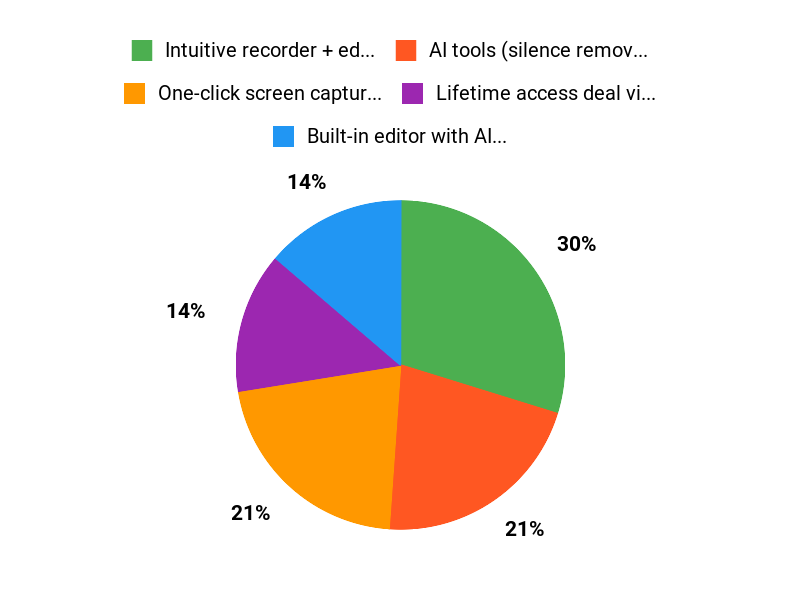
- One-click screen capture (full, window, or custom area)
- Built-in editor with AI silence removal and blur effects
- Hardware-accelerated export to MP4, WMV, GIF, or MP3
- Lifetime license option with free upgrades
Current Price: $59
Rating: 4.76 (total: 105+)
FAQ
Is ScreenToVideo Worth The Price?
I think ScreenToVideo can be a great value if you want an all-in-one screen recorder and editor without recurring fees; the current AppSumo offer lists lifetime access for $59 (originally $119) and includes free lifetime upgrades and support. I’ve read many ScreenToVideo reviews that praise the intuitive editor, AI silence removal, captions, and quick exports, so if you create tutorials, courses, or marketing videos I find the tool compelling.
That said, some users report stability issues in specific workflows, so I recommend weighing the features you need against the mixed feedback before buying and confirming AppSumo’s refund policy if you want extra peace of mind.
How Reliable Is ScreenToVideo For Recording And Editing?
From what I see in ScreenToVideo reviews there are both happy customers and users who hit bugs, so reliability depends on your setup and use case. I personally recommend keeping the app updated to the latest release, using hardware-accelerated export when available, recording in shorter segments rather than one very long file, and saving projects frequently to avoid data loss. If you experience issues like skipped frames, long export hangs, or the black-screen problem some users reported when trimming, send your project file and export settings to support@screentovideo.com so the team can investigate and help — I found that sharing logs and screenshots speeds up resolution.
How Do I Get Support, Updates, And Make The Most Of The AppSumo Deal?
If you bought through ScreenToVideo appsumo your purchase usually grants lifetime access and updates tied to that deal; I suggest downloading the latest installer from the official site and registering with the email you used on AppSumo. For troubleshooting I contact support@screentovideo.com with project files and screenshots, and I keep an eye on community feedback in ScreenToVideo reviews to learn common fixes and workflows.
To get smooth results I recommend recording with sufficient system resources, choosing MP4 export for compatibility, using the AI tools for quick polishing, and exporting shorter clips or using merge operations so you avoid long-export hangs.
Why Users Love ScreenToVideo
We love ScreenToVideo because it makes turning recorded screens into polished videos ridiculously fast and simple — the intuitive editor, smart templates, and one-click export let us spend minutes editing instead of hours. Its crisp output, flexible format options, and reliable performance help us deliver professional-looking tutorials and demos without a steep learning curve or bloated software.
Wrapping Up
After trying ScreenToVideo and reading a range of ScreenToVideo reviews, I see a tool that balances simplicity and capability. For $59 via AppSumo, you get a lifetime license with powerful editing features, AI tools, and straightforward exporting. That makes it a good fit for content creators, course creators, and small businesses who want to produce polished screen recordings without ongoing subscriptions. However, stability concerns reported by some users — including frame skipping, export hangs, and rare black-screen issues during editing — mean I recommend you test your most important workflows before relying on it for mission-critical projects.
Overall, I appreciate the speed and editing toolkit, and I think the ScreenToVideo appsumo offer represents strong value if you accept the occasional need to troubleshoot or contact support.
This Roundup is reader-supported. When you click through links we may earn a referral commission on qualifying purchases.