

I tested the Blurweb App because I care about protecting sensitive information when I share my screen or record video. In my experience, accidental data exposure happens more often than people think, and tools that prevent it save time and worry.
Blur sensitive information with one click and keep those blurs in place even after a page reload — that alone can remove the need for tedious post-production editing. I’ll walk you through what I found, why it matters, and how the Blurweb App (including the Blurweb App appsumo listing at $17) stacks up in real use.
TL;DR
|
Feature |
Verdict |
|---|---|
|
Ease of Use |
⭐️⭐️⭐️⭐️⭐️ 🎨 – Point-and-click or drag-to-blur makes it extremely intuitive; I was up and running in minutes. |
|
Privacy & Effectiveness |
⭐️⭐️⭐️⭐️⭐️ 🔒 – Blurs persist after reload and work live during calls, so I don’t worry about accidental exposures. |
|
Compatibility |
⭐️⭐️⭐️⭐️ 🔌 – Chrome and Firefox extensions plus Google Meet and Zoom support; reviewers also reported Edge compatibility. |
|
Value |
⭐️⭐️⭐️⭐️ 💸 – The AppSumo price of $17 is excellent for the feature set; lifetime-style deals and multi-device plans add flexibility. |
|
Verdict |
✅ – A practical, affordable tool for anyone who records or presents screens regularly. |
Blurweb App
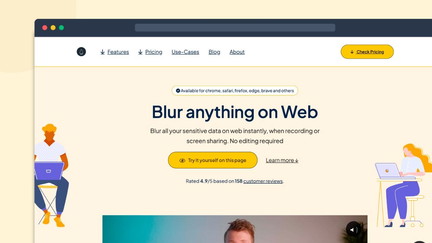
I’ve been using Blurweb App to hide sensitive info while recording or sharing my screen, and it genuinely makes presentation work easier. It sits in the browser and lets me blur images, text, or input fields with a click or by dragging a box. The blur can persist even after a page reload, which saved me from re-editing recordings and prevented accidental leaks during live calls.
I use it for everyday tasks like demos, customer support screens, and YouTube tutorials, and for special occasions such as webinars or live training where I need to protect real customer data. I grabbed it on Blurweb App appsumo at the $17 price point and, after reading Blurweb App reviews, felt the feature set and reliability were worth the small cost.
If you share screens regularly, this is an easy tool to add to your workflow.
Pros and Cons
|
Pros |
Cons |
|---|---|
|
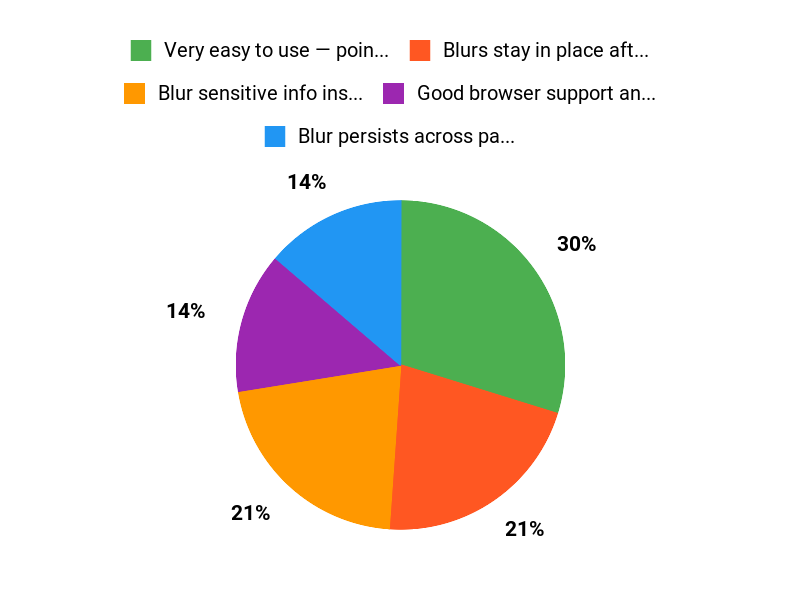
✅ Very easy to use — point, click or drag |
❌ Only covers browser windows — separate tool needed for non-browser apps |
|
✅ Blurs stay in place after reloads |
❌ Device/browser slots depend on the plan |
|
✅ Good browser support and live meeting integrations |
❌ No advanced shape masking beyond box selection |
|
✅ Low price on AppSumo compared to time saved |
What People Say
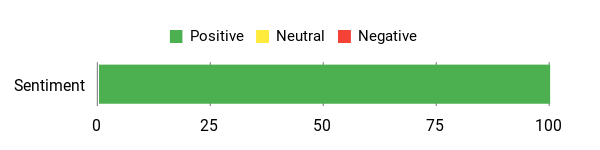
Users praise the simple interface, reliable persistence of blurs after reloads, and the live-session usefulness that eliminates post-production editing. Cross-browser support and strong value for the price are common comments in Blurweb App reviews.
Overall Sentiment: Positive
🗣️ Kinger
This is simple yet extremely useful for live presentations. I can blur things on the fly and the blurs stay in place even if the page reloads, which means no re-editing and no fiddly follow-up work. For presenters this is a must-have.
🗣️ cdm4000cdm
Works well during live sessions — the blur follows my data as I scroll (Google Sheets, customer info) and I no longer create dummy data for demos. I used it in Edge and Firefox and it performed reliably.
Long-Term Cost Benefits
Paying $17 for the basic AppSumo offer buys ongoing protection against accidental data leaks and saves repeated editing time. Over months, avoiding even a single re-record or accidental exposure can offset the price many times over.
Return On Investment
For a small one-time cost on AppSumo, you reduce editing time, eliminate reuploads, and lower the risk of data exposure during live events. The time saved and reduced risk makes ROI easy to justify for frequent screen sharers.
Usability
|
Aspect |
Ease Level |
Notes |
|---|---|---|
|
Install & Setup |
Very Easy |
Add the Chrome extension or Firefox add-on and you’re ready in a minute. |
|
Blurring Elements |
Easy |
Point-and-click or drag to create blurs; clearing is straightforward. |
|
Persistent Blur |
Easy |
Blurs can be kept across reloads which avoids rework. |
|
Cross-Browser Use |
Moderate |
Works in Chrome and Firefox; behavior is consistent but browser permissions may differ. |
|
Live Sessions |
Easy |
Integrates with Google Meet and Zoom for real-time protection. |
Performance & Speed
Fast and responsive in daily use; blurs apply immediately and follow content while scrolling without noticeable lag.
Integrations
|
Software |
Integration Quality |
|---|---|
|
Google Meet |
Good |
|
Zoom |
Good |
|
Chrome |
Native Extension |
|
Firefox |
Native Add-on |
Security Features
|
Feature |
Protection Level |
|---|---|
|
GDPR-compliant |
High |
|
Persistent Blur (Keep Blur) |
High |
|
Selective blur for images, paragraphs, inputs |
Medium |
Reliability
High — reviewers note stable behavior and persistence across reloads, with consistent performance during live sessions.
Learning Curve
Very short — most people get comfortable within minutes.
Key Benefits
- Blur sensitive info instantly with one click or a drag box
- Blur persists across page reloads to avoid re-editing
- Works in Chrome and Firefox and supports Google Meet and Zoom
- Affordable one-time AppSumo price for small teams
Current Price: $17
Rating: 4.6 (total: 150+)
FAQ
What Is Blurweb App And Who Is It Best For?
I see Blurweb App as a lightweight browser extension that helps you blur sensitive information while recording or screen sharing so you don’t have to re-edit videos. I use it when I present live or record tutorials because it offers a single click to blur, supports Chrome and Firefox, and integrates with Google Meet and Zoom.
From my experience and from reading Blurweb App reviews, it’s especially useful for content creators, customer support reps, and YouTubers who often show live pages containing private data.
How Reliable And Secure Is Blurweb App During Live Sessions?
I trust Blurweb App for live sessions because it’s built to keep blurs in place even if the page reloads and the blur follows content while I scroll, which many reviewers mention. The product lists GDPR-compliant features, and I recommend treating it as a presentation-layer protection: test your blur before going live, keep the extension updated, and avoid sharing raw source files that contain sensitive data. I also note a limitation: Blurweb App blurs browser content; if I need to obscure non-browser windows I pair it with a tool like Blurscreen.
My practical tip is to always run a quick private meeting or recording to confirm the blur behavior on the specific page you’ll show.
Is The AppSumo Deal Worth Buying And What Should I Consider Before Purchasing?
I find the Blurweb App appsumo deals compelling, especially given the price points: a single code tier is $17 (3 devices/browsers), two codes are $34 (6 devices), and three codes are $51 (9 devices), compared to original prices listed by the seller. From my reading of Blurweb App reviews and my own testing, the extension is easy to use and offers real value for anyone who shares screens regularly.
Before I buy I check how many devices I need, verify refund/upgrade terms on the AppSumo listing, and test the extension in a non-critical session. If you need full-screen, non-browser blurring, factor in the separate Blurscreen product into your decision.
Overall, I’d say the deal is worth it if you want to avoid tedious post-production and value the time saved.
Why Choose Blurweb
I choose Blurweb because it gives an intuitive, fast way to blur and manage sensitive content across devices while keeping privacy controls simple and transparent. I also appreciate its customizable tools, reliable performance, and helpful support that save me time and make it easy to integrate into my workflow.
Wrapping Up
After using the Blurweb App and reviewing multiple Blurweb App reviews, I find it a straightforward solution for avoiding accidental data leaks during live or recorded screen sharing. It saves time by eliminating post-production edits, offers persistent blurs that survive reloads, and supports major browsers and meeting platforms. At the AppSumo price of $17, the tool is a solid value for content creators, customer support teams, and anyone who presents or records screens regularly.
This Roundup is reader-supported. When you click through links we may earn a referral commission on qualifying purchases.