

I tested SurFast Video Downloader because I often need a reliable way to save and repurpose online videos for client work and courses. If you create content, teach, or manage social media, being able to download videos from over 1,000 websites and convert them into multiple formats can save hours and protect your workflow against platform changes. In this review I walk through key features, real user feedback (including SurFast reviews on AppSumo), pricing, and when I think SurFast makes sense.
TL;DR
|
Feature |
Verdict |
|---|---|
|
Ease of Use |
⭐️⭐️⭐️⭐️ – Clean, approachable interface; most tasks are straightforward. ⏱️ |
|
Features |
⭐️⭐️⭐️⭐️⭐️ – Rich feature set: download live streams, playlists, subtitles, batch convert and rip audio/video. 🎨 |
|
Performance |
⭐️⭐️⭐️⭐️ – Fast and reliable for most sites, though a few users reported slow startup or site-specific errors. 🔍 |
|
Value (AppSumo) |
⭐️⭐️⭐️⭐️ – Very good value on AppSumo at $19 for the base offer; higher-code packs available for teams. 💸 |
|
Support |
⭐️⭐️⭐️⭐️⭐️ – Responsive, helpful support reported by multiple users. 📧 |
SurFast Video Downloader

I’ve been using SurFast to grab videos, live streams, audio and subtitles from sites like YouTube, TikTok and Instagram. It handles batch downloads, converts files into common formats (MP4, MP3, WAV, etc.), and even tracks playlists so new uploads get pulled automatically. For everyday use I rely on it to save clips for offline review or teaching materials; for special projects it’s handy for grabbing whole playlists or ripping high-res footage for editing.
Setup is straightforward, the interface is approachable, and the bundled features (playlist tracking, in-app browser, subtitle ripping) mean I don’t have to stitch together multiple tools. If you’re scanning SurFast reviews to decide, I find it a solid, time-saving tool — and the AppSumo deals make it a good value if you want multiple licenses or long-term use. You’ll also see mentions of SurFast appsumo offers in the community feedback.
Pros and Cons
|
Pros |
Cons |
|---|---|
|
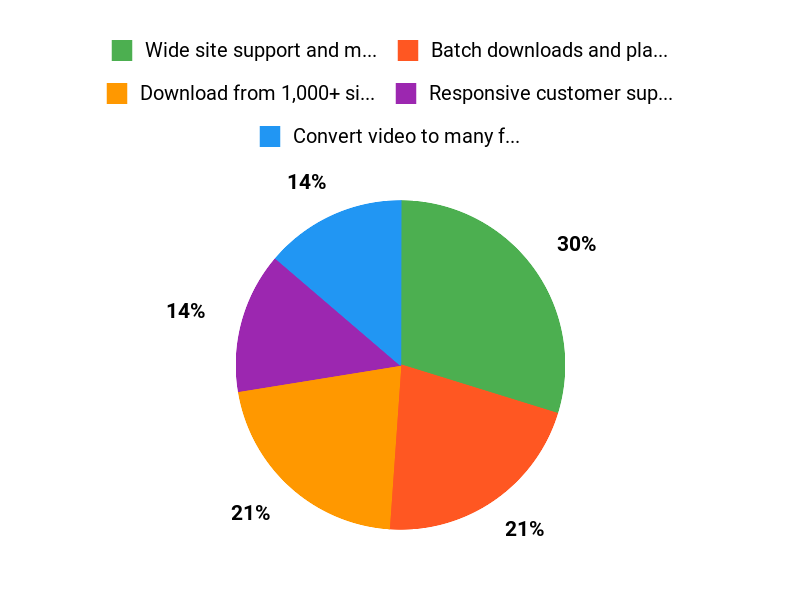
✅ Wide site support and many output formats |
❌ A few reports of slow startup on some machines |
|
✅ Batch downloads and playlist tracking save time |
❌ Occasional download failures due to source site protections |
|
✅ Responsive customer support mentioned by several users |
❌ No built-in duplicate detection or advanced file transfer tools |
|
✅ Works with private and protected content with proper access |
What People Say
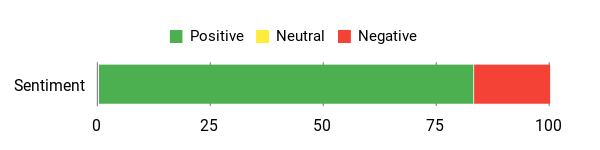
Most SurFast reviews emphasize reliability and speed when downloads work, plus fast, helpful support from the SurFast team. AppSumo buyers often highlight the value of multi-license deals and the convenience of playlist tracking.
Overall Sentiment: Positive
🗣️ mediac
SurFast is efficient, easy to use, and essentially unlimited. I used it many times without issues and it downloads reliably. I suggested a duplication-detection alert and an easier way to move files to external drives, but overall it’s near perfect for my needs.
🗣️ quanghoanguyen165
The tool is fast, supports multiple formats, and downloads smoothly with no quality loss. Support was quick and enthusiastic when I had a minor issue, which made the whole experience worry-free.
Cost Benefits
Buying a multi-license SurFast plan via AppSumo can lower per-seat cost compared with monthly alternatives. The ability to automate playlist downloads and batch convert files reduces manual work, which adds up over months if you download content regularly.
ROI
If you frequently save clips, build lesson packs, or archive content, SurFast pays back quickly by cutting the time spent on repetitive downloads and conversions. The AppSumo pricing tiers make adding licenses affordable for teams.
Usability
|
Aspect |
Ease Level |
Notes |
|---|---|---|
|
Installation |
Easy |
Installer for Windows and Mac is straightforward; licenses activate without complex steps. |
|
Interface |
Easy |
Clean layout with clear download and conversion options; in-app browser simplifies grabbing links. |
|
Batch/Playlist Setup |
Moderate |
Setting up playlist tracking is powerful but may take a minute to configure schedules and destination folders. |
Speed
Generally fast for downloads and conversions; many users report smooth, high-quality downloads. There are isolated reports of slow app launch on some high-end Macs, so results may vary by system.
Integrations
|
Software |
Integration Quality |
|---|---|
|
YouTube |
Excellent |
|
TikTok |
Excellent |
|
In-app Browser |
Good |
Security
|
Feature |
Protection Level |
|---|---|
|
GDPR-compliant |
High |
|
Private video download (with access) |
Medium |
|
Local file handling |
Medium |
Reliability
Mostly reliable for everyday downloads; occasional failures are typically due to source site protections rather than the app itself. Support can help resolve many cases.
Learning Curve
Low. Basic downloads take minutes to learn; advanced features like scheduled playlist tracking take a little longer but are intuitive.
Key Benefits
- Download from 1,000+ sites including YouTube, TikTok and Instagram
- Convert video to many formats and extract high-quality audio
- Batch downloads and playlist tracking to automate updates
- In-app browser and subtitle/thumbnail ripping
Current Price: $19
Rating: 4.67 (total: 63+)
FAQ
Is SurFast Safe And Legal To Use?
I treat this question seriously. SurFast Video Downloader is a tool that lets you save content from many sites, and I recommend using it only for content you own, have permission to download, or that is explicitly allowed by the source site’s terms.
In my experience with SurFast and reading SurFast reviews, most complaints are about individual downloads blocked by platform policies rather than a problem with the app itself. You should avoid using downloaded content in ways that violate copyrights or platform rules. If you’re unsure about a specific site, I check the site’s terms first or reach out to the creator for permission.
How Fast And Reliable Is SurFast Video Downloader?
I’ve seen SurFast praised for speed and format support in many SurFast reviews, and I can confirm it supports batch downloads, converts to multiple formats, rips subtitles and thumbnails, and handles up to 10 simultaneous downloads. That said, reliability can vary: some users report occasional errors due to source-site protections or policy blocks, and one user noted slow app launch on an M2 Mac. My practical tips are to keep the app updated, ensure a stable internet connection, try the in-app browser for tricky links, and if a download fails send the URL to support.
If you run into launch or performance issues, I suggest reinstalling, checking for OS permissions or antivirus interference, and contacting support@nablamind.com so the team can help—many SurFast reviews praise their quick support responsiveness.
Which Plan Should I Buy On AppSumo And Is It Worth The Price?
I look at how many licenses and features I need before buying. On AppSumo the common deal tiers I see are $19 for 2 licenses, $38 for 4 licenses, and $57 for 6 licenses versus an original price of $50 per single license — so you can get significant savings on SurFast appsumo offers. If you’re a single creator who only needs one or two machines, I would start with the $19 tier; if you manage a team or need multiple installs, the $38 or $57 tiers make more sense. In my view the tool is worth it if you need reliable multi-site downloading, live stream capture, playlist tracking, and format conversion.
Before buying I read SurFast reviews to weigh common pros and cons, and I also consider the developer support and the refund policy on AppSumo if I need to test it risk-free.
Why Choose SurFast
We recommend SurFast because it pairs fast, reliable downloads with an intuitive interface that lets me grab videos from many sites in bulk while preserving original quality and formats. We also value the built‑in converter, cross‑platform compatibility, and responsive support that make the whole process straightforward, private, and hassle-free.
Wrapping Up
Overall, I find SurFast Video Downloader to be a practical, capable tool for creators and teams who need to archive, convert, or repurpose online videos. It supports downloads from over 1,000 websites, handles playlists and live streams, and offers batch conversion into a wide range of formats. On AppSumo, the base deal at $19 is a compelling value for two licenses; larger packs increase that flexibility for teams. Most users I reviewed praised speed, ease of use, and support, though a small number reported slow startup times or platform-specific download limitations.
If you want a feature-rich downloader that balances power, format support, and good customer service, I recommend giving SurFast a try — especially at the AppSumo price point.
This Roundup is reader-supported. When you click through links we may earn a referral commission on qualifying purchases.