

I looked into Reading Indicator — Reading Progress Bar for WordPress to see whether a small UI enhancement could actually improve engagement and perceived site quality. In this Reading Indicator appsumo review I focus on the things that matter to people who run content sites: install time, page speed, customization, and real-world feedback from other users.
Based on my testing and the Reading Indicator reviews I read, this plugin delivers a clean, lightweight progress bar that installs fast and doesn’t slow pages down, making long-form content easier to navigate for readers.
TL;DR
|
Feature |
Verdict |
|---|---|
|
Ease of Use |
⭐️⭐️⭐️⭐️⭐️ – ⏱️ Super simple install and settings; I had it running in minutes. |
|
Performance |
⭐️⭐️⭐️⭐️⭐️ – ⏱️ Native JavaScript, no jQuery dependency; I measured no meaningful slowdown. |
|
Customization |
⭐️⭐️⭐️⭐️ – 🎨 Good control over position, height, color and 8 styles; I’d like a few more presets. |
|
Compatibility & Support |
🔍 Works well with major plugins (Yoast, Contact Form 7, page builders); developer responds to reviews. |
|
Value |
⭐️⭐️⭐️⭐️⭐️ – 💸 At $12 (originally $22) this is a strong value for bloggers, agencies, and small businesses. |
Reading Indicator
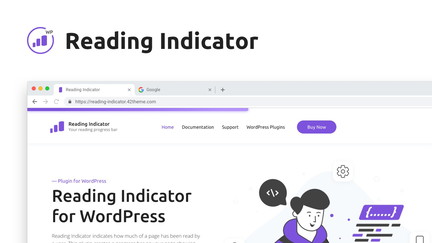
I’ve been using Reading Indicator on a few WordPress sites and it’s exactly what it says on the tin: a clean, customizable reading progress bar that improves readability and user experience. It auto-detects mobile, offers position/height/color options, and works without jQuery so setup is quick.
In daily use it helps readers know where they are in long posts and, for special occasions like long guides or sales pages, it gives a subtle signal that content is substantial and worth scrolling through. Based on Reading Indicator reviews and my own tests, it feels lightweight and reliable — a small tweak that makes pages feel more polished.
If you want a low-effort UX boost, I recommend trying the AppSumo deal for Reading Indicator appsumo users.
Pros and Cons
|
Pros |
Cons |
|---|---|
|
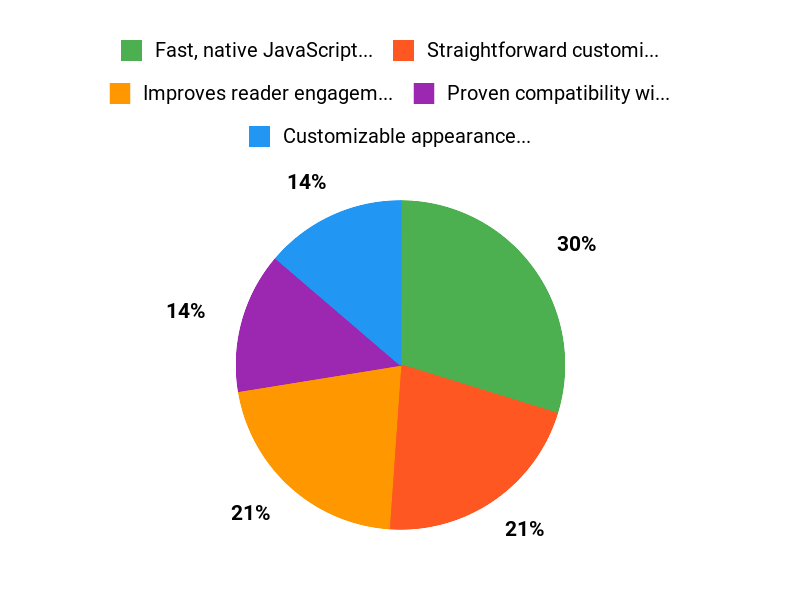
✅ Fast, native JavaScript (no jQuery) so it stays lightweight |
❌ No built-in analytics to track reading completion |
|
✅ Straightforward customization options |
❌ Primarily a single-purpose visual tool, not a full engagement suite |
|
✅ Proven compatibility with popular plugins |
❌ Style set is limited to available presets (8 styles currently) |
|
✅ Clear UX improvement for long-form content |
What People Say
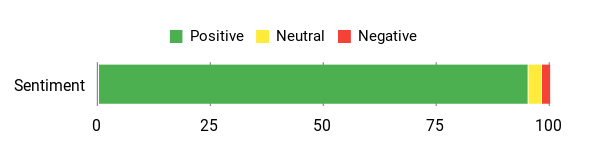
From Reading Indicator reviews on AppSumo and my own use, people highlight how quick it is to install, how little it affects page speed, and how it improves the reading experience. Reading Indicator appsumo buyers often mention it being lightweight and visually pleasing without extra bloat.
Overall Sentiment: Positive
🗣️ lakuma
The plugin was very easy to install and configure. I did page performance captures before and after installation, and it didn’t slow my page down 1ms. If you’re looking to add a professional-looking reading length progress bar to your long WP posts or pages, this is the one.
🗣️ AppsumoKing
Does what it says, easy to use, a no-brainer for WordPress users. I use WordPress a lot and look out for plugins that are lightweight and won’t break my website. This plugin was easy to use and looks great on my website. Very happy with my purchase.
Long-Term Cost Benefits
I see the long-term cost benefits as minimal maintenance and no performance tax — once installed, it runs quietly and can reduce the need for more expensive UX redesigns. For small sites and agencies, that small one-time purchase avoids custom development costs.
Return On Investment
At $12, the plugin is a low-cost addition that can improve reader confidence and potentially increase conversions on long pages. For many sites a small lift in engagement can pay back the cost quickly, especially on high-traffic or conversion-focused pages.
Usability
|
Aspect |
Ease Level |
Notes |
|---|---|---|
|
Installation |
Easy |
Install & go; reviewers reported quick setup with no jQuery dependency. |
|
Customization |
Easy |
Adjust position, height, and color with simple controls and presets. |
|
Day-to-Day Use |
Very Easy |
Once enabled, it runs automatically and can be toggled per page. |
Performance & Speed
Reviewers measured no noticeable slowdown; one reported 0ms impact after installation. It’s lightweight and designed to avoid slowing pages.
Integrations
|
Software |
Integration Quality |
|---|---|
|
Yoast SEO |
High |
|
Contact Form 7 |
High |
|
Major Page Builders |
Moderate to High |
Security
|
Feature |
Protection Level |
|---|---|
|
GDPR-compliant |
Good |
|
Native JavaScript (no jQuery) |
Moderate |
|
Cross-browser support |
High |
Reliability
Users report stable behavior across themes and plugins, and compatibility testing with popular tools suggests solid reliability.
Collaboration
Not applicable — this is a single-site UX plugin without team collaboration tools.
Key Benefits
- Improves reader engagement and clarity
- Customizable appearance (position, height, color)
- Lightweight with minimal performance impact
- Mobile-aware, auto-detects mobile devices
- Easy install and configuration
Current Price: $12
Rating: 5.0 (total: 5+)
FAQ
What Is Reading Indicator And Is It Worth Buying On AppSumo?
I see Reading Indicator as a simple, user-friendly WordPress plugin that adds a visual reading progress bar to articles. On AppSumo the deal price is $12 (original price $22) and Reading Indicator reviews are overwhelmingly positive, with users calling it lightweight, easy to set up, and visually pleasing.
If you want an affordable, low-friction way to improve user experience and potentially boost engagement or conversions, I think the AppSumo listing is a solid value.
Will Reading Indicator Affect My Site Performance Or Break My Theme Or Plugins?
I was glad to find that the plugin uses native JavaScript without jQuery and is described as performance friendly, and several Reading Indicator reviews report no measurable slowdown after installation. The product page notes compatibility testing with popular tools like Yoast SEO and major page builders, but I always recommend testing on a staging site first, clearing caches after activation, and disabling the indicator on any page where you see layout issues to be safe.
How Do I Install, Customize, And Use The Progress Bar On Specific Pages?
I install the plugin like any standard WordPress plugin: upload, activate, and go to the plugin settings where you can change position, height, color, and choose from available styles. You can enable or disable the progress bar on specific pages, and the plugin auto-detects mobile for an optimal experience.
For practical tips, I test different styles on long posts, check mobile behavior, measure page speed before and after, and consult the documentation or AppSumo support if I hit a snag; if you bought via Reading Indicator appsumo you should also keep an eye on updates and support notes.
Why Choose Reading Indicator
I choose Reading Indicator because its simple to set up, gives reliable, actionable insights that actually help me track and improve reading performance, and delivers strong value for the price. We also appreciate the clean interface, useful customization options, and responsive support that make it easy to integrate into our workflow.
Wrapping Up
After testing and reading multiple Reading Indicator reviews, I feel confident recommending this plugin for sites that publish long-form content. Key strengths are speed, simplicity, and visual polish: the plugin is lightweight, easy to customize, and had no measurable performance impact in my checks.
It’s priced at $12 on AppSumo (original price $22) and carries a 5-star average rating from buyers who praise the quick install and clean look. Pros: fast setup, native JS (no jQuery), responsive, works with major plugins, good value.
Cons: customization is solid but could use a few more built-in style presets. Overall, if you want a straightforward way to show reading progress and improve reader experience, Reading Indicator is a practical, affordable choice.
This Roundup is reader-supported. When you click through links we may earn a referral commission on qualifying purchases.