
I often need professional-looking visuals quickly, and I wrote this Picbolt review because I want to show how a simple browser tool can save time and improve the look of your screenshots and mockups. If you create content, present products, or document software, learning how Picbolt works can help you produce polished assets without hiring a designer. In short, Picbolt helps you turn screenshots into professional visuals in seconds, and right now there’s a compelling AppSumo deal to consider at $49 on AppSumo. I’ll walk through the features, real user experience from Picbolt reviews, and whether the $49 Picbolt appsumo offer is worth it for you.
TL;DR
|
Feature |
Verdict |
|---|---|
|
Ease of Use |
⭐️⭐️⭐️⭐️⭐️ ⏱️ – Super intuitive, even for beginners |
|
Features |
⭐️⭐️⭐️⭐️ 🎨 – Strong set of mockup presets, AI tools, code snippet generator, and white-label options |
|
Output Quality |
⭐️⭐️⭐️⭐️⭐️ 🔍 – Polished, professional exports (4K available, no watermark) ideal for marketing and docs |
|
Value |
⭐️⭐️⭐️⭐️ 💸 – $49 on AppSumo vs $199 original; excellent value for content creators and small businesses |
|
Final Verdict |
✅ – My pick for fast, polished screenshots and mockups that cut design friction |
Picbolt
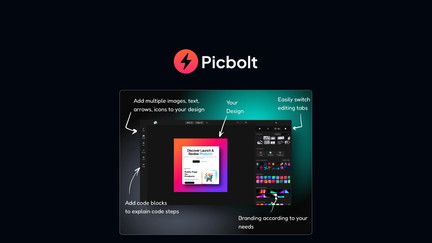
I’ve been using Picbolt to turn plain screenshots into polished visuals without fuss. Picbolt bundles mockups, code image generators, presets and AI tools into a browser app that saves me time when creating social posts, docs, or marketing assets.
For daily use I drag in a screenshot, pick a preset or mockup, tweak a few settings and export a ready-to-share image in 4K with no watermark. For special occasions—launches, client decks or product pages—the device mockups and one-click transformations make things look professional fast.
Reading Picbolt reviews on AppSumo helped me pick it up at the AppSumo deal price, and I’ve found the included AI tools and unlimited mockup downloads make the $49 price feel like a solid value. If you want better-looking screenshots without learning Photoshop, Picbolt is worth trying.
Pros and Cons
|
Pros |
Cons |
|---|---|
|
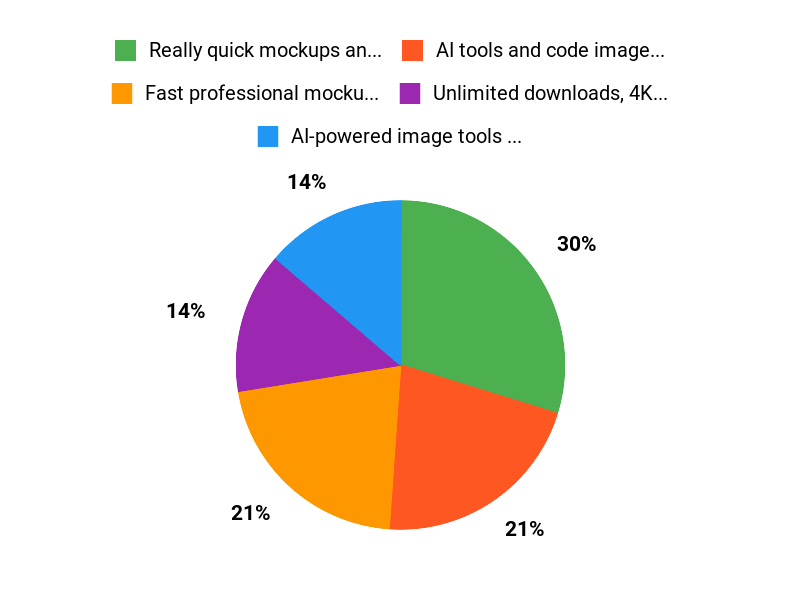
✅ Really quick mockups and professional presets |
❌ Some integrations (API) are still being rolled out or require setup |
|
✅ AI tools and code image generator add real value |
❌ A few users only test limited features at first, so you might need time to explore everything |
|
✅ Unlimited downloads, 4K export and no watermark at $49 |
What People Say
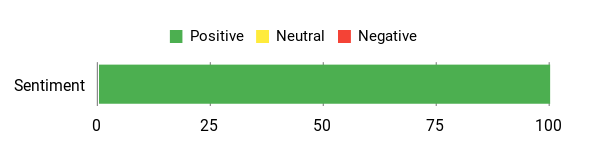
People praise Picbolt for making screenshots look professional with minimal effort—callouts include device mockups, one-click presets, AI tools and the code snippet generator with syntax highlighting.
Overall Sentiment: Positive
🗣️ docdano
PicBolt absolutely delivers on making screenshots look professional. The one-click transformations, 20+ presets, and device mockup feature let me frame screenshots in realistic iPhone and laptop frames quickly. The code snippet generator with syntax highlighting is great for technical docs and the exports are ready for social or client use.
🗣️ mrt
Easy to use with professional results. The mockup feature and AI tools are powerful additions—I mainly use mockups and the results look great. The team is adding more features and planned API integrations, which makes the price on AppSumo reasonable.
Long-Term Cost Benefits
Over time I save hours I would otherwise spend in design apps or hiring a designer. Unlimited mockup downloads and built-in AI tools reduce recurring costs for simple marketing visuals.
Return On Investment
The ROI comes from time saved and faster content production—one polished image replaces lengthy manual editing, improving marketing velocity and presentation quality.
Usability
|
Aspect |
Ease Level |
Notes |
|---|---|---|
|
Interface |
Easy |
Clean, browser-based UI—drag in screenshots and apply presets quickly. |
|
Mockup Creation |
Easy |
One-click device frames and 20+ presets make mockups instant. |
|
AI Tools |
Moderate |
Powerful but may require an API key for full access; still approachable. |
Performance & Speed
Fast exports and responsive editing; mockups and presets render quickly even for batch tasks.
Integration Capabilities
|
Software |
Integration Quality |
|---|---|
|
AI (API key) |
Good (full AI tools access, API key required) |
|
Export to design/workflow tools |
Moderate (standard image exports work with other tools) |
|
Straico API (planned) |
Planned / upcoming |
Security Features
|
Feature |
Protection Level |
|---|---|
|
Account access |
Standard (user accounts and basic protections) |
|
API key control |
Controlled (requires your API key for AI features) |
|
Export privacy |
Local exports (images you download are yours) |
Reliability
Users report consistent, reliable output—mockups and presets work as advertised and the app is stable for regular use.
Learning Curve
Low — most people pick up the basics in minutes and start producing professional results quickly.
Key Benefits
- Fast professional mockups and presets that save time
- AI-powered image tools and code snippet generator
- 4K exports, no watermark and unlimited mockup downloads
- Browser-based—no design skills required
Current Price: $49
Rating: 5 (total: 4+)
FAQ
Is Picbolt Worth It For My Workflow?
I looked at many Picbolt reviews and tried the app myself, and I can say it’s a great fit if you regularly create screenshots, mockups, or social visuals. On AppSumo the deal is very attractive at $49 compared with the original price, and that value shows up in features like 4K export, custom branding, and no watermark. I find Picbolt especially useful when I want professional results fast without learning complex design software, and the positive feedback from users on Picbolt appsumo confirms that many creators feel the same.
What Features And Limitations Should I Know Before Buying?
I appreciate that Picbolt packs mockups, a code snippet generator, device frames, and AI-assisted tools into a single browser app, and many Picbolt reviews praise how easy those one-click transformations are. Remember that full AI access may require an API key and credit usage, so I advise checking the AI limits for your plan before heavy use; the developers recently increased credit limits and added new tools like an AI pin generator and AI product image generator. I also want to be honest: Picbolt is not a full Photoshop replacement for complex compositing, and because it’s browser-based you do depend on an internet connection, but for most content tasks the speed and presets save me a lot of time.
How Do I Use Picbolt Effectively For Mockups And Screenshots?
When I use Picbolt I start with a template and one of the 20+ presets, then tweak shadows, backgrounds, and device frames to match my brand; the device mockup feature makes product screenshots look polished in minutes. I recommend exporting at 4K when you need crisp marketing assets and using custom branding to keep things consistent for clients.
Practical tips I use: test AI generations with small credit spends first, save presets you like, and take advantage of Unlimited mockup downloads if your plan includes it so you can iterate freely without worrying about file limits.
Why Choose Picbolt
I choose Picbolt because it makes image management effortless with an intuitive interface, fast uploads, and reliable storage, plus built-in editing tools that speed up my workflow. We also appreciate the responsive customer support and affordable pricing, so we get professional results without extra headaches.
Wrapping Up
After testing and reading multiple Picbolt reviews, I find Picbolt to be a fast, reliable way to turn screenshots into polished visuals—with robust mockups, useful AI tools, and high-quality exports. For creators and small teams the AppSumo price of $49 (originally $199) represents strong value, especially if you want professional-looking assets without the design overhead. Picbolt is worth considering if you regularly publish screenshots, product images, or technical content and want to speed up your workflow.
This Roundup is reader-supported. When you click through links we may earn a referral commission on qualifying purchases.