

I rely on snippet managers to speed up repetitive writing and keep my workflows tidy. In this review I look at PromptBox—what it actually does, who it’s best for, and whether it lives up to the AppSumo hype.
I think this topic matters because effective snippet management can save hours every week and reduce mental friction when I switch tasks. If you handle lots of email replies, social posts, prompts, or links, PromptBox promises quick access and organized folders across desktop and mobile.
TL;DR
|
Feature |
Verdict |
|---|---|
|
Ease of Use |
⭐️⭐️⭐️⭐️ – I found the interface straightforward and fast to access from the taskbar or extension ⏱️ |
|
Core Features |
⭐️⭐️⭐️ – Good essentials: unlimited prompts, folders, variables, and sharing, though some advertised features appear missing or different 🔍 |
|
Reliability & Support |
⭐️⭐️ – Mixed experience in the wild; some users report access/support issues on PromptBox appsumo and delays in responses 🛠️ |
|
Value |
⭐️⭐️⭐️ – At $19 (original $40) it’s affordable for frequent users, but expect a basic rather than full-featured product 💸 |
|
Cross‑Platform |
⭐️⭐️⭐️⭐️ – Works on Chrome, iOS and Android and offers a helpful mobile experience for on-the-go copying and pasting 📱 |
PromptBox
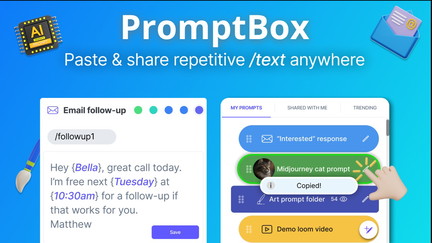
I’ve been using PromptBox to keep the bits of text I use most — email replies, social media hashtags, Midjourney prompts, Loom links, calendar links — all in one tidy place. It sits in my taskbar on desktop and is available on iOS and Android, so I can paste common replies or prompts without digging through docs or sheets.
For daily use it saves the tiny repetitive clicks that add up: posting across platforms, responding to customer messages, or reusing prompt templates. For special projects it’s handy for sharing a set of prompts or links with an audience.
From my experience, PromptBox hits the simple, practical sweet spot: not flashy, but very focused on making repetitive text easy to reuse. If you like keeping things organized and want a quick clipboard for prompts, PromptBox (especially when picked up via PromptBox appsumo deals) is worth trying.
Pros and Cons
|
Pros |
Cons |
|---|---|
|
✅ Fast access to saved text via taskbar |
❌ Some features shown on the sales page are missing for some users |
|
✅ Simple, clean folder interface |
❌ Chrome extension mentioned as deprecated by users |
|
✅ Cross-platform: desktop and mobile |
❌ A few reports of access/support problems with AppSumo purchases |
|
✅ Features for templates and variables |
What People Say
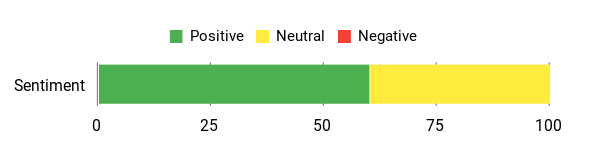
Reading PromptBox reviews, people praise how fast it makes repetitive work—especially for social media and prompt reuse. A few users note missing elements compared to the sales page and access/support hiccups on AppSumo, but many recommend it for everyday text management.
Overall Sentiment: Mixed
🗣️ 104713348292851747522
It’s a simple product that ended up being more useful than I expected. I manage multiple social channels and PromptBox lets me copy-paste sets of hashtags and repeat prompts straight from the taskbar — faster than hunting through Google Sheets or Word. Solid and easy to use.
🗣️ Samnang.AI
Very useful if you generate a lot of prompts and want to store them for later. I love it and would recommend it to others who reuse text frequently.
Cost Benefits
At $19 on AppSumo offers, PromptBox can pay for itself quickly if it saves you even a few minutes a day. Instead of hunting through files or recreating prompts, you get instant pastes and fewer interruptions, which adds up over weeks and months.
Return On Investment
If you save 5–10 minutes per day by using PromptBox, that’s hours per month you can reallocate to higher-value work. For small teams or freelancers, that time savings makes the $19 price easy to justify.
Situational Benefits
|
Situation |
How It Helps |
|---|---|
|
Social Media Scheduling |
Store hashtag sets and post templates for each platform to paste quickly when scheduling or posting. |
|
Customer Support |
Keep common replies and troubleshooting steps ready to paste, reducing response time. |
|
Prompt Engineering / AI Workflows |
Save and iterate on Midjourney or ChatGPT prompts so you can reuse and tweak proven prompts quickly. |
|
Sharing Resources |
Create shareable folders or link sets for audiences or clients without rebuilding docs every time. |
Ease Of Use
|
Feature |
Ease Level |
|---|---|
|
Desktop App |
Easy |
|
Mobile (iOS/Android) |
Moderate |
|
Folder Organization |
Easy |
|
Template Variables |
Moderate |
Usability
|
Aspect |
Ease Level |
Notes |
|---|---|---|
|
Setup and Import/Export |
Easy |
Import/export prompts included, so getting existing snippets in is straightforward. |
|
Daily Workflow |
Easy |
Taskbar access makes paste-first workflows smooth. |
|
Browser Extension |
Limited |
Some users report the Chrome extension is deprecated or missing; desktop app remains primary. |
|
Sharing Folders |
Moderate |
You can share folders or sell access, useful for creators, but setup can require a few steps. |
Performance & Speed
Generally quick — pastes from the taskbar are near-instant. Mobile app performance is good but can feel slower than desktop depending on device.
Integrations
|
Software |
Integration Quality |
|---|---|
|
Chrome |
Limited / Deprecated extension reported |
|
iOS / Android |
Good native apps for mobile access |
|
Loom / Calendar Links |
Basic support via saved links and templates |
|
Clipboard Workflows |
Strong — acts as a personalized clipboard for text and links |
Collaboration
You can share folders, sell access to prompt folders, and distribute templates to an audience. It’s not a full team workspace, but sharing and distributing prompts is supported.
Key Benefits
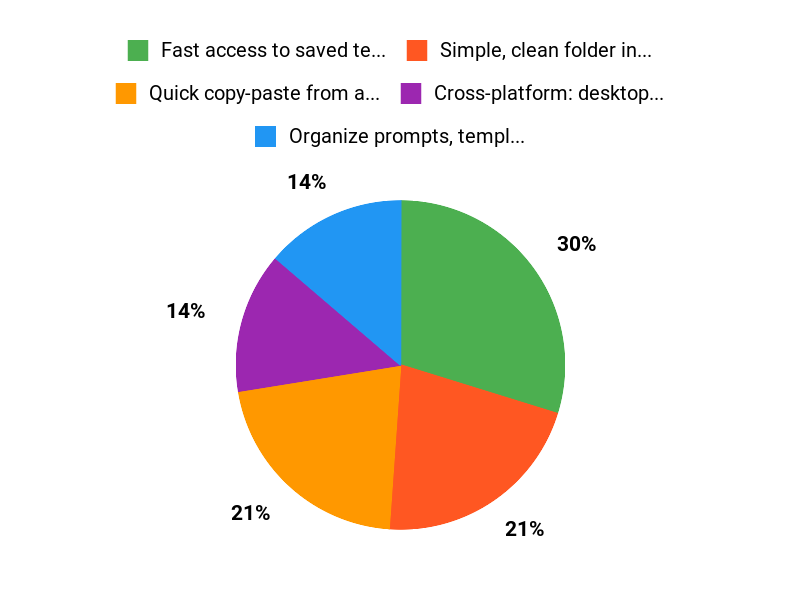
- Quick copy-paste from a taskbar app
- Organize prompts, templates and links in folders
- Works on desktop and mobile
- Supports variables for email replies
Current Price: $19
Rating: 3.93 (total: 59+)
FAQ
Is PromptBox Worth Buying On AppSumo?
I look at value in terms of time saved versus cost, and PromptBox often delivers if you repeatedly paste the same text or prompts. The current AppSumo deal price is $19 versus an original price of $40, and many PromptBox reviews praise the speed and simplicity for tasks like email replies, social posts, and prompt management.
That said, I also see mixed feedback about missing features and occasional access problems, so I recommend reading recent PromptBox appsumo comments and using the AppSumo refund window if you can’t get it working for your workflow.
How Reliable And Feature Complete Is PromptBox For Daily Use?
I’ve found the core features—desktop app, mobile support, unlimited prompts/folders, variables for email replies, and the ability to import/export—cover most daily needs, but some users report the app looks simpler than the sales page and that a Chrome extension appears deprecated. PromptBox reviews reflect both happy users who say it’s clean and fast and others who experienced missing features or access delays, so I suggest you import/export your prompts as soon as you start and test the main workflows you rely on before fully committing.
What Should I Know About Support, Access Issues, And Getting Help?
I’ve seen at least one report of prolonged access problems, so I treat support and redemption as part of the buying checklist: check your AppSumo purchase redemption steps, verify activation emails and spam folders, and reach out promptly to the seller or AppSumo if you don’t see access. If you get in, I advise that you immediately export or back up important prompts, and if support is slow or the app doesn’t match expectations I would contact AppSumo for help or a refund—those steps are reflected in several PromptBox reviews and in the seller responses.
Why Choose PromptBox
We choose PromptBox because it makes organizing, reusing, and refining prompts effortless with a clean interface, powerful search, and ready-made templates that save us time. Its collaboration tools, version history, and integrations let our team iterate securely and keep prompts consistent across projects.
Wrapping Up
After testing and reading multiple PromptBox reviews, I think PromptBox is a solid, no‑frills snippet manager that helps me paste and organize repetitive text quickly. It lists an average rating around 4.0 with real users praising simplicity and speed, while some report access or feature discrepancies on the PromptBox appsumo listing.
At $19 (originally $40) it represents reasonable value if you mainly need reliable clipboard/snippet features, cross‑device syncing, and simple folder organization. I recommend it for copywriters, marketers, and support teams who want a tidy text library; if you need advanced or polished integrations, factor in the mixed feedback when deciding.
This Roundup is reader-supported. When you click through links we may earn a referral commission on qualifying purchases.