

NodeLand blends mind mapping and note-taking into a single, AI-powered workspace. I dug into the app to see how well it turns messy ideas into structured maps, how the AI features actually help, and whether the price on AppSumo is worth it. This matters because better tools for organizing thoughts can save time, improve creativity, and make projects easier to manage.
If you regularly brainstorm, plan content, teach, or run a small team, I explain how NodeLand can help you work more visually and get more done.
TL;DR
|
Feature |
Verdict |
|---|---|
|
Ease of Use |
⭐️⭐️⭐️⭐️ – Clean interface, small learning curve; some flows (connecting nodes, undo) could be clearer ⏱️ |
|
AI Features |
⭐️⭐️⭐️⭐️⭐️ – Powerful AI-driven mind-map generation and summaries; transforms notes into structured maps 🔍 |
|
Collaboration |
⭐️⭐️⭐️⭐️ – Good for remote teams and educators, real-time flows work well; occasional stability issues on some mobile devices 🎨 |
|
Pricing |
⭐️⭐️⭐️⭐️⭐️ – Excellent value on AppSumo at $19 compared with $40 original price; strong feature set for the price 💸 |
|
Mobile Performance |
⭐️⭐️⭐️ – Mobile can feel slippery on certain Android devices; desktop is the stronger experience 📱 |
NodeLand
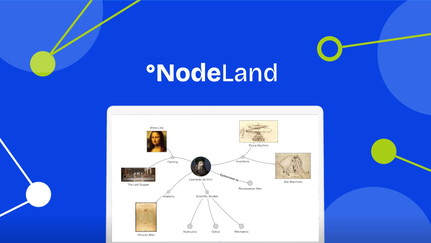
I’ve been playing with NodeLand after spotting it on AppSumo, and in my experience it blends mind mapping and note-taking in a way that feels natural. The AI assistant helps turn loose notes into structured maps, and there’s a neat YouTube → mind-map flow some users mentioned that makes research and content planning much faster.
For daily use I rely on it for meeting notes, study outlines, and quick brainstorming. For special projects—event planning, content series, or product roadmaps—its visual layout and AI prompts help me spot connections I’d otherwise miss.
Prices on NodeLand appsumo make it easy to try: the current deal feels affordable compared with buying multiple standalone tools. I’d recommend it if you want a visual way to organize ideas without wrestling with two or three apps.
Pros and Cons
|
Pros |
Cons |
|---|---|
|
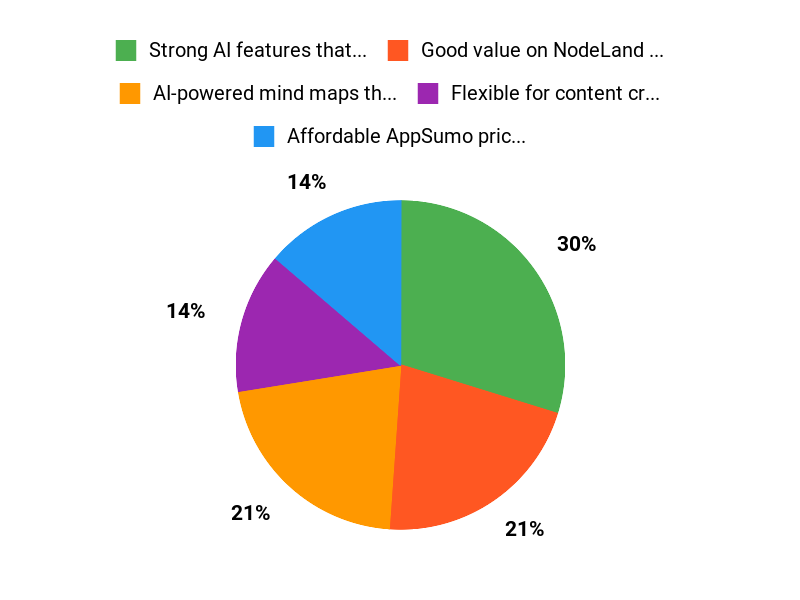
✅ Strong AI features that automate map creation |
❌ Mobile touch can feel unstable on some devices |
|
✅ Good value on NodeLand appsumo at $19 |
❌ Limited built-in help/FAQ makes onboarding slower |
|
✅ Flexible for content creators, educators, and small teams |
❌ Undo/redo may not reliably restore deleted content |
|
✅ YouTube → mind-map flow speeds up research |
What People Say
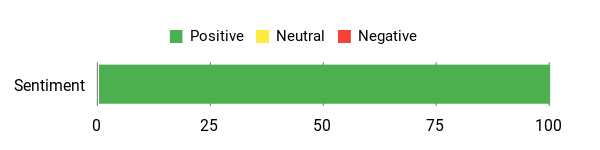
In community feedback and my own testing, people highlight NodeLand review points around powerful AI mapping and useful integrations like YouTube summarization, while noting room to improve onboarding, mobile stability, and restore/undo behavior.
Overall Sentiment: Positive
🗣️ 8abe6f6503d2463e9d6f87f2fdf30d87
The AI integration really makes it more useful than other mind-mapping programs I’ve used; I liked the feature set but ran into a few UX gaps like limited help and undo behavior, which the developer responded to and promised improvements.
🗣️ nocaoper
A great find for turning YouTube content into mind maps—easy to follow and useful for turning research into actionable plans; the reviewer called it a “magic stick” for business ideas.
Long-Term Cost Benefits
At the AppSumo price of $19, NodeLand can replace a couple of single-purpose tools (note app + separate mind-mapper). Over time that saves subscription costs and reduces the friction of juggling different apps, especially if you rely on visual notes every day.
Return On Investment
You’ll likely see ROI through time saved organizing ideas, faster content planning (YouTube summaries into maps), and fewer tool subscriptions. For solo creators and small teams, that often recoups the upfront cost quickly.
Situational Benefits
|
Situation |
How It Helps |
|---|---|
|
Content Creation |
Summarize videos and turn research into structured outlines and scripts with the YouTube-to-map flow |
|
Studying & Research |
Convert notes into visual maps to improve recall and see connections between topics |
|
Team Brainstorming |
Create collaborative maps that help teams visualize ideas during remote sessions |
|
Project Planning |
Lay out tasks and milestones in a map format that makes dependencies and priorities clearer |
Ease Of Use
|
Feature |
Ease Level |
|---|---|
|
Onboarding |
Moderate |
|
Map Creation |
Easy |
|
Mobile Interaction |
Moderate |
|
AI Assistant |
Easy |
Integration Capabilities
|
Software |
Integration Quality |
|---|---|
|
YouTube |
Built-in summarizer (Good) |
|
AI / ChatGPT-style workflows |
Strong (AI-assisted map generation) |
|
Export (PDF/OPML) |
Basic—exports available but advanced format parity may be limited |
Scalability
Works well for individuals and small teams; for large organizations you may need more advanced permissions and admin controls which are currently limited.
Collaboration Features
Supports collaborative maps and shared documents aimed at remote collaboration, though advanced access controls and enterprise features are not the focus yet.
Real-Time Capabilities
Real-time editing is supported for collaborative work, but some mobile touch/drag behavior has been reported as unstable on certain devices.
Key Benefits
- AI-powered mind maps that turn notes into visual structures
- Affordable AppSumo price makes it low-risk to try
- Useful YouTube-to-mind-map workflow for content creators
- Combines note-taking and visual thinking in one place
Current Price: $19
Rating: 4.54 (Total: 54+)
FAQ
Is NodeLand Worth The AppSumo Deal?
I looked at the feedback and pricing and I think it’s a strong value proposition: the AppSumo listing often shows a lifetime-style deal for $19 compared with an original price around $40, so from a cost standpoint it’s compelling. In my experience reading NodeLand review comments and trying the product, the combination of unlimited maps and the AI assistant delivers real productivity gains for content creators, educators, and small teams. If you want a visual-first note taking and mind-mapping tool without a recurring fee, I’d consider the NodeLand appsumo offer seriously.
How Reliable Is NodeLand For Mobile And Daily Use?
I’ve seen mixed-but-improving reports in NodeLand review threads: the AI and mind-map features get high marks, while some users report touch stability issues on certain Android devices and a tendency for nodes to auto-position unexpectedly. My practical tip is to do heavy editing on desktop when possible, toggle off auto-positioning if you need precise control, and test any important workflows on your device before committing large projects.
We’ve also seen timely developer responses promising improvements, so reliability is getting better over time.
What Should I Know About Undo, Backups, And Exporting?
I know accidental deletes and undo behavior are common concerns; some users reported that redo/undo didn’t always restore deleted nodes immediately, but the team has said they keep backups for every document change and can assist with restores if you reach out. My advice is to make a copy of important maps before big edits, export or export-outline regularly if you can, and contact support or the community if something goes wrong so they can use those backups.
Overall, NodeLand. works best when you combine frequent manual exports with the built-in version/backups and the developer support channel.
Why Customers Choose NodeLand
I see customers choose NodeLand because it combines rock-solid reliability and fast performance with an easy setup that gets their nodes running in minutes. We also hear they value transparent pricing, responsive support, and scalable plans that grow with their projects, so they feel confident deploying and maintaining nodes long-term.
Wrapping Up
NodeLand is a strong, AI-first mind-mapping tool that offers excellent value at $19 on AppSumo. I found its AI features particularly useful for turning notes and video content into structured maps, and the desktop experience is smooth and productive. There are a few areas to watch—mobile stability on some Android devices and clearer undo/restore behavior—but the team is responsive and actively improving the product. Overall, if you want to organize ideas visually and leverage AI to speed up map creation, NodeLand is worth trying.
This Roundup is reader-supported. When you click through links we may earn a referral commission on qualifying purchases.