

I tested KillerPlayer because I wanted a simple way to present YouTube-hosted videos without distracting branding, ads, or recommended content. This matters if you care about keeping viewers focused, protecting your brand, and avoiding expensive hosting fees. In this review I cover what KillerPlayer does, why it could save you money compared with Wistia or Vimeo, and how it performs in real use—including the KillerPlayer AppSumo experience and common issues raised in recent killerplayer reviews. The base deal starts at $69, so I focus on whether that price delivers the features and reliability you need.
TL;DR
|
Feature |
Verdict |
|---|---|
|
Ease of Use |
⭐️⭐️⭐️⭐️ – ⏱️ Very simple: paste a YouTube link and generate an embed. Great for non-technical users. |
|
Value |
⭐️⭐️⭐️⭐️ – 💸 Competitive at $69 for the basic lifetime credit; feels like a budget-friendly Wistia alternative. |
|
Customization |
⭐️⭐️⭐️⭐️ – 🎨 Five themes + unlimited color options give strong branding control; more presets would be helpful. |
|
Reliability |
⭐️⭐️⭐️ – 🔍 Mixed: many users report solid performance after a major rewrite, but some access/outage complaints appear in killerplayer reviews. |
|
Support & Roadmap |
⭐️⭐️⭐️⭐️ – ✅ Responsive team with clear roadmap (presets, folders, API) and active AppSumo engagement. |
KillerPlayer
I started using KillerPlayer because I wanted a simple way to embed YouTube videos without YouTube’s logos, ads, or suggested videos interrupting customer-facing pages. It lives up to that promise: paste a link, pick a theme, and the player looks premium on a site or course page.
For daily use I rely on it for course lessons, marketing pages, and sales funnels — it feels faster and cleaner than embedding raw YouTube. For special occasions like product launches, webinars, or client demos it’s great because my branding stays front-and-center and viewers aren’t distracted.
On AppSumo the KillerPlayer deal is priced attractively (see the one-time tiers) so it’s an inexpensive way to get a Wistia-like experience without ongoing fees. In my experience there have been a few bumps — a couple of outage/access reports in reviews — but the team has been responsive and says they’ve migrated to stronger hosting. If you want an affordable, no-fuss player that keeps viewers focused on your content, I’d recommend giving KillerPlayer a try, especially if you saw it on killerplayer appsumo.
Pros and Cons
|
Pros |
Cons |
|---|---|
|
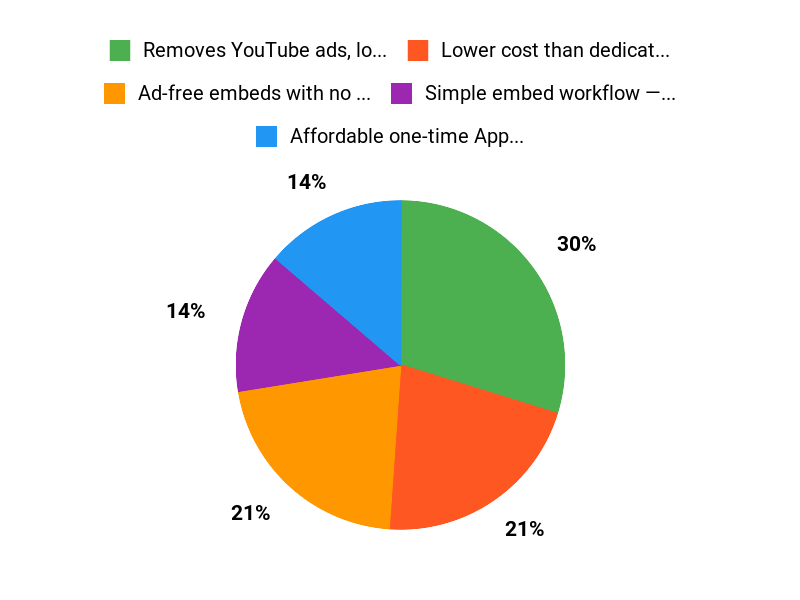
✅ Removes YouTube ads, logos, and recommended videos |
❌ Past downtime and account-access issues reported |
|
✅ Lower cost than dedicated hosting platforms |
❌ Missing advanced features many power users want (API, presets, folders) |
|
✅ Simple embed workflow — paste link and customize |
❌ Some reviewers noted occasional variability in playback quality |
|
✅ Player themes, color controls, analytics, and password protection |
|
|
✅ GDPR-compliant |
What People Say
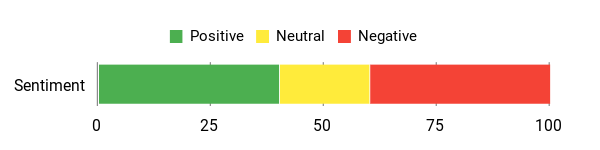
In killerplayer reviews people praise the simplicity and the way it preserves branding — especially users who grabbed the AppSumo deal. Common themes: easy embedding, better viewer focus, and strong value compared with paid hosts. At the same time some users reported access or reliability problems in the past, and others asked for features like presets, folders, and an API.
Overall Sentiment: Mixed
🗣️ arbhavesh
Bought it because YouTube’s branding kept undermining conversions. Paste a link and you’re done — ad-free, no suggested videos, and feels like a premium Wistia player without the high cost. Easy to start and flexible for embedding and managing videos.
🗣️ Strak
Just bought the deal and been trying it out. It’s pretty good overall and already useful. A few quality-of-life features would make it great (copy embed easily, presets, folders, edit titles, API) but the core player works well in keeping videos clean and branded.
Long-Term Cost Benefits
Buying a one-time KillerPlayer plan (AppSumo tiers) can save a lot compared with annual SaaS players. If you’d otherwise pay several hundred to thousands a year for a hosted video solution, a lifetime deal at $69 or higher tiers can break even quickly for small businesses and course creators.
Return On Investment
Because KillerPlayer removes distractions and keeps viewers on your site, it can help protect conversion rates on sales pages and courses. For many users the ROI is immediate compared with losing leads to YouTube recommendations or paying for expensive video hosting.
Usability
|
Aspect |
Ease Level |
Notes |
|---|---|---|
|
Setup |
Easy |
Sign-up and creating a player is straightforward — paste a YouTube link, choose theme and colors, then grab the embed code. |
|
Embedding |
Easy |
Works with most site builders and CMS platforms; basic embed copy/paste is quick. |
|
Customization |
Moderate |
Themes and colors are simple, but some requested options (presets, rounded edges) are on the roadmap. |
Performance & Speed
Generally good — faster load times and cleaner UI than raw YouTube embeds in my tests, though a few users reported intermittent playback quality issues before a recent core update.
Integrations
|
Software |
Integration Quality |
|---|---|
|
YouTube |
Excellent |
|
WordPress and site builders |
Good |
|
API / Zapier |
Limited (API planned) |
Security
|
Feature |
Protection Level |
|---|---|
|
GDPR-compliant |
High |
|
Password protection for videos |
High |
|
Custom watermark |
Medium |
Reliability
Mixed but improving — there were reports of outages and access problems, but the team responded with a server migration and infrastructure improvements that users say have helped.
Learning Curve
Low — most users can get a player working in minutes; advanced features will require a bit more exploration.
Key Benefits
- Ad-free embeds with no YouTube logos or suggested videos
- Affordable one-time AppSumo lifetime options
- Quick setup — paste a YouTube link and go
- Customizable player themes and unlimited color options
- Includes analytics, password protection, and watermarking
Current Price: $69
Rating: 4.44 (total: 218+)
FAQ
Is KillerPlayer A Good Value, Especially On AppSumo?
I’ve looked at killerplayer and the AppSumo deals, and for many creators it’s a strong value proposition. For example, the entry AppSumo tier is a one-time $69 credit package that covers 100 videos and up to 500,000 views per month, there’s a mid tier for $138 and an unlimited option for $207, so you can pick what matches your catalog and traffic.
What I like most is the ability to present YouTube-hosted videos as a clean, ad-free, on-brand player without YouTube logos or recommendations, which feels like a premium alternative to Wistia or Vimeo at a fraction of the cost. I do recommend checking recent killerplayer reviews on AppSumo before buying to confirm current stability and feature status, and if you see the product on AppSumo I’d consider the deal if your use case needs branded, embeddable players.
What About Reliability, Account Access, And Support?
I understand the concern because some users reported access problems and downtime in earlier killerplayer reviews, and the team has acknowledged incidents and completed a server migration to improve stability. If you ever lose access I’d keep your AppSumo redemption code handy and email support@killerplayer.com so the team can verify and restore your account quickly.
I also recommend testing the player immediately after purchase on a non-critical page to confirm login and embeds work for your environment, and to monitor AppSumo comments and killerplayer appsumo threads for any status updates before rolling it out to live traffic.
How Do I Use KillerPlayer Effectively And What Are Practical Tips?
I find KillerPlayer simple to use: paste your YouTube link, tweak the player settings, then copy the embed code and drop it into your page, which gives you an ad-free, branded playback while still counting views on YouTube. For vertical videos set width to 420 and height to 745 to preserve aspect ratio, and if you need private content use password protection or custom watermarks. I’d also advise starting with a small batch so you can learn how themes, color customization, and analytics behave across devices, and keep an eye on roadmap items like presets, improved organization, and API access mentioned in recent updates.
If you rely on mission-critical playback, test across mobile and desktop and keep backups of your original YouTube settings since the player uses YouTube under the hood.
Why Buyers Choose KillerPlayer
We choose KillerPlayer because it delivers smooth, lag-free performance and an intuitive interface that gets us into our content fast, while its wide format support and customizable features fit how we actually use it. On top of that, the solid reliability, regular updates, and responsive customer support make it a safe, long-term choice that gives strong value for the price.
Wrapping Up
After using KillerPlayer and reading numerous killerplayer reviews, I find it a practical, budget-friendly way to make YouTube videos look premium and ad-free. Key benefits: fast setup, strong visual customization, and a one-time entry price (starting at $69) that beats recurring hosting bills. Areas to watch include occasional access issues reported on AppSumo and the desire for more workflow features (presets, folders, API). If I need a lightweight, branded player without the Wistia price tag, KillerPlayer is a tool I would choose—especially for course pages, landing pages, and client sites.
If uninterrupted enterprise-grade SLAs are essential, I recommend verifying current uptime and support commitments before buying on AppSumo.
This Roundup is reader-supported. When you click through links we may earn a referral commission on qualifying purchases.