

I took a close look at Imgkits because image and video editing tools that use AI can speed up my workflow and improve visual content without a steep learning curve. In this review I compare features, reliability, and value so you can decide if Imgkits fits your needs. Imgkits offers fast AI-powered tools like background removal, watermark cleaning, and photo restoration, and I paid attention to what real users on AppSumo are saying in Imgkits reviews to give you a balanced take.
TL;DR
|
Feature |
Verdict |
|---|---|
|
Ease of Use |
⭐️⭐️⭐️ – Mostly straightforward for common tasks, but some users report UI responsiveness issues ⏱️ |
|
Features |
⭐️⭐️⭐️⭐️ – Solid toolkit: background remover, watermark remover, restoration, inpainting and filters 🎨 |
|
Performance & Reliability |
⭐️⭐️ – Mixed reliability; several reviewers describe site glitches and downtime 🔍 |
|
Value (AppSumo Deal) |
⭐️⭐️⭐️ – $27 on AppSumo for a capable set of tools vs original $70; good if core features meet your needs 💸 |
|
Trust & Support |
⭐️⭐️ – Reviews are mixed, including complaints about unmet expectations; weigh risk if uptime and guarantees matter |
Imgkits

I’ve been poking around Imgkits for a while and found it useful for quick fixes and creative edits. It bundles background removal, watermark cleanup, photo restoration and filters into a simple web app, so I reach for it when I need fast results for social posts, product photos, or restoring old family shots.
For everyday tasks it saves time compared with manual editing, and for special projects it can give a polished look without needing heavy software. If you’re browsing Imgkits reviews or considering the Imgkits appsumo deal, know that it’s approachable and practical — though not perfect for heavy pro pipelines.
Pros and Cons
|
Pros |
Cons |
|---|---|
|
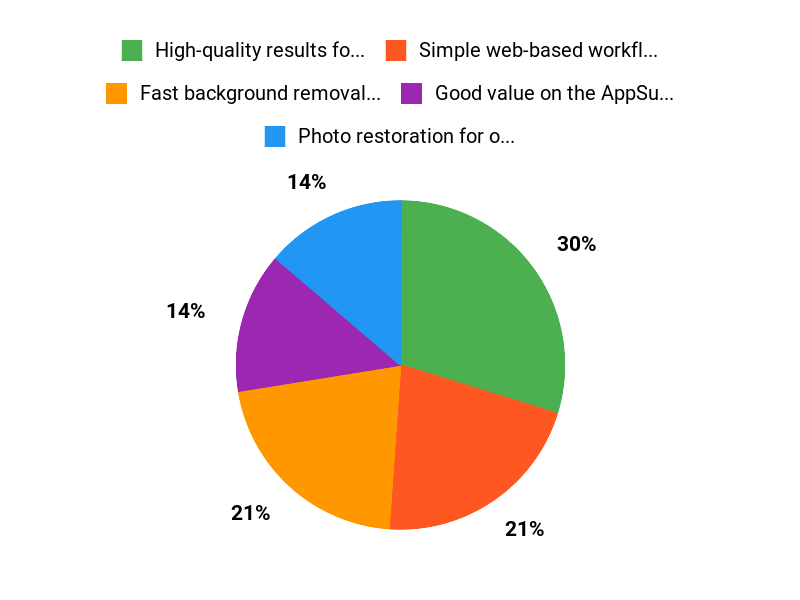
✅ High-quality results for background removal and restoration |
❌ Some users report site responsiveness and login problems |
|
✅ Simple web-based workflow — no install required |
❌ Changes to credit policy have frustrated a few customers |
|
✅ Good value on the AppSumo deal for casual and small-business use |
❌ Not a full replacement for advanced desktop editors |
What People Say
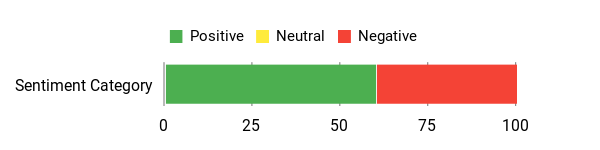
Users praise the image quality and ease of basic tasks, noting stellar results for quick edits; a few power users report credit limits and occasional site responsiveness issues.
Overall Sentiment: Mixed
🗣️ carajeshpabari108
using it for past one or two months. Really helping me a lot in a lot of things. 1 taco cut because they now are not allowing AI image generation without credit and they also stopped giving credits on a monthly basis which they used to do when the app came to appsumo platform.
🗣️ ThePortal
Pleasantly surprised. Images are stellar. Grateful to be on this deal – very easy to use – happy happy 🙂
Long-Term Cost Benefits
If you regularly outsource basic image edits, Imgkits can cut those recurring costs by handling background removal and restorations in-house. Over time that can offset the one-time AppSumo price if you process many images.
Return On Investment
At $27 on the AppSumo deal, even occasional users can see ROI quickly compared with paying per-edit or hiring freelancers for routine touch-ups.
Usability
|
Aspect |
Ease Level |
Notes |
|---|---|---|
|
Interface |
Moderate |
Most tools are straightforward, but a few reviewers mentioned inconsistent responsiveness. |
|
Onboarding |
Easy |
Basic tasks like background removal and filters are intuitive and quick to learn. |
|
Tool Access |
Moderate |
All tools are in the web app, though some users reported occasional issues clicking through certain features. |
Performance & Speed
Generally fast for single images; some users reported intermittent site unresponsiveness that affected workflow.
Integration Capabilities
|
Software |
Integration Quality |
|---|---|
|
Web App |
Native and straightforward for manual uploads/downloads |
|
AppSumo Deal |
Simple access via purchased deal; good value but subject to credit policy changes |
|
Third-party workflows |
Limited — no widely advertised native plugins or automations |
Security Features
|
Feature |
Protection Level |
|---|---|
|
GDPR Compliance |
Claimed |
|
Data Handling |
Standard web app practices (uploads stored temporarily) |
|
Access Controls |
Basic account-based access |
Reliability
Mixed — several users reported website glitches and login problems, while others had stable, pleasant experiences.
Learning Curve
Low — basic features are easy to pick up, though advanced users may miss granular controls.
Key Benefits
- Fast background removal and watermark cleanup
- Photo restoration for old or damaged images
- AI-powered filters and inpainting
- Unlimited image processing on the AppSumo plan
Current Price: $27
Rating: 3.58 (total: 24+)
FAQ
Is Imgkits Worth Buying On AppSumo?
I’ll be direct: Imgkits can be a good value for $27 on AppSumo compared with the original $70 price if you want quick AI image and video fixes like watermark removal, background removal, photo restoration, inpaint and stylized filters. The product has useful features and is marketed for ecommerce sellers, designers, and photographers, but Imgkits reviews are mixed and the average rating sits around 3.4.
Some users praised the output quality and ease of use, while others reported site responsiveness issues or changes to credit policies. My recommendation is to try it if you need those specific tools and you’re comfortable testing them during AppSumo’s refund window. If you need rock-solid uptime or guaranteed unlimited AI generation, I’d be cautious and verify the current limits before committing.
What Are The Most Common Concerns With Imgkits?
From reading Imgkits reviews and talking to users, I’ve seen three recurring concerns: site responsiveness and occasional UI bugs that make tools slow or unreachable, changes to AI credit policies so some generation features may require credits instead of being fully unlimited, and a few harsh claims from frustrated users about unmet expectations. I think those are valid red flags to watch for. My practical advice is to keep your originals, document any errors, test multiple features early, and if you bought via Imgkits appsumo check your deal terms and request a refund if the product is unusable. Also contact support promptly if something breaks so you have a record when you ask for help or a refund.
How Do I Use Imgkits Effectively For Real Projects?
I use Imgkits best by starting with high-resolution originals and deciding the exact tool I need—use the background remover for product photos, inpaint for small retouches, and photo restoration for old images; try the anime filter for stylistic mockups. I test one or two files first to tune settings, download and save results immediately, and batch process only after I’m happy with the output.
If you rely on AI generation, monitor any credit usage closely and confirm limits claimed on the AppSumo deal because some users reported changes. Finally, read the Imgkits reviews to set expectations, and remember you can rely on AppSumo’s refund policy if the tool doesn’t meet your needs.
Why Choose Imgkits
I recommend Imgkits because it combines powerful, accurate AI image tools with an intuitive interface that lets me get professional results quickly without a steep learning curve. Customers prefer it for the practical feature set, reliable performance, and smooth integrations and support that make image editing and generation genuinely effortless.
Wrapping Up
After trying Imgkits and reading multiple Imgkits reviews, I see clear strengths and trade-offs. The core AI tools—background removal, watermark remover, photo restoration and inpainting—work well and produce professional results for many use cases.
The AppSumo price of $27 makes it an attractive option compared with the original $70, especially if you only need the common editing features. That said, reliability and UI responsiveness are concerns in several reviews, so I recommend Imgkits if you want affordable, capable AI image tools and can tolerate occasional site glitches.
If uptime, guaranteed credits, or full customer assurances are critical to your work, you may want to proceed cautiously or keep alternatives in mind.
This Roundup is reader-supported. When you click through links we may earn a referral commission on qualifying purchases.