
I spent time testing Drawtify to see where it fits in my design toolkit. If you create graphics, charts, or animated vectors, this online vector editor promises to let you produce polished results quickly.
I’ll explain what I liked, what felt missing, and why the Drawtify appsumo lifetime deal at $79.90 could be worth considering if you want a non-subscription alternative. This review draws on real Drawtify reviews and hands-on use so you can decide whether it helps you work faster and with more control.
TL;DR
|
Feature |
Verdict |
|---|---|
|
Ease of Use |
⭐️⭐️⭐️⭐️ – Clean interface and approachable tools, quick to learn ⏱️ |
|
Templates |
⭐️⭐️⭐️ – Useful template library but template search can be imprecise 🔍 |
|
Vector & Animation |
⭐️⭐️⭐️⭐️⭐️ – Powerful vector controls and solid animation features 🎨 |
|
Export & File Types |
⭐️⭐️⭐️⭐️ – Exports SVG and high-res assets without needing paid Canva or Adobe workflows 💾 |
|
Value |
⭐️⭐️⭐️⭐️⭐️ – Strong value at $79.90 on AppSumo for a lifetime deal, especially for freelancers and content creators 💸 |
Drawtify
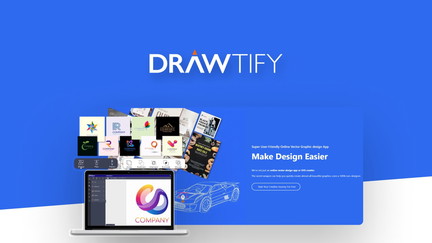
I tried Drawtify as part of an AppSumo deal and found it to be a surprisingly capable vector editor that sits somewhere between Canva and traditional desktop tools. In day-to-day use I reach for it when I need quick infographics, multi-page newsletters, or precise SVG exports without firing up Adobe.
It has a lot of built-in templates, icons and photo resources, plus animation tools for short vector animations. For special projects—like a printable poster or a one-page brochure—I appreciate the control over canvas size and the small file sizes vectors produce.
There are rough edges (template search and custom font support could be better), but overall Drawtify feels like a useful, high-performing design tool—especially if you grabbed the Drawtify appsumo lifetime deal.
Pros and Cons
|
Pros |
Cons |
|---|---|
|
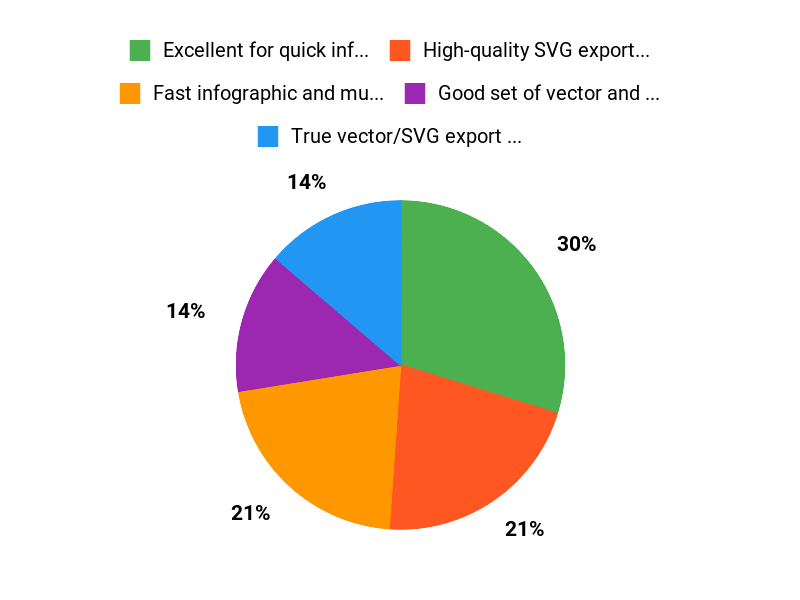
✅ Excellent for quick infographics and short multi-page documents |
❌ Template search isn’t as precise as some competitors |
|
✅ High-quality SVG export and precise canvas control |
❌ No native custom-font upload (requested by users) |
|
✅ Good set of vector and animation tools |
❌ Some features require a bit of fiddling or tutorial time |
|
✅ Attractive lifetime price via AppSumo |
What People Say
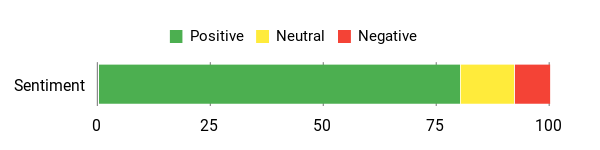
Users value Drawtify for quick infographic workflows, strong SVG/print exports and multi-page templates; a few mention limits in template search and no custom font upload yet.
Overall Sentiment: Positive
🗣️ heyoliver
heyoliver highlighted that Drawtify makes infographics much faster than other tools. They said you can export high-quality SVGs and control canvas size without needing paid Canva or Adobe, and that the app handles multi-page newsletters and brochures well — a real time-saver for short reports.
🗣️ AhayahAssemblyChurch
AhayahAssemblyChurch praised the vector capabilities — tiny file sizes that scale from a seed to a billboard — and called the program a keeper after experimenting with photos, Bézier curves and printing. They also appreciated getting in on the lifetime deal.
Cost Benefits
Paying $79.90 for a lifetime deal (versus a listed original price of $990) can eliminate monthly subscription costs for users who need recurring design exports, making it economical for freelancers and small teams over time.
Return on Investment
If Drawtify saves you even a few hours per month compared with more complex tools or paid subscriptions, the lifetime price pays for itself quickly—especially for regular content creators and small agencies.
Usability
|
Aspect |
Ease Level |
Notes |
|---|---|---|
|
Interface |
Moderate |
Clean and approachable at first glance; deeper features take time to master. |
|
Template Search |
Challenging |
Search can return broad results; finding a specific template by keyword isn’t always precise. |
|
Animation Tools |
Moderate |
Intuitive for basic animations, but advanced options are still growing. |
|
Export Options |
Easy |
Straightforward SVG, PNG and print-ready exports with good size control. |
Performance & Speed
Generally responsive for vector work and exports; users report fast infographic workflow and smooth multi-page handling.
Integrations
|
Software |
Integration Quality |
|---|---|
|
Adobe Illustrator |
Good (SVG and compatible exports) |
|
Canva |
Limited (different template/search approach; not a direct sync) |
|
WordPress |
Basic (download assets then upload; embed iframe not built-in) |
|
AppSumo |
Available (sold and distributed via AppSumo deals) |
Security Features
|
Feature |
Protection Level |
|---|---|
|
Account Authentication |
Standard |
|
Local File Export |
High (you control exported files) |
|
Team Access Controls |
Basic |
Reliability
Users describe Drawtify as stable and reliable for regular design tasks; long-term viability noted by lifetime-deal buyers.
Learning Curve
There’s an initial learning curve for vector-specific tools and some features, but basic tasks are approachable and tutorials help bridge gaps.
Key Benefits
- Fast infographic and multi-page design creation
- True vector/SVG export for print and web
- Large built-in template and element library
- Animation tools and multi-page layouts
- One-time AppSumo lifetime pricing option
Current Price: $79.90
Rating: 4.7 (total: 23+)
FAQ
Is Drawtify Worth Buying For Designers And Non-Designers?
I think Drawtify is a strong value proposition, especially if you find the AppSumo deal for $79.90 attractive compared with the original $990 price, and the positive Drawtify reviews (average around 4.6–4.7) back that up. I like that it combines a full vector editor, SVG export, multi-page layouts and animation tools in one browser-based app, so for quick infographics, newsletters and small brochures it often saves me time versus firing up Adobe or switching tools.
On the flip side, I’ve seen feedback about limited template search and the inability to upload custom fonts, so if those are must-haves for you I recommend testing those features first. My tip is to sign up, try a real project (exporting SVG and PDF), and check the Drawtify appsumo listing and user reviews to confirm it fits your workflow.
How Does Drawtify Compare To Canva, Adobe And Affinity?
From my experience and from reading many Drawtify reviews, Drawtify sits between simple template tools like Canva and professional suites like Adobe or Affinity: it feels faster than Adobe for one-off brochures and gives me more design control than Canva when I need precise vector work. I especially appreciate fast infographic creation and native SVG export without needing a paid Canva subscription, and the multi-page and animation features make it a solid middle ground.
I will say that Canva still wins for template name search and community templates, and Adobe/Affinity remain better for advanced photo editing and complex production workflows, so I use Drawtify for 1–4 page reports, infographics and quick vector tasks and keep the others for heavy-duty work.
Will Drawtify Fit My Workflow And What Practical Tips Should I Know?
I recommend treating Drawtify as a versatile vector-first tool and testing it with a real deliverable to see how it fits your workflow; try building a one-page infographic or a multi-page newsletter and export as SVG and PDF to check quality. I also advise learning basic Bézier curve edits early, using the built-in templates and icon sets to speed work, and using the preview/share features when collaborating.
If you need custom fonts and hit limitations, I’ve found workarounds like outlining text or contacting support, and watching YouTube tutorials helps resolve small hurdles quickly. Finally, check the Drawtify appsumo page for current terms and community feedback—many users on AppSumo report it’s worth the price, and those Drawtify reviews give practical insights into real-world pros and cons.
Why Customers Choose Drawtify
I choose Drawtify because its intuitive vector tools and extensive library of templates and assets let me create polished graphics quickly without a steep learning curve. Its affordable pricing and web-based access mean I can work from anywhere, collaborate easily, and get professional results fast.
Wrapping Up
After trying Drawtify and reading multiple Drawtify reviews, I found it to be a capable vector and animation editor that sits comfortably between simple template tools and heavyweight apps. The interface makes it easy to get started, the vector controls and animation features are impressive, and the lifetime price of $79.90 on AppSumo makes it an attractive value for freelancers, content creators, and small teams who want robust exports (SVG, high-res PNG) without recurring fees.
The main downsides are template search limitations and no native custom font upload in some plans, so if those are deal-breakers you may still prefer Canva or Adobe. Overall, I recommend Drawtify as a practical, cost-effective tool when you want strong vector control and quick design outputs.
This Roundup is reader-supported. When you click through links we may earn a referral commission on qualifying purchases.