

I know how disruptive SSL and mixed-content problems can be for rankings and user trust. WP Force SSL promises to fix those issues quickly by offering real-time SSL monitoring, a Content Scanner that finds and fixes mixed content, and a centralized dashboard for managing multiple sites.
In this review I explain what the plugin does, how it performed for me, and whether the WP Force SSL AppSumo deal is worth buying. If you manage client sites, build sites for others, or run multiple WordPress installs, the time you save fixing SSL headaches can pay for itself fast.
TL;DR
|
Feature |
Verdict |
|---|---|
|
Ease of Use |
⭐️⭐️⭐️⭐️⭐️ ⏱️ – Quick, guided setup; I had sites forced to HTTPS in minutes. |
|
Core Features |
⭐️⭐️⭐️⭐️ 🔍 – Real-time monitoring, redirects, security headers and a thorough Content Scanner. |
|
Value (AppSumo) |
⭐️⭐️⭐️⭐️ 💸 – AppSumo pricing starts at $49 for a 10-site license; strong value for agencies and multi-site users. |
|
Support & Reliability |
⭐️⭐️⭐️⭐️ 🤝 – Mostly positive WP Force SSL reviews and responsive developer replies; note one recurring complaint about manual certificate renewals. |
|
Verdict |
✅ – A practical, reliable tool to fix SSL problems and prevent silent SEO losses. |
WP Force SSL
I’ve used WP Force SSL on a few client sites and my own projects, and it’s one of those plugins that quietly fixes a lot of headaches. It automatically hunts down mixed content, redirects HTTP to HTTPS, checks security headers and monitors SSL certificates so you get alerted if something’s about to fail.
For daily use it’s great—set it up, watch the dashboard, and sleep easier knowing you’re not losing SEO or trust because of a broken cert. For agencies or launch days it’s handy too: the centralized dashboard and white-label options let me manage many sites at once and present a polished tool to clients.
On AppSumo the WP Force SSL appsumo deal gives lifetime access plans that make it sensible for freelancers and small agencies, and the WP Force SSL reviews I read and left show consistent praise for reliability and compatibility with other plugins. If you want something low-fuss that solves recurring SSL problems and keeps an eye on things, this is worth trying.
Pros and Cons
|
Pros |
Cons |
|---|---|
|
✅ Straightforward setup and minimal performance impact |
❌ Built-in SSL certificate offering lacks automated renewals — some users must reinstall every 3 months |
|
✅ Powerful content scanner that finds mixed content errors |
❌ Advanced automation features (auto SSL renewals) are limited depending on the plan |
|
✅ Central dashboard and white-label options for agencies |
|
|
✅ Compatible with a wide range of plugins and hosts |
What People Say
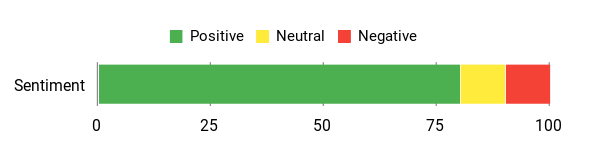
Across WP Force SSL reviews people highlight how it solves stubborn SSL problems quickly and without breaking other plugins. Many mention the dashboard and monitoring as the features that make their lives easier, while a few point out limits in the provided SSL certificate automation.
Overall Sentiment: Positive
🗣️ jeffbaygents
Went from an F to an A in minutes and Site PSI remained at 100%. Worked alongside 15 other plugins with no issues; I bought multiple codes to roll it out on new client sites.
🗣️ beclickedagency
Easy setup and a dashboard that lets us see all client sites at a glance. We equipped all our clients and it reliably fixed SSL issues and improved security.
Long-Term Cost Benefits
Buying a lifetime plan (AppSumo codes) can save recurring plugin or dev support costs. It reduces time spent troubleshooting SSL issues, avoids SEO hits from mixed content, and lowers client support time over months and years.
Return on Investment
You typically recoup the cost by saving a few hours of developer time per incident, preventing traffic loss from SSL failures, and offering a managed service to clients. For agencies, white-labeling and centralized management help turn the plugin into a billable value-add.
Usability
|
Aspect |
Ease Level |
Notes |
|---|---|---|
|
Setup |
Easy |
Most users report a quick setup; dashboard provides clear steps. |
|
Dashboard |
Easy |
Centralized view for multiple sites makes management simple for agencies. |
|
Content Scanner |
Moderate |
Powerful and thorough; occasional manual review may still be needed for edge cases. |
|
Monitoring & Alerts |
Easy |
Real-time alerts are straightforward and useful for uptime/expiry warnings. |
|
White Labeling |
Moderate |
Rebranding is possible without code edits, though full customization takes a bit of setup. |
Performance & Speed
Minimal impact; users report Site PSI staying at 100% after implementation and no slowdown in normal operations.
Integration Capabilities
|
Software |
Integration Quality |
|---|---|
|
WordPress |
Excellent |
|
Hosting Providers |
Good |
|
Other Plugins & Themes |
Excellent |
Security Features
|
Feature |
Protection Level |
|---|---|
|
SSL Certificate Monitoring |
High |
|
Mixed Content Scanner & Fixes |
High |
|
Security Headers Checks |
Moderate |
Scalability
Scales from single-site use to agency workflows with 10, 50 or unlimited site licenses; centralized management helps when you handle dozens or hundreds of sites.
Reporting & Analytics
Provides monitoring logs, uptime and certificate expiry alerts in the dashboard. Not a full analytics suite, but enough reporting to track SSL health across sites.
Key Benefits
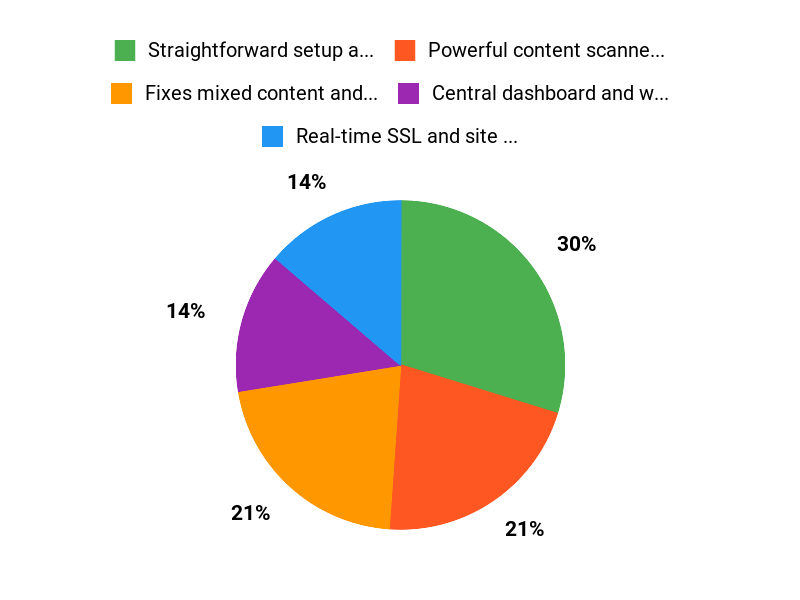
- Fixes mixed content and redirects HTTP to HTTPS
- Real-time SSL and site monitoring with alerts
- Content Scanner that checks every resource on every page
- Centralized dashboard for multi-site and white-label control
- Works with all plugins, themes and hosting providers
Current Price: $49
Rating: 4.47 (total: 15+)
FAQ
What Is WP Force SSL And Who Is It Best For?
I use WP Force SSL to resolve mixed content issues, force HTTPS redirects, check security headers, and monitor certificates in real time. The plugin shines if you manage multiple sites, run an agency, or want an easy way to keep client sites secure without fiddling with server configs. The AppSumo offering labeled WP Force SSL appsumo gives lifetime access tiers starting at $49 for a 10-site license, $98 for 50 sites, and $147 for unlimited sites, while original prices were listed at $199 and higher. From my experience and from WP Force SSL reviews, the Content Scanner and real-time monitoring are the features people praise most because they catch those silent mixed-content SEO killers quickly.
Does WP Force SSL Automatically Install And Renew SSL Certificates?
I want to be clear: WP Force SSL excels at detecting certificate problems, redirecting HTTP to HTTPS, removing mixed content, and notifying you when a certificate is nearing expiration. However, automatic certificate issuance and unattended renewals can depend on your host and the certificate source. Some users in WP Force SSL reviews noted that the plugin’s bundled certificate option may require manual installation and periodic renewal, so I always recommend checking your host’s ACME/Let’s Encrypt support or using the host’s automated SSL if available.
A practical tip I use is to enable monitoring and set notifications in the dashboard, and if automatic renewals matter to you, confirm with your host before buying so you avoid manual steps every few months.
How Does WP Force SSL Perform In Real Sites And What Should I Consider Before Buying?
In my testing and based on user feedback, WP Force SSL performs well and is lightweight; several WP Force SSL reviews mention no drop in PageSpeed scores after activation and one reviewer reported going from an F to an A on SSL checkers while PSI stayed at 100%. Before I buy, I check compatibility with my hosting, whether I need white labeling, and how many site licenses I’ll need; the AppSumo deal often makes those decisions easy.
I also recommend testing the plugin on a staging site first, taking a backup before sweeping mixed content fixes, and using the centralized dashboard to monitor multiple sites. If you manage clients, the white label and rebranding options included in higher tiers are useful, and if automated certificate management is a priority, verify that with your host so you don’t run into the manual renewal complaint some users reported.
Why WP Force SSL
I recommend WP Force SSL because it lets me force HTTPS sitewide with a single click, automatically fixes mixed-content issues and sets up proper redirects so visitors see the secure padlock without manual fiddling. I also like that it’s lightweight, compatible with most themes and plugins, and backed by responsive support, so it removes SSL headaches quickly and safely.
Wrapping Up
I found WP Force SSL to be a practical solution that quickly addresses the common SSL and mixed-content problems that hurt SEO and user trust. It provides real-time SSL monitoring and a Content Scanner that digs through every page to remove mixed content, and the centralized dashboard is a real help for agencies.
The AppSumo offer—starting at $49 for a 10-site license—makes it easy to justify trying it out. Most WP Force SSL reviews are positive about ease and effectiveness, though some users have flagged the lack of fully automated certificate renewals as a downside.
Overall, I recommend WP Force SSL if you want a fast way to fix SSL issues and keep sites monitored without juggling hosts or plugins.
This Roundup is reader-supported. When you click through links we may earn a referral commission on qualifying purchases.