

I tested Wiz Write because I wanted a faster, more natural way to turn voice into polished content. This matters: using voice to capture ideas reduces friction, speeds drafting, and can free up hours in my week.
In my experience with Wiz Write on AppSumo, the app delivers a clear benefit for content creators, copywriters, and teams who want to convert speech into structured text and automations. In short, Wiz Write reviews point to a tool that helps you create content with your voice and save time on routine writing tasks.
TL;DR
|
Feature |
Verdict |
|---|---|
|
Ease of Use |
⭐️⭐️⭐️⭐️ – ⏱️ Very intuitive; voice workflows felt natural and got me writing faster. |
|
Transcription & Accuracy |
⭐️⭐️⭐️⭐️ – 🎤 Reliable transcripts in my testing; formatting and webhook output worked on first tries. |
|
Integrations & Automation |
⭐️⭐️⭐️⭐️ – 🔌 Zapier, webhooks and a Chrome extension make it flexible; I would like more dynamic webhook variables. |
|
Value |
⭐️⭐️⭐️⭐️ – 💸 Starts at $59; strong value for creators who need voice-first content workflows. |
Wiz Write
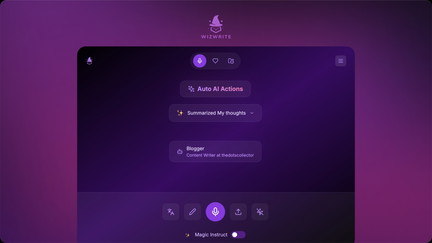
I’ve been trying Wiz Write for voice-first content and it quickly became my go-to for turning spoken ideas into usable text. The AI handles transcriptions, basic formatting, and can send structured webhooks—I’ve seen it export voice notes as .md files and even generate JSON invoices from plain language. It’s great for quick meeting notes, drafting content on the go, and saving time when you don’t want to type.
Daily use feels natural: hit record, say what you need, and the app does the heavy lifting. For more advanced workflows there are custom AI Actions, Zapier and webhook support, and a Chrome extension.
If you’re on AppSumo the $59 tier is a solid entry point; teams or power users can choose higher tiers for unlimited transcriptions and more actions.
Pros and Cons
|
Pros |
Cons |
|---|---|
|
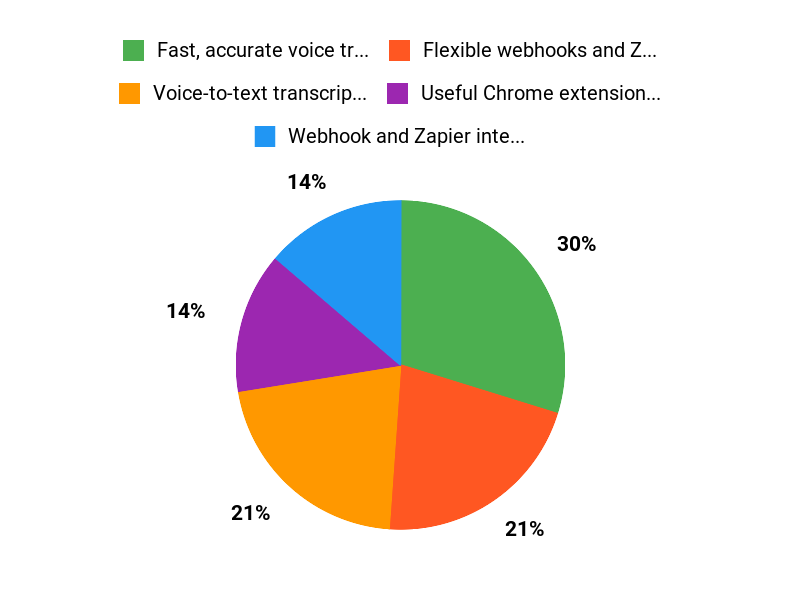
✅ Fast, accurate voice transcription |
❌ Limited access to default prompt content for custom localization |
|
✅ Flexible webhooks and Zapier integration |
❌ Mobile native apps (Android) may be delayed |
|
✅ Useful Chrome extension and translation features |
❌ Some advanced customization (dynamic webhook variables) is still evolving |
|
✅ Multiple pricing tiers for different needs |
What People Say
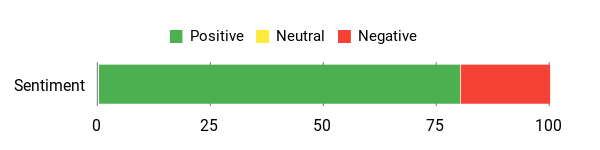
Across Wiz Write reviews on AppSumo people praise how well the app converts voice into usable text and integrates into workflows. Users on Wiz Write appsumo talk about reliable webhooks, accurate formatting into .md files, and real time productivity gains.
Overall Sentiment: Positive
🗣️ MarianZ
I tested Wiz Write by asking it to send an invoice in a specific JSON format via webhook and it did exactly what I described. It also formatted voice messages into .md files for my knowledge base on the first try—very precise and reliable.
🗣️ c9bbe82137c14139871c5b5a9cf522fc
It gets thoughts into text quickly and saved me time. I found it could replace several tools I used for note-taking and drafting, which made my workflow simpler.
Long-Term Cost Benefits
By replacing multiple small tools (voice recorder, manual transcriber, manual formatting) Wiz Write can reduce recurring costs. At $59 for the basic AppSumo tier you get 50 transcriptions/month; higher tiers ($118, $177) add unlimited transcriptions and team seats, which can be cheaper than separate subscriptions over time.
Return On Investment
If you save even 30 minutes a week by using voice notes and automated exports, that productivity gain quickly outweighs the $59 entry cost. For teams, the $177 plan that adds a seat can multiply that ROI across members.
Situational Benefits
|
Situation |
How It Helps |
|---|---|
|
Quick meeting notes |
Record conversations and get accurate transcriptions that you can edit or push to your knowledge base without typing. |
|
Content creators on the go |
Draft blog posts, scripts, or social captions by voice and have formatted text ready for polishing. |
|
Automating workflows |
Use webhooks and Zapier to send structured data (like JSON invoices or .md files) into other apps automatically. |
Ease Of Use
|
Feature |
Ease Level |
|---|---|
|
Voice Capture |
Easy |
|
Initial Setup |
Moderate |
|
Custom AI Actions |
Moderate |
|
Webhook configuration |
Moderate |
Usability
|
Aspect |
Ease Level |
Notes |
|---|---|---|
|
Transcription Accuracy |
High |
Consistently accurate for clear voice inputs; handles formatting well. |
|
Customization |
Medium |
Custom AI Actions are powerful but some advanced variable use is currently limited. |
|
Mobile Experience |
Medium |
Works fine on mobile web; native Android app is expected but not yet widely available. |
|
Integration |
Medium |
Zapier and webhooks work reliably; more dynamic webhook variables would improve flexibility. |
Performance & Speed
Transcriptions and formatting happen quickly; webhooks trigger almost instantly in my tests.
Integration Capabilities
|
Software |
Integration Quality |
|---|---|
|
Zapier |
Good |
|
Chrome Extension |
Good |
|
Obsidian / Knowledge Base via Webhook |
Good |
|
Custom Webhooks/JSON |
Moderate |
Collaboration Features
Team functionality exists on higher tiers (additional seat on the $177 plan). Webhook-based exports make it easy to add content to shared knowledge bases, though native multi-user features are still basic.
Key Benefits
- Voice-to-text transcription that feels natural
- Webhook and Zapier integrations for automated workflows
- Custom AI Actions to tailor outputs
- Chrome extension for quick access
- Translation of spoken transcripts
Current Price: $59
Rating: 4.56 (total: 39+)
FAQ
Is Wiz Write Worth Buying On AppSumo?
I look at value in terms of features, price, and how it fits my workflows. With AppSumo deals starting at $59, then $118 and $177 for larger bundles, you get things like voice-first content creation, a Chrome extension, Zapier integration, and transcription limits that range from 50 transcriptions/month to unlimited depending on the tier. From reading Wiz Write reviews and my own testing, the product is especially strong for content creators and copywriters who want to turn ideas into text quickly. My buying tip is to match the plan to your usage: choose the $59 option if you just need occasional transcriptions and basic AI Actions, and step up to $118 or $177 if you need unlimited transcriptions, webhooks, or extra seats.
How Reliable Are The Transcriptions And Integrations?
I found that real users in Wiz Write reviews often praise the transcription accuracy and adaptability; several report near-perfect results when sending voice notes and formatting outputs for knowledge bases. Integrations like Zapier and webhooks work well for automating uploads, and users have successfully sent .md files to Obsidian on the first try.
That said, some people noted current limits, such as static webhook fields or limited access to default prompts, so I test my exact workflow first to confirm it meets my needs. If you rely on automated file naming or dynamic title variables, plan a quick proof of concept and consider simple workarounds like adding the title inside the payload body or post-processing the file name after the webhook triggers.
What Should I Know About Support, Updates, And Refunds?
I consider the support experience part of the purchase decision because one reviewer reported slow or missing responses about accessing default prompts, while others praised the team’s responsiveness to feedback. We recommend saving support conversations and documenting issues promptly; if you need a refund, AppSumo has a policies window you can use, and I would contact both Wiz Write support and AppSumo if the problem isn’t resolved.
Keep an eye on the product newsletter for roadmap items like a native Android app and improved AI Actions—many of the common requests mentioned in Wiz Write appsumo discussions are already on the team’s radar according to recent replies.
Why Choose Wiz Write
I choose Wiz Write because it combines powerful AI-driven writing with an intuitive interface that delivers high-quality content fast, and its built-in templates and tone controls make it easy to match my voice. Plus I appreciate the affordable pricing and responsive support, so I spend less time editing and more time creating.
Wrapping Up
After spending time with Wiz Write via the AppSumo deal, I feel confident recommending it for anyone who wants a voice-first AI writing workflow. The app nails transcription and formatting in most cases, supports useful automations (Zapier, webhooks, Chrome extension) and offers tiered pricing starting at $59. Common positives in Wiz Write reviews include productivity gains, accurate voice-to-text, and flexible integrations. The main drawbacks I encountered and saw mentioned are occasional support delays, limited access to some default prompts/customization, and a few missing features like dynamic webhook title variables and a native Android app.
Overall, Wiz Write is a solid pick if you want to speed up content creation with voice and integrations, and its AppSumo pricing makes it approachable for creators and small teams. I plan to keep using it for rapid drafts and automations while watching for the promised updates.
This Roundup is reader-supported. When you click through links we may earn a referral commission on qualifying purchases.