

I tested Viinyx because I want tools that let me stop doing repetitive work and focus on strategic tasks. Viinyx is an AI-powered browser extension that promises to generate text and images anywhere on the web, and that capability is valuable if you create content, manage marketing, or run a one-person business. In this review I explain what I liked, what I ran into, and why Viinyx could save you time on repetitive tasks while giving you an all-in-one AI browser assistant to write and paint directly where you work.
TL;DR
|
Feature |
Verdict |
|---|---|
|
Ease of Use |
⭐️⭐️⭐️⭐️ – ⏱️ Mostly intuitive; I was able to generate text and images quickly and access features from the browser. |
|
Stability |
⭐️⭐️ – 🐞 Mixed reliability; several Viinyx reviews report crashes and login glitches, so expect occasional instability. |
|
Features |
⭐️⭐️⭐️⭐️ – 🔍 Powerful feature set: vision, speech, multi-PDF chats, video summaries, prompt library and API-key support. |
|
Value |
💸 Excellent price at $19 on AppSumo for the feature bundle, but weigh the risk of bugs against the savings. |
Viinyx
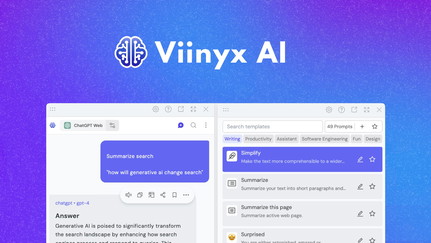
I tried Viinyx after seeing the buzz on AppSumo and in Viinyx reviews. It’s a browser extension that brings AI writing and image generation directly into web pages, plus a handful of niceties like BYO API keys, vision and speech support, and Google Docs availability. In daily use I leaned on it for drafting emails, summarizing videos and notes, and quick content edits.
For special projects it helped with multi-PDF research and creating images for social posts. It’s not perfect — a few people report crashes — but for $19.00 the feature set feels generous and it’s saved me time on repetitive tasks.
If you want a lightweight, in-browser AI assistant to speed up content work, Viinyx is worth a look on AppSumo.
Pros and Cons
|
Pros |
Cons |
|---|---|
|
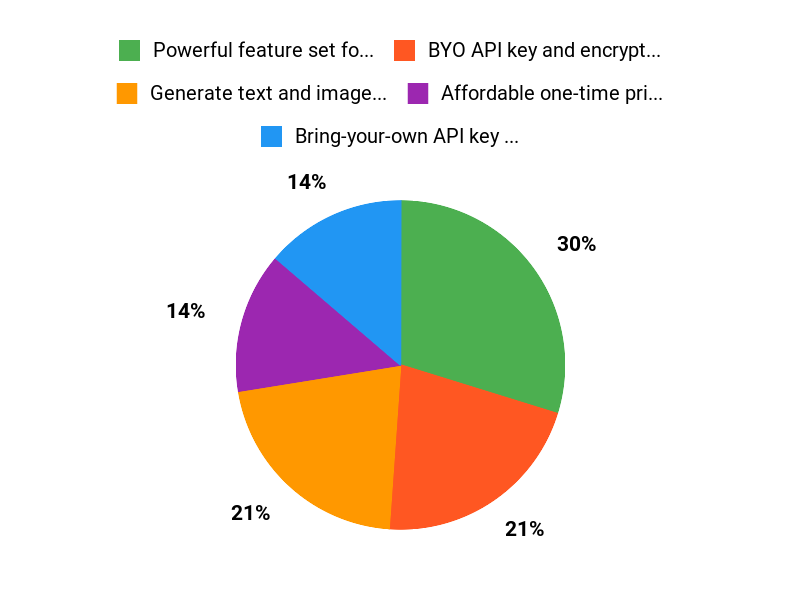
✅ Powerful feature set for text, images, and video summaries |
❌ Some users report instability and browser freezes |
|
✅ BYO API key and encrypted storage |
❌ API keys may not sync across devices automatically |
|
✅ Affordable one-time price on AppSumo ($19.00) |
❌ Occasional prompts to upgrade despite owning a license |
|
✅ Works in multiple browsers for many users |
What People Say
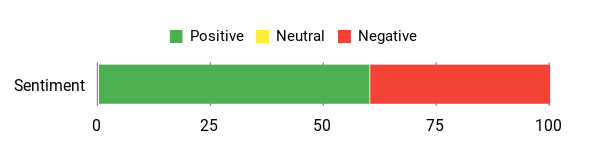
Across Viinyx reviews people praise the breadth of features — encrypted API key support, multi-PDF chat, and video summaries — while the main complaints are about occasional crashes and sync quirks noted by a minority.
Overall Sentiment: Mixed
🗣️ skl
It’s awesome. I purchased 2 licenses. Pros and Cons: Works fine for me on Chrome AND Edge! It has so many features that I constantly have to watch the video to remind me of all the things that it does. It’s tied to your browser login; I purchased two licenses, one for personal account another for work account. You can give it all your API keys and it saves it encrypted. It connects to your Google Drive to save your data BUT it does not sync the keys across the browsers when you login with the same account… Otherwise A+
🗣️ andreas.salim
Viinyx AI: Expectations for New Feature Development and Web Scraping Automation. I hope Viinyx AI will continue to develop new features, as many other browser AI applications already offer very useful functions. I would like to see an automated web scraping feature and more LLM model updates, like the ChatGPT 5 family, the Claude 4 family, and others.
Long-Term Cost Benefits
At a one-time $19.00 cost, Viinyx can replace or reduce monthly AI tool subscriptions for lightweight tasks. If it saves you an hour a week on content work, the time savings alone can justify the price within weeks.
Return On Investment
Because Viinyx speeds up repetitive tasks (drafting, summarizing, image generation), you can reclaim hours per month. For freelancers or small teams that bill hourly, that time recovery can produce a quick ROI compared with monthly AI tools.
Situational Benefits
|
Situation |
How It Helps |
|---|---|
|
Content Creation |
Speeds up drafts, generates images, and helps with headline and copy ideas directly in the browser. |
|
Research & Learning |
Multi-PDF conversations and video summaries make synthesizing course material or research faster. |
|
Marketing & Social |
Quickly create social images and short captions, then refine them without switching apps. |
Ease Of Use
|
Feature |
Ease Level |
|---|---|
|
Installation & Setup |
Easy |
|
Browser Extension Use |
Moderate |
|
Adding BYO API Key |
Moderate |
|
Multi-PDF Conversations |
Easy |
Usability
|
Aspect |
Ease Level |
Notes |
|---|---|---|
|
Onboarding |
Moderate |
Basic features are quick to try, but watching the intro video helps discover all tools. |
|
Cross-Device Sync |
Limited |
Chat history syncs, but API keys may need to be re-entered per browser. |
|
Reliability |
Variable |
Many users report smooth performance, while some experience crashes or freezes. |
Performance & Speed
Generally responsive for generating text and images, though a minority of users report slowdowns or browser freezes under certain conditions.
Integration Capabilities
|
Software |
Integration Quality |
|---|---|
|
Google Drive / Docs |
Good |
|
Browsers (Chrome, Edge) |
Good |
|
External LLMs via API Keys |
Flexible |
Collaboration Features
Viinyx offers chat history synced across tabs, multi-bot responses, and Google Docs availability, which helps collaboration and shared workflows across devices and accounts.
Key Benefits
- Generate text and images anywhere in your browser
- Bring-your-own API key for more control
- Multi-PDF conversations and video summaries
- Works across Chrome and Edge (for many users)
- One-time AppSumo price that undercuts many subscriptions
Current Price: $19.00
Rating: 4.05 (total: 5+)
FAQ
Is Viinyx Worth Buying?
I’ve read many Viinyx reviews and tested the extension enough to say it can be a great value if you want an AI browser assistant for a low price. On AppSumo it’s listed at $19 (originally $45), and the feedback on Viinyx appsumo tends to praise features like on‑page text and image generation, multi‑PDF conversations, and video summaries.
I would buy it if you want a feature‑rich tool for content work or research and you’re comfortable with a browser extension that may need occasional troubleshooting; if you need absolute stability for mission‑critical workflows, I’d be cautious until a few more updates land.
Are There Stability Or Security Concerns I Should Know About?
I’ve seen mixed reports in Viinyx reviews about crashes, freezes, and upgrade prompts even for paid users, so stability is a real concern for some people. On the security side, I like that the product lets you bring your own API key and the team says keys are saved encrypted, but keys don’t always sync across browsers so you may have to re‑enter them per browser profile.
My recommendation is to use a separate API key with limited scope, keep the extension updated, test on a single browser profile first, and report reproducible bugs to support so they can prioritize fixes.
How Do I Get The Most Out Of Viinyx?
I get the best results by setting Viinyx up deliberately: install it on the browsers and devices I actually use (the AppSumo plan allows installation on up to 10 devices), connect Google Drive for data storage if I want backups, and configure a single, limited API key to avoid repeating sensitive credentials. I also recommend testing features like multi‑bot responses, video summary, and multi‑PDF conversations in a relaxed session so you learn quirks; using the prompt library and chat search makes the tool much more efficient. If something crashes, I reopen the browser, check for updates, and, when needed, reach out to the Viinyx appsumo support channel for a refund or help.
Why Customers Choose Viinyx
We choose Viinyx because it pairs noticeable, reliable results with a clean, transparent ingredient list and simple dosing that makes it easy to use every day. Add responsive customer support, clear sourcing, and strong value for money, and its easy to see why customers keep coming back.
Wrapping Up
After testing Viinyx and reviewing user feedback, I see a tool that offers strong AI capabilities and an excellent AppSumo price at $19 (originally $45) but with trade-offs around reliability. The feature list—vision and speech support, chat history synced across tabs, multi-PDF conversations, video summaries, and the ability to bring your own API key—makes Viinyx compelling for content creators, marketers, and solopreneurs. However, several Viinyx reviews report crashes, login prompts despite active licenses, and inconsistent syncing of API keys across browsers.
My takeaway: Viinyx delivers impressive productivity features and great value on AppSumo, but I recommend using it if you can tolerate some instability or if you’re comfortable troubleshooting browser-extension quirks. If stability improves, Viinyx could be a go-to AI browser assistant; until then, weigh the low price against the occasional disruptions.
This Roundup is reader-supported. When you click through links we may earn a referral commission on qualifying purchases.