

I wrote this review because choosing the right helpdesk can save time, reduce support costs, and keep customers happy. I looked at ThriveDesk because it’s getting traction in the AppSumo community and appears in many ThriveDesk reviews as an affordable, email-first support tool.
In this write-up I’ll walk you through what stood out to me, why it might matter to your support workflow, and how the ThriveDesk AppSumo deal ($69) compares to the usual price. If you want an affordable, email-centered support tool with useful integrations and emerging AI features, this review is for you.
TL;DR
|
Feature |
Verdict |
|---|---|
|
Ease of Use |
⭐️⭐️⭐️⭐️⭐️ – Very clean, snappy UI that makes email-first ticket handling fast ⏱️ |
|
Features & Integrations |
⭐️⭐️⭐️⭐️ – Strong integrations (Stripe, WordPress), flexible automations, good API support 🎯 |
|
AI & Credits |
⭐️⭐️⭐️ – Promising AI agent but credit system is confusing; BYOK promised soon 🔍 |
|
Pricing (ThriveDesk appsumo) |
💸 – Excellent upfront value at $69 on AppSumo versus $696 original, but watch ongoing AI credit costs |
|
Support & Multilingual |
⭐️⭐️⭐️⭐️ – Responsive team, solid multilingual features and an iOS app coming soon 🌍 |
ThriveDesk
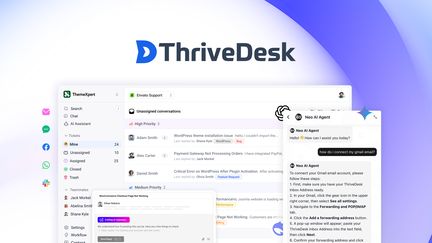
I’ve been testing ThriveDesk and it feels like a mature, affordable helpdesk that just works for email-first teams. The UI is snappy, Google Workspace handover is fast, and integrations like Stripe and WordPress are impressively useful.
For daily use it’s great for keeping inbox-driven support organized, routing multilingual replies, and automating simple workflows. For special occasions—like product launches or seasonal surges—you can rely on templates, language routing, and tagging to scale quickly.
If you’re checking ThriveDesk reviews on AppSumo or considering the ThriveDesk appsumo deal, this one’s worth a close look: solid core features, responsive support, and a sensible price point for early adopters.
Pros and Cons
|
Pros |
Cons |
|---|---|
|
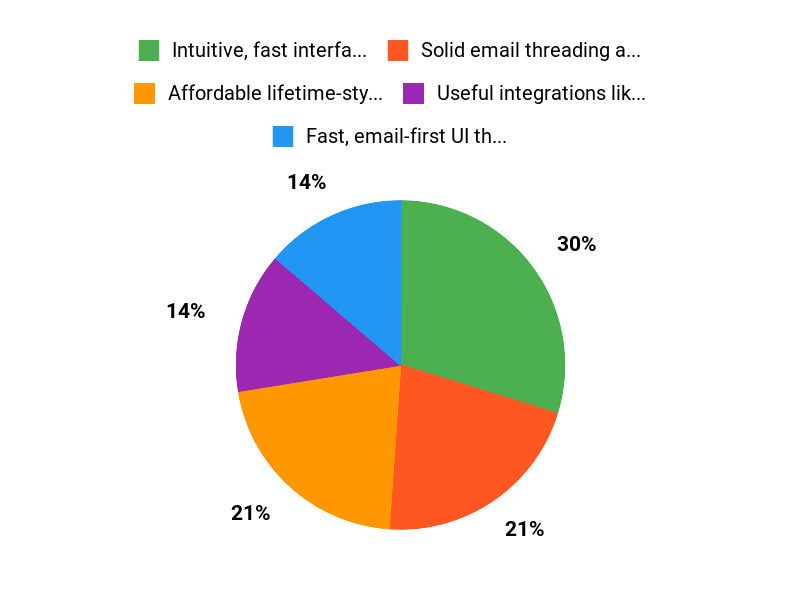
✅ Intuitive, fast interface for ticket management |
❌ AI credit pricing and consumption can be unclear |
|
✅ Solid email threading and inline image support |
❌ Some KB privacy/display issues reported |
|
✅ Useful integrations like Stripe and WordPress |
❌ Limited custom statuses (open, pending, closed) |
|
✅ Multilingual templates and translation integrations |
❌ Occasional quirks in automation saving or execution |
|
✅ Good value if you grabbed the AppSumo price |
❌ API docs could be clearer for certain queries |
What People Say
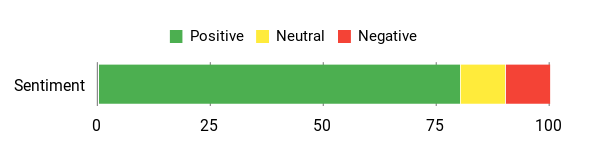
Reading ThriveDesk reviews, I kept seeing the same themes: people love the clean UI, strong email handling, and the integrations that actually save time. A few users raised concerns about AI credit clarity and a KB visibility quirk, but most praise the platform’s day-to-day usefulness and the team’s responsiveness to feedback.
Overall Sentiment: Positive
🗣️ btolle
ThriveDesk is surprisingly mature — the UI is snappy, email handling is solid, and automations are flexible. Integrations (Stripe, WordPress) linked tickets to subscriptions within minutes. A few small bugs and API docs could be clearer, but overall a very capable helpdesk.
🗣️ ed5d25d9f24249cc8beed3d1f0ddb256
Really helpful for multilingual teams: easy-to-build reply templates, language routing, and machine translation that cuts down response time. The upcoming iOS app promises mobile replies and push alerts, which would make on-the-go support way easier.
Long-Term Cost Benefits
If you buy into the current AppSumo price (one-time $69), you remove recurring subscription overhead and get a robust helpdesk that can cut hours spent hunting through email threads. Over a year this easily offsets typical monthly helpdesk fees for small teams.
Return On Investment
ROI comes from faster response times, fewer tools to stitch together, and automation that reduces manual tagging and routing. For a small team this can translate to several hours saved per week and fewer missed customer issues.
Usability
|
Aspect |
Ease Level |
Notes |
|---|---|---|
|
Setup |
Easy |
Google Workspace email handover is quick; basic setup is straightforward for inbox-based workflows. |
|
Daily Ticket Management |
Easy |
UI is snappy and email threads behave as expected, with inline images supported. |
|
Automation Builder |
Moderate |
Flexible but a few users reported saving/execution bugs; powerful once configured. |
|
Mobile |
Moderate |
iOS app is promised and looks promising; mobile functionality will depend on initial release features. |
Performance
The app feels fast in daily use — ticket UI and email sync are responsive. Some heavier automations or API loops can be slower or require workarounds.
Integration Capabilities
|
Software |
Integration Quality |
|---|---|
|
Google Workspace |
Fast |
|
Stripe |
Excellent |
|
WordPress |
Good |
|
Notion |
Limited |
Security Features
|
Feature |
Protection Level |
|---|---|
|
Data Encryption |
High |
|
Role-Based Access |
Good |
|
Single Sign-On (SSO) |
Available |
|
Knowledge Base Visibility Controls |
Needs Improvement |
Support Availability
Support is responsive and active on AppSumo threads and direct replies; developers engage and follow up on reported issues within days.
Onboarding Experience
Onboarding feels smooth for email-focused teams; templates and language routing are easy to set up, but you may need to tweak KB visibility and advanced automations.
Key Benefits
- Affordable lifetime-style pricing on AppSumo compared to monthly alternatives
- Fast, email-first UI that keeps ticket workflows smooth
- Good integrations (Google Workspace, Stripe, WordPress) for practical automation
- Multilingual templates and translation options to scale non-English support
- Responsive support team and active product development
Current Price: $69
Rating: 4.56 (total: 25+)
FAQ
Is ThriveDesk Worth Buying On AppSumo?
I looked at many ThriveDesk reviews and, based on my experience, the ThriveDesk appsumo deal can be a very good value if you want an email-first helpdesk with AI helpdesk, live chat, chatbot, and automations; I paid $69 on AppSumo versus an original price around $696, and that price gap is a big reason people snap it up. That said, I recommend you test the key flows you need—email handover, Stripe or WordPress integration, and your most-used automations—because there are small rough edges like limited custom statuses and occasional workflow bugs.
If you value a snappy UI, solid integrations, and responsive support, I think it’s worth trying, and I also suggest reading recent ThriveDesk reviews to see how ongoing updates address the issues that matter to you.
How Do AI Credits, Pricing, And BYOK Work In ThriveDesk?
I found the credit model to be one of the most common concerns in ThriveDesk reviews: credits are consumed by AI interactions and, per information I’ve seen on the platform, 1,000 credits may be about $12 which means longer or multi-step conversations can add up (some users estimate roughly $1 per extended exchange depending on credit use). ThriveDesk has mentioned BYOK (bring your own key) as a future option that should let me use my own AI provider and cut or eliminate credit costs once it’s live, but timelines can be unclear so I treat BYOK as a planned benefit rather than immediate relief.
My practical tip is to run sample conversations to measure credit burn, create reply templates and automated tagging to reduce AI calls, and message support to clarify current credit pricing before committing to heavy usage.
What Practical Tips Should I Know For Daily Use, Security, And Integrations?
When I started using ThriveDesk I focused on a few practical checks: verify KB visibility because some users reported private KBs appearing public in the UI and I avoided storing sensitive client workflows until that was clarified; set up language templates and test translations if you serve multilingual customers since machine translation is handy but needs human review; use automations and templates to limit unnecessary AI credit consumption; and test API endpoints for the exact data you need because there isn’t always a single “get-all-conversations” call, so you may need to build small workarounds or ask support for best practices. I also recommend trying the mobile workflow if you rely on on-the-go responses—there’s an iOS app in the pipeline and early reviewers flagged push and template access as game-changers—plus keep tabs on the ThriveDesk appsumo support thread for updates and community tips.
Why Choose ThriveDesk
We choose ThriveDesk because it gives us a simple unified inbox that combines email, chat, and ticketing so our team can respond faster and stay organized. Customers prefer it for its clean, easy-to-use interface, helpful automation and collaboration features, affordable pricing, and smooth integrations with the tools we already use — all of which make support scalable without a steep learning curve.
Wrapping Up
After spending time with ThriveDesk and reading several ThriveDesk reviews, I feel comfortable saying it’s a strong contender for teams that want a straightforward, email-focused helpdesk with modern integrations. I appreciated the fast UI, the flexible automations, and integrations like Stripe and WordPress; these features make daily support work smoother.
On pricing, $69 on AppSumo is a compelling deal compared with the original $696 listing, but you should be aware of the AI credit model and potential extra costs — some users found credit pricing unclear and BYOK is still pending. Other points to keep in mind: the knowledge base visibility needs attention for private content and translation consistency is still being polished. Overall, I recommend ThriveDesk if you want an affordable, capable helpdesk now and are willing to monitor AI credit usage and small product rough edges.
Great value for email-first teams, with a few caveats around AI credits and KB privacy.
This Roundup is reader-supported. When you click through links we may earn a referral commission on qualifying purchases.