
I tested Socrates from AppSumo because I wanted a faster way to get instant answers from my private files and PDFs. This matters because I often spend time digging through contracts, class handouts, or project documents, and a tool that reliably extracts and summarizes that content can save hours. In this review I explain what I liked, where Socrates needs work, and how buying it for $39 might help you speed up document-driven tasks while being aware of current limitations.
TL;DR
|
Feature |
Verdict |
|---|---|
|
Ease of Use |
⭐️⭐️⭐️ – Generally approachable but responses can be overly verbose ⏱️ |
|
PDF Handling |
⭐️⭐️⭐️⭐️ – Good at reading files and extracting details, but OCR / page selection and zoom need improvement 🔍 |
|
Language Support |
⭐️⭐️ – Mixed results, especially with German prompts; consider BYOK or alternative models if you need robust multi-language support 🌐 |
|
Value |
⭐️⭐️⭐️ – $39 on AppSumo is attractive for occasional research, though power users may find current UX limiting 💸 |
|
Support & UX |
⭐️⭐️ – Active replies from the team but the app needs UI refinements (zoom, page filtering, offline behavior) 🎨 |
Socrates
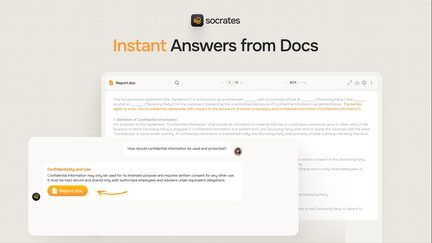
I’ve been testing Socrates from AppSumo as a way to pull instant answers from PDFs and other private files. It shines when you want a quick summary or to extract details from contracts, class handouts, or research documents — I can drop a PDF in and ask targeted questions without hunting through pages.
On a daily basis I use it for reading contracts, compiling lists from multiple documents, and getting quick clarifications. For special projects, it helps me assemble research notes or teaching materials faster than doing it manually. That said, the output can be verbose and it sometimes adds internal reasoning markers in replies, so I usually ask it to be concise or switch models.
Overall, for people who need a document-aware assistant, Socrates is a handy tool — on AppSumo it’s worth trying if you want a document-first AI that works across Win, Mac, and web.
Pros and Cons
|
Pros |
Cons |
|---|---|
|
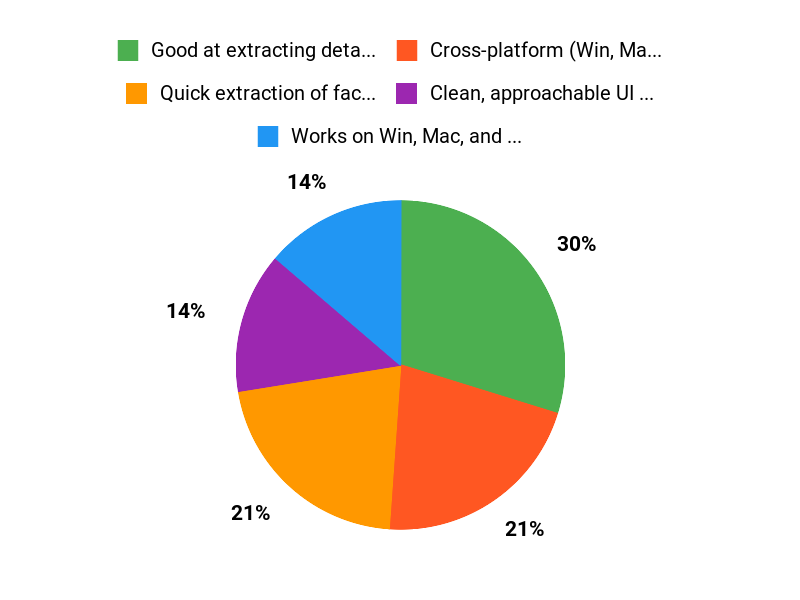
✅ Good at extracting detailed information from PDFs and other files |
❌ Tends to produce overly long, reasoning-filled responses |
|
✅ Cross-platform (Win, Mac, web) with local-focused features planned |
❌ Can misinterpret prompts or struggle with non-English (German) input |
|
✅ Clean, approachable UI according to several users |
❌ Some missing PDF UI features (zoom, page-range filters) and offline quirks |
What People Say
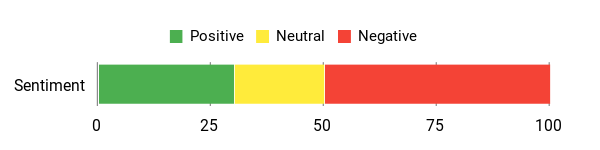
Socrates reviews on AppSumo often praise the document parsing and UI, but many users note verbosity, occasional prompt misunderstandings (especially with non-English prompts), and room for UI/UX improvements.
Overall Sentiment: Mixed
🗣️ leonid62
I got a T5 because I find the idea really great and I really like how it works. It parses documents and returns detailed answers, which saved me time when extracting info from PDFs, even if some cleanup was needed.
🗣️ LarsBurkhardt
I like the UI and the concept of local document interaction; when it understands the request it can guide workflows well, especially for organizing files inside chats.
Long-Term Cost Benefits
If you regularly process documents, Socrates can reduce time spent reading and summarizing PDFs, which adds up over months. I found that a steady workflow of contract reviews or class materials can justify the cost if the tool saves several hours per week.
Return on Investment
For someone who frequently extracts or compares information from documents, the ROI is tangible: less manual copying, faster summaries, and fewer missed details. If your use is occasional and you dislike verbose output, ROI will be lower.
Usability
|
Aspect |
Ease Level |
Notes |
|---|---|---|
|
Onboarding |
Moderate |
Setup is straightforward but learning how to prompt concisely takes time. |
|
PDF Handling |
Moderate |
Good at reading PDFs but needs better zooming, page-range selection, and OCR handling for non-searchable docs. |
|
Chat & Prompts |
Challenging |
Responses can be long and include internal reasoning markers; you often need to refine prompts for concise answers. |
Performance & Speed
Generally responsive for short documents; larger files or deep dives can take longer and sometimes return verbose outputs that require extra time to parse.
Integrations
|
Software |
Integration Quality |
|---|---|
|
Local Files |
Good – accesses private files in chats, local features improving |
|
Google Drive |
Basic – works for pulling documents but may need manual uploads for best results |
|
Other LLM models (BYOK) |
Flexible – you can pick models that work better for specific languages |
Security
|
Feature |
Protection Level |
|---|---|
|
Local Processing (planned) |
High – local deep dive mode reduces cloud exposure |
|
Private File Access |
Good – files are tied to chats and not publicly exposed |
|
Model Choice (BYOK) |
Good – lets you pick trusted models for sensitive docs |
Reliability
Mixed — reliable for many straightforward tasks, but users report failures on some offline workflows and prompt understanding, particularly in German.
Collaboration
Basic collaboration via shared chats and folders; the AI doesn’t index files outside of chat context, so teamwork workflows may need adjustment.
Key Benefits
- Quick extraction of facts from PDFs and private files
- Works on Win, Mac, and web for cross-device use
- Can compile combined lists and summarize long documents
- Local options (upcoming) for privacy-focused workflows
Current Price: $39
Rating: 4.5 (total: 66+)
FAQ
Is Socrates On AppSumo Worth Buying?
I look at value in two parts: price and fit. At the AppSumo deal price of $39 (originally $108 according to the listing), Socrates can be a strong bargain if you need a dedicated tool to get instant answers from private files on Win, Mac, or web and you expect to iterate on prompts and settings.
I recommend checking the current Socrates appsumo deal terms and refund window before buying, and testing it with a couple of representative PDFs or documents to see if the output style and accuracy match your needs. From reading Socrates reviews I know people praise the idea and some core features, but there are recurring complaints about verbosity, language support, and certain UI limits, so buy with a short test plan in mind.
How Well Does Socrates Handle PDFs And OCR In Real Use?
In my experience and from the feedback I’ve read, Socrates can extract useful information from PDFs but its success depends on the PDF quality and your expectations. If documents are not OCR-ready you should run OCR first, or accept that messy source text will lead to imperfect outputs; some reviewers reported long, cluttered answers and bracketed citations like [1] and [2] that made quick copy/paste awkward.
To get better results I tell Socrates exactly which pages to use, supply cleaner OCRed files when possible, ask for concise formats (for example: “Give me a plain comma-separated list”), and try different models or BYOK options when language support is important.
What Common Problems Appear In Socrates Reviews And How Can I Mitigate Them?
I pay attention to recurring themes in Socrates reviews so I know what to expect: excessive verbosity and internal “
Why Choose Socrates
We choose Socrates because it turns messy research into clear, actionable insights fast — its AI-powered summaries and smart organization let us go from raw content to usable notes in minutes. Customers also love the intuitive interface and seamless integrations that slot into existing workflows, and the AppSumo offer makes it an easy value-packed choice for teams and solo creators who want to save time.
Wrapping Up
Socrates from AppSumo offers a promising, document-focused AI that can save time when you need to extract information from PDFs. In my experience it handles basic extraction and research well for $39, but common issues reported in Socrates reviews — verbose responses, inconsistent language understanding (notably German), limited PDF zoom and page-filtering, and some offline workflow gaps — mean it is best for users who are comfortable refining AI outputs. If you need concise, copy-ready lists or flawless multi-language prompts out of the box, you should weigh those limitations before buying.
This Roundup is reader-supported. When you click through links we may earn a referral commission on qualifying purchases.