

I looked into Phygital+ because I wanted a single workspace that can handle images, videos, and 3D models without bouncing between multiple AI tools. In this review I break down what works, what doesn’t, and who might actually benefit.
Phygital+ promises 20+ AI tools in one place, but the real value depends on credit limits, performance, and how feature access is handled. If you’re considering the Phygital+ appsumo offer, this guide will help you decide whether the platform meets your workflow needs and budget.
TL;DR
|
Feature |
Verdict |
|---|---|
|
Ease of Use |
⭐️⭐️⭐️ – Clean, modular UI that’s easier than raw prompting, but workflows can feel slow ⏱️ |
|
Features |
⭐️⭐️⭐️⭐️ – Wide toolset (images, video, 3D) and useful modular workflows 🎨 |
|
Performance |
⭐️⭐️ – Beta stability issues and long processing times make heavy work frustrating 🔍 |
|
Value |
⭐️⭐️ – $59 price is attractive on AppSumo, but limited generations/credits reduce practical value 💸 |
|
Support & Transparency |
⭐️⭐️ – Active team presence is promising, but credit transparency and feature gating raise concerns |
Phygital+
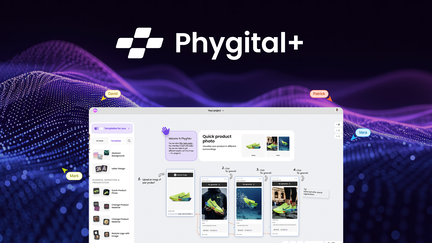
I’ve spent time testing Phygital+ and I like the idea: it brings 20+ AI tools into one workspace so you don’t have to hop between multiple apps. For everyday use I found it handy for social media visuals and quick product illustrations, and it can scale up for special occasions like product launches or creating 3D mockups for a campaign.
The node-based, step-by-step workflows make it approachable if you’re not super technical, and features like Flux can save you time compared with juggling separate image tools. That said, this feels like an early-stage product — credit limits, some performance slowdowns, and a few locked premium features can be frustrating. If you’re curious, the Phygital+ appsumo deal is a good way to try the platform, but keep an eye on how many generations/credits you actually get before committing long term.
Overall, I’d recommend it for creators who want an all-in-one toolkit and are willing to tolerate a bit of beta roughness while the product matures.
Pros and Cons
|
Pros |
Cons |
|---|---|
|
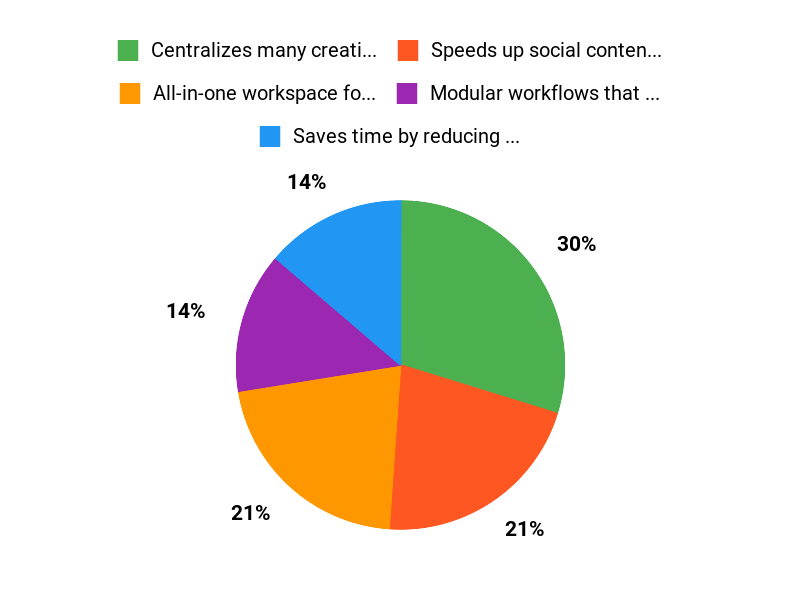
✅ Centralizes many creative tools in one place |
❌ Very limited generations/credits for active use |
|
✅ Speeds up social content and product visual creation |
❌ Some premium features appear locked depending on tier |
|
✅ Modular workflows that make complex tasks clearer |
❌ Performance can be slow and there are stability issues |
What People Say
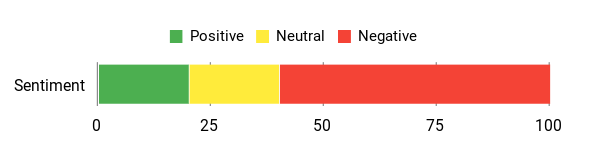
From Phygital+ reviews I’ve seen, people appreciate the convenience and some specific tools (Flux gets called out positively). Common complaints are limited generations/credits, locked premium features across tiers, and occasional performance issues. If you pick up the Phygital+ appsumo deal, test the credit usage early so you know whether it fits your workflow.
Overall Sentiment: Mixed
🗣️ Alex_Seturon
I’ve been using Phygital+ mostly for social media visuals and updating product illustrations — Flux worked surprisingly well for me and it saved a lot of time compared to switching between different AI tools. Having the tools grouped in one platform helped me stay consistent with content and branding.
🗣️ German-User
The modular design is a genuine plus: breaking the process into steps makes the workflow more approachable and the UI feels friendlier than pure prompting. There are more features in higher tiers and the overall approach can help beginners get structured results.
Long-Term Cost Benefits
Consolidating multiple tools into Phygital+ can lower subscription overhead if you regularly create images, videos, and 3D assets. However, the credit/generation model means actual cost savings depend on how many generations you need; heavy users may need to upgrade or buy more credits.
Return On Investment
ROI comes mainly from time saved by avoiding tool switching and keeping brand assets consistent. For low-to-moderate use the AppSumo deal can pay off quickly; for heavy production work, frequent credit limits may reduce ROI until the credit system or performance improves.
Situational Benefits
|
Situation |
How It Helps |
|---|---|
|
Social Media Content |
Create consistent post visuals quickly with templates and Flux edits to keep your feed on-brand. |
|
E‑commerce Product Images |
Edit product shots, remove or change backgrounds, and generate variations without juggling multiple tools. |
|
Campaign Launches |
Produce a set of images, short videos, and 3D mockups in one place, helping you iterate faster during launch prep. |
Ease Of Use
|
Feature |
Ease Level |
|---|---|
|
Onboarding |
Easy |
|
Creating Simple Images |
Easy |
|
Advanced Node Workflows |
Moderate |
|
Managing Credits |
Challenging |
Integration Capabilities
|
Software |
Integration Quality |
|---|---|
|
Export to Design Tools (PNG/JPG/MP4) |
Good |
|
API/Third-Party Integrations |
Limited |
|
CMS/E‑commerce Platforms |
Moderate |
Collaboration
Basic sharing and brand asset storage are available, but real-time collaborative editing feels limited compared with dedicated design platforms.
Reporting & Analytics
There are basic usage stats and generation counts, but reviewers note a lack of transparency around credit consumption at times.
Workflow Management
Node-based workflows let you break down jobs into steps, which helps structure work, though some users report slow processing between steps.
Key Benefits
- All-in-one workspace for images, video, and 3D
- Saves time by reducing tool switching
- Node-based workflows that help non-technical users
- Good for maintaining brand consistency across assets
- Includes specialized tools like Flux for visual edits
Current Price: $59
Rating: 3.07 (total: 15+)
FAQ
Is Phygital+ Worth Buying On AppSumo?
I’ve read many Phygital+ reviews and tried the product context myself, and my take is pragmatic: Phygital+ can be a great value if you want an all-in-one workspace to create images, short videos, and simple 3D outputs without hopping between tools. The AppSumo deal currently lists the product at $59, which is attractive compared with subscribing to multiple separate tools.
At the same time, the user feedback is mixed and the average rating sits around 3 out of 5, so I recommend buying only if you understand the trade-offs: you may encounter beta-stage glitches, limited generations/credits depending on tier, and occasional slow processing. If you want a cheap way to consolidate creative work and are comfortable testing early-stage features, I’d say go for the Phygital+ appsumo deal; otherwise wait for more mature updates or stronger Phygital+ reviews before committing.
How Do Credits, Tiers, And Feature Access Work?
From what I and many reviewers have seen, Phygital+ uses a tiered access model where higher tiers unlock more templates and tools, but actual generations/credits are limited and not always transparent. Several people reported running out of generations quickly and not seeing a clear counter, which is why I always test features early and ask the seller on AppSumo to clarify what my tier includes. If you already bought a tier, check your account settings and contact support immediately if premium tools seem locked; we’ve seen reports of features being inaccessible even when tiers suggest they should be available. My practical tip is to treat credits as precious: verify what’s included before heavy use, take screenshots of your tier mapping, and open a support ticket if there’s a mismatch—AppSumo sellers often respond when you provide clear evidence.
How Should I Use Phygital+ Daily For Best Results And Lower Costs?
I approach Phygital+ by starting small: I run quick, low-cost test generations to find the right prompts, templates, and node workflows before committing credits to full-size assets. Because some users complain about image quality and slow workflows, I recommend using prebuilt templates and the Flux tool where it fits, batching similar tasks to reduce context switching, and exporting intermediate results to refine prompts offline.
If you need consistency, I use the platform for brand templates and simple social visuals but prefer specialized tools for complex compositions. When you’re experimenting, keep a log of how many generations each workflow consumes because the platform’s transparency about credit usage has been inconsistent in reviews. Finally, if you bought through AppSumo and aren’t satisfied, check their refund policy and leave clear feedback in Phygital+ reviews so the team can prioritize fixes.
Why Choose Phygital+
We choose Phygital+ because it seamlessly blends physical and digital experiences, making customer interactions feel natural while giving us powerful customization and analytics to optimize results. Its easy setup, reliable performance, and responsive support let us scale confidently and turn engagement into real value.
Wrapping Up
After testing and reading Phygital+ reviews, I see a platform with a compelling idea: an all-in-one creative workspace with 20+ AI tools. The AppSumo price of $59 makes it tempting compared with the original $144, but the experience is mixed.
The UI and modular workflows are helpful for quickly assembling on-brand content, and some users report excellent social-media and product visuals. At the same time, performance feels beta-level: long processing times, occasional crashes, and an opaque credit/generation system reduce productivity.
Many reviewers on AppSumo raised the same concerns — limited generations, uncertainty about which premium features will stay unlocked, and credit transparency. If you mainly need occasional visuals and like experimenting, Phygital+ appsumo deal could be worth $59 as an exploratory tool.
If you rely on steady, high-volume output for client work, the current limits and stability mean I would be cautious. In short, Phygital+ shows promise, but I recommend evaluating your expected monthly generation needs and watching for improvements before committing long term.
This Roundup is reader-supported. When you click through links we may earn a referral commission on qualifying purchases.