
I look at tools that help me share sensitive information without creating long-term security risks. Password.link matters because it replaces risky methods like email or chat with one-time, self-destructing links, notifications, and audit logs so I know who saw credentials and when. In this review I explain what it does, why it might be useful for freelancers, content creators, and small teams, and how the $99.99 lifetime Pro plan compares to its original $799 value.
TL;DR
|
Feature |
Verdict |
|---|---|
|
Ease of Use |
⭐️⭐️⭐️⭐️ – Clean, no-friction setup; I can create and send secure links quickly ⏱️ |
|
Security |
⭐️⭐️⭐️⭐️⭐️ – AES-256 encryption, one-time links and view logs give me strong protection and visibility 🔒 |
|
Customization & Branding |
⭐️⭐️⭐️⭐️ – White‑labeling and custom pages let me present credentials under my own brand 🎨 |
|
Integrations & Team Features |
⭐️⭐️⭐️⭐️ – API, SSO/Azure support and audit logs make it practical for small teams and workflows 🔗 |
|
Value |
⭐️⭐️⭐️⭐️ – Lifetime Pro at $99.99 is affordable compared with the original $799 price, especially for recurring secure sharing 💸 |
Password.link
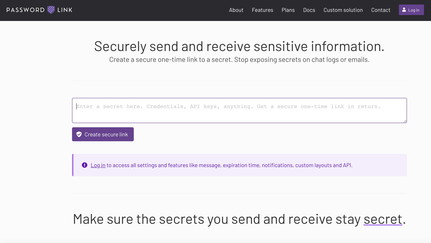
I’ve been using Password.link for a few weeks and it fills a clear niche: sending passwords and other secrets without leaving them in Slack, email, or chat logs. You create a one-time link, the recipient views it once, and the secret self-destructs — very handy for handing off credentials during onboarding, sending temporary API keys to freelancers, or sharing payment details for a single transaction.
Setup felt straightforward, and the core features I used — notifications, audit logs, and custom pages — worked without fuss. It’s especially useful when I need to keep a paper trail (who opened what, when) and when I want to remove any chance of that secret living in chat history.
If you run a small team, freelance, or manage occasional contractor access, I’d recommend it as a lightweight, pragmatic way to reduce the risk of leaked credentials.
Pros and Cons
|
Pros |
Cons |
|---|---|
|
✅ Simple and intuitive one-time link workflow |
❌ UI is basic and could use polish |
|
✅ Strong encryption (AES-256) and audit logging |
❌ Custom domain setup currently requires a support request |
|
✅ White-labeling and custom page options |
❌ Team size limit in this plan (up to 20) |
|
✅ Integrations such as SSO and Azure |
❌ SOC2 Type 2 compliance was in progress (not yet guaranteed) |
|
✅ Lifetime plan offers good value |
What People Say
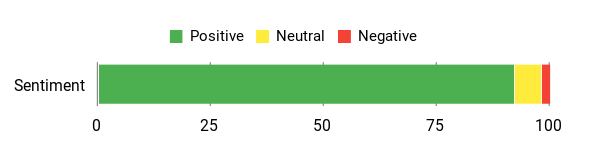
Users consistently highlight ease of use, responsive support, and practical security features like audit logs and encryption. A few mention the UI is basic but functional, and that white-labeling and custom domains are possible with support help.
Overall Sentiment: Positive
🗣️ 7909388a27ac4c64bcb8c67e313fad3d
Support has been quick during US business hours, and the product includes Azure integration, SSO, an Audit log in the teams menu, and the ability to request a custom domain for branding. They also mentioned working toward SOC2 Type 2 compliance.
🗣️ grajeda1996
This app does exactly what you expect and more — secure chat, Secret request, and a password vault. The security features go over and above, and I can easily recommend it to anyone taking online security seriously.
Long-Term Savings
At $99.99 for lifetime access, you avoid recurring fees while getting features that reduce the risk and admin time tied to credential leaks. Over time that can save on incident costs, password resets, and manual tracking of who has access.
Return On Investment
A one-time $99.99 purchase can pay for itself quickly: fewer support tickets and less risk of breaches mean less time and money spent on damage control. For small teams the ROI is especially strong given built-in audit logs and integrations.
Usability
|
Aspect |
Ease Level |
Notes |
|---|---|---|
|
Setup |
Easy |
Basic onboarding is straightforward; custom domain requires a request to support. |
|
Daily Use |
Easy |
Creating and sending one-time links is quick and reliable. |
|
Admin Controls |
Moderate |
Audit logs and team settings are useful but could be more discoverable in the UI. |
|
Support |
Easy |
Support is responsive during business hours and helpful for setup questions. |
Performance & Speed
Links open quickly and encryption/decryption happens transparently. Notifications and audit entries arrive promptly, so you rarely wait to confirm delivery.
Integrations
|
Software |
Integration Quality |
|---|---|
|
Azure / SSO |
Good |
|
Slack (notifications) |
Good |
|
API |
Good |
|
Custom Domain (CNAME) |
Moderate – requires support request |
Security Features
|
Feature |
Protection Level |
|---|---|
|
AES-256 Encryption |
High |
|
One-Time Self-Destructing Links |
High |
|
Audit Logs |
High |
|
Notifications (email/Slack) |
Medium |
Scalability
Designed for small teams (plan supports up to 20 users). The API and white-label options help scale workflows, but very large organizations may need a larger-seat plan.
Collaboration
Team audit logs, shared secrets, and notifications make collaboration straightforward for small teams and contractors. Admin controls help track who accessed what.
Key Benefits
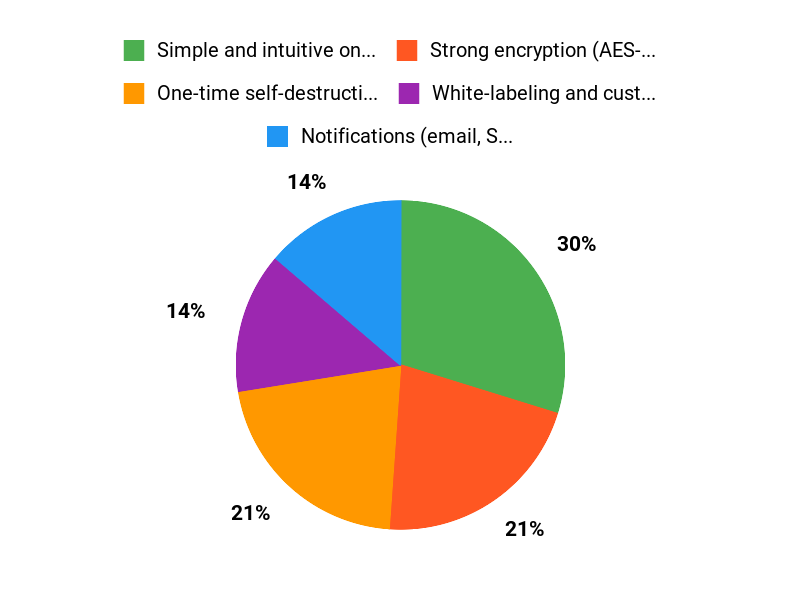
- One-time self-destructing links
- Notifications (email, Slack, etc.) when secrets are viewed
- Custom pages and hide branding (white-label)
- Strong AES-256 encryption
- Audit logs and team controls
- API and integrations (SSO, Azure)
Current Price: $99.99
Rating: 4.72 (total: 18+)
FAQ
Is Password.link Secure Enough For Sensitive Data?
I look for concrete security features before trusting a secret-sharing tool and Password.link checks several important boxes: it uses AES-256 Encryption, creates one-time self-destructing links so secrets can’t be read again after access, and provides logs and notifications so I can see who viewed an item and when. That said, I still verify recipients through a separate channel and rotate credentials after use for extra safety.
If you need enterprise attestations, note that the vendor mentioned they were working toward SOC2 Type II and you should confirm current compliance status before making compliance-driven decisions.
What Should I Consider Before Buying The Password.link Lifetime Deal?
I weigh features and limits against price: the AppSumo lifetime offer is $99.99 (originally $799), which is compelling if you need ongoing secure one-time links, custom pages, hide branding, CNAME support, API access, and up to 20 team members with 500 secrets monthly. I consider whether 500 secrets per month and a 20-user team size fit my needs, whether I require SOC2-level compliance for my organization, and whether I want white-labeling or SSO/Azure integration.
Practical buying tips I follow are to test support responsiveness (custom domain setup requires a support request), confirm audit/logging capabilities meet my policy, and try API or SSO integration in a small pilot before rolling it out to the whole team.
How Do I Use Password.link Safely With My Team?
I use Password.link by creating a one-time link for each credential, enabling notifications to the channels we monitor (email, Slack, etc.), and checking the audit log after sharing to confirm who accessed the secret. I recommend white-labeling with a CNAME if you want consistent branding and submitting a support request to enable your custom domain.
For day-to-day safety I verify recipients off-channel when possible, use the built-in password generator, rotate secrets after they are accessed, and leverage SSO/Azure integration for centralized access control. If you need automation, I test the API with non-critical data first and review logs regularly to catch any unexpected access patterns.
Why Choose Password.link
I choose Password.link because it makes securely sharing credentials effortless — I can create encrypted, single-use links that expire automatically so passwords don’t linger in my chat history. We also appreciate the simple, no-fuss interface and fine-grained access controls that give us peace of mind when sending sensitive information.
Wrapping Up
After testing and reading user feedback, I find Password.link to be a practical solution for securely sharing credentials. Its one-time, self-destructing links, notifications, audit logs and AES-256 encryption are compelling for anyone who regularly sends passwords or sensitive data.
I appreciate the white‑labeling, API and team features that let me integrate it into workflows, and the $99.99 lifetime Pro plan offers strong value against the original $799 price. The main downsides are a basic UI that some users want improved and the need to request custom domain setup through support, but support appears responsive during US business hours. Overall, I recommend Password.link for freelancers and small teams who need an affordable, secure way to share secrets without long-term exposure.
This Roundup is reader-supported. When you click through links we may earn a referral commission on qualifying purchases.