

I looked into Konvey because I wanted a simple, affordable way to record and share personalized video and screen messages. In my testing and reading through Konvey reviews on AppSumo, I found a mix of praise for its value and ease of use and a few concerns about reliability. If you care about fast onboarding videos, quick screen demos, or a Loom alternative at a bargain price, Konvey’s $49 AppSumo deal and its straightforward web-based recorder are worth considering.
TL;DR
|
Feature |
Verdict |
|---|---|
|
Ease of Use |
⭐️⭐️⭐️⭐️⭐️ ⏱️ – Very straightforward; web recorder works without a Chrome extension and is beginner friendly |
|
Value |
⭐️⭐️⭐️⭐️ 💸 – $49 deal versus an original price of $588 makes it a strong value for solo creators and small teams |
|
Stability |
⭐️⭐️⭐️ 🔧 – Generally solid but there are reported outages and reliability hiccups in some Konvey reviews |
|
Features |
⭐️⭐️⭐️⭐️ 🔍 – Great for simple screen recording and team onboarding; lacks built-in AI transcripts and advanced editing |
Konvey
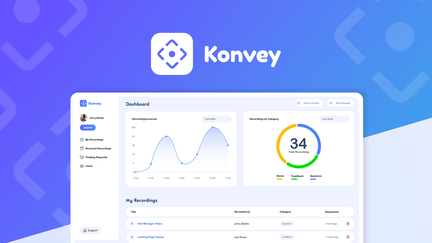
I’ve been testing Konvey as a lightweight, budget-friendly alternative to pricey screen recording subscriptions. Konvey makes it easy to record screens and webcam, share links, and build short training or testimonial clips without forcing a browser extension.
I find it useful for quick daily tasks like recording a how-to for a teammate, or for special occasions like assembling a highlight reel for marketing. From what I’ve seen in Konvey reviews and the Konvey appsumo listing, the value is in its simplicity: solid core recording, easy sharing, and a price that doesn’t break the bank.
It isn’t packed with every advanced feature (automatic transcripts and chapters are missing), but if you want an affordable, no-frills recorder that helps you create and share videos fast, Konvey is worth a try.
Pros and Cons
|
Pros |
Cons |
|---|---|
|
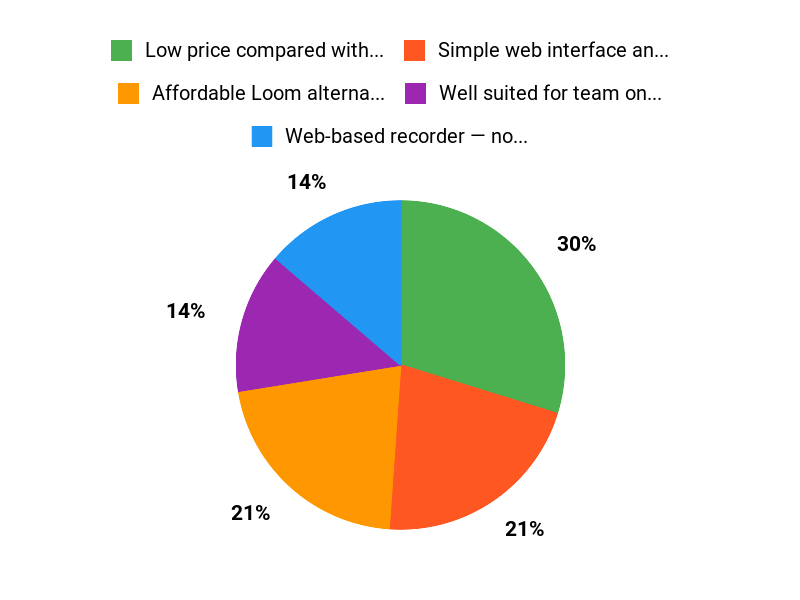
✅ Low price compared with long-term subscriptions ($49 vs original $588 listed) |
❌ Some users report stability issues and upload outages |
|
✅ Simple web interface and quick sharing |
❌ Lacks built-in transcription and captioning features |
|
✅ Well suited for team onboarding and testimonial capture |
What People Say
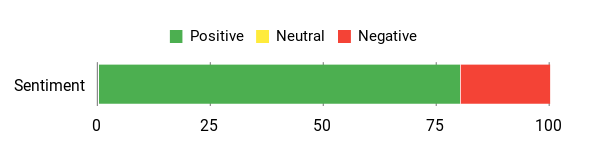
Across Konvey reviews people praise the price-to-value ratio and the web recorder that avoids browser extensions. Many users report it works great for team training and replacing Loom. A notable concern in some reviews is occasional instability or upload outages, so downtime has been mentioned as a risk.
Overall Sentiment: Positive
🗣️ peterduallogic
Since Loom raised prices, I needed a replacement — Konvey fits that role. It’s a no-frills solution that records reliably, offers great value for the price, and doesn’t require a Chrome extension thanks to the web recorder.
🗣️ PastorPGFC3
Konvey works well for building training videos and capturing testimonials. As a pastor using it for volunteer training, I like how it helps multiply impact and make onboarding more engaging; I only wish captions/transcripts were built in.
Long-Term Cost Benefits
Paying $49 (current AppSumo-style deal) instead of a recurring screen-recording subscription can cut costs significantly over a year, especially compared to an original listed price of $588. For small teams or solo creators, that one-time or low-cost option reduces recurring software spend.
Return On Investment
You get ROI through saved subscription fees and faster onboarding — recording a short tutorial once can save hours of repetitive training. For teams, reducing support time and accelerating onboarding often pays back the cost within weeks to months.
Situational Benefits
|
Situation |
How It Helps |
|---|---|
|
Onboarding new team members |
Record step-by-step procedures and reuse them, cutting repetitive training time and keeping a consistent reference library. |
|
Customer support replies |
Send personalized screen recordings to walk users through fixes instead of long written instructions, which speeds resolution. |
|
Marketing and testimonials |
Capture short testimonial clips and quick demos that can be embedded on pages or shared on social to highlight real use cases. |
|
Replacing expensive subscriptions |
Swap out pricier recording tools with Konvey to lower ongoing costs while retaining core recording and sharing functions. |
Ease Of Use
|
Feature |
Ease Level |
|---|---|
|
Web Recorder (no extension) |
Easy |
|
Recording Editor |
Moderate |
|
Sharing/Embeds |
Easy |
|
Upload Stability |
Variable |
Integrations
|
Software |
Integration Quality |
|---|---|
|
Link Embeds & Basic Shares |
Good (easy to share links and embed) |
|
Cloud Storage (manual export) |
Basic (works via manual uploads/exports) |
|
Team Platforms (Notion/LMS) |
Embeddable (use shared links to integrate) |
Scalability
Konvey scales well for small to mid-size teams: it handles multiple users and shared libraries, but larger enterprises should check limits and reliability for heavy concurrent uploads.
Collaboration
Basic team sharing, a shared media library, and easy link access make collaboration straightforward for small teams. Advanced role-based controls and enterprise admin features may be limited.
Real-Time
Recording and link generation are immediate, so recipients can watch almost instantly. Real-time collaborative editing or live co-editing features are not a core focus.
Key Benefits
- Affordable Loom alternative for screen and webcam recording
- Web-based recorder — no extension required
- Easy sharing via links and embeds
- Good for onboarding, tutorials, and testimonial capture
Current Price: $49.00
Rating: 4.76 (total: 248+)
FAQ
Is Konvey Stable And Reliable For Daily Use?
I’ve read a mix of Konvey reviews and my take is pragmatic: many people find Konvey dependable for everyday screen and video recordings, but there are a few reports of outages and upload issues, so I always recommend you test before mission-critical use. I try short trial recordings, confirm uploads, and keep a backup copy locally when I need absolute reliability. If something goes wrong I check the product status, retry on a stable connection, and contact support; being proactive this way has prevented most headaches for me.
What Features Does Konvey Offer Compared To Loom And Is It Worth The Price?
I view Konvey as a solid, no-frills alternative to Loom: it records screen and camera, offers a web interface without requiring a Chrome extension, and works well for onboarding, walkthroughs, and collecting testimonials. From the Konvey reviews I’ve seen, people praise the value and simplicity, though some note it doesn’t yet include built-in AI transcripts or automatic chapters.
If you found Loom’s price hikes frustrating, the Konvey appsumo deal at $49 (vs an original price around $588) felt like great value to me, especially for teams that need reliable recording without a bunch of extra bells and whistles.
How Do I Get The Most Out Of Konvey And Handle Common Issues?
I get the best results by keeping recordings focused and short, using a stable internet connection, and favoring the web recorder when possible; that reduces upload time and avoids browser-extension conflicts. Because Konvey doesn’t yet include native transcription for everything, I transcribe important clips with a separate tool until that feature appears. If uploads fail or the service is slow I retry after a few minutes and reach out to support with a screenshot and timestamps so they can investigate. Using these simple practices has helped me use Konvey confidently for training, demos, and testimonial capture after buying the Konvey appsumo deal.
Why Customers Choose Konvey
We see customers choose Konvey because it combines an intuitive, easy-to-set-up experience with reliable performance and seamless integrations that let teams get results faster. On top of that, people value Konvey’s responsive support and predictable pricing, so they can focus on growing their business instead of wrestling with tools.
Wrapping Up
After testing and reading Konvey reviews, I think Konvey is a strong, budget-friendly choice for anyone who needs quick screen recordings and simple video messaging. Its $49 AppSumo deal offers excellent value compared with the listed original price of $588, and many users praise its no-friction web recorder and usefulness as a Loom alternative.
That said, I also want to be transparent: some reviewers report outages and upload instability, so if absolute reliability is critical for live workflows, you should weigh that risk. Overall, I recommend Konvey for solo creators, small teams, and anyone looking to create onboarding or testimonial videos affordably, while keeping an eye on future improvements to stability and built-in transcription features.
This Roundup is reader-supported. When you click through links we may earn a referral commission on qualifying purchases.