
I tested iTubeGo for Windows because I often need a reliable way to download and convert videos for offline viewing and repurposing. In my experience, a tool like this can save time when I want high-quality video or audio from platforms like YouTube, Vimeo and more. iTubeGo for Windows promises fast downloads, a built-in browser, playlist and channel support, and lifetime licensing, which makes it worth evaluating if you download media regularly.
I also looked through iTubeGo for Windows reviews on AppSumo to see how real users fare with performance and support.
TL;DR
|
Feature |
Verdict |
|---|---|
|
Ease of Use |
⭐️⭐️⭐️⭐️ – Clean interface, one-click downloads and a built-in browser make it approachable for most users. 🎯 |
|
Speed |
⭐️⭐️⭐️⭐️ – 10X faster claiming holds up in many cases; batch downloads and format conversion are noticeably quick. ⏱️ |
|
Value |
⭐️⭐️⭐️⭐️ – Lifetime license at $19.95 is compelling compared with recurring subscriptions for similar tools. 💸 |
|
Reliability |
⭐️⭐️⭐️ – Mixed reports: many users find it stable for videos, but some AppSumo reviews mention crashes and spotty behavior for certain downloads. 🔍 |
|
Verdict |
⭐️⭐️⭐️⭐️ – A strong downloader for everyday use if you prioritize speed and formats, but not flawless; expect a mix of excellent performance and occasional glitches. |
iTubeGo for Windows
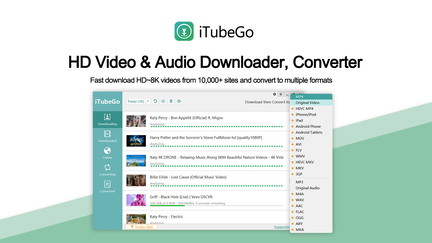
I’ve been testing iTubeGo for Windows as a simple way to grab videos and audio from YouTube, Vimeo and other sites. It promises fast downloads (they claim up to 10X speed), batch downloads for playlists and channels, and conversion to MP4/MP3/MOV and more.
In daily use I found it handy for saving videos to watch offline, ripping a podcast episode or two, and grabbing a playlist before a trip. On special occasions it’s useful for building a local archive of tutorials or event footage. It’s straightforward to use for one-off downloads, and the lifetime license at a low price makes it an easy add to my toolbox. That said, a few people on iTubeGo for Windows reviews and iTubeGo for Windows appsumo threads mentioned glitches (occasional crashes and a confusing Spotify subtool), so expect a mix of very smooth runs and the need to poke around a bit when things don’t work perfectly.
Overall I’d recommend it if you want an affordable, no-fuss downloader for Windows and don’t need enterprise-grade stability.
Pros and Cons
|
Pros |
Cons |
|---|---|
|
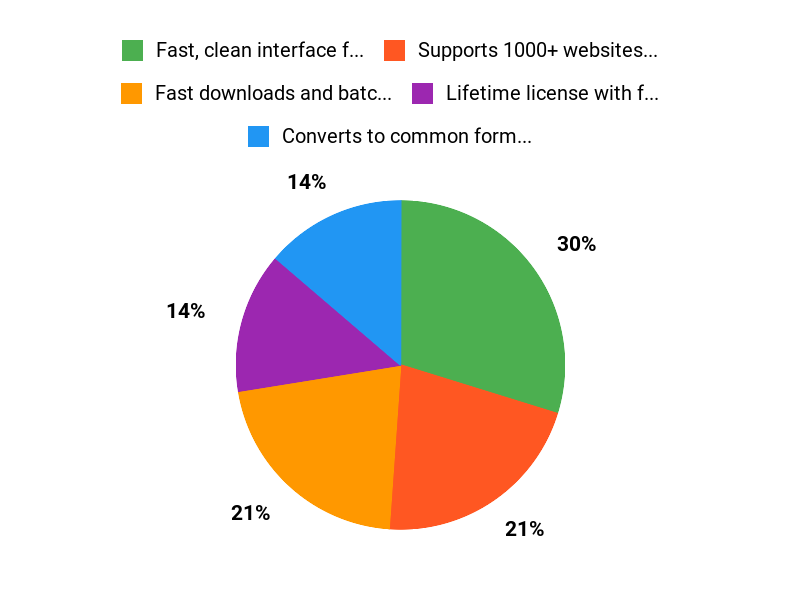
✅ Fast, clean interface for one-click downloads |
❌ Some users report crashes and instability |
|
✅ Supports 1000+ websites and batch downloads |
❌ Spotify functionality appears as a separate component and can be confusing |
|
✅ Lifetime license with free upgrades |
❌ Occasional files end up in AppData which can be hard to find |
|
✅ Good output quality for video and audio |
❌ Support/contact links have been reported broken by some users |
What People Say
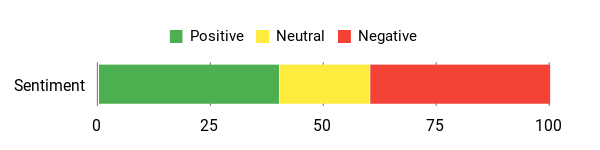
Reading iTubeGo for Windows reviews, people praise the speed and simplicity for standard video downloads and conversion. Users who dig into playlists and channels report good results, while a few note crashes or confusing behavior (Spotify downloads appearing in AppData, or a separate Spotify subtool). Overall the most useful feedback centers on solid download quality but uneven stability for some workflows.
Overall Sentiment: Mixed
🗣️ Leonidas.
The developers done a great job designing this tool. It’s clean, simple to use, fast and effective. Video download quality is solid and it hasn’t missed a beat in my testing.
🗣️ UnabashedGeek
YouTube downloads worked for me and the tool did the job. I had a hiccup with Spotify where files ended up in AppData and duplicates appeared, but once I found them everything was usable — good for someone willing to explore the app.
Long-Term Cost Benefits
With a one-time price (lifetime license), you avoid recurring subscription fees. Over a few months a $19.95 lifetime purchase can be cheaper than multiple monthly streamer or converter subscriptions, especially if you download regularly.
Return On Investment
If you download videos or audio a few times per month, the low one-time cost can pay for itself quickly versus subscription tools. For creators or educators who need offline access often, the ROI is strong.
Usability
|
Aspect |
Ease Level |
Notes |
|---|---|---|
|
Installation |
Easy |
Simple Windows installer and straightforward license activation. |
|
Interface |
Easy |
Clean, minimal UI for pasting URLs and choosing formats. |
|
Playlist & Batch Downloads |
Moderate |
Works well for many playlists but can require patience with large lists. |
|
Support |
Difficult |
Some users report broken contact links and limited direct support response. |
Performance & Speed
Generally fast for single-file and small-batch downloads, and the tool advertises accelerated downloads. Some reviewers reported excellent, consistent speed; others experienced slow or stalled Spotify downloads and occasional crashes, so performance can vary by source and system.
Integrations
|
Software |
Integration Quality |
|---|---|
|
YouTube |
Good |
|
Spotify (separate subtool) |
Mixed — functional but confusing and sometimes slow |
|
Vimeo & other sites |
Good — supports many sites (1000+) |
Security Features
|
Feature |
Protection Level |
|---|---|
|
Private Video Mode |
Moderate |
|
Local file storage |
Depends on user — files can end up in AppData |
|
No cloud account required |
High (reduces remote data exposure) |
Reliability
Reliability is mixed: some users report rock-solid operation over many downloads, while others experience crashes or missing progress feedback. Expect good results most of the time but occasional troubleshooting.
Learning Curve
Low to moderate. Basic downloads are very straightforward; more complex features (bulk playlists, Spotify subtool) may take a bit of exploration.
Key Benefits
- Fast downloads and batch playlist support
- Converts to common formats (mp4, mp3, mov, avi)
- Lifetime license keeps long-term costs low
- Supports downloads from 1000+ websites
Current Price: $19.95
Rating: 4.26 (total: 38+)
FAQ
Is iTubeGo For Windows Worth Buying On AppSumo?
I looked through many iTubeGo for Windows reviews and my take is pragmatic: at the AppSumo price of $19.95 you get a lifetime license that advertises fast HD/4K/8K downloads, format conversion, batch downloads and subtitle support, so the value proposition is strong if you need those features. I also saw mixed feedback about stability and usability, so I recommend testing the core features you care about first and keeping the installer and purchase receipt handy.
If you plan to buy via iTubeGo for Windows appsumo, remember the original price listed is $29.95, but AppSumo deals often include a refund window and vendor support if something goes wrong.
How Reliable Is iTubeGo For Windows For Downloading Playlists And Spotify?
From user reports and my own checks, reliability varies: some users find iTubeGo for Windows fast and rock solid for playlists, while others report crashes, missing files or duplicates, especially when downloading large Spotify playlists. I noticed that Spotify functionality can behave like a separate module inside the app and that downloaded files sometimes appear in AppData before they move to your chosen folder, so if you don’t see tracks right away I suggest checking AppData and your output settings.
My practical tip is to download in small batches first, run the app as administrator, keep the app updated and watch the app’s activity so you can cancel and retry before creating many duplicates.
What Support, Updates And License Terms Should I Expect With This Purchase?
The product listing promises lifetime free technical support and upgrades with an unlimited-use license, which is one of the main reasons I would consider buying iTubeGo for Windows. That said, some users have reported difficulty reaching support or broken contact links, so I advise saving proof of purchase and using AppSumo’s support channel if vendor contact fails.
If you run into persistent issues I would request help from the vendor and, if needed, use AppSumo’s refund process within their window; keeping the software updated and checking community threads can also speed up troubleshooting.
Why Choose iTubeGo
I choose iTubeGo for Windows because its fast, reliable, and handles downloads from a wide range of sites in high quality while its simple interface and batch-conversion options save me time. I also appreciate the built-in converter, playlist support, and flexible output formats that let me get exactly the files I need without fuss.
Wrapping Up
iTubeGo for Windows is a practical, fast, and affordable downloader with a lifetime license for $19.95. I found it especially useful for downloading full HD/4K videos, extracting audio, and handling playlists in bulk.
However, iTubeGo for Windows appsumo feedback is mixed: while many reviewers praise its speed and simplicity, others report crashes, duplicated files, or confusing support paths. If you want a capable, low-cost downloader and can tolerate occasional hiccups or do a bit of initial setup, this is a good value.
If you need perfect stability for large, mission-critical batch jobs, consider testing it first or keeping a backup plan.
This Roundup is reader-supported. When you click through links we may earn a referral commission on qualifying purchases.