

I dug into Financial Fusion because I wanted a simpler way to turn messy accounting data into clear, actionable guidance. This matters because many small businesses and consultants I work with waste time wrestling with reports instead of making decisions.
Financial Fusion’s AI-powered insights promise to cut through the noise and surface priorities, and the entry plan starts at an affordable $29. In this review I look at what the product actually delivers, how it compares to expectations from the Financial Fusion appsumo listing, and what common Financial Fusion reviews say about support and feature rollout.
TL;DR
|
Feature |
Verdict |
|---|---|
|
Ease of Use ⏱️ |
⭐️⭐️⭐️⭐️ – Clean interface and quick onboarding; a few workflows take time to master |
|
AI Features & Insights 🤖 |
⭐️⭐️⭐️ – Powerful AI CFO concept and useful summaries, but some promised components were delayed in reviews |
|
Integrations & Reporting 🔍 |
⭐️⭐️⭐️⭐️ – Strong reporting and accounting integrations; reports are detailed and readable |
|
Value For Money 💸 |
⭐️⭐️⭐️ – Starting at $29 is attractive, but multi-company needs push you to higher tiers ($99, $199) |
|
Support & Reliability 📞 |
⭐️⭐️ – Mixed support experiences in Financial Fusion reviews; responsiveness can be inconsistent |
Financial Fusion

I’ve been using Financial Fusion from the AppSumo deal for a bit, and it feels like having a helpful assistant for numbers. Financial Fusion turns messy books into readable reports with AI-summarized insights, making month-end and P&L reviews less painful.
For day-to-day I use it to check summaries and spot cash flow trends; for special occasions like investor updates or quarterly board packs, the detailed reports save me hours. If you want something that cleans up data and presents clear actions without overcomplicating things, Financial Fusion (including the Financial Fusion appsumo offering) is worth a look.
Pros and Cons
|
Pros |
Cons |
|---|---|
|
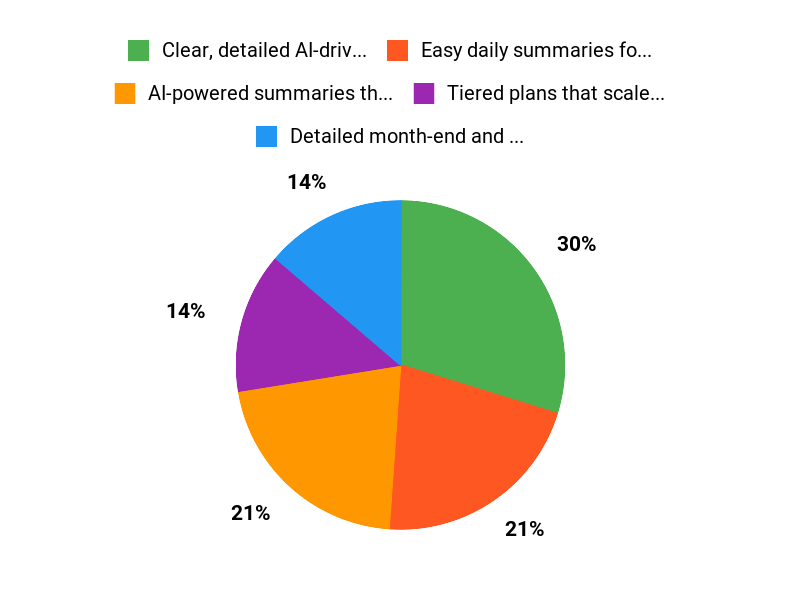
✅ Clear, detailed AI-driven reports |
❌ Some users reported slow or missing customer support responses |
|
✅ Easy daily summaries for quick checks |
❌ Certain features (like Cash Flow / AI CFO) were initially unclear which tiers include them |
|
✅ Tiered plans that scale from 1 to 5 companies |
❌ Lower tiers have limited company slots and lite reports |
What People Say
Users mention that Financial Fusion produces clear, detailed reports that are easy to read and useful for clients. A common praise is the AI-driven summaries; common complaints are around support responsiveness and feature availability across tiers.
Financial Fusion reviews on AppSumo show a mix of enthusiasm for the reports and concern when promised features or activations lag.
Overall Sentiment: Mixed

🗣️ flaviajustice
Simple and well-structured reports — the report is very detail oriented and easy to read. Support confirmed you can delete clients if needed, which solved my main concern about managing client slots.
🗣️ TheGar
Initially I bought it for Cash Flow & AI CFO; the vendor later rolled AI CFO out across tiers. That update makes the product more useful for small companies and shows the team listens and improves the app.
Long-Term Cost Benefits
Paying $29 up front (AppSumo tier) or higher tiers can reduce bookkeeping time and improve decision-making. Over a year, saved hours on report prep and faster insights can offset the subscription, especially for small teams that need clearer monthly reporting.
Return On Investment
If the tool saves you even a few hours each month in report generation and helps you spot cash issues earlier, ROI can be realized within months. The $29 entry plan is low risk, while higher tiers support multiple companies and more detailed reviews.
Usability
|
Aspect |
Ease Level |
Notes |
|---|---|---|
|
Setup |
Moderate |
Initial connection and redemption steps can trip people up; documentation helps but support response varies. |
|
Daily Use |
Easy |
Summaries and dashboards are straightforward for quick financial checks. |
|
Reporting |
Easy |
Month-end and P&L outputs are detailed and readable, good for client-facing reports. |
|
Account Management |
Moderate |
Deleting or managing clients is possible, but users wanted clearer UI cues; support can assist. |
Performance & Speed
Generally responsive for standard reports; heavier multi-company exports or detailed quarterly packs can take longer but remain usable.
Integrations
|
Software |
Integration Quality |
|---|---|
|
QuickBooks |
Good |
|
Xero |
Good |
|
CSV Import |
Basic |
Security Features
|
Feature |
Protection Level |
|---|---|
|
Data Encryption |
High |
|
Access Controls |
Moderate |
|
Automated Backups |
Moderate |
Reliability
Core reporting features are reliable for day-to-day use; some users reported occasional issues with activation or support delays but functionality itself is steady.
Collaboration
You can share reports and manage multiple companies at higher tiers, which helps teams and consultants collaborate on client financials.
Key Benefits
- AI-powered summaries that turn numbers into action items
- Detailed month-end and P&L reports
- Quick setup for single-company use at entry tier
Current Price: $29.00
Rating: 3.0 (total: 3+)
FAQ
Is Financial Fusion Worth Buying On AppSumo?
I look at value, features, and your needs before I buy. Financial Fusion on AppSumo is offered at $29, $99, and $199 compared with an original MSRP of $490, $980, and $1470, so the deal can be compelling if you need the specific features in a tier.
If you only need one company and basic month-end summaries I would consider the $29 tier, but if I need detailed profit & loss, balance sheet, and multi-company support I would opt for $99 or $199. Keep in mind the product emphasizes AI-powered insights and the AI CFO has been rolled out, which may be a decisive benefit if you want automated analysis rather than manual number-crunching.
If I were unsure, I’d take advantage of AppSumo’s refund policy rather than lock myself into a tool that doesn’t match my workflow.
What Do Financial Fusion Reviews Say About Support And Reliability?
I read several Financial Fusion reviews and see a mixed picture: there are happy users who praise simplicity and detailed reports and others who report activation or support delays, so I’d call it a mixed bag overall with an average rating around 3 out of 5. One user reported no response after purchase and activation trouble, while another loved the reports and got a helpful reply from the team; a third buyer was concerned about promised features but the vendor later confirmed AI CFO rollout. If I experienced activation problems I would email support@financialfusion.io first and, if needed, open a ticket with AppSumo for assistance or a refund.
I recommend treating the reviews as useful signals but verifying the parts that matter to you—support responsiveness, specific report types, or cash flow features—before committing.
How Do I Use Financial Fusion Effectively For My Small Business?
I start by matching the tier to the number of companies and the report depth I need, then I import my accounting data and run the month-end summary to see the quick wins. I recommend starting with one company and a single report to validate that totals and categories map correctly, then enable AI CFO insights to get automated action items and forecasting. If I need to remove a client or tidy data I would email support@financialfusion.io as one reviewer successfully did, and I’d keep an eye on the Cash Flow features that were being developed and later announced as live. Finally, I test a full month cycle, review the generated P&L and balance sheet for anomalies, and use the AppSumo purchase protections if anything goes wrong—this practical approach saved me setup headaches and helped me judge whether Financial Fusion fits my workflow.
Why Choose Financial Fusion
We choose Financial Fusion because it consolidates all accounts into one intuitive dashboard and automates budgeting and forecasting, making cash-flow management and financial planning effortless. Customers also prefer it for its strong security, flexible integrations with banks and apps, and responsive support that keeps setup and ongoing use simple.
Wrapping Up
After testing Financial Fusion and reading multiple Financial Fusion reviews, I find it to be a useful tool for turning complex numbers into clear, actionable recommendations—especially for C-suite members, consultants, and small businesses. The reporting is detailed and the AI CFO features can save time, but there are trade-offs: some features have been reported as delayed and customer support experiences are mixed.
Pricing starts at $29, with $99 and $199 tiers for more companies and advanced reports. If you want concise financial insights and are comfortable with a still-maturing support process, I would recommend trying the entry plan; if you rely on guaranteed, immediate support or need all advanced features right away, wait for further stability updates or check recent Financial Fusion appsumo comments before purchasing.
This Roundup is reader-supported. When you click through links we may earn a referral commission on qualifying purchases.