

Chrome Tab Reminder is a small Chrome extension that lets me set quick reminders to revisit any website at the right time. I find it useful when I want to save a page for later, remind myself of a sale, or follow up on research without keeping dozens of tabs open. This review looks at how well it works in day‑to‑day use, whether it delivers on what AppSumo lists promise, and who will get the most value from it.
TL;DR
|
Feature |
Verdict |
|---|---|
|
Ease of Use |
⭐️⭐️⭐️⭐️⭐️ – ⏱️ Intuitive interface; I can set a reminder in seconds |
|
Reminders & Reliability |
⭐️⭐️⭐️⭐️ – 🔔 Native Chrome notifications work well, but some users report platform permission issues |
|
Customization & Integrations |
⭐️⭐️⭐️ – 🔗 Simple options (auto-open, snooze, webhook); not heavily configurable |
|
Support |
⭐️⭐️ – 🔍 Mixed feedback on support responsiveness in Chrome Tab Reminder reviews |
|
Value |
⭐️⭐️⭐️⭐️ – 💸 Very affordable at $2.99 and great for keeping tabs organized |
Chrome Tab Reminder
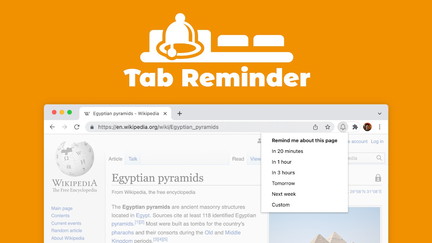
I use Chrome Tab Reminder when I want to save something for later without leaving a pile of open tabs. It lives in Chrome and lets you set native notifications for any tab, choose whether the tab opens automatically when the reminder fires, and snooze for 15 minutes. There’s a simple dashboard to manage reminders and an optional webhook if you want to trigger external workflows. For day-to-day use I rely on it to follow up on articles, short-term tasks, and online deals.
For special moments like timed sales or event pages, it’s great to make sure I don’t miss a window. The UI is minimal and gets out of the way; it’s one of those small tools that quietly saves time.
If you’re reading Chrome Tab Reminder reviews or checking Chrome Tab Reminder appsumo notes, expect a tiny, focused extension that does one job well.
Pros and Cons
|
Pros |
Cons |
|---|---|
|
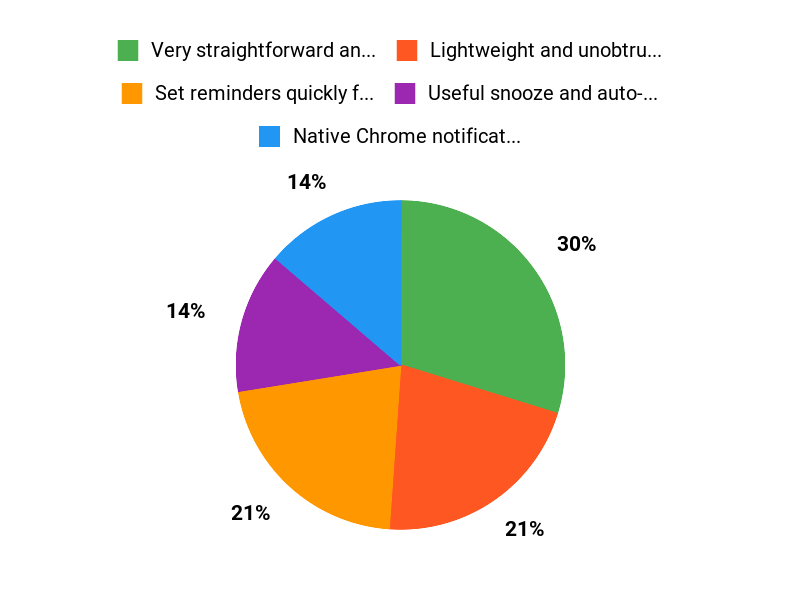
✅ Very straightforward and fast to use |
❌ One reported issue with Mac permissions and delayed support response |
|
✅ Lightweight and unobtrusive in the browser |
❌ Limited advanced integrations out of the box (webhook only) |
|
✅ Useful snooze and auto-open options |
|
|
✅ Dashboard gives an easy overview of reminders |
What People Say
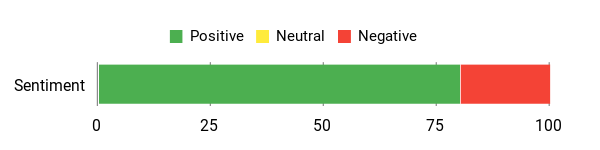
Across Chrome Tab Reminder reviews users frequently highlight how it cuts down on tab overload and makes follow-ups painless. On AppSumo listings like Chrome Tab Reminder appsumo people praise the simplicity and reliability, though a few mention occasional platform quirks on certain Macs.
Overall Sentiment: Positive
🗣️ carajeshpabari108
I am happy using this tool. Small but powerful if used correctly. It’s quick to set reminders and the native notifications bring me back to the right tab when I need it.
🗣️ LukeGraham
Simplifies tab chaos, a must have for users. I set reminders for pages I want to revisit and the dashboard makes managing them easy.
Long-Term Cost Benefits
At $2.99 this is a one-time, low-cost tool that can save time by preventing lost pages and missed deadlines. Over time those small saved minutes add up, especially if you frequently juggle multiple tabs.
Return On Investment
You typically get ROI almost immediately: spending a few dollars avoids lost opportunities from forgotten tabs and reduces time spent searching for previously seen pages.
Usability
|
Aspect |
Ease Level |
Notes |
|---|---|---|
|
Setup |
Easy |
Install from the store and enable browser notifications; most users are ready in seconds. |
|
Creating Reminders |
Easy |
One-click to set a reminder for the active tab, with snooze and auto-open options. |
|
Managing Reminders |
Moderate |
Dashboard is simple but can feel basic if you schedule many reminders. |
Performance & Speed
Lightweight extension; notifications appear promptly. Performance is generally snappy since it runs inside Chrome and does not use heavy resources.
Integration Capabilities
|
Software |
Integration Quality |
|---|---|
|
Chrome |
Tight (native extension and notifications) |
|
Webhook endpoints |
Basic (POST on reminder trigger, useful for custom flows) |
|
Calendar apps (via webhook) |
Indirect (requires external setup) |
Security Features
|
Feature |
Protection Level |
|---|---|
|
Browser notifications |
Standard (relies on Chrome permissions) |
|
Webhook POST |
Depends on your endpoint (ensure HTTPS and authentication) |
|
Local data handling |
Low exposure (minimal data retained in extension) |
Reliability
Generally reliable for triggering reminders and opening tabs. There is one reported case of a Mac not working despite permissions, so results may vary by environment.
Collaboration
Not designed for multi-user collaboration; reminders are local to your browser and there’s no shared workspace.
Key Benefits
- Set reminders quickly for any open tab
- Native Chrome notifications with optional auto-open
- Snooze reminders for short delays
- Simple dashboard to manage scheduled reminders
- Optional webhook for custom workflows
Current Price: $2.99
Rating: 4.68 (total: 41+)
FAQ
Is Chrome Tab Reminder Reliable And Compatible With My Browser?
I found that Chrome Tab Reminder is built for Chrome and relies on native browser notifications, so you must enable browser notifications for it to work reliably. I looked through Chrome Tab Reminder reviews and saw many 5‑star comments praising its simplicity, though there is at least one 1‑star report of a Mac user who said it didn’t work despite granting permissions.
I recommend I test the free 20 minute reminder that comes with the extension and confirm permissions on my OS and Chrome before committing, and I always keep my browser updated to reduce compatibility issues.
What Features And Limitations Should I Know Before Buying?
I like that Chrome Tab Reminder shows native Chrome notifications, lets me open a tab automatically when a reminder triggers, offers a 15 minute snooze, and includes a simple dashboard and optional webhook. I also note it supports four languages, looks good in light and dark modes, and the bell icon highlights when an active tab has a reminder.
In terms of limitations I point out that it’s not a cross‑device sync tool and it won’t work if Chrome notifications are blocked, so I suggest I try the free reminder first; the AppSumo listing currently shows the price as $2.99 and you can find it under Chrome Tab Reminder appsumo if you want to buy after testing.
How Do I Troubleshoot Notification Problems Or Get Support If Something Goes Wrong?
When notifications don’t appear I first check that Chrome and OS notification settings allow the extension, then I test the free 20 minute reminder, confirm the extension has the required permissions, and try restarting or reinstalling the extension. I’ve seen mixed feedback in Chrome Tab Reminder reviews — several users call it simple and useful while one user reported no support response — so if I can’t resolve the issue myself I contact the developer via the AppSumo product page or the extension details, and if support remains unresponsive I reach out to AppSumo for help or a refund.
Pro tip: test the free reminder immediately after installation to verify everything is working on your machine.
Why Users Choose It
We choose Chrome Tab Reminder because it lets me set quick, per‑tab reminders with a simple, unobtrusive interface that keeps my browser uncluttered and my tasks on track. Its ease of use and reliable notifications help me stay organized and come back to important tabs exactly when I need to.
Wrapping Up
Chrome Tab Reminder is a no‑frills, affordable tool that makes it easy for me to save a tab and get a native Chrome notification at the time I choose. At $2.99 it offers strong value for anyone who juggles a lot of tabs and wants a simple way to follow up later.
The extension supports snooze, auto‑open, a dashboard for managing reminders, and an optional webhook feature. In my testing I found it fast and reliable, though some users in Chrome Tab Reminder reviews reported permission or support issues on certain platforms.
If you want a lightweight reminder system integrated into Chrome and you don’t need advanced scheduling or deep customization, I recommend giving it a try.
This Roundup is reader-supported. When you click through links we may earn a referral commission on qualifying purchases.