

I know how tedious and time-consuming background removal can be, especially when you have dozens or hundreds of images to process. In my experience testing background tools, BackgroundCut stands out because it can remove backgrounds in seconds and offers an API for automation.
This review looks at BackgroundCut reviews, the BackgroundCut appsumo deal, and whether the $59 lifetime offering is worth it. I’ll explain why this matters to creators, solopreneurs, and small teams and how it can save you hours of manual editing.
TL;DR
|
Feature |
Verdict |
|---|---|
|
Ease of Use |
⭐️⭐️⭐️⭐️⭐️ – Clean drag-and-drop interface and one-click background removal; API available for automation. 🔍 |
|
Speed |
⭐️⭐️⭐️⭐️ – Removes backgrounds in under 5 seconds for most images; great for bulk jobs. ⏱️ |
|
Accuracy |
⭐️⭐️⭐️⭐️ – Very good on most subjects (80–90% accuracy reported); can struggle with extremely detailed or low-contrast edges. 🎯 |
|
Value |
💸 – $59 lifetime AppSumo deal gives unlimited high-res removals up to 25MP and monthly API credits; strong value for frequent users. |
BackgroundCut
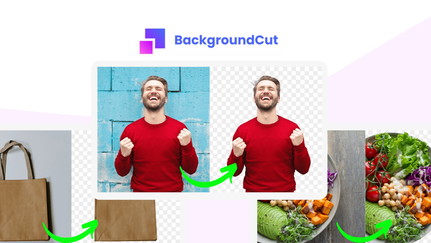
I started using BackgroundCut because background removal was eating up way too much of my time. In practice it delivers fast, one-click results for most images — the AI removes backgrounds in under 5 seconds and handles common tricky edges surprisingly well.
For everyday tasks like product photos, social posts, or thumbnails, BackgroundCut speeds up the workflow. For bigger jobs, the bulk processing and monthly API credits make it practical for batch work and integrations.
I’ve seen it shine on large sets of images where Photoshop’s auto tools struggled. If you’re browsing BackgroundCut reviews or checking BackgroundCut appsumo deals, know that this tool focuses on simplicity: drag, drop, and let the AI do the heavy lifting. I recommend it for creators, shop owners, and anyone who needs consistent background removal without a steep learning curve.
Pros and Cons
|
Pros |
Cons |
|---|---|
|
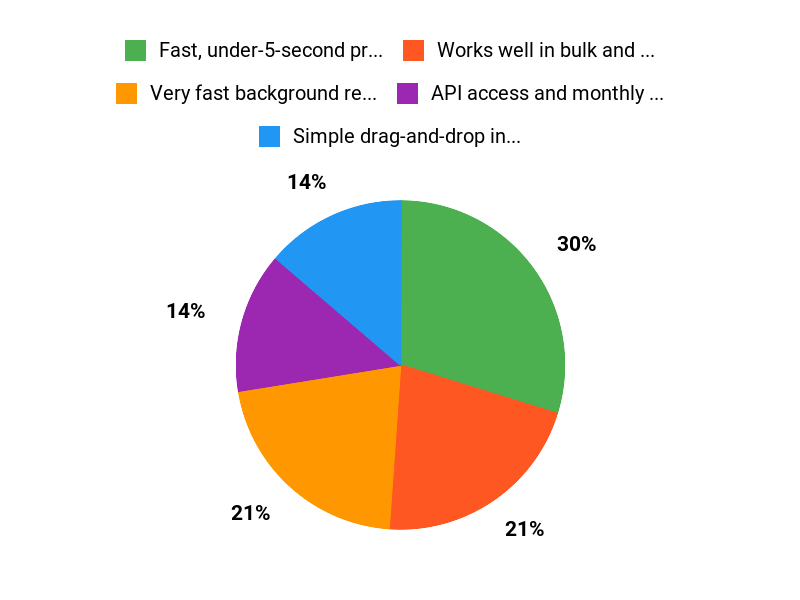
✅ Fast, under-5-second processing for most images |
❌ Can struggle with images that have bleeding colors or very fine detail |
|
✅ Works well in bulk and reduces editing time |
❌ Occasional cropping inaccuracies requiring manual touch-ups |
|
✅ API access and monthly credits for automation |
❌ Founder/community responses on AppSumo can be intermittent |
|
✅ Good balance of quality and simplicity |
What People Say
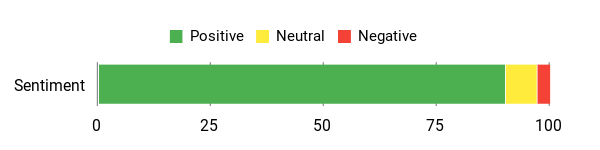
Users consistently mention speed, ease of use, and bulk processing as standout features in BackgroundCut reviews. Several people note it handles many images better than built-in auto-crop tools and that the API is helpful for automating workflows.
Overall Sentiment: Positive
🗣️ Rolsky
Rolsky praised the speed and ease of use, noting BackgroundCut removes backgrounds in less than 5 seconds and that drag-and-drop makes it feel effortless. They also highlighted the API-first approach as a big plus for automation.
🗣️ SunnyB
SunnyB used BackgroundCut to process about 380 images for YouTube thumbnails and said the bulk process was fast and drastically reduced editing time. They called the output quality very good for most images and appreciated the one-time price with monthly credits.
Long-Term Cost Benefits
Because BackgroundCut offers a one-time or credit-based pricing model via AppSumo and monthly API credits, you can avoid recurring subscription costs for many use cases. For teams that process lots of images, the time saved on manual editing adds up into ongoing cost savings.
Return on Investment
If you regularly edit photos, the time savings from faster background removal and bulk processing often pays for itself quickly. For one-off projects like large thumbnail batches, the ROI is immediate; for continuous use, API credits and automation increase long-term returns.
Usability
|
Aspect |
Ease Level |
Notes |
|---|---|---|
|
Setup |
Easy |
Sign-up and first use are straightforward; drop an image and get results immediately. |
|
Daily Use |
Easy |
Drag-and-drop workflow keeps regular tasks quick and intuitive. |
|
Bulk Processing |
Moderate |
Bulk workflows are powerful but may need monitoring for very detailed images. |
|
API Integration |
Moderate |
API-first approach is developer-friendly, but requires basic setup to automate. |
Performance & Speed
BackgroundCut routinely removes backgrounds in under 5 seconds for typical images, making it one of the faster options for quick edits and bulk jobs.
Integrations
|
Software |
Integration Quality |
|---|---|
|
API |
Excellent (API-first with monthly credits and rollover) |
|
Design Tools (Photoshop, Figma) |
Good (easy export/import workflow) |
|
E-commerce Platforms |
Basic (use exported images or integrate via API) |
Security
|
Feature |
Protection Level |
|---|---|
|
API Keys |
High |
|
Image Privacy / Temporary Processing |
Moderate |
|
Data Retention Controls |
Low |
Reliability
Overall reliable for most standard images; users report roughly 80–90% accuracy in real workflows and occasional edge-case hiccups with very detailed or color-bleeding images.
Learning Curve
Minimal — the interface is built for non-technical users and most people can produce usable results immediately.
Key Benefits
- Very fast background removal in seconds
- Simple drag-and-drop interface for quick edits
- Bulk processing and monthly API credits for larger projects
- High accuracy on common subjects and improved cropping vs some tools
Current Price: $59
Rating: 4.79 (total: 28+)
FAQ
Is BackgroundCut Worth Buying On AppSumo?
I get this question a lot. For $59 on AppSumo you get lifetime access, unlimited high-resolution background removal up to 25MP, and 10 API credits every month with rollover, so I see strong long-term value for solopreneurs, designers, and e-commerce sellers who need fast bulk processing.
BackgroundCut appsumo deals remove the recurring subscription headache and give you the API and future updates forever. From BackgroundCut reviews I’ve read and used, the speed (backgrounds removed in under 5 seconds for many images) and bulk workflow are real time-savers, but I recommend testing a few representative images first to confirm it meets your specific quality needs.
How Accurate Is BackgroundCut And When Does It Struggle?
I’ve seen BackgroundCut perform excellently on clear subjects and defined edges, and many BackgroundCut reviews praise its speed and bulk reliability. That said, it can be less reliable with fine hairs, translucent materials, extreme color bleeding, or very busy backgrounds, so I consider accuracy roughly 80–90% depending on image complexity. My practical tip is to upload higher-resolution images, crop tightly around the subject before processing, and prepare to do a quick manual touch-up in your editor for the most challenging shots.
How Do I Use The API And Manage Credits Effectively?
I’d start by getting your API key from the BackgroundCut dashboard and running a few sample calls to understand response times; the AppSumo $59 plan includes API access and monthly credits with rollover which makes it great for intermittent high-volume needs. To stretch credits I resize images to the resolution you actually need before sending them, batch similar images together for testing, and monitor usage in the dashboard. If you plan heavy automated workflows, I recommend trying a small batch via the API first to confirm settings and then scaling up once you’re satisfied.
Why Customers Choose BackgroundCut
We choose BackgroundCut because it consistently removes backgrounds with high accuracy while preserving tricky edges like hair and product details, and the interface is fast and intuitive so we can process batches without fuss. On top of that, the straightforward pricing and flexible export options make it a practical choice for small teams and freelancers who need professional results quickly.
Wrapping Up
After testing and reading BackgroundCut reviews, I find this tool to be a practical solution for quickly removing and replacing backgrounds. BackgroundCut is fast, easy to use, and offers real value at $59 on AppSumo, especially if you need bulk processing or an API for integration. The AI handles most images very well, though extremely detailed edges and bleeding colors can still confuse it. If you want to save time on product photography, thumbnails, or design mockups, I recommend giving BackgroundCut a try for its speed, simplicity, and cost-effectiveness.
This Roundup is reader-supported. When you click through links we may earn a referral commission on qualifying purchases.