

I tested kiwilaunch because streamlined booking and reliable website widgets matter to anyone selling services online. In this review I’ll explain what I liked, what I found limiting, and how this product can help you get more bookings with less setup.
If you want a no-code online booking solution that integrates with Stripe and embeds directly on your site, kiwilaunch deserves a close look. I also reference kiwilaunch reviews and the kiwilaunch appsumo deal context to help you weigh value and trade-offs.
TL;DR
|
Feature |
Verdict |
|---|---|
|
Ease of Use ⏱️ |
⭐️⭐️⭐️⭐️⭐️ – Clean, no-code setup and intuitive booking widgets; I had basic pages and services live in minutes. |
|
Core Features 🔍 |
⭐️⭐️⭐️ – Strong scheduling, course and fixed-date support, and Stripe payments, but missing advanced coaching needs like e-signatures, WYSIWYG email templates, and native self-scheduling. |
|
Value / Pricing 💸 |
⭐️⭐️⭐️⭐️ – The AppSumo price of $59 (vs. original $936) is compelling for freelancers, course creators, and small businesses who need simple, branded booking. |
|
Support & Reliability 🛠️ |
⭐️⭐️⭐️ – Founder replies are present and engaged, but response times can be uneven; some users report waiting hours to days. |
|
Verdict ✅ |
Great fit for practitioners and small teams who want an embedded, no-code booking system; less ideal if you need advanced coaching workflows or conditional intake forms. |
Kiwilaunch
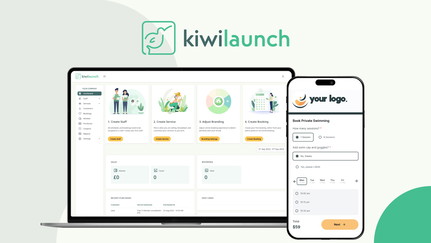
I like how kiwilaunch makes adding booking functionality to your site feel almost effortless. It’s a no-code scheduler with customizable widgets, real-time availability, and built-in Stripe payments, so clients can find and book classes or services without leaving your site. For everyday use I’ve seen it work great for recurring classes, one-on-one sessions, and small local services; for special occasions it handles fixed-date courses and workshops cleanly.
If you’re scanning kiwilaunch reviews on AppSumo or elsewhere, you’ll see people praising the clean booking pages and simple analytics. I’d recommend it for solo creators, small teams, and anyone who wants a polished, brandable booking widget without heavy setup.
Pros and Cons
|
Pros |
Cons |
|---|---|
|
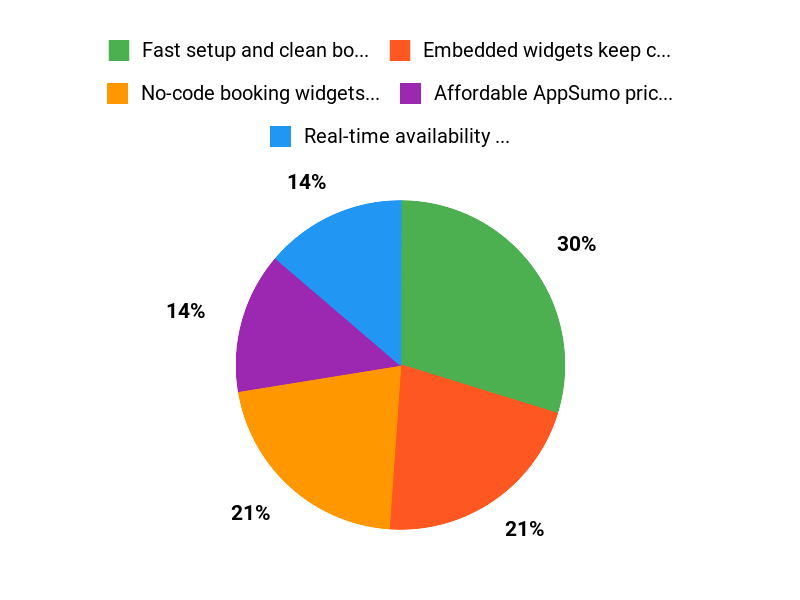
✅ Fast setup and clean booking UI |
❌ Missing some advanced coaching/therapy features like self-scheduling nuances and built-in e-signatures |
|
✅ Embedded widgets keep clients on your site |
❌ Limited custom layout options on the booking page |
|
✅ Affordable AppSumo price compared to the listed original |
❌ No WYSIWYG editor for styled confirmation emails |
|
✅ Good basic analytics and payment handling |
❌ Some power-user functions (like bulk duplication) are not available yet |
What People Say
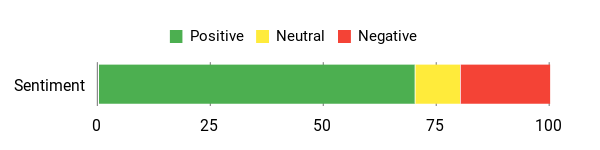
From reading kiwilaunch reviews and trying it myself, people appreciate the clean booking pages and straightforward analytics. On kiwilaunch appsumo listings you’ll notice repeated praise for ease of setup and the smooth customer booking flow, though some users want deeper scheduling features for complex use cases.
Overall Sentiment: Positive
🗣️ hello073
This has been perfect for my little yoga business! My customers love the ease of searching for my upcoming classes, the payments are easy, the dashboard and analytics is easy to understand, and the look and feel is really clean. 10/10!
🗣️ Bohangis
This deal is awesome. For the value it offers, you cant sleep on it. Awesome service, simple to setup and understand, straightforward and just wonderful overall. I would have loved the option to move a few pieces around on the booking page tho. Still it is a solid 5 taco deal.
Long-Term Cost Benefits
At the AppSumo price of $59 (original listed price $936), I see this as a low upfront cost to add bookings and payments. Over time the 1% transaction fee and the time saved from automated bookings can cover the expense quickly for small businesses that get steady bookings.
Return On Investment
If you convert even a handful of bookings per month that would have required manual handling, the time savings plus direct payments via Stripe make the $59 deal pay for itself in a few months. For class-based businesses the cleaner booking flow can also lift conversion and reduce no-shows with automated reminders.
Situational Benefits
|
Situation |
How It Helps |
|---|---|
|
Weekly classes and recurring sessions |
Clients can search and book upcoming classes easily and you get a simple schedule and analytics to track attendance. |
|
One-off workshops or fixed-date courses |
You can create fixed-date offerings and sell spots with a clear booking page and integrated payments. |
|
Small service-based businesses (salons, cleaners) |
Real-time availability and booking widgets on your site reduce back-and-forth and let customers book when it’s convenient. |
|
Solo practitioners and freelancers |
Minimal setup and white-label options let you present a professional booking experience without heavy tech work. |
Ease Of Use
|
Feature |
Ease Level |
|---|---|
|
Initial setup and embedding widgets |
Easy |
|
Creating different service types |
Moderate |
|
Client booking flow |
Easy |
|
Payment integration (Stripe) |
Easy |
Usability
|
Aspect |
Ease Level |
Notes |
|---|---|---|
|
Onboarding |
Easy |
Guided setup gets you to a working booking page quickly. |
|
Customization |
Moderate |
Branding and domain are available, but layout tweaks are limited. |
|
Scheduling complexity |
Moderate |
Handles multiple service types well but lacks advanced coaching-specific features. |
|
Mobile experience |
Easy |
Booking widgets and client pages work well on mobile. |
Integrations
|
Software |
Integration Quality |
|---|---|
|
Stripe |
Good |
|
Calendar integrations (Google/Apple) |
Good |
|
Marketing tools (via integrations) |
Fair |
|
Custom domain / CNAME |
Good |
Collaboration
There are basic back-office tools that let a small team manage bookings; it’s not built as a full multi-user enterprise collaboration suite but works for small teams and admins.
Workflow Management
Workflows are straightforward: create services, publish booking widgets, accept payments. If you need advanced automations you may need external tools or integrations.
Key Benefits
- No-code booking widgets you can embed on your site
- Real-time availability and multiple service types
- Integrated payments via Stripe and low transaction fee
- White-label and custom domain options for branding
Current Price: $59
Rating: 4.7 (total: 46+)
FAQ
Is Kiwilaunch Right For My Business?
I look at kiwilaunch as a no-code online booking and scheduling tool that shines when you need an embeddable booking widget, real-time availability, and integrated payments via Stripe. I’ve found it particularly well suited for course creators, freelancers, small studios and local services where a clean booking page and simple admin dashboard are the priority.
If you want to evaluate value, the AppSumo offer is $59 versus an original listed value of $936, which many users in the kiwilaunch reviews call a strong deal. If you run a therapy or high-touch coaching practice that requires built-in e-signatures, complex conditional intake forms, or a fully customizable client portal, I’d advise testing the flow first because some competitors specialize in those features.
What Are The Most Common Limitations And Practical Workarounds?
I try to be upfront about trade-offs: users in the kiwilaunch reviews mention missing features like a WYSIWYG editor for email templates, built-in e-signatures, conditional intake logic, and a native duplicate/copy function for repeating dates. In practice I work around those gaps by embedding external forms (Typeform, Google Forms) for advanced intake, using HelloSign or DocuSign for agreements, and creating templates outside the app then paste content as needed.
For bulk dates I follow the tip many customers mention: set up one template service and use quick copy-paste or CSV imports where possible, and test your booking page so clients receive clear instructions. The platform is improving, so I also check release notes and contact support to see if a requested feature is on the roadmap.
How Should I Approach Buying On AppSumo And Getting Support?
When I buy through AppSumo I read recent kiwilaunch appsumo reviews and verify support expectations beforehand because responses can be uneven — some customers report reply times from a few hours to a couple of days. I recommend saving your purchase receipt, testing the product end-to-end (booking, payment, email confirmations), and asking the vendor a pre-purchase question about the one feature that would make or break your workflow.
If you anticipate needing advanced features, I try the AppSumo deal for $59 to validate fit and plan to use external tools as needed; if you run into issues, keep AppSumo refund policies and support threads handy and document interactions to speed any dispute or refund process.
Why Choose Kiwilaunch
We choose Kiwilaunch because it streamlines campaign creation with intuitive AI-powered templates and automation that saves time and removes the guesswork. Customers prefer it for its reliable results, fast setup, and responsive support that make launching products easier and more cost-effective.
Wrapping Up
After using kiwilaunch and reviewing multiple kiwilaunch reviews, I see a product that delivers a simple, polished booking experience and strong value when you grab the kiwilaunch appsumo offer at $59. The platform shines for course creators, freelancers, and small service businesses thanks to easy embeds, Stripe payments, and useful admin tools. That said, I found and saw other reviewers note important gaps for coaching and therapy workflows: no WYSIWYG editor for emails, no built-in e-signatures, and a lack of native self-scheduling and conditional intake forms.
If you need an elegant, no-code booking widget and good value, kiwilaunch is worth trying. If your business requires advanced coaching features out of the box, I would consider platforms that prioritize client portals, customizable emails, and e-signatures instead.
This Roundup is reader-supported. When you click through links we may earn a referral commission on qualifying purchases.