
I dug into Memogram because collecting guest photos and videos after events is usually a headache, and I wanted to see whether this tool actually makes that process easier. In this review I look at real Memogram reviews, first‑hand testing, and the AppSumo listing to help you decide if Memogram or Memogram appsumo is the right fit for your events. I’ll show how it can save time, centralize media, and why the $49 lifetime deal might matter to event organizers, influencers, and photographers.
My goal is to give you a clear, practical picture so you can decide quickly whether to try it.
TL;DR
|
Feature |
Verdict |
|---|---|
|
Ease of Use |
⭐️⭐️⭐️⭐️ – Smooth QR code flow and intuitive interface, set up in minutes ⏱️ |
|
Value |
⭐️⭐️⭐️⭐️ – Lifetime deal at $49 (original $149) is compelling for small teams and solo organizers 💸 |
|
Branding & Customization |
⭐️⭐️⭐️ – Prominent Memogram branding is limiting for businesses; Enterprise plan promises removal 🎨 |
|
Media Quality & Uploads |
⭐️⭐️⭐️ – Generally reliable, but some users report slow uploads and occasional grainy video; fixes are planned 🔍 |
|
Best For |
📸 Event organizers, influencers, and photographers who want a low‑friction media collection tool |
Memogram
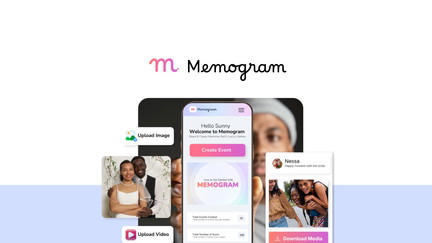
I’ve been using Memogram for events where I want every guest photo to end up in one place without the back-and-forth of chasing people. Scan a QR code, upload photos and videos, and they appear in a central gallery you can customize.
It works great for casual gatherings, parties, and smaller corporate events — people don’t need accounts, which lowers friction and means even grandparents and kids can share moments. For daily use I’d rely on it to gather candid content for social posts; for special occasions it keeps everything organized and easy to share. From my experience and from reading other Memogram reviews, the interface feels polished and thoughtful, though businesses should note branding limits and some speed/quality quirks that the team is actively addressing.
If you snag a lifetime deal on Memogram appsumo, it’s a handy tool to stash all event memories without chasing attendees.
Pros and Cons
|
Pros |
Cons |
|---|---|
|
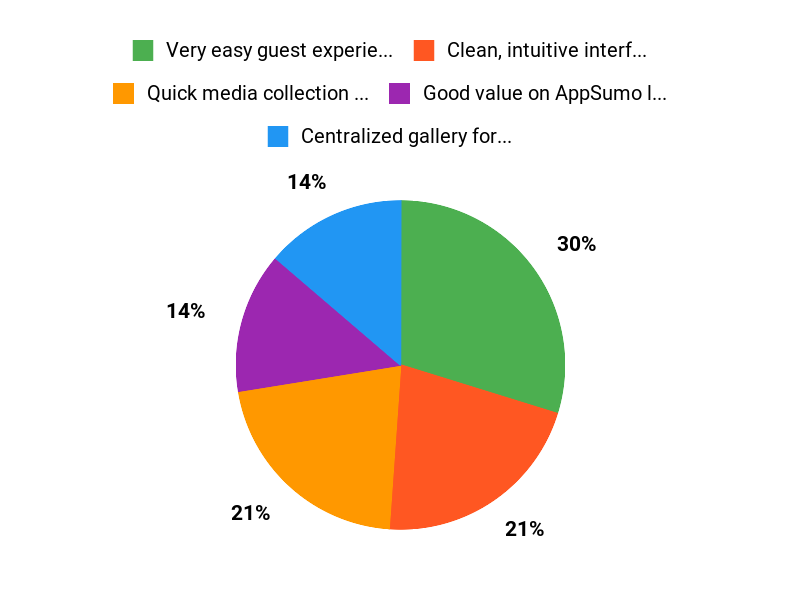
✅ Very easy guest experience — QR code onboarding is frictionless |
❌ Prominent Memogram branding with limited removal options for non-Enterprise plans |
|
✅ Clean, intuitive interface praised by several reviewers |
❌ No client/sub-user accounts yet, which limits agency use |
|
✅ Good value on AppSumo lifetime deals for personal or small events |
❌ Occasional slow upload speeds and some reports of grainy video output |
|
✅ Active developer responses and a clear roadmap |
❌ Current photo upload limits (e.g., 5-photo limits mentioned by users) |
What People Say
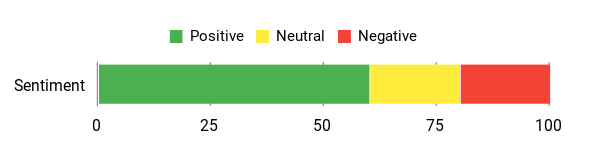
Reading Memogram reviews and trying it myself, I hear two consistent themes: people love how easy it is to get guests to contribute media, and power users want more agency/business features like client accounts and less forced branding. The team appears responsive and has roadmap items addressing many of these points.
Overall Sentiment: Mixed
🗣️ jonathan1453
The interface is clean, intuitive, and refreshingly easy to navigate. It felt like a tool built by people who understand real-world events — great for managing logistics and collecting media in one place.
🗣️ migbos12
Collecting photos and videos was as easy as scanning a QR code. Guests of all ages contributed without friction and the customizable event page looked great after tweaks — made preserving memories effortless.
Long-Term Savings
Buying a lifetime or discounted plan (like those seen on Memogram appsumo) can save recurring subscription costs and cut admin time after events. Over time you’ll spend less effort collecting media manually, and the central gallery reduces lost or forgotten photos — a clear efficiency gain for event organizers.
Return On Investment
ROI comes from saved staff hours, faster social content turnaround, and improved guest satisfaction. For small teams, the time saved from not chasing photos often pays for the cost within a few events.
Usability
|
Aspect |
Ease Level |
Notes |
|---|---|---|
|
Setup |
Easy |
Creating an event and QR code is straightforward; reviewers praised the initial experience. |
|
Uploading Media |
Moderate |
Guests upload without accounts, but some users reported slow upload speeds and a 5-photo limit that can be frustrating. |
|
Customization |
Moderate |
Event pages are customizable, but branding removal requires Enterprise-level features. |
Performance & Speed
Some users mentioned slow upload speeds and occasional grainy video output; the Memogram team says a CDN rollout and media improvements are planned, which should boost performance noticeably.
Integrations
|
Software |
Integration Quality |
|---|---|
|
Web Access |
Good — real-time sync and easy gallery access |
|
Mobile Uploads |
Good — QR code flow works well on phones, though upload speed varies |
|
Storage/CDN |
Improving — currently uses S3; team plans a better CDN to speed uploads |
Security
|
Feature |
Protection Level |
|---|---|
|
Event Expiration Controls |
Configurable — media and event pages can expire based on plan |
|
Private Event Links |
Basic — access via link/QR code, suitable for casual events |
|
Account Access |
Limited — no client-specific accounts yet, sub-user access coming in Enterprise |
Collaboration
Currently limited for agencies — there’s no per-client login or granular moderation per client yet, though sub-user access and branding removal are planned in the Enterprise release.
Updates & Upgrades
The team has responded to feedback and listed upcoming items: an Enterprise tier with branding removal and sub-user access, a CDN upgrade for faster uploads, and an AI media enhancer on the roadmap.
Key Benefits
- Quick media collection via QR codes with no account required
- Centralized gallery for easy sharing and organization
- Simple setup that works for both casual and event professionals
- Real-time sync across web and mobile
Current Price: $49.00
Rating: 4.13 (total: 15+)
FAQ
Is Memogram Right For My Event Or Business?
I think Memogram shines when you want a simple, guest-friendly way to collect photos and videos using a QR code, and many Memogram reviews praise how easy it is for attendees to contribute without accounts. I recommend it for event organizers, photographers, and influencers who need a central gallery and real-time sync, but I also want to be honest: if you need multi-client management today (separate logins and per-client moderation) the current consumer/Pro tiers can feel limiting. The team has said an Enterprise tier with sub-user access and branding removal is coming, so if you need agency-level features right now I’d either wait for that rollout or plan around those limitations and run a clear process for handling client media.
How Do Pricing And Plan Limits Affect What I Can Do?
From what I see on Memogram appsumo and in product details, the main deal at $49 gives you 20 events per year and media expires 30 days after upload with event pages expiring 14 days after the event, while the $99 plan offers unlimited events and no expiration; the listed original prices are $149 and $249 respectively. I’d pick the $49 lifetime deal if I’m running a handful of one-off events and don’t need long-term archives, and I’d choose $99 if I want ongoing events and permanent galleries.
My practical tip is to match the plan to your event cadence and archive needs, and test the workflow before a paid or high-stakes event so you don’t get surprised by expirations or limits.
What Should I Know About Branding, Upload Speed, And Media Quality?
I’ve noticed in Memogram reviews that branding and upload speed are common concerns: people report prominent Memogram branding and occasional slow uploads, and some mention grainy video output in edge cases. The team has responded publicly that an Enterprise plan will allow branding removal and sub-user access, that a CDN update should boost upload speeds significantly, and that they plan AI media enhancements down the road. My advice is to run a quick test event to confirm upload performance and video quality on your venue network, keep strong Wi-Fi available for guests, and avoid sharing a single account with clients until sub-user features arrive; if branding is a deal-breaker for client-facing work, wait for the Enterprise roll-out or factor white-label needs into your purchase decision.
Why Customers Choose Memogram
I hear customers choose Memogram because it’s simple and intuitive to use, reliably delivers the core features they need, and gives them confidence with strong privacy and responsive support. We also find people value the flexible pricing and customization options that let them tailor the product to their workflow without a steep learning curve.
Wrapping Up
Memogram is a practical, low‑friction way to collect guest photos and videos using a QR code and a central gallery. I like that it’s easy to set up, works across web and mobile in real time, and comes with a compelling AppSumo price of $49 (originally $149), which makes it attractive for solo organizers and small teams. On the flip side, several Memogram reviews call out forced branding, slow uploads in some cases, and limits on photo uploads for lower tiers — issues the team says they’re fixing with an Enterprise tier and CDN improvements.
My take: if you need a fast, simple solution to aggregate event media and the $49 lifetime deal fits your budget, Memogram is worth trying; if you require full white‑labeling and agency client accounts today, you may want to wait for the Enterprise rollout.
This Roundup is reader-supported. When you click through links we may earn a referral commission on qualifying purchases.