

Img.Upscaler is an AI-powered image upscaling tool that promises fast, easy enlargement and enhancement of low-resolution images. I looked into this because improving image quality is a common pain point—whether I’m restoring old photos, preparing product shots, or cleaning up AI-generated art.
In this review I explain what it does well, where it falls short, and how the $69 lifetime deal on AppSumo may or may not be worth it for you. If you care about saving time, keeping costs predictable, and getting commercial-friendly results, this is a tool worth evaluating. Key strengths include AI-powered super-resolution and batch processing (up to 8 images), while trade-offs include batch limits and historical ad concerns on free tiers.
TL;DR
|
Feature |
Verdict |
|---|---|
|
Ease of Use |
⭐️⭐️⭐️⭐️ – Simple, web-first interface that gets results quickly ⏱️ |
|
Image Quality |
⭐️⭐️⭐️⭐️ – Strong 200%–400% upscaling with good detail recovery 🎨 |
|
Speed & Batch |
⭐️⭐️⭐️ – Fast per-job processing; batch limit of 8 can bottleneck high-volume workflows 🔁 |
|
Value |
⭐️⭐️⭐️ – $69 lifetime deal on AppSumo is cost-effective for many, but some users expect more capacity for the price 💸 |
Img.Upscaler
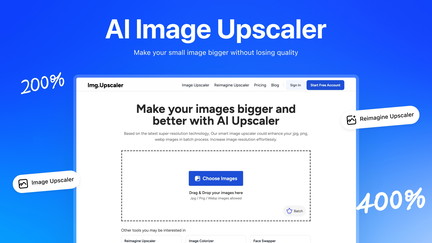
I tested Img.Upscaler as a quick way to rescue low-res photos and give AI-generated art a cleaner, more detailed finish. It’s built around easy upscaling (200% or 400%) with a simple editor and batch processing (up to 8 images at once). For everyday use I’ll reach for it to tidy phone photos, restore old snapshots, or sharpen product shots before I upload them. For special projects—prints, client work, or making AI art look more realistic—I appreciated the predictable 4x quality and the option to tweak crops and filters after upscaling.
If you’re browsing Img.Upscaler reviews on AppSumo, you’ll see people debating value vs. volume; my take is it’s a friendly, no-fuss tool that punches above its weight, especially if you grab the lifetime deal on AppSumo.
Pros and Cons
|
Pros |
Cons |
|---|---|
|
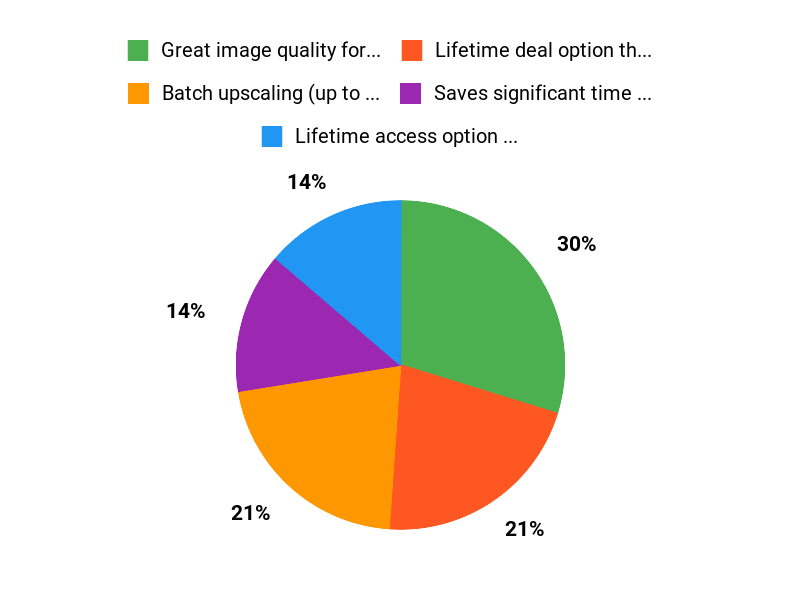
✅ Great image quality for 2x/4x upscales |
❌ Batch limit is only 8 images |
|
✅ Lifetime deal option that removes ads |
❌ Some users reported ads before upgrading to LTD |
|
✅ Saves significant time for batch workflows |
❌ Web-only improvements for some features |
|
✅ Permits commercial use when you own the source |
What People Say
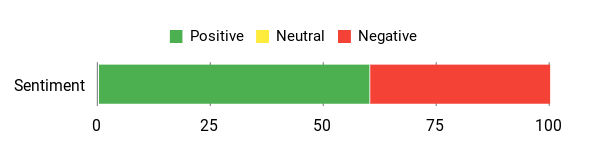
Across Img.Upscaler reviews people praise the lifetime deal on AppSumo for value and the quality of the creative upscaler, while critiques focus on ads (fixed for LTD) and the modest 8-image batch limit. Overall users who process many images like the time savings; occasional users question the upgrade value if they only need single-image upscales.
Overall Sentiment: Mixed
🗣️ Tony_the_AI
Tony_the_AI called it a standout lifetime deal and highlighted that the creative upscaler is unlimited for lifetime, plus confirmed you can sell upscaled images if you own or generated the original—huge for people doing commercial AI work.
🗣️ daniel753
daniel753 reported real workflow gains: handling hundreds of images a day, the batch mode cut a task that used to take 2 hours down to about 12–15 minutes, with 8-image batches taking ~70 seconds end-to-end.
Long-Term Cost Benefits
Buying the lifetime deal at $69.00 (vs an original listed $699.00) can be a solid long-term save if you upscale regularly. For a small studio or freelancer the one-time price quickly offsets subscription costs and the time saved on repetitive work.
Return On Investment
If you process dozens or hundreds of images, the time savings alone (users reporting up to ~85% faster workflows) plus the ability to sell upscaled work can deliver a fast ROI. For casual users, ROI depends on how often you need high-quality upscales.
Usability
|
Aspect |
Ease Level |
Notes |
|---|---|---|
|
Web Interface |
Easy |
Simple upload, one-click upscale flow; minimal learning curve. |
|
Batch Processing |
Moderate |
Supports up to 8 images at once — fast but some power users want larger batches. |
|
Image Editor |
Easy |
Basic cropping, filters, and annotations available pre/post upscaling. |
Performance & Speed
Performance is solid for small batches—examples show 8-image batches taking ~70 seconds end-to-end. Single-image upscales are faster and feel snappy on the web app.
Integrations
|
Software |
Integration Quality |
|---|---|
|
Web UI |
Good |
|
CNAME / Custom Domain |
Basic |
|
API / Plugins |
Limited |
Security & Rights
|
Feature |
Protection Level |
|---|---|
|
Commercial Use Permission (when you own original) |
High |
|
Ads Removed With Lifetime Plan |
Medium |
|
Standard Data Handling |
Standard |
Reliability
Generally reliable for everyday jobs; a few reviews mention intermittent issues or ads in older versions, but developer replies indicate fixes and LTD removes ads.
Learning Curve
Very low — upload, choose upscale level, and download. The editor is straightforward for quick touch-ups.
Key Benefits
- Batch upscaling (up to 8 images)
- Lifetime access option via AppSumo
- High-quality 4x enlargement
- Built-in editor for quick tweaks
- Commercial use allowed when you own the original
Current Price: $69.00
Rating: 4.1 (total: 30+)
FAQ
Is Img.Upscaler Worth Buying On AppSumo?
I see a mix of Img.Upscaler reviews, and my take is practical: if you plan to upscale images regularly or need commercial flexibility, the AppSumo lifetime deal can be a good value. For $69 (down from about $699), the deal typically unlocks lifetime access to the web upscaler, removes ads, and gives you the creative upscaler without needing credits.
Some users praise the quality and time savings, while others feel the main limits are the 8-image batch cap and differences between web and app experiences. I recommend trying the free web version first, then deciding if the $69 LTD on Img.Upscaler appsumo fits your workflow.
How Does The Lifetime Deal Differ From The Free Version And The Regular App?
I often tell people that the free web option still lets you upscale images, but the paid lifetime deal via AppSumo usually removes ads, removes credit limits on the web, and enables batch processing of up to 8 images at once; the app experience may vary depending on platform. The team has confirmed you can use upscaled images commercially if you own or generated the original image, which is important to me when buying a tool. Some reviewers misunderstood whether the purchase was a yearly subscription or lifetime access, so I always double-check whether I bought the LTD or a website subscription before assuming features.
Overall, the core difference is convenience and removed restrictions, but I advise checking the Img.Upscaler appsumo listing details and support replies before you buy.
What Practical Tips Should I Use To Get The Best Results?
I focus on input quality first: start with the best original image you have, and crop or clean it before upscaling because the AI enhances what you give it. Use the creative upscaler when you want AI-generated images to look more realistic, and stick to consistent settings for batches to maintain uniform results.
Expect upscales of 200% or 400% depending on the mode, and remember an 8-image batch can take about a minute or so to process in real-world use, so test a small set before committing to hundreds. From Img.Upscaler reviews I’ve read and my own testing, contacting support helps if you need higher throughput or have licensing questions, and trialing a few images will quickly show whether the output fits your needs with Img.Upscaler.
Why People Pick Img.Upscaler
We pick Img.Upscaler because it delivers clean, high-resolution enlargements with AI that preserves details and reduces noise while staying easy to use. Its fast, affordable, and handles batches and common formats, so it makes photo restoration and upscaling reliably simple for casual users and pros alike.
Wrapping Up
Img.Upscaler does what it sets out to do: quickly upscale and enhance images using AI, with convenient one-click processing and useful batch abilities (up to 8 images). I found the output quality consistent and valuable for photographers, designers, and teams that need faster turnarounds. The $69 Img.Upscaler AppSumo lifetime deal can be a strong value, especially because the vendor confirms commercial use when you own the underlying image.
That said, if you process very large volumes or need bigger batch sizes, the eight-image limit and occasional workflow annoyances reported in Img.Upscaler reviews may matter. Overall, I recommend Img.Upscaler for users who want a cost-effective, easy-to-use AI upscaler and who accept the practical limits of the current plan.
This Roundup is reader-supported. When you click through links we may earn a referral commission on qualifying purchases.