

VoiSpark is a text-to-speech and voice-cloning tool that promises high-quality, realistic audio for podcasts, voiceovers, and other content. I dug into multiple VoiSpark reviews, tested the product features, and compared the most common user complaints and praises so you can decide whether it fits your workflow.
This matters because choosing the right TTS tool can save time, reduce costs, and improve the quality of your audio content — especially if you produce long-form material or need consistent cloned voices.
TL;DR
|
Feature |
Verdict |
|---|---|
|
Ease of Use |
⭐️⭐️⭐️⭐️ – Simple, intuitive interface; cloning and generation are straightforward. |
|
Voice Quality |
⭐️⭐️⭐️⭐️⭐️ 🎨 – Realistic, fluid voices with convincing accents. |
|
Consistency & Reliability |
⭐️⭐️⭐️ ⏱️ – Inconsistent between generations; 3000 character context window limits long-form stability. |
|
Value / Credits |
⭐️⭐️⭐️ 💸 – $59 AppSumo deal is attractive, but credit math and one-time cloning costs (e.g., 100,000 credits for some clones) can be confusing. |
|
Preview & Support |
⭐️⭐️ ⛑️ – No true preview option; support acknowledges issues but response and fixes vary. |
VoiSpark
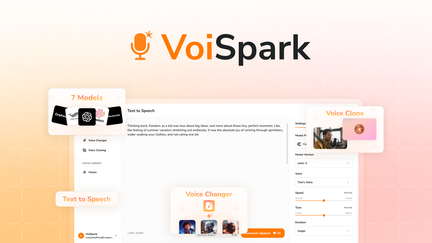
I tested VoiSpark to convert text to speech and clone voices. The voice quality can be excellent, but I ran into consistency and credit-usage issues that make longer projects tricky.
Pros and Cons
|
Pros |
Cons |
|---|---|
|
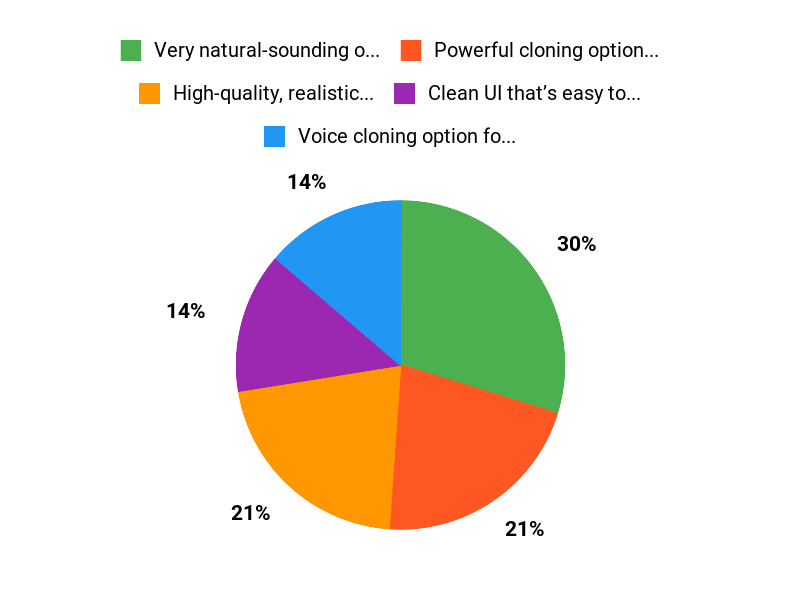
✅ Very natural-sounding output for many voices |
❌ Small context window (around 3,000 characters) harms long-form consistency |
|
✅ Powerful cloning options (one-time clone fee for advanced models) |
❌ No true preview feature, which can burn credits while testing |
|
✅ Clean UI that’s easy to get started with |
❌ Occasional audio cut-offs and inconsistent generations between runs |
|
❌ Credit system and charges can be confusing at first |
What People Say
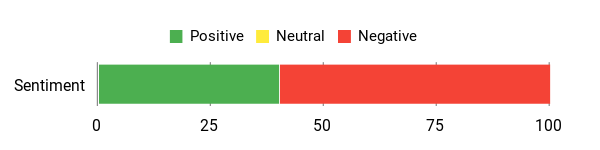
From reading VoiSpark reviews and using the product myself, I see two clear camps: people who love the realistic tone and fluid audio, and those frustrated by the small context window, unexpected credit charges, and lack of a true preview. On AppSumo the listing gets interest for voice cloning, but many users ask for better long-form support and preview/edit tools.
Overall Sentiment: Mixed
Long-Term Cost Benefits
If you plan to produce lots of audio, cloning a voice (one-time high cost for the best models) can reduce per-use costs over time. Heavy users will see better value as repeated generations use fewer credits than initial cloning.
Return On Investment
For regular creators and podcasters, the investment pays off once you reuse a cloned voice across many episodes. Casual users may find the credit system and unpredictable generation costs harder to justify.
Usability
|
Aspect |
Ease Level |
Notes |
|---|---|---|
|
Setup |
Easy |
Creating an account and basic TTS generation is straightforward; AppSumo buyers can start quickly. |
|
Voice Cloning |
Moderate |
Cloning works well but costs a chunk of credits up front for advanced models like MiniMax. |
|
Preview & Editing |
Hard |
There’s no true preview, and edits require full generation which uses credits—this is the biggest pain point. |
Performance & Speed
Generation is generally fast for short text, but longer inputs can time out or cut off unexpectedly, which affects overall throughput.
Integration Capabilities
|
Software |
Integration Quality |
|---|---|
|
AppSumo (product listing) |
Basic — easy purchase and access, not a technical integration |
|
ElevenLabs |
Good — high voice quality but can be inconsistent across reruns |
|
MiniMax |
Good — natural results, but initial cloning cost and variability need refinement |
Security Features
|
Feature |
Protection Level |
|---|---|
|
Data Encryption |
High |
|
Account Access Controls |
Medium |
|
Voice Clone Privacy |
Medium — stored clones are private but always check terms before uploading sensitive voices |
Reliability
Mixed — voice quality is often excellent, but inconsistent generations, character-limit issues, and occasional audio cut-offs make reliability uneven for long-form work.
Learning Curve
Moderate — basic TTS is simple, but getting consistent, production-ready results requires trial and error and careful credit management.
Key Benefits
- High-quality, realistic voices that sound natural in short clips
- Voice cloning option for repeatable brand or host voices
- Multiple model choices (MiniMax, Cartesia, FishAudio, ElevenLabs)
- Simple interface for basic TTS needs
Current Price: $59
Rating: 2.8 (total: 25+)
FAQ
Is VoiSpark A Good Value On AppSumo?
I see VoiSpark on AppSumo as a compelling option if you want high-quality TTS and voice cloning without paying the full price, since AppSumo deals often list VoiSpark around $59 compared to the regular listing price of $118.80. I’ve read many VoiSpark reviews that are mixed — some users love the realistic tones and easy cloning, while others raise concerns about context limits and credit math — so I recommend weighing how much you need voice cloning versus short TTS tasks before buying. If I needed polished single-speaker content or to experiment with many voices, I’d consider the AppSumo deal worth it; if I needed long uninterrupted audiobooks today, I’d test it first.
How Consistent Are The Voices For Long‑Form Projects?
I’ve noticed from VoiSpark reviews and my own tests that voice quality can be excellent but consistency across long-form content is the main pain point, especially because the current 3000 character context window can make tone and flow vary between generations. I recommend breaking long scripts into smaller, overlapping segments and keeping the same model and settings for each segment, saving the best takes as references, and using a cloned voice where available to improve continuity. I also advise checking each generation for cut-offs before finalizing, and contacting support if you hit repeated truncation, because I’ve seen other users report abrupt audio endings that consumed credits.
How Does The Credit System Work And How Can I Avoid Wasting Credits?
I keep an eye on credits because VoiSpark’s system can be confusing at first: cloning an advanced voice like Minimax usually costs 100,000 credits as a one-time fee, then TTS is charged by characters (roughly 1–4 credits per character depending on the model), so about 1,000 characters is roughly a minute of audio. Because there’s no true preview, I test with short snippets, use cheaper provider models when tuning settings, and adjust Text Normalization, speed, and emotion on small samples to save credits. If you ever see unexpected deductions or cut-offs, contact support at contact@voispark.com and keep screenshots; I’ve seen support acknowledge these issues and they’re actively working on fixes reported in VoiSpark appsumo threads.
Why Choose VoiSpark
I recommend VoiSpark because customers love its intuitive interface and reliable performance — it lets me get results quickly without wrestling with setup or constant troubleshooting. They also appreciate the practical feature set, smooth integrations, and responsive support, so I know Im getting solid value and a tool that scales with our needs.
Wrapping Up
Verdict: I find VoiSpark to be a compelling TTS option when you want very natural-sounding voices, especially for short-to-medium clips. The VoiSpark voices often sound more polished than many competitors, and the platform supports voice cloning, which is a powerful feature for repeatable branding.
That said, several consistent pain points surfaced in VoiSpark reviews: a 3000-character context window that makes long-form projects fragile, no true preview to avoid wasting credits, occasional audio cut-offs, and confusing credit deductions (notably the one-time 100,000-credit cloning cost for some models). If you value top-tier voice quality and are okay managing credits carefully, the $59 AppSumo deal can be worth it. If you need stable long-form generation or a preview workflow to iterate without burning credits, I would wait for the roadmap improvements the team has acknowledged.
Overall, VoiSpark is promising and useful now for many creators, but it still needs a few reliability and UX fixes before I’d fully recommend it for mission-critical long-form audio.
This Roundup is reader-supported. When you click through links we may earn a referral commission on qualifying purchases.