
I looked into Graficto because clear visuals save time and make ideas stick. In my experience, being able to create powerful infographics in seconds matters whether I’m teaching, marketing, or building a blog post.
After reading multiple Graficto reviews and testing the product myself, I can say the Graficto app delivers a fast, design-forward workflow that removes the typical friction of infographic creation. The AppSumo deal and lifetime access at $109 also make Graficto appsumo listings worth checking if you want a cost-effective visual tool.
TL;DR
|
Feature |
Verdict |
|---|---|
|
⭐️⭐️⭐️⭐️⭐️ Ease of Use ⏱️ |
Super intuitive — I can build an infographic in minutes. |
|
⭐️⭐️⭐️⭐️ Value 💸 |
$109 lifetime access vs. the original $400 price — excellent value for frequent creators. |
|
⭐️⭐️⭐️⭐️ Templates & Style 🎨 |
Hundreds of templates and palettes; easy to switch layouts quickly. |
|
⭐️⭐️⭐️⭐️ AI Features 🔍 |
AI auto-fills text and icons accurately — a real time-saver for basic infographics. |
|
⭐️⭐️⭐️⭐️ Export & Sharing 📤 |
Exports to SVG, PNG, JPG in high resolution and shareable public URLs. |
Graficto
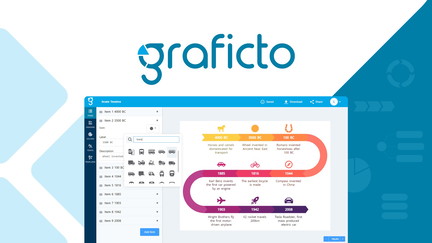
I’ve been using Graficto from the AppSumo deal and it quickly became my go-to for clean, fast infographics. The Graficto app uses smart templates and AI to fill text and icons, so I can turn ideas into visuals in minutes without being a designer.
It’s great for day-to-day needs like social posts, lesson slides, or quick client visuals, and also for special occasions like workshop handouts or presentation highlights. The interface is straightforward, exports to SVG/PNG/JPG are high quality, and lifetime access on AppSumo makes it a cost-effective tool I reach for whenever I need a polished visual fast. If you’ve skimmed other Graficto reviews, you’ll notice the same: people love the AI fill, the template switching, and how one good graphic can save design time and cost.
Pros and Cons
|
Pros |
Cons |
|---|---|
|
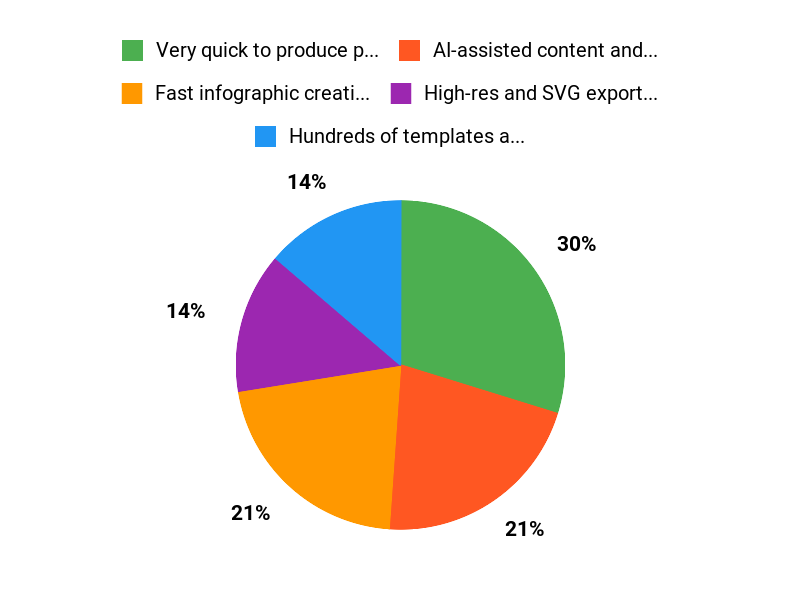
✅ Very quick to produce polished visuals |
❌ Not designed for complex data analysis or advanced charting |
|
✅ AI-assisted content and icon suggestions |
❌ Missing formatting options like adding % directly in value fields |
|
✅ High-res and SVG export for further edits |
❌ Template library could grow faster for some niche uses |
|
✅ Simple, approachable interface |
What People Say
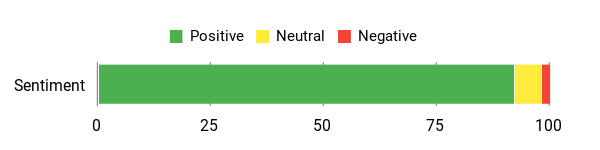
Across Graficto reviews people highlight the AI auto-fill and template flexibility as major time-savers, and several reviewers point out the excellent export quality (SVG/PNG) and cost-effectiveness—some even say it pays for itself on the first use. A few users requested small feature additions like percentage support in value fields.
Overall Sentiment: Positive
🗣️ fga
An image speaks louder than words, especially online where you have milliseconds to grab attention. Images communicate information rapidly and ignite curiosity. The big problem is that beautiful images are expensive to create.
Graficto addresses the issue with remarkable poise and unparalleled cost-effectiveness, proving its worth with just the first infographic. It is perfect for illustrating fundamental concepts. It is not a tool to construct complex charts or graphs. These tasks require specific tech and data analysis tools, but the results are often too complex for a webpage.
And you can enhance the infographic using any SVG editor to create visually appealing presentations.
🗣️ JD-Sumo
Graficto is a game-changer for anyone who needs to create infographics quickly and effortlessly! What sets it apart is the smart AI feature that automatically fills in your infographic with relevant text and icons—huge time saver and incredibly accurate.
I also love how easy it is to switch between different infographic templates; with just a couple of clicks, you can use the same information and transform your design instantly.
Highly recommended!
Long-Term Cost Benefits
With lifetime premium access around $109, I compare that to recurring design fees or freelance costs. If you produce a handful of visuals per year, Graficto saves on subscription and one-off designer costs, plus time saved converting ideas into shareable graphics.
Return on Investment
Users report that a single high-quality infographic can cover the cost — between saved freelance hours and faster publishing. For teams that regularly create course materials, marketing visuals, or lesson slides, ROI can be realized within the first few projects.
Usability
|
Aspect |
Ease Level |
Notes |
|---|---|---|
|
Onboarding |
Easy |
Templates and guided fields make getting started quick; minimal setup required. |
|
Template Selection |
Very Easy |
Switching templates keeps your content intact so you can try different looks in seconds. |
|
Editing & Export |
Easy |
Editing items is intuitive and exports (SVG/PNG/JPG) are high quality for presentations and web. |
Performance & Speed
Fast — AI fills content quickly and rendering is snappy for most templates. Exports complete within a few seconds for typical visuals.
Integration Capabilities
|
Software |
Integration Quality |
|---|---|
|
SVG Editors (Inkscape, Illustrator) |
High |
|
Social Platforms (Twitter, LinkedIn) |
Good |
|
Cloud Storage (Google Drive, Dropbox) |
Moderate |
Security Features
|
Feature |
Protection Level |
|---|---|
|
Account Authentication |
Medium |
|
Export Controls (local file output) |
High |
|
Data Privacy Policy |
Medium |
Reliability
Reliable for everyday use — stable web app with regular template updates and responsive creator replies on AppSumo.
Learning Curve
Short — non-designers can produce useful visuals within minutes; a small amount of exploration improves results.
Key Benefits
- Fast infographic creation with AI-assisted content
- Hundreds of templates and easy template switching
- High-resolution exports including SVG for further editing
- Lifetime value via the Graficto AppSumo deal
Current Price: $109
Rating: 4.65 (total: 48+)
FAQ
Is Graficto Worth The Price?
I’ve looked through many Graficto reviews and used the product enough to say that the $109 lifetime premium access on the Graficto appsumo listing is a strong value compared with the original $400 price. I like that the tool targets people who need quick, attractive infographics without hiring a designer, and the average rating (around 4.6–4.8 in user feedback) backs that up.
If you want to save time, produce social-ready visuals, and get editable vector exports, I think it’s worth the investment, but if you need advanced data analysis or complex scientific charts, you should pair Graficto with a dedicated charting tool.
How Easy Is It To Create, Customize, And Export Infographics?
I find the Graficto app very approachable: you pick a template, add your content, and the design updates dynamically; the AI-generated content feature often fills text and icons for you, which saves a lot of time. Customization like changing palettes and fonts is one click, and exports include high-resolution PNG, JPG and vectors so I can further tweak files in other editors.
My practical tip is to export to SVG if you need fine adjustments or to add characters like % or $ that some templates don’t format directly—editing the SVG is an easy workaround and the team has mentioned roadmap updates in response to user requests.
What Are The Common Limitations And How Can I Overcome Them?
From reading user comments and my own use, the main limits are that Graficto isn’t intended for heavy data modeling or complex interactive charts and some label formatting (for example percent signs) may require manual post-editing; I’ve seen the developers acknowledge these requests on the Graficto appsumo page. To work around those points I export SVGs for final tweaks, combine Graficto visuals with a spreadsheet or charting tool when I need precise data visuals, and keep an eye on weekly template updates so I benefit from new features as they arrive.
Why Choose Graficto
We choose Graficto because it blends powerful features with an intuitive interface, letting us get professional results quickly without a steep learning curve. Customers also favor it for reliable performance, affordable pricing, and responsive support that helps tailor outputs to specific needs.
Wrapping Up
After spending time with Graficto and reading multiple user comments, I feel confident recommending it for anyone who needs fast, attractive infographics without design skills. The Graficto app is particularly strong on usability and speed, with smart AI features that auto-fill content and hundreds of templates that make swapping layouts easy. At $109 lifetime access from the AppSumo listing, it represents solid value compared with the original $400 price.
Pros: quick workflow, AI-driven text/icons, SVG/PNG/JPG exports, and regular template updates. Cons: not built for highly complex charts or advanced data analysis and some users want additional label formatting like percent signs.
Overall, I see Graficto as a practical, cost-effective tool that helps me communicate ideas visually with minimal friction.
This Roundup is reader-supported. When you click through links we may earn a referral commission on qualifying purchases.