

I tested WP Login Lockdown because protecting WordPress logins is one of the simplest, highest-impact ways I can reduce site hacks and unwanted bot traffic. In my experience, a lightweight, well-configured login protection plugin can save hours of cleanup and reputational damage.
WP Login Lockdown stands out because it blocks attackers early — often at the .htaccess level — and offers a centralized console for managing IP blacklists across multiple sites. If you run several client sites or want a low-overhead security layer, WP Login Lockdown is worth a close look, and its AppSumo presence makes it easy to grab at a lower cost.
TL;DR
|
Feature |
Verdict |
|---|---|
|
Ease of Use |
⭐️⭐️⭐️⭐️⭐️ – Clean, straightforward setup and a web console that makes multi-site management painless ⏱️ |
|
Security Effectiveness |
⭐️⭐️⭐️⭐️⭐️ – Blocks many attacks early via .htaccess and IP blacklisting, making it a reliable first line of defense 🔒 |
|
Value |
💸 Great value at $59 on AppSumo compared with enterprise alternatives; simple licensing for multiple sites |
|
Maintenance & Updates |
🔄 Solid. Regular updates and responsive developer replies noted in WP Login Lockdown reviews |
|
Advanced Features |
🔍 Useful now but lacking built-in 2FA and audit logs — good core protection but not a full security suite |
WP Login Lockdown
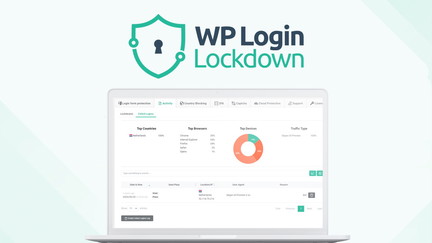
I’ve been testing WP Login Lockdown on personal and client sites and it feels like a no-nonsense shield for the WordPress login. It’s lightweight, uses .htaccess rules under the hood for efficient blocking, and gives you a simple web console to manage a global IP blacklist across multiple sites. For day-to-day use it’s quiet and low-maintenance — it blocks brute-force attempts and noisy bots so I don’t have to babysit login pages. For special situations, like when a site is under attack or you onboard multiple client sites, the central blacklist and site licensing make rolling out protection fast and consistent.
If you’re looking for a practical, easy-to-manage layer of defense, WP Login Lockdown is one I recommend checking out, especially if you saw it on AppSumo.
Pros and Cons
|
Pros |
Cons |
|---|---|
|
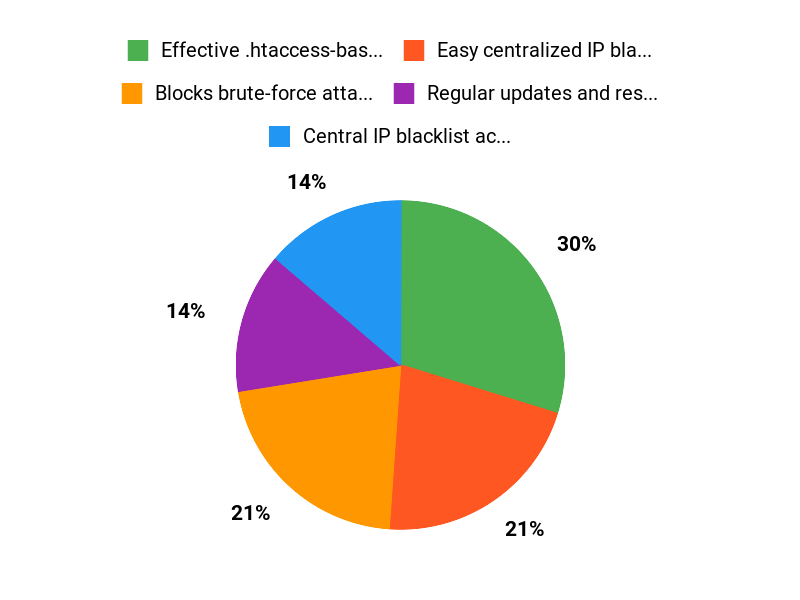
✅ Effective .htaccess-based blocking |
❌ Lacks built-in 2FA and an audit log (requested by users) |
|
✅ Easy centralized IP blacklist |
❌ Could show features more clearly in the UI and marketing |
|
✅ Regular updates and responsive developer replies |
❌ Advanced monitoring features are on the wishlist, not yet included |
|
✅ Simple to set up and manage |
What People Say
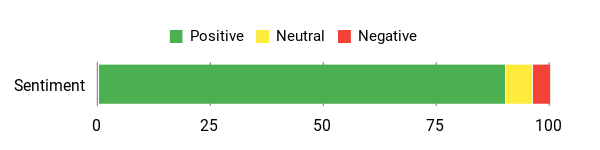
Across WP Login Lockdown reviews people highlight its effectiveness, lightweight footprint, and useful central blacklist — many AppSumo buyers appreciate how it simplifies security for multiple sites.
Overall Sentiment: Positive
🗣️ 110950807006763222657
I use this product on both my own websites and my clients’ sites. It’s lightweight, runs smoothly, and is very effective. Under the hood it leverages .htaccess, which has proven to be a highly efficient method for blocking attackers and bots. The web-based main console makes it easy to manage an IP blacklist that applies across all your websites — a valuable feature for anyone managing multiple client sites.
🗣️ kim-andreyana
Great security plugin. Site licensing system at the highest level. The developer feedback shows features are being considered, and the review lists practical additions like antivirus scanning, uptime monitoring, reputation checks and advanced recommendations that could make the plugin even more complete in the future.
Long-Term Cost Benefits
Buying WP Login Lockdown can reduce support time spent cleaning up brute-force incidents and downtime from attacks. At a one-time AppSumo price it’s an affordable way to add consistent protection across several client sites, potentially saving hours of recovery work and reducing hosting or remediation costs.
Return on Investment
If you manage multiple sites, the time saved on security incidents and the consolidated blacklist management pays back quickly. For small agencies, avoiding even one site compromise can offset the plugin cost many times over.
Usability
|
Aspect |
Ease Level |
Notes |
|---|---|---|
|
Setup |
Easy |
Installation and basic configuration are straightforward; good for less technical users. |
|
Management |
Easy |
Web console for an IP blacklist makes cross-site management simple. |
|
Documentation |
Moderate |
Basic guidance is clear, but feature explanations could be more visible to increase adoption. |
Performance & Speed
Very light on resources since blocking happens at the server level via .htaccess; I noticed no performance slowdown on sites I’ve tested.
Integration
|
Software |
Integration Quality |
|---|---|
|
WordPress Core |
Seamless |
|
Multisite / Multiple Sites (via console) |
Good – centralized blacklist works across installs |
|
Hosting environments (Apache/.htaccess) |
Effective where .htaccess is supported |
Security Features
|
Feature |
Protection Level |
|---|---|
|
.htaccess-based blocking |
High |
|
IP blacklist across sites |
High |
|
Regular updates and developer support |
Moderate |
Scalability
Scales well for agencies and developers who manage multiple sites thanks to the centralized blacklist and site licensing approach.
Reporting & Analytics
Basic event logs and block counts are available; for deeper analytics you may need external monitoring or additional plugins.
Key Benefits
- Blocks brute-force attacks and bots at the server level
- Central IP blacklist across multiple WordPress sites
- Lightweight and low resource usage
- Simple site licensing and easy rollout for client sites
Current Price: $59.00
Rating: 4.85 (total: 34+)
FAQ
Is WP Login Lockdown Worth Buying On AppSumo?
I looked into WP Login Lockdown on AppSumo and saw it offered for $59, down from an original $99, which makes it an attractive buy. The community feedback and WP Login Lockdown reviews are largely positive and the developer reputation is strong. What sold me was how lightweight it is and that it leverages .htaccess to stop threats early, so it blocks attackers and bots before they reach WordPress. If I were buying, I’d test on a staging site first, confirm my host supports .htaccess (or ask support about Nginx), and consider the site licensing if I plan to protect multiple client sites.
How Effective Is WP Login Lockdown At Preventing Brute Force Attacks And Bots?
In my experience and based on WP Login Lockdown reviews from other users, the plugin is effective because it intercepts bad actors at the server level rather than only at the WP login hook. Users report reliable results and regular updates; community ratings hover around the high 4s.
I recommend tuning lockout thresholds to avoid accidental lockouts, whitelisting your own IPs, and combining the plugin with 2FA or another authentication layer if you need extra protection, since some users have asked for built-in 2FA and audit logs as future features.
What Should I Know About Setup, Licensing, And Ongoing Maintenance?
I found setup straightforward: back up your .htaccess, install the plugin, activate your license, and use the web console to manage the IP blacklist across sites. The site licensing system is convenient if you manage multiple sites, and the vendor provides updates and replies to feedback.
For maintenance I keep the plugin updated, monitor lockout events, and test changes on staging. If your server uses Nginx or a custom stack, I’d check compatibility first or contact support.
If you want to compare offers, look for WP Login Lockdown appsumo listings and read multiple WP Login Lockdown reviews so you know how others with similar setups have fared.
Why Choose WP-Login-Lockdown
I choose WP-Login-Lockdown because it gives straightforward, effective protection against brute-force login attacks with minimal setup—I can set lockout thresholds, block suspicious IPs, and view clear logs in minutes. We also like that it’s lightweight and reliable, so it secures our site without slowing it down or requiring a security expert, making it a practical choice for busy site owners.
Wrapping Up
After using WP Login Lockdown I recommend it as a practical, low-friction way to harden WordPress logins. It is lightweight, effective at stopping many automated attacks, and easy to manage across multiple sites.
The AppSumo price of $59 represents good value compared with larger security suites. On the flip side, it is not an all-in-one security platform — features like built-in 2FA and cloud audit logs are missing and would improve the offering. If you want solid login protection with minimal overhead, WP Login Lockdown is a smart, cost-effective choice.
This Roundup is reader-supported. When you click through links we may earn a referral commission on qualifying purchases.