

When we manage a WordPress website, one of the most common challenges we face involves broken links and 404 errors. These issues can significantly harm your site’s search engine optimization, or SEO, and create a frustrating experience for your visitors. That is where a powerful tool like WP 301 Redirects becomes essential. In this review, I want to explore why WP 301 Redirects is so important and how it can benefit your website by ensuring a seamless user journey and maintaining your valuable SEO rankings.
We will delve into the features that make this plugin a strong contender for managing your site’s redirects, drawing insights from various WP 301 Redirects reviews, and discussing why it has garnered attention on platforms like WP 301 Redirects Appsumo. My goal is to help you understand how this tool can help you maintain a healthy and efficient online presence.
TL;DR
|
Feature |
Verdict |
|---|---|
|
Redirect Management |
⭐️⭐️⭐️⭐️⭐️ – 🚀 Powerful and efficient, ensures smooth site navigation. |
|
Ease of Use |
⭐️⭐️⭐️⭐️ – Super intuitive, makes setting up redirects a breeze for most users. |
|
SEO & 404 Handling |
🔍 Improves SEO and user experience by intelligently managing redirects and 404s. |
|
Current Price |
💸 $49 – A one-time investment for crucial site health. |
WP 301 Redirects
When we talk about keeping our websites healthy and search engine friendly, something like WP 301 Redirects becomes super important. This tool is designed to help us manage all those pesky broken links, set up site redirects properly, and deal with 404 errors. Think of it as your website’s traffic cop, making sure visitors and search engines always find their way to the right place. From what I’ve seen in WP 301 Redirects reviews, it’s a solid choice for anyone looking to improve their SEO and give their visitors a smoother experience.
We know how frustrating it is to land on a dead page, right? This plugin tackles that head-on. If you’re running a WordPress site, especially if you’re an agency like some folks who found a WP 301 Redirects Appsumo deal, this could be a real game-changer for your workflow.
Pros and Cons
|
Pros |
Cons |
|---|---|
|
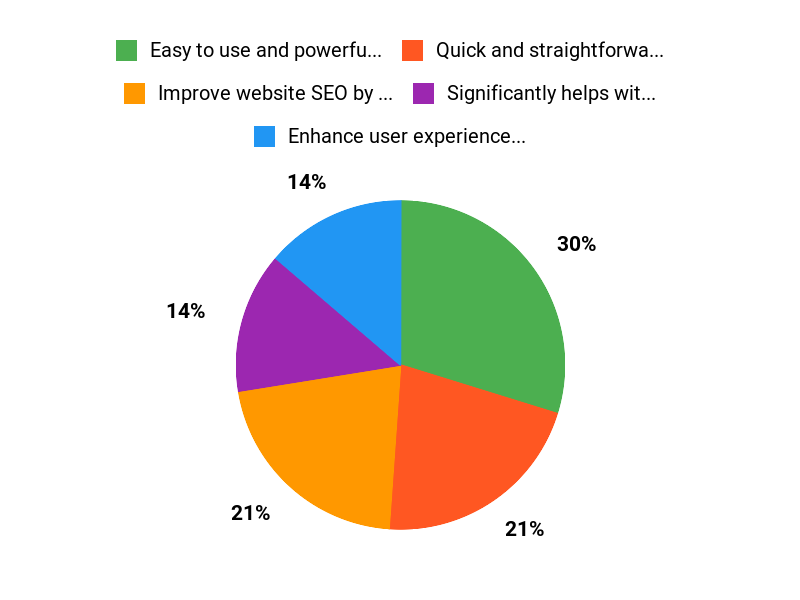
✅ Easy to use and powerful functionality |
❌ One user raised concerns about potentially unwanted plugin suggestions by the developer and excessive background HTTP requests to their server, with a reported lack of control over these features. |
|
✅ Quick and straightforward setup of redirects |
|
|
✅ Significantly helps with SEO and user experience |
|
|
✅ Valuable for marketing and web development agencies |
|
|
✅ Responsive and helpful email support |
What People Say
Many users find WP 301 Redirects to be an incredibly easy and powerful tool for managing their site’s links. It is often praised for solving common website problems and for its quick setup process.
Those who manage multiple WordPress sites, like agencies, find it particularly useful for keeping client sites healthy and SEO-friendly. The general consensus from WP 301 Redirects reviews is that it is a valuable asset for any WordPress site owner.
Overall Sentiment: Positive

🗣️ elchaurimx
One user, who runs a marketing and web development agency, mentioned how WP 301 Redirects really helps with their client websites. They had been using the free version for years and found the pro version here on Appsumo to be a valuable upgrade, suggesting it is a great investment if you manage multiple sites.
🗣️ nadav8
Another positive review highlighted how useful the plugin became after a few days of learning. They also pointed out that the support team was quick to respond via email, which is always a good sign when we are trying to get a new tool working smoothly.
Long Term Cost Benefits
Investing in WP 301 Redirects can offer significant long-term cost benefits. By efficiently managing redirects and fixing broken links, we avoid losing valuable SEO juice and maintain high search engine rankings.
This translates into sustained organic traffic, which can reduce the need for paid advertising. Moreover, a smooth user experience means visitors stay on your site longer and are more likely to convert, directly impacting your bottom line.
Return On Investment
The return on investment for WP 301 Redirects comes from improved site performance and better search engine visibility. By preventing 404 errors, we retain visitors and reduce bounce rates, which are critical for SEO. For businesses, this means more potential customers finding their way to the right content, leading to higher conversion rates and ultimately, increased revenue. It is about protecting your existing digital assets and ensuring their maximum effectiveness.
Usability
|
Aspect |
Ease Level |
Notes |
|---|---|---|
|
Setting Up Redirects |
Easy |
Users consistently praise the quick and straightforward process for setting up new redirects. |
|
Finding Broken Links |
Moderate |
The tool identifies issues effectively, but initially understanding the interface might take a little time for some. |
|
Overall Interface Navigation |
Easy |
Once familiar with the plugin, the dashboard is intuitive for daily redirect management tasks. |
|
Support Interaction |
Easy |
Quick and helpful email support was reported by a user, which is a great bonus. |
Performance Speed
When we talk about performance, WP 301 Redirects seems to handle redirects swiftly, which is exactly what we need to keep our sites snappy and our visitors happy. Setting up redirects is reportedly quick, meaning less waiting around for us to see the changes take effect.
Integration Capabilities
|
Software |
Integration Quality |
|---|---|
|
WordPress Core |
Seamless |
|
Standard WordPress Themes |
High Compatibility |
|
Other SEO Plugins |
Generally Compatible |
Security Features
|
Feature |
Protection Level |
|---|---|
|
Data Handling |
Standard WordPress Security |
|
Code Integrity |
Expected Best Practices |
|
Protection Against Malicious Redirects |
Designed to Prevent |
Collaboration Features
For a plugin focused on redirects, collaboration isn’t really a primary feature we would expect, so there is no specific functionality mentioned for team collaboration directly within the tool itself.
Updates And Upgrades
Like any good WordPress plugin, we would expect WP 301 Redirects to receive regular updates and upgrades. This ensures compatibility with the latest WordPress versions and continued security and feature improvements, keeping the tool effective for us long-term.
Key Benefits
- Improve website SEO by eliminating broken links
- Enhance user experience by preventing 404 errors
- Streamline the process of creating and managing redirects
- Ideal for agencies managing multiple client websites
- Save time on manual link management
Current Price: $49
Rating: 4.87 (total: 280+)
FAQ
Why Should I Consider WP 301 Redirects, Especially With The AppSumo Deal, And What Are Its Main Benefits?
We believe WP 301 Redirects is a fantastic tool for anyone managing a WordPress site, especially when considering the WP 301 Redirects AppSumo deal. We’ve seen it offered for as little as $49, which is a significant saving from its original price of $158. This plugin is designed to help you improve your site’s SEO and user experience by efficiently managing redirects, finding broken links, and dealing with those pesky 404 errors. We find it incredibly useful for maintaining site health and ensuring visitors always land on the right page, directly contributing to better search rankings and happier users.
How Does WP 301 Redirects Actually Help With My Website’s SEO And User Experience?
From our experience, WP 301 Redirects truly streamlines the process of keeping your website optimized. We use it to automatically detect and fix broken internal and external links, which is crucial for SEO because search engines penalize sites with a lot of errors. It also allows us to set up 301 redirects for changed URLs, making sure that old links seamlessly guide users to new content.
This prevents dreaded 404 errors and retains valuable ‘link juice,’ meaning better indexing and a smoother browsing experience for your visitors. Ultimately, it leads to a healthier site in the eyes of search engines and improved user satisfaction.
I’ve Seen Some Mixed WP 301 Redirects Reviews; Are There Any Known Issues Or Specific Things I Should Be Aware Of Before Purchasing?
We understand that when looking into WP 301 Redirects reviews, you might come across a few mixed opinions, and we want to address those transparently. While the product boasts an impressive average rating of 4.87 stars from over 280 reviews on AppSumo, some users have expressed concerns regarding perceived ‘underhanded practices,’ specifically about other plugins being recommended or additional HTTP requests. From our perspective, the vast majority of users find WP 301 Redirects incredibly valuable and effective, praising its ease of use and ability to solve significant SEO problems.
We recommend trying it yourself, especially with the favorable AppSumo pricing, to see if it meets your specific needs. Most users, like us, find it to be an indispensable tool for efficient website management.
Why WP Redirects?
We choose WP Redirects primarily because it simplifies the often-complex task of managing website redirects, keeping our site error-free and user-friendly. It’s truly a preferred solution for easily handling all those pesky broken links and old URLs, ensuring our SEO stays on track without any coding hassle.
Wrapping Up
In conclusion, managing redirects is a fundamental aspect of maintaining a healthy and SEO-friendly WordPress website. We have seen how a tool like WP 301 Redirects can be invaluable in this regard. It empowers us to efficiently handle broken links and 404 errors, directly contributing to improved SEO performance and a smoother experience for our site visitors. The various WP 301 Redirects reviews generally highlight its effectiveness and ease of use, making it a compelling option for many site owners.
For those looking to proactively safeguard their site’s integrity and search engine visibility, considering WP 301 Redirects Appsumo as a potential solution offers a pathway to a more robust online presence. We believe that investing in a reliable redirect management tool like this is a smart decision for any WordPress user committed to optimizing their site.
This Roundup is reader-supported. When you click through links we may earn a referral commission on qualifying purchases.