
I dug into UPDF because PDFs are a daily bottleneck for many workflows, and I want to know whether this app really simplifies editing, annotating, converting and organizing documents across devices. In this review I cover what UPDF does well, where it falls short, and whether the AppSumo deal is worth your time. If you use PDFs for work or study, understanding UPDF can help you decide whether to replace a mix of tools with a single cross-platform editor that supports OCR, conversion and basic protection features. UPDF on AppSumo sells a lifetime Individual Plan for $59, redeemable on up to 4 devices, so value and limits are important to weigh alongside features.
TL;DR
|
Feature |
Verdict |
|---|---|
|
Ease of Use |
⭐️⭐️⭐️⭐️ – Clean, approachable UI; I was editing and annotating PDFs quickly ⏱️ |
|
Features |
⭐️⭐️⭐️⭐️⭐️ – Robust set: edit text/images, annotate, OCR, convert to many formats, and organize pages 🎯 |
|
Value (UPDF appsumo) |
⭐️⭐️⭐️⭐️ – Strong value at $59 for a lifetime Individual Plan on AppSumo; includes 2GB cloud storage 💸 |
|
Cross-Platform |
⭐️⭐️⭐️⭐️ – Works on Windows, macOS, iOS and Android; redeem on up to 4 devices (2 desktops + 2 mobiles) 📱 |
|
Installation & Security |
⭐️⭐️⭐️ – Some users reported antivirus false positives during install; support suggests whitelisting and contacting AV vendors 🔒 |
UPDF
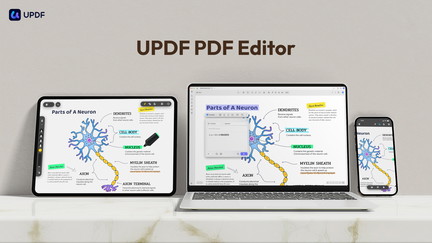
I’ve been using UPDF for a while and it’s one of those apps that quietly solves a lot of PDF headaches. It lets me edit text and images, annotate, convert with OCR, organize pages, add protection, and sign documents across Windows, macOS, iOS, and Android. On AppSumo the Individual Plan redeems for up to four devices (2 desktops + 2 mobiles), and the lifetime deal includes 2GB of UPDF Cloud Storage; the AI Assistant isn’t part of the AppSumo offer.
For everyday tasks I use it to mark invoices, add watermarks, and quickly convert PDFs to Word or images. For special occasions like contract reviews or travel paperwork, its page organization and signing tools save time.
At $59 on AppSumo, it feels like a practical buy if you want a single tool that covers most PDF needs without pulling together a bunch of smaller utilities.
Pros and Cons
|
Pros |
Cons |
|---|---|
|
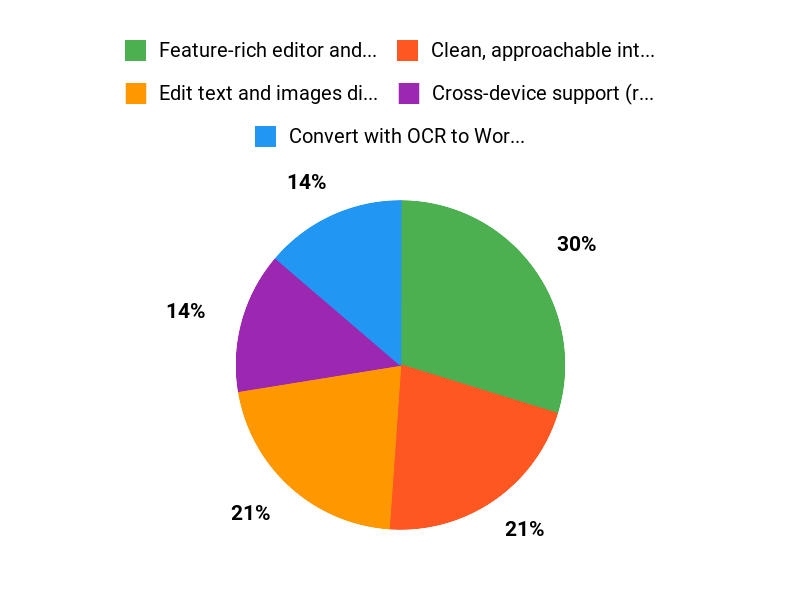
✅ Feature-rich editor and converter with OCR |
❌ One reported antivirus false positive during installation |
|
✅ Clean, approachable interface that feels fast |
❌ AI Assistant features are not included in the AppSumo lifetime deal |
|
✅ Cross-device support (redeem on 4 devices via AppSumo) |
❌ UPDF Cloud only includes 2GB with the AppSumo offer |
|
✅ Strong value at $59 compared with the original price |
What People Say
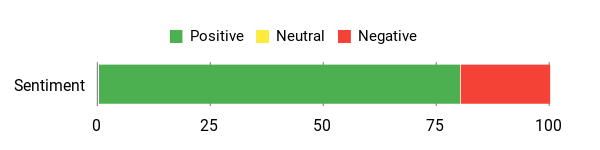
Reading UPDF reviews, most users mention the polished UI and how it replaces several tools they used before. People praise simple daily tasks like annotating, watermarking, and converting.
A handful raised concerns about an antivirus false positive during install, which the team said they’d address.
Overall Sentiment: Positive
🗣️ jerry684
Purchased UPDF and spent a day matching invoices and paying bills. I like being able to add notes and mark things paid with a big watermark before attaching PDFs to my files. After one day, this lifetime deal completely streamlined my processes.
🗣️ jenna_b
This is a really nice piece of software. It’s packed with features I’d been cobbling together elsewhere for years, the UI is polished and professional, and it causes no issues when I leave it open 24/7.
Cost Over Time
Buying the lifetime AppSumo deal at $59 avoids recurring subscription fees and can replace multiple single-purpose PDF tools, so over a couple of years it usually pays for itself.
Return On Investment
If you routinely convert, sign, or annotate PDFs, the one-time $59 purchase saves the hassle and cost of multiple subscriptions. Compared to the original $109.99 price, you get immediate savings and steady value.
Situational Benefits
|
Situation |
How It Helps |
|---|---|
|
Freelancers managing invoices |
Quickly add watermarks, annotate payment status, and convert receipts to editable formats for bookkeeping. |
|
Students or researchers |
Annotate readings, extract pages, and convert PDFs to text for notes and citations. |
|
Small business admin |
Organize batches of invoices, sign contracts, and produce clean exports for accounting. |
|
Travel or legal documents |
Combine, reorder, and add signatures to ensure all paperwork is digital and presentable. |
Ease Of Use
|
Feature |
Ease Level |
|---|---|
|
Editing Text & Images |
Easy |
|
OCR and Conversion |
Moderate |
|
Mobile/Desktop Sync |
Easy |
|
Organizing Pages |
Easy |
Usability
|
Aspect |
Ease Level |
Notes |
|---|---|---|
|
Desktop App |
Smooth |
Polished UI and stable during extended use |
|
Mobile App |
Convenient |
Useful for quick annotations and signing on the go |
|
Conversion Accuracy |
Good |
Formats generally preserved; OCR depends on source quality |
|
Learning Curve |
Low |
Most features are discoverable without heavy training |
Performance & Speed
Snappy for editing and small conversions; larger OCR jobs take longer depending on file size and complexity.
Integration
|
Software |
Integration Quality |
|---|---|
|
Windows |
Native desktop support |
|
macOS |
Native desktop support |
|
Google Drive |
Fair – supports sharing and basic links |
|
Dropbox |
Fair – works for file exchange |
Collaboration
You can share PDFs via link, leave annotations, and use comments or stamps. It’s not built for live, real-time co-editing, but annotations and shared links work fine for review workflows.
Key Benefits
- Edit text and images directly in PDFs
- Convert with OCR to Word, Excel, PowerPoint and more
- Cross-platform: Windows, macOS, iOS, Android
- Annotate, organize pages, and add watermarks or signatures
- Good value lifetime deal on AppSumo with 4-device redemption
Current Price: $59
Rating: 4.68 (total: 160+)
FAQ
Is UPDF Worth Buying On AppSumo?
I think UPDF is a solid value on AppSumo if you need a full-featured PDF editor without a subscription. The deal commonly shown is $59 compared with an original price of $109.99, it includes lifetime access for the Individual plan plus 2GB of UPDF cloud storage and the ability to redeem on up to 4 devices (this deal often supports 2 desktops + 2 mobiles).
I see many positive UPDF reviews praising the editor, conversion tools, OCR, and polished UI, but I also note that the AI Assistant is not included in the AppSumo offer. My tip is to double-check that the features you need (for example advanced AI chat or extra cloud) are included before you buy, and remember this is the Individual plan, not an Enterprise plan.
Is UPDF Safe To Install And Use?
I’ve read mixed UPDF reviews about installation because a few users have reported antivirus false positives. My approach is to download only from the official site or redeem through AppSumo, keep my antivirus definitions updated, and never disable protection.
If your scanner flags the installer, I recommend submitting the file to VirusTotal, contacting your antivirus vendor about a possible false positive, and reaching out to UPDF support for guidance rather than turning off real-time protection. In my experience, taking those steps avoids risk while resolving most detection issues.
How Do I Get The Most Out Of UPDF In Daily Use?
I use UPDF for editing, annotating, converting, OCRing scanned pages, organizing pages, and adding passwords; it handles most PDF tasks across Windows, macOS, iOS, and Android. My practical tips are to run OCR on high-resolution scans for best accuracy, save a copy before bulk conversions, use convert to Word/Excel/PPT when I need editable content, and apply watermarks or permission passwords when sharing sensitive files. If you plan to use multiple devices, remember the AppSumo redemption covers multiple devices so I keep my account signed in where needed.
Finally, if you require the AI Assistant or extra cloud, I check UPDF’s site for add-ons because those features are not always included in the AppSumo deal.
Why Choose UPDF
We choose UPDF because it combines powerful PDF editing—easy text and image edits, annotations, conversions and OCR—with a clean, intuitive interface that keeps our workflow fast and simple. It’s affordable and privacy-conscious, so we get professional results quickly while keeping our documents secure.
Wrapping Up
After testing UPDF and reading UPDF reviews, I find it to be a capable, user-friendly PDF editor that covers most day-to-day needs: text and image editing, annotations, solid conversion and OCR, plus multi-device access. The AppSumo offer at $59 provides strong value for individuals who want a lifetime Individual Plan redeemable on up to 4 devices, and it includes 2GB of UPDF cloud storage.
On the downside, there are isolated reports of antivirus false positives during installation; I recommend checking support guidance, verifying downloads from the official site, and proceeding cautiously if you see warnings. Overall, UPDF is worth considering if you want an affordable, cross-platform PDF editor and you understand this AppSumo plan is for individuals (not enterprise) and does not include the AI Assistant feature.
This Roundup is reader-supported. When you click through links we may earn a referral commission on qualifying purchases.