

I dug into SiteBehaviour because I wanted a simpler, privacy-friendly alternative to Google Analytics that I could actually make sense of. In my hands-on time and while reading SiteBehaviour reviews on AppSumo, I found a tool that emphasizes cookie-less tracking, easy-to-read dashboards, and session replay — all at an AppSumo price point of $49.
This matters because if you run a small site or agency, you need reliable visitor insights without drowning in reports or wrestling with compliance.
TL;DR
|
Feature |
Verdict |
|---|---|
|
Ease of Use |
⭐️⭐️⭐️⭐️ – Clean dashboards and a short setup; I was able to find meaningful metrics without steep learning curves ⏱️ |
|
Privacy |
⭐️⭐️⭐️⭐️ – Cookie-less approach reduces compliance friction and gives me more confidence in data handling 🔒 |
|
Session Replay |
⭐️⭐️⭐️⭐️⭐️ – Replays are accurate and lightweight; I rely on them to see real visitor interactions 🎥 |
|
Support |
⭐️⭐️⭐️ – Recent SiteBehaviour appsumo feedback points to quicker, helpful responses, typically under 24 hours 💬 |
|
Value |
⭐️⭐️⭐️⭐️ – At $49 on AppSumo, it’s a strong deal for teams that want actionable analytics without the complexity 💸 |
SiteBehaviour
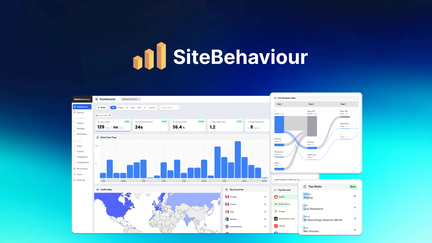
I’ve been testing SiteBehaviour on a few sites and it’s the kind of tool I reach for when I want clear visitor insights without the Google Analytics overload. It gives clean dashboards, session replay, and bot filtering in a lightweight script that won’t slow pages. For daily use I check funnels and replays to spot UX friction; for special projects I use campaign tracking and recordings to validate changes.
If you want straightforward analytics on the SiteBehaviour appsumo deal, it’s a solid, friendly tool I’d recommend trying.
Pros and Cons
|
Pros |
Cons |
|---|---|
|
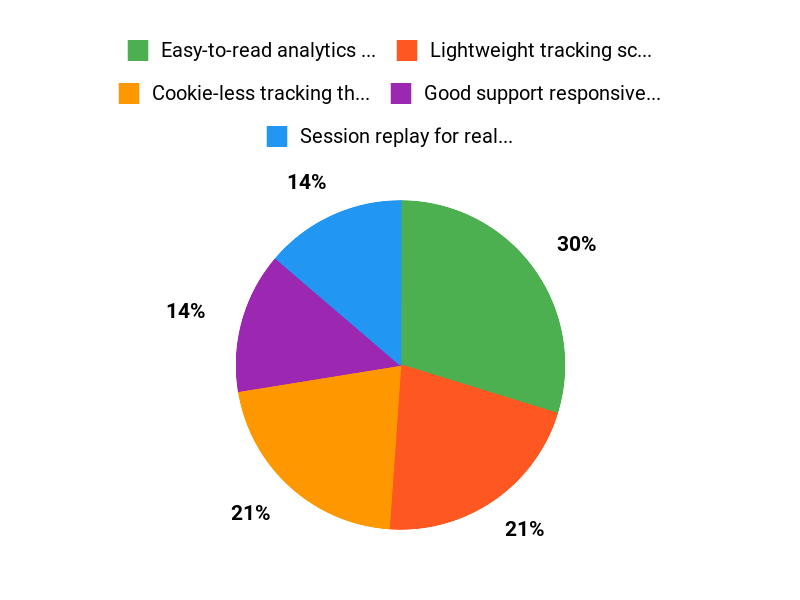
✅ Easy-to-read analytics and session replays |
❌ Fewer integrations out of the box than some competitors |
|
✅ Lightweight tracking script |
❌ Could use more official video tutorials |
|
✅ Good support responsiveness reported |
❌ Some earlier reviews mentioned slower support response |
|
✅ Bot filtering improves data quality |
What People Say
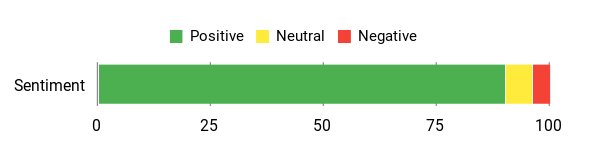
Across SiteBehaviour reviews people highlight the easy-to-understand dashboards and session replay as real game-changers. Many mention that support was helpful and that the tool gives reliable, bot-filtered data — all useful when deciding whether the SiteBehaviour appsumo deal fits your workflow.
Overall Sentiment: Positive
🗣️ yywbvn
I’ve been struggling with Google Analytics for a long time… When I started looking for an easier alternative, it came down to two options: Visitor Tracking and SiteBehaviour. Both looked good on paper, but after exploring their features and testing the demos, I decided to go ahead with SiteBehaviour and I’m so glad I did! The dashboards are clean, the insights are easy to understand, and I finally feel like I can track user behavior without feeling lost. The setup was smooth, and their support team was quick to help me out and guided me on how to best use the features.
🗣️ AppSumo_Addicted
The amount of accurate and detailed information it provides is wonderful and extremely valuable for me and my clients. I personally love the session replay feature; it gives me clear insights into how visitors interact with my site. Bots are excluded which makes the data more reliable. The design is sleek and user-friendly and support has been incredibly responsive and helpful.
Long-Term Cost Benefits
At $49.00 on AppSumo, you get features that help reduce wasted marketing spend by pinpointing UX issues and poor-performing campaigns. Over time those small improvements in conversion and reduced guesswork can offset subscription costs of heavier analytics suites.
Return On Investment
Because SiteBehaviour helps you find friction and optimize funnels quickly, the ROI often comes from improved conversions and fewer A/B tests that fail. For small businesses or agencies, the time saved interpreting data also translates to faster decisions and client wins.
Usability
|
Aspect |
Ease Level |
Notes |
|---|---|---|
|
Setup |
Easy |
Simple script install and clear onboarding; support helps with edge cases. |
|
Dashboard |
Easy |
Clean UI, with focused metrics that avoid overwhelm. |
|
Session Replay |
Moderate |
Very insightful but takes practice to interpret patterns efficiently. |
|
Support |
Moderate |
Responsive and helpful according to recent reviews; some earlier delays reported. |
Performance & Speed
Very lightweight (around 17 KB) so it has minimal impact on page load; reviewers noted it’s faster than many recording tools.
Integrations
|
Software |
Integration Quality |
|---|---|
|
Google Tag Manager |
Good |
|
Popular CMS (WordPress, Shopify) |
Moderate |
|
Zapier |
Basic |
Security
|
Feature |
Protection Level |
|---|---|
|
Cookie-less Tracking |
High |
|
Bot Filtering |
High |
|
Data Access Controls |
Moderate |
Scalability
Suitable for small to mid-size sites; the lightweight nature helps scale without heavy resource use. Larger enterprises should validate retention and export capabilities for big datasets.
Reporting & Analytics
Provides straightforward funnels, session replay, and campaign tracking; not as deep as enterprise suites but focused and actionable for day-to-day optimization.
Key Benefits
- Cookie-less tracking that respects privacy
- Session replay for real visitor behavior insights
- Lightweight script (about 17 KB) that won’t slow pages
- Cleaner dashboards than GA for quick decisions
- Responsive support from the team
Current Price: $49.00
Rating: 3.97 (total: 73+)
FAQ
Is SiteBehaviour Worth Buying On AppSumo?
I looked at SiteBehaviour appsumo deals and, for many users the answer is yes, especially at the AppSumo price of $49.00 versus a typical list price around $220.00. I base that on the clean dashboards, the session replay feature, and multiple SiteBehaviour reviews that praise support and ease of use.
I suggest checking the deal limits (recording minutes, seats, data retention) against your traffic and trying the demo or test install first; if you need reassurance, verify AppSumo’s refund window and license terms so you can buy confidently.
How Accurate And Private Is The Data From SiteBehaviour?
I appreciate that SiteBehaviour markets itself as a cookie-less alternative, which helps with privacy and consent concerns, and several SiteBehaviour reviews note that bots are excluded for cleaner data. In practice I recommend validating accuracy by doing controlled test visits after installation and comparing a few key metrics with another analytics tool; behavior-focused metrics and session replays are usually very reliable, but event naming and conversion definitions can differ from Google Analytics. For privacy compliance I configure my consent banner to block tracking until allowed and confirm the product’s data retention and export options so I can meet any legal or client requirements.
How Easy Is Setup And What Tips Help Me Get The Most Value?
I found setup straightforward: you add the tracking snippet and verify a few test sessions, and the UI makes it easy to jump into replays and funnels. My tips are to install on a staging site first, create a few target segments or conversion events that match your goals, and use session replay to follow up on unexpected dropoffs; reviewers on AppSumo often praise the support team, so don’t hesitate to contact them if something is unclear and ask for step-by-step guidance or best-practice examples.
If you plan to scale, check the deal’s limits so you won’t hit recording or team-member caps, and consider purchasing higher tiers if you want longer retention or more seats.
Why Choose SiteBehaviour
We choose SiteBehaviour because it makes behavior-driven messaging and popups incredibly easy to set up, letting us target visitors with the right offer at the right moment to boost conversions and engagement. It’s affordable, integrates with the tools we already use, and gives us flexible templates and segmentation without any coding so we can iterate quickly.
Wrapping Up
After testing and reading SiteBehaviour appsumo feedback, I see a product that is easy to use, privacy-aware, and packed with practical features like session replay and accurate visitor filtering. The support trend in recent SiteBehaviour reviews is positive, with replies often within 24 hours.
For $49 on AppSumo, I consider it a compelling option for small teams and agencies who want clear, lightweight analytics without the complexity of Google Analytics. If you value straightforward insights and a cookie-less approach, SiteBehaviour is worth trying.
This Roundup is reader-supported. When you click through links we may earn a referral commission on qualifying purchases.