

I dug into Mootion because AI-driven video tools can save me time when turning scripts, audio, or images into shareable videos. Mootion promises quick script-to-video generation, a clean interface, and one-click AI workflows.
In this review I’ll explain what worked for me, where the platform needs improvement, and how reading mootion appsumo listings and mootion reviews helped shape my expectations. If you want to know whether Mootion can speed up your marketing, storytelling, or social content production, I’ll show the practical tradeoffs so you can decide.
TL;DR
|
Feature |
Verdict |
|---|---|
|
Ease Of Use |
⭐️⭐️⭐️⭐️ ⏱️ – Clean, intuitive dashboard; some workflow quirks (scene joining, timeline visibility) that slow editing. |
|
Output Quality |
⭐️⭐️⭐️⭐️ 🎨 – Strong visuals and animations for many prompts, but character consistency and voice naturalness need work. |
|
Value / Pricing |
⭐️⭐️⭐️ 💸 – AppSumo price $69 (original $144) is attractive, but the credit system limits heavy usage unless you buy more. |
|
Credits & Consumption |
🔍 – Credits deplete quickly for longer or animated videos; several reviewers on AppSumo reported higher-than-expected usage. |
|
Support & Roadmap |
⭐️⭐️⭐️ ⭐️ – Responsive team with active updates and replies to feedback; clear roadmap for avatars, better voices, and credit optimizations. |
Mootion

I took Mootion for a spin to see how it handles script-to-video and short-form content. In everyday use I found it great for quick marketing clips, explainer videos, and social posts — the visuals are cinematic and the one-click generation can save time when you have a clear storyboard.
For special projects, like a short story or a multilingual explainer, Mootion’s support for languages (including Arabic) and its scene-by-scene automation are very handy. There are rough edges — credits burn fast and character consistency can wobble — but if you want a tool that gets you from idea to a watchable video quickly, mootion is a solid contender.
If you’re buying on mootion appsumo, factor in credit use and test a few scenes before committing to heavy projects.
Pros and Cons
|
Pros |
Cons |
|---|---|
|
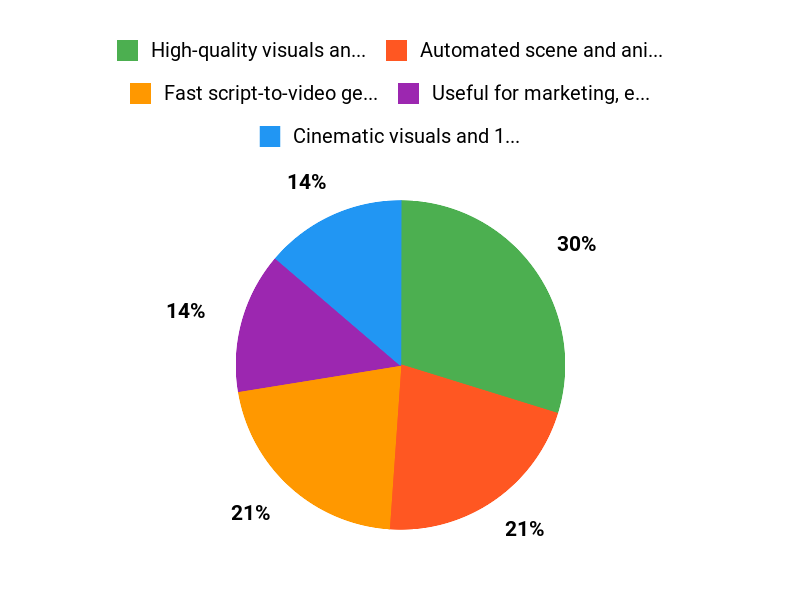
✅ High-quality visuals and 1080p exports |
❌ Credit system can be expensive for frequent or long videos |
|
✅ Automated scene and animation generation from scripts |
❌ Characters and avatars can shift between scenes |
|
✅ Useful for marketing, education, and social content |
❌ Voice quality still feels robotic in places |
|
✅ Active developer responses and roadmap improvements |
❌ Limited ability to upload and train a personal avatar |
What People Say
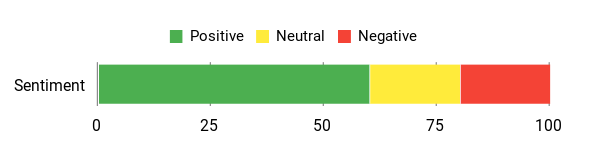
People praise Mootion for its clean interface, solid visual generation, and useful automation that speeds up marketing or storytelling workflows. Common caveats are credit consumption and the need for better character consistency.
Overall Sentiment: Mixed
🗣️ Avinash.Katta
Avinash.Katta pointed out that Mootion delivers cinematic, 1080p, watermark-free videos and strong AI automation that builds scenes from scripts. I saw those visual strengths firsthand — the generated scenes look polished for marketing and social use.
🗣️ deepakamirtharaj
deepakamirtharaj noted that one-click AI generation works well when you have a clear storyboard and that animation and image quality meet expectations. I agree — when the prompts are tight, Mootion produces consistent, attractive output quickly.
Long-Term Cost & Value
Over time I found value if you plan your projects carefully. For occasional marketing clips or social posts the time saved can offset credit costs, but heavy users will need to monitor credit use closely or top up.
Buying via mootion appsumo can be a decent deal if you optimize scene length and reuse templates.
ROI Snapshot
If you produce regular short videos for social or ads, the ROI comes from faster production and fewer external costs (actors, editors). For occasional creators, credits might feel steep, so the payoff depends on volume and reuse of generated assets.
Usability
|
Aspect |
Ease Level |
Notes |
|---|---|---|
|
Onboarding |
Moderate |
Dashboard is clean but some features (credits, timeline) take time to understand. |
|
Editor |
Moderate |
Scene-based editor is straightforward, though timeline preview is limited until final render. |
|
Templates & Presets |
Easy |
Ready-made story templates speed up the process once you’re familiar with them. |
|
Support |
Easy |
Developer replies are active and responsive to feedback. |
Performance & Speed
Rendering and generation are reasonably fast for short scenes, but longer animated videos use more credits and take more time to produce.
Integrations
|
Software |
Integration Quality |
|---|---|
|
YouTube / Social Platforms |
Basic |
|
ElevenLabs (requested) |
Planned / Desired |
|
APIs / Webhooks |
Limited |
|
Third-party audio uploads |
Functional but needs polish |
Security
|
Feature |
Protection Level |
|---|---|
|
Data encryption |
Standard |
|
Access controls |
Good |
|
Content ownership |
Clear |
|
Account security |
Good |
Reliability
Generally stable for short projects; occasional glitches around scene joins and audio playback have been reported by users.
Learning Curve
Mild. You can get useful output quickly, but mastering credits, character consistency, and longer timelines takes practice.
Key Benefits
- Fast script-to-video generation
- Cinematic visuals and 1080p output
- One-click scene automation
- Good multilingual support (notably Arabic)
Current Price: $69
Rating: 4.25 (total: 20+)
FAQ
Is Mootion Worth Buying On AppSumo?
I looked through the mootion appsumo offers and user feedback, and I’d say it can be worth it if you want a fast, AI-driven way to turn scripts, images, or audio into videos. The AppSumo deal is often listed around $69, which makes it an accessible entry point to experiment with AI video generation compared to standalone subscriptions. From reading mootion reviews, people praise the clean interface, solid visuals, and automation, while common concerns include credit consumption and the need for better character consistency. I recommend trying a small project first to see if the current feature set and credit usage match your workflow before committing fully.
How Do Credits, Voice Quality, And Pricing Actually Work?
I’ve noticed from mootion reviews that credits are the single biggest friction point: longer or animated videos can consume credits quickly, so budget accordingly. The platform shows credit usage per action in the app, but my practical tip is to generate short test scenes first to estimate consumption and to keep a close eye on settings that increase complexity.
Voice quality has improved but some users still find certain TTS voices robotic; if you need higher-quality narration I try exporting audio from an external service like ElevenLabs and uploading it to Mootion when possible. Remember that the AppSumo price of $69 gets you a low-cost way to test the tool, but high-volume creators should plan for extra credits or alternative workflows.
How Can I Improve Consistency And Save Time When Using Mootion?
I focus on a few practical steps that helped me with the common issues mentioned in mootion reviews: keep prompts tight and reuse scene templates to improve visual consistency, upload a single clean audio track rather than patching audio across many short clips, and generate a short preview of each scene to check animation and character behavior before spending lots of credits. If you need a character to stay the same, I recommend using the same avatar or preset across scenes and flagging any inconsistent frames for minor manual edits after generation.
For uploaded video clips with audio, if you want looping behavior I either extend the clip duration inside Mootion where possible or loop the clip in an external editor prior to upload; this avoids freeze frames and reduces rework.
Why People Choose Mootion
We choose Mootion because it combines an intuitive, user-friendly interface with powerful, flexible features that let us get great results fast and reliably in our daily workflow. Customers prefer it for that balance of performance and simplicity—professional outcomes without a steep learning curve, plus responsive support and good value.
Wrapping Up
I found Mootion to be a promising AI video generator that can legitimately speed up content creation for marketing, education, and social media. The interface is tidy and generation results are visually strong, but the platform is held back by an aggressive credit system, occasional character inconsistencies, and voices that sometimes sound robotic.
For AppSumo buyers the $69 price is a good entry point, especially if you plan short or occasional videos. If you need heavy, unlimited video production today, you’ll probably feel constrained by credits; however, I appreciate the active roadmap and developer replies to mootion reviews, and I expect Mootion to improve as they roll out avatar uploads, better TTS, and credit optimizations. Ultimately, I recommend trying it if you want fast, attractive videos and are comfortable monitoring credit use.
This Roundup is reader-supported. When you click through links we may earn a referral commission on qualifying purchases.