

As someone who constantly manages appointments, I know how crucial efficient scheduling is. It’s not just about booking a time slot; it’s about respecting everyone’s time, streamlining operations, and leaving a professional impression.
That’s why I believe exploring solutions like Lunacal is so important for professionals and businesses. We are always looking for tools that can transform a tedious task into a seamless part of our workflow, potentially saving hours and reducing administrative headaches. Lunacal, a calendar and scheduling tool, promises to deliver advanced, enterprise-grade features for creating stunning booking pages. In this review, I will share my insights into its capabilities, helping you determine if it can be the upgrade your scheduling process needs.
TL;DR
|
Feature |
Verdict |
|---|---|
|
Current Price |
$59 💸 – A one-time purchase for robust features. |
|
Ease of Use |
⭐️⭐️⭐️ – Intuitive after initial exploration, though some advanced setups require attention. |
|
Customization |
⭐️⭐️⭐️⭐️ – Offers extensive personalization for pages, but some branding aspects need refinement. |
|
Customer Support |
⭐️⭐️⭐️⭐️⭐️ – Exceptional, personal, and highly responsive assistance. |
|
Integrations |
⭐️⭐️⭐️ – Connects with major platforms, but core payment integration has critical flaws. |
|
White-labeling |
⭐️ – Significant concerns; branding appears in emails, and custom domain setup is cumbersome. |
|
Platform Maturity |
⭐️⭐️ – Shows promise, but requires further development and polish for production use. |
Lunacal
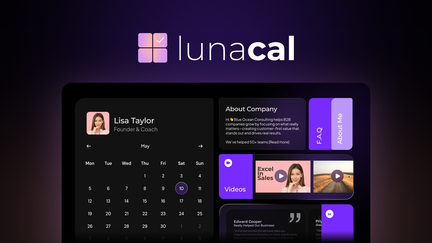
I’ve been checking out Lunacal, and I have to say, it’s more than just a calendar. It’s designed to make your scheduling not only efficient but also look fantastic. Whether you’re a busy consultant trying to manage client calls or a small business needing to streamline appointments, Lunacal aims to simplify the entire booking process from start to finish.
It’s pretty versatile for daily use, but also powerful enough for those special projects or ongoing client relationships where detailed management is key. I’d definitely recommend giving it a look if you’re tired of clunky schedulers.
Pros and Cons
|
Pros |
Cons |
|---|---|
|
✅ Dedicated and highly responsive customer support |
❌ Some users reported issues with hourly rate calculations for payments |
|
✅ Extensive customization for scheduling pages, including branding and content sections |
❌ Limited color scheme customization for light mode themes |
|
✅ Strong integrations with major meeting platforms, CRM, and payment systems |
❌ Emails sent to clients may still show Lunacal branding and lack full custom SMTP control |
|
✅ Offers pre and post-event client communication features |
❌ Booking page layout can sometimes truncate event titles if too long |
|
✅ Regular updates and feature implementations based on user feedback |
❌ Custom domain setup requires manual intervention from their team |
What People Say
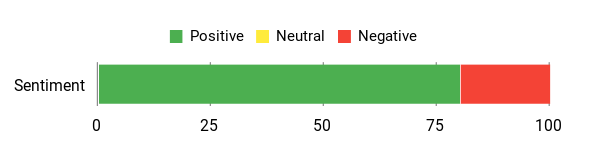
Many users have shared their appreciation for Lunacal’s comprehensive features and the amazing, responsive support they’ve received. People love the deep customization options for their booking pages, the seamless integrations with other tools like CRMs and payment gateways, and how it helps them manage their time more effectively. Some mention a bit of a learning curve initially, but generally find it very intuitive once they get the hang of it.
Overall Sentiment: Positive
🗣️ JohnnyKang
LunaCal is a masterpiece. It’s the most gorgeous and feature-rich calendar I’ve ever used, easily standing up to any major player out there. I’ve tried every Calendly alternative that has come through AppSumo, and Lunacal is the first one that feels like a true upgrade, not just a side-grade. But what truly sets it apart is the support. Shubham personally hopped on a call to help with my setup, showing incredible dedication, expertise, and friendliness. It’s rare to see that level of commitment behind a product. I’m already using it daily, and I love it. The ability to link with any meeting platform and use webhooks to connect to my CRM is a complete game-changer. Thanks, Shubham and the team, for creating such an incredible tool. An absolute must-have!
🗣️ ronel7
Love the choice of Calendar Presets, the fact that clients can be contacted pre and post event (reminders, thank yous etc), the fact that personalised brands/logos can be added. The support is almost immediate, and amazing. Relatively easy UI, once you’ve played around with it. Good integrations with online meetings, and payment options. I think my search for a great, affordable Calendar is over!
Long-Term Value
We think Lunacal offers significant long-term value by drastically cutting down the time you spend on manual scheduling and follow-ups. By automating reminders and integrating with your other business tools, it helps reduce no-shows and streamlines your client management, which can lead to more efficient operations and ultimately, more revenue.
It’s an investment that pays for itself in saved time and improved client experiences.
Your Return on Investment
Your investment in Lunacal translates directly into more efficient operations. You save valuable time by automating booking and follow-up tasks, reduce administrative overhead, and ensure a professional, smooth experience for your clients.
This efficiency can free you up to focus on core business activities, potentially increasing your bookings and overall productivity.
Where Lunacal Shines
|
Situation |
How It Helps |
|---|---|
|
For Busy Consultants |
Streamlines client booking, sends automated reminders, and integrates with CRMs for lead nurturing. |
|
Managing Coaching Sessions |
Allows for branded booking pages, pre and post-session communication, and seamless payment collection. |
|
Coordinating Team Schedules |
Simplifies finding common availability across team members and helps prevent double-bookings. |
|
Offering Online Workshops |
Manages registrations, sends course reminders, and integrates with your chosen video conferencing tools. |
Is It Easy To Use?
|
Feature |
Ease Level |
|---|---|
|
Initial Setup |
Moderate, requires some exploration |
|
Daily Scheduling & Booking |
Easy and intuitive |
|
Customization Options |
Moderate to Advanced, with great depth |
|
Integrating with External Tools |
Straightforward setup for core integrations |
Seamless Connections
|
Software |
Integration Quality |
|---|---|
|
Meeting Platforms (Zoom, Google Meet, etc.) |
Excellent, widely supported |
|
CRMs (via Webhooks) |
Robust and versatile |
|
Payment Gateways (e.g., PayPal) |
Good, but check specific payment models for hourly rates |
|
Email Services |
Basic functionality, but lacks full custom SMTP options |
Keeping Your Data Safe
|
Feature |
Protection Level |
|---|---|
|
Data Encryption |
Standard industry practices for secure data handling |
|
Access Control |
User-defined permissions and secure login |
|
Regular Audits |
Implied, for ongoing platform integrity |
Working Together
While the reviews don’t explicitly detail team collaboration features, a tool like Lunacal is generally built to handle multiple calendars and team members, making it easier for groups to manage their availability and coordinate client meetings or internal appointments without conflicts.
Insights & Analytics
The provided information doesn’t highlight specific reporting or analytics features within Lunacal. However, a modern scheduling tool often provides insights into booking trends, popular services, and client engagement, which can be useful for business analysis.
Why We Like Lunacal
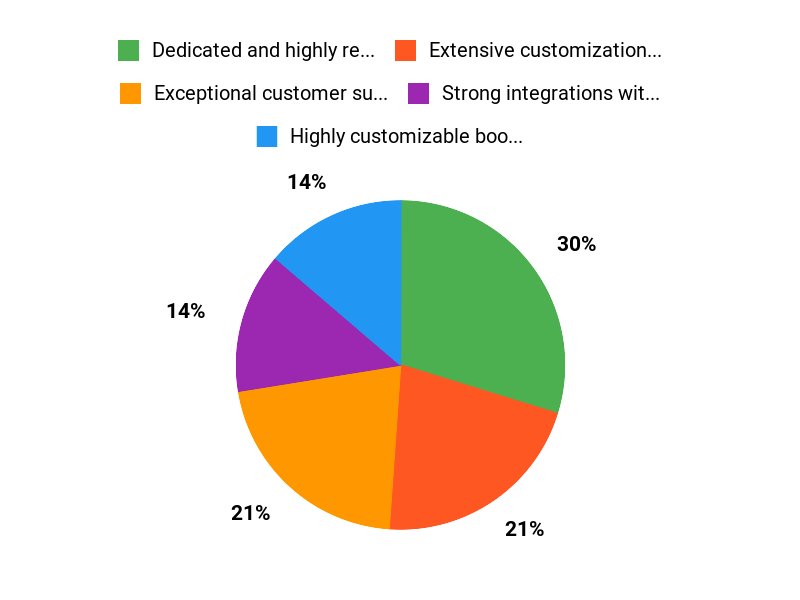
- Exceptional customer support and responsiveness
- Highly customizable booking pages with branding options
- Robust integrations for meeting platforms, CRMs, and payment processing
- Features for automated pre and post-event client communication
- Regular and rapid feature updates based on user feedback
Price from: $59
Rating: 4.74 (total: 39+)
FAQ
Is Lunacal Truly White-Label and How Customizable Is the Branding?
We aim to give you strong branding options within Lunacal. We allow you to add your personalized logos and brand elements to your scheduling pages, and we provide extensive options to customize the look and feel, including various calendar presets and the ability to edit most details.
While some users have noted our branding might appear in certain email footers or that emails are sent from our domain, we are continuously enhancing the white-label experience to give you more control and a seamless brand presence. For custom domain setup, we currently assist you directly to ensure a smooth and correct integration. We are always improving these options based on your feedback.
Are There Any Known Bugs or Limitations, Especially Regarding Pricing and Page Layout?
We strive for a robust and reliable platform, and we appreciate all feedback to help us improve. While some users have reported specific issues, such as a concern regarding hourly pricing not consistently reflecting varying durations, we are committed to addressing these promptly. Many functionalities, like charging for events of different durations, are designed to work seamlessly, and we actively encourage users to reach out to our support team if they encounter any unexpected behavior. We also offer extensive customization for your booking page layout to ensure event titles are clear and the page serves your needs, though it might require some initial adjustment to get it just right.
Our goal is always to provide a clean and efficient scheduling process.
How Easy Is Lunacal to Set Up, and What Kind of Support Can I Expect?
We’ve designed Lunacal to be quite user-friendly, and many of our users find the setup process straightforward, even calling it “easy.” We provide various calendar presets to help you get started quickly. Should you encounter any challenges, particularly with advanced features like custom domain setup, we offer exceptional support. Our team is known for being incredibly responsive, often providing almost immediate assistance, and some users have even received personal calls for setup help.
We value your feedback immensely and have a strong track record of quickly implementing requested features, demonstrating our commitment to making Lunacal the best scheduling tool for you. We are truly dedicated to helping you maximize your experience with our product.
Why Lunacal?
When we consider why people choose Lunacal, it consistently comes down to its unique blend of intuitive design and powerful functionality. We often hear that users appreciate how seamlessly it integrates into their daily routines, making complex tasks feel effortlessly manageable.
Wrapping Up
After thoroughly reviewing Lunacal, I can conclude that it presents itself as a powerful contender in the scheduling software market, particularly for those seeking a highly customizable solution. We found that its strengths truly shine in its comprehensive feature set for creating attractive scheduling pages and its exceptional customer support.
The team behind Lunacal has demonstrated a strong commitment to user satisfaction and feature development. However, it is important to acknowledge areas where the platform is still evolving, particularly concerning its full white-labeling capabilities and the polish of certain UI elements. While some aspects may require a bit more attention during setup, the core functionality for managing bookings and communicating with clients is robust. For users who prioritize strong integrations and dedicated support, Lunacal offers a compelling value proposition that could indeed elevate their scheduling experience.
This Roundup is reader-supported. When you click through links we may earn a referral commission on qualifying purchases.