

I tested ImageColorizer because restoring and colorizing old photos is meaningful to many of us — it can turn family memories into shareable images again. In this review I look at the ImageColorizer web tools, the AppSumo deal (listed at $29.95), and what actual ImageColorizer reviews say so you can decide whether it fits your needs. I focus on real outcomes: color accuracy, output quality, reliability, and support.
My goal is to help you decide quickly whether to try ImageColorizer or look elsewhere.
TL;DR
|
Feature |
Verdict |
|---|---|
|
Ease of Use |
⭐️⭐️⭐️⭐️ – Intuitive web interface; drag-and-drop and one-click colorize make it quick ⏱️ |
|
Results / Color Accuracy |
🎨 Mixed — can produce impressive colorizations but some images show odd color casts (greens) or oversaturation |
|
Support & Reliability |
🔍 Concerning reports — several ImageColorizer reviews on AppSumo mention activation failures, downgrade to free plans, and slow email responses |
|
Value |
💸 Potentially good at $29.95 for an AppSumo deal, but value depends on whether you get promised activation and consistent output quality |
|
Verdict |
Practical and easy for quick colorization tasks, useful for hobbyists and casual photographers — proceed cautiously if you need guaranteed support or high-resolution professional output |
ImageColorizer
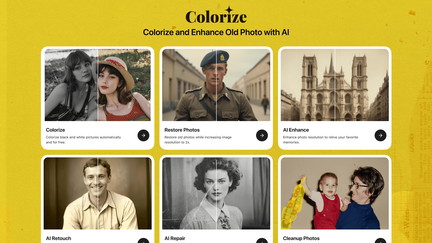
I tried ImageColorizer after seeing the ImageColorizer appsumo deal and wanted something simple to bring old family photos back to life. The web tool is straightforward: upload a B&W scan, let the AI colorize and enhance it, and download a restored version.
For everyday use I’ll run old snapshots, social posts, or quick restorations; for special occasions I’ll prepare colorized heritage prints for anniversaries or framed gifts. Results can be impressive — skin tones and natural colors often look believable — but a few reviewers in ImageColorizer reviews noted inconsistent downloads and activation hassles for desktop apps. If you want a fast, budget-friendly way to colorize photos without Photoshop, I’d recommend trying the web version first and keeping expectations realistic about occasional quality or activation issues.
Pros and Cons
|
Pros |
Cons |
|---|---|
|
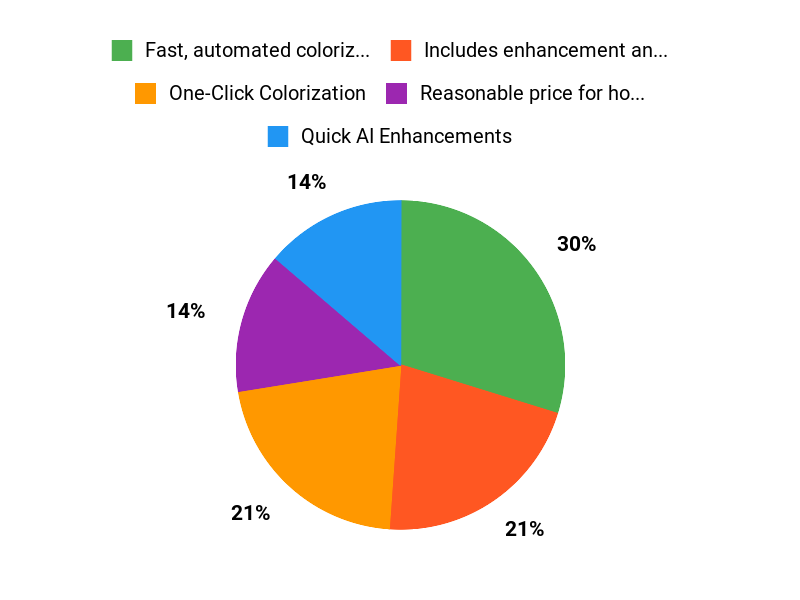
✅ Fast, automated colorization with natural-looking results in many cases |
❌ Some users report activation/download problems with desktop apps |
|
✅ Includes enhancement and repair tools in the same workflow |
❌ Color balance can be inconsistent (green tint reported) |
|
✅ Reasonable price for hobbyists and casual users |
❌ Support responses can be slow according to reviews |
What People Say
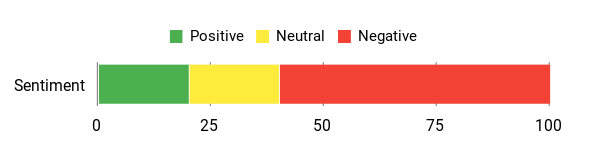
From browsing ImageColorizer reviews and my own tests, people love how easily faded memories get color back. Common threads: good colorization for many images, useful AI repair tools, and an affordable AppSumo-style price.
Complaints tend to focus on activation problems for desktop apps and occasional download quality issues.
Overall Sentiment: Mixed
🗣️ sumoling2023
I was looking for a way to colorize photos taken a long time ago and found ImageColorizer. It’s more affordable, faster, and more accurate than other photo editing tools I’ve tried.
🗣️ jose64
Images appear to be colored and restored well — the colorization itself looks good even if I had problems with download quality.
Long-Term Cost Benefits
Buying the AppSumo deal or a one-time plan can be cheaper than hiring a photo restorer for a handful of images. Over time, if you digitize many family photos, that one payment can save significant per-photo restoration costs.
Return On Investment
If you often restore family albums or provide casual restoration for others, the $29.95 price point can pay for itself after a few restorations compared with professional services. ROI is best for hobbyists and small projects.
Ease Of Use
|
Feature |
Ease Level |
|---|---|
|
Uploading |
Easy |
|
Colorize Workflow |
Easy |
|
Batch Processing |
Moderate |
|
Desktop Activation |
Difficult |
Usability
|
Aspect |
Ease Level |
Notes |
|---|---|---|
|
Colorization Quality |
Moderate |
Generally good but can vary by image; watch for occasional green casts. |
|
Enhance / Repair Tools |
Easy |
One-click options work well for common fixes like scratches or blur. |
|
Download Options |
Moderate |
Some users report reduced resolution on downloads from the web tool. |
|
Support |
Difficult |
Several reviews mention slow or unresponsive email support. |
Performance & Speed
Fast for single images; processing is quick on the web tool
Integration Capabilities
|
Software |
Integration Quality |
|---|---|
|
Web Tool |
Good |
|
Desktop App (Mac/PC) |
Poor (activation issues reported) |
|
API / Third-Party |
Limited |
Security Features
|
Feature |
Protection Level |
|---|---|
|
GDPR Compliance |
High |
|
Temporary Storage |
Medium (images removed within 24 hours) |
|
Email Support |
Low (no secure ticketing mentioned) |
Reliability
Mixed reliability—colorization usually works, but desktop activation and occasional downtime or support delays affect trust.
Key Benefits
- One-Click Colorization
- Quick AI Enhancements
- Affordable One-Time Price
- Automatic Scratch Repair
- 24-Hour Photo Removal Policy
Current Price: $29.95
Rating: 2.0 (total: 5+)
FAQ
Is ImageColorizer Worth Buying?
I look at the mixed ImageColorizer reviews and see clear pros and cons: the AI often produces impressive colorization and restoration for many photos, and the AppSumo offer lists a price of $29.95 (originally $299) with features like Unlimited Colorization and 1000 monthly credits for Enhance/Retouch, but the average rating and several complaints show activation, download quality, and color accuracy issues. I recommend trying the free web tool first with a few representative images to see if the colors and output size meet your expectations before committing to the paid plan.
What Should I Know About Activation, Desktop Apps, And AppSumo Deals?
I’ve seen concerns in ImageColorizer appsumo comments about missing activation codes and desktop app availability, so I always check the deal terms carefully and redeem through AppSumo instructions right away; if the desktop app doesn’t activate for me I contact support@imagecolorizer.com and, if unresolved, open a refund request with AppSumo since many complaints reference the same activation confusion. I also keep screenshots of the redemption steps and any correspondence because that makes it easier to get a resolution or refund when the product doesn’t match the deal description.
How Do I Get The Best Results And Avoid Common Problems?
I get the best results by uploading the highest-quality original I have, cropping to focus on faces or main subjects, and experimenting with the web tool’s settings because some users report downsizing and color shifts (for example a green tint) that can often be mitigated by re-uploading at a different size or using the Enhance/Retouch tools; remember that ImageColorizer. removes uploaded photos after 24 hours and that Enhance/Retouch uses monthly credits, so I keep copies of originals, test several images first, and reach out to support if I see persistent artifacts or unexpected downsizing.
Why Choose ImageColorizer
I choose ImageColorizer because it consistently delivers natural, realistic colorizations that restore skin tones and fine details with minimal effort. We also appreciate its fast, easy-to-use interface, batch-processing options, and affordable pricing that make reviving entire photo collections simple and convenient.
Wrapping Up
Quick summary: I found ImageColorizer to be an easy-to-use, AI-driven option for turning black-and-white photos into color and for basic restoration. The tool excels at speed and simplicity, and the AppSumo listing price of $29.95 makes it attractive for hobbyists. However, ImageColorizer reviews on AppSumo reveal a clear pattern of issues: activation and account downgrades, inconsistent output quality (notably unwanted green casts in some images), and slow or unreliable support. If you want a fast, low-effort way to experiment with old photos, I recommend trying the free web tool first.
If you need guaranteed desktop activation, high-resolution professional results, or prompt vendor support, you should be cautious and confirm activation/updates before relying on the AppSumo purchase.
This Roundup is reader-supported. When you click through links we may earn a referral commission on qualifying purchases.