

Chaos Control review: I tested Chaos Control because I wanted a practical way to turn scattered tasks and goals into a calm, predictable workflow. If you’re juggling projects, daily routines, and long-term goals, this app can help you stay on track without adding complexity.
In this review I explain how Chaos Control works, why it matters for people who want to get more done with less friction, and how the AppSumo offering stacks up against competing tools. I’ll also show how the $99 lifetime-style license on AppSumo makes the app a compelling value for entrepreneurs and solopreneurs.
TL;DR
|
Feature |
Verdict |
|---|---|
|
Ease of Use |
⭐️⭐️⭐️⭐️⭐️ ⏱️ – Very intuitive hierarchy (Areas → Goals → Tasks). I set up daily plans quickly and the Chaos Box simplifies capture. |
|
Features & Flexibility |
⭐️⭐️⭐️⭐️ ⭐️🎨 – Strong GTD-based tools, contexts, recurring tasks and Time Tracking. Plenty of depth without being overwhelming once you customize views. |
|
Cross-Platform Sync |
⭐️⭐️⭐️⭐️ 🔍 – iOS, Android, Windows and Mac sync well. Desktop has minor quirks but the workflow remains reliable. |
|
Value (AppSumo) |
⭐️⭐️⭐️⭐️ 💸 – $99 AppSumo access (original $297) offers long-term value and free personal-use updates for AppSumo customers. |
Chaos Control
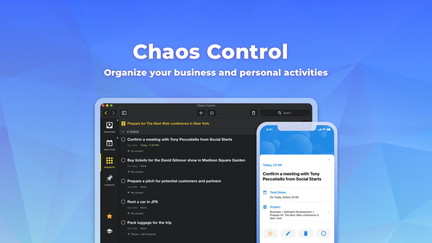
I’ve been using Chaos Control for weeks and it really lives up to the hype I saw in many Chaos Control review posts. The app centers around a clean Areas → Goals → Tasks hierarchy, a simple Chaos Box inbox for quick captures, and daily planning tools that make it easy to turn a messy to-do list into a realistic day.
I use it for daily routines, subscription reminders, and larger projects — it handles both small errands and multi-step goals. On AppSumo the Chaos Control appsumo offer felt like a great value because it includes updates and cross-platform sync for iOS, Android, Windows and Mac.
It’s not flashy, but it’s thoughtfully designed: contexts, repeating tasks, and time-tracking features are genuinely useful. If you want a personal productivity tool that grows with you (and doesn’t get in the way), this is one I recommend trying.
Pros and Cons
|
Pros |
Cons |
|---|---|
|
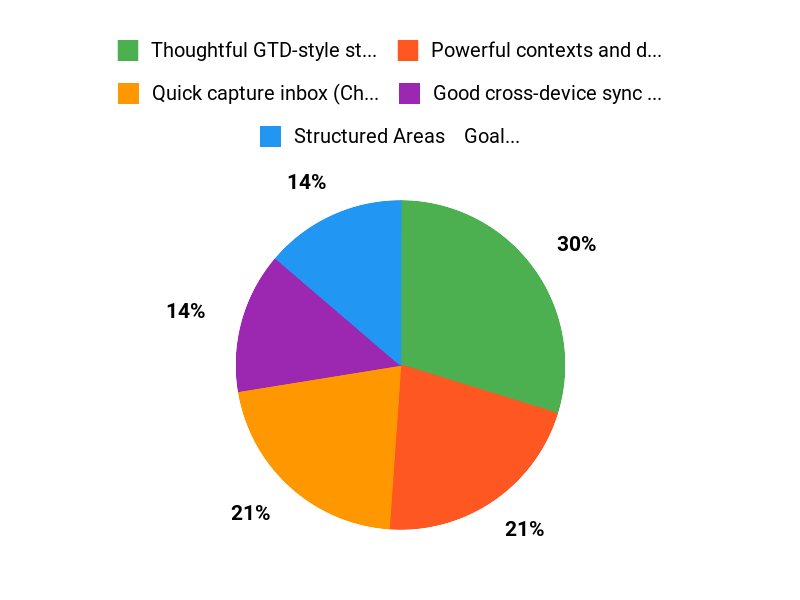
✅ Thoughtful GTD-style structure that stays simple to use |
❌ Limited team/collaboration features — built more for individuals |
|
✅ Powerful contexts and daily planning features |
❌ Desktop app has a few small rough edges |
|
✅ Good cross-device sync and responsive support |
❌ Some users may find settings/options overwhelming at first |
|
✅ Great one-person productivity tool, especially for ADHD or habit work |
What People Say
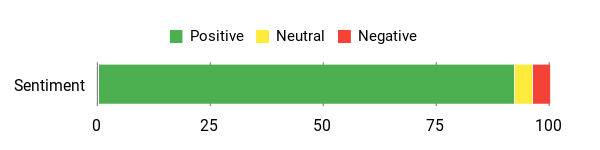
From multiple Chaos Control review entries and my own time with the app, people say it tames scattered tasks, offers a practical Chaos Box, and makes daily planning simple.
Overall Sentiment: Positive
🗣️ nadia347
Chaos Control 2 nails the fundamentals and then some. Its intuitive Areas → Goals → Tasks hierarchy ensures nothing slips through the cracks, while due dates, reminders, and recurring schedules are a breeze to set up. The Chaos Box is where the magic happens: dump every stray thought and address it when you’re ready. I use it to manage personal goals, business projects, subscription renewals, and even daily household routines. The support team is very responsive and has made a stunning product to rival other task management and calendar apps.
🗣️ Tibor
This tool has become my most important app for organizing tasks. I love the Chaos Box for quick captures, Contexts to tag tasks by work type or people, Daily Planning for a clear action list, and Time Tracking to log activities. I use both desktop and iOS; desktop has a few minor issues but the core features are intuitive and powerful.
Long-Term Cost Benefits
I see this as more of an investment in time savings than tech. At the AppSumo price you get ongoing updates and cross-platform sync, so you avoid subscription churn. Over months, better planning and fewer missed tasks pay back the cost by reducing stress and wasted time.
Return On Investment
If Chaos Control helps you recover even 30–60 minutes a week by reducing context switching and forgotten tasks, that time adds up quickly. For many users the upfront $99 cost is covered within a few weeks of regained productivity and less mental overhead.
Situational Benefits
|
Situation |
How It Helps |
|---|---|
|
Daily Routines |
Use Daily Plan and repeating tasks to build reliable morning/evening routines and reduce decision fatigue. |
|
ADHD or Distractible Minds |
Chaos Box captures stray ideas fast and the Areas→Goals→Tasks structure keeps focus on one small next action. |
|
Small Business Projects |
Projects, contexts and categories let you link tasks to clients, deadlines and deliverables without bloating the workspace. |
|
Time Tracking & Productivity Experiments |
Built-in time tracking makes it easy to log work and follow productivity frameworks like Buy Back Your Time. |
Ease Of Use
|
Feature |
Ease Level |
|---|---|
|
Chaos Box (Inbox) |
Easy |
|
Setting Up Areas/Goals/Tasks |
Moderate |
|
Mobile App |
Easy |
|
Advanced Features (Contexts, Time Tracking) |
Moderate |
Usability
|
Aspect |
Ease Level |
Notes |
|---|---|---|
|
Onboarding |
Moderate |
Takes a few minutes to understand Areas→Goals→Tasks, but sample templates and the Chaos Box help. |
|
Customization |
Easy |
Contexts, folders and repeating rules are flexible and simple to apply. |
|
Learning Curve |
Moderate |
Power users can dig deeper, but casual users can keep a minimal view. |
|
Cross-Device Sync |
Good |
Sync is reliable between iOS, Android and desktop. |
Performance & Speed
Generally snappy on mobile and acceptable on desktop. A few reviewers noted minor desktop glitches, but nothing that prevented daily use.
Integration Capabilities
|
Software |
Integration Quality |
|---|---|
|
iOS App |
Excellent |
|
Android App |
Excellent |
|
Google Calendar (Sync/Export) |
Good |
|
PDF/CSV Export |
Good |
Collaboration
Chaos Control is aimed primarily at individual productivity. It has limited collaboration features, so teams that need shared project work may find it lacking compared with full team tools.
Key Benefits
- Quick capture inbox (Chaos Box) to clear your head
- Structured Areas → Goals → Tasks hierarchy for long-term planning
- Cross-platform sync (iOS, Android, Windows, Mac)
- Flexible recurring tasks and daily planning
- Works well for ADHD-friendly workflows and routines
Current Price: $99.00
Rating: 4.81 (total: 42+)
FAQ
Is Chaos Control Right For Me?
In this Chaos Control review I found the app works well for a wide range of people, from entrepreneur-curious users and solopreneurs to anyone who wants a better GTD-style system for home or work. I like that the structure of Areas → Goals → Tasks and the Chaos Box makes it easy to capture random ideas and then process them into actionable tasks.
If you struggle with overwhelm, mild ADHD, or managing multiple projects, Chaos Control can help you get clarity. I should mention that the community reviews rate it highly and many users praise its Daily Plan, Contexts, and recurring task features, so it’s not just for business use—personal routines and habit tracking fit nicely too.
What Should I Consider Before Buying Chaos Control?
When I looked at the purchasing options I considered price, platform support, and long-term value. The AppSumo deal lists Chaos Control for $99 with 3 licenses and promises free personal-use updates for AppSumo customers versus the original price of $297. I also checked that it syncs across iOS, Android, Windows, and Mac, which matters if you use multiple devices.
Keep in mind some reviewers mention minor desktop quirks, but overall the product is highly rated and the devs are responsive. If you need team-level features beyond 3 licenses, confirm that with the vendor, and if privacy or offline requirements are critical, ask about data handling before you buy. For many of us the AppSumo offer makes it a strong value proposition compared to alternatives.
How Do I Get The Most Out Of Chaos Control Day-To-Day?
I found a few practical habits that make Chaos Control really useful: start by dumping everything into the Chaos Box and then schedule processing time so ideas become tasks or projects; use Daily Plan each morning to focus only on what matters; create Contexts to filter tasks by location, people, or type of work; and set up recurring tasks for routines. If the app feels overwhelming, hide less-used fields until you have a simple daily list, as some users reported doing. Try the Time Tracking feature if you want to measure where your time goes, and export important lists to PDF when you need printable or shareable plans. I also recommend starting small—migrate one area of your life first so the system grows with you instead of feeling like another chore.
Why Choose Chaos Control
We choose Chaos Control because it pairs an intuitive interface with flexible tools for organizing tasks, setting priorities, and tracking goals so staying focused feels simple rather than stressful. Customers also appreciate its customizable templates, cross-device sync, and project- and habit-focused features that help us tame overwhelm and actually get things done.
Wrapping Up
My verdict: I recommend Chaos Control for people who want a thoughtful, GTD-aligned planner that stays out of your way while giving you strong organizing power. The core Areas → Goals → Tasks structure and Chaos Box capture model make it easy to convert scattered ideas into actionable plans. With cross-device sync, time tracking, contexts and a flexible Daily Plan, it covers everything I personally need to run both personal and small-business workflows.
At $99 via AppSumo, you get multiple licenses, ongoing personal-use updates, and a strong set of export and syncing tools — a combination that makes Chaos Control a practical, long-term pick for entrepreneurs and solopreneurs who want to tame their task chaos.
This Roundup is reader-supported. When you click through links we may earn a referral commission on qualifying purchases.