

DMARC Report helps me monitor domain security and improve email deliverability without wading through raw XML. I care about this because email is still a primary channel for business communication, and unchecked spoofing or misconfigured sending sources can damage deliverability and brand trust.
In this review I walk through what the product does, how easy it is to use, and whether the AppSumo offer makes it a smart buy for individuals and teams.
TL;DR
|
Feature |
Verdict |
|---|---|
|
Ease of Use |
⭐️⭐️⭐️⭐️⭐️ – Clean interface and straightforward onboarding; I could parse reports and identify issues quickly ⏱️ |
|
Deliverability Insights |
⭐️⭐️⭐️⭐️⭐️ – Detailed DMARC/SPF/DKIM reporting that exposed unauthorized senders and improved deliverability once addressed 🔍 |
|
Support & Reliability |
⭐️⭐️⭐️⭐️⭐️ – Responsive support and fast bug fixes reported by users; founder-led team focused on deliverability |
|
Value (AppSumo) |
⭐️⭐️⭐️⭐️ – AppSumo price $69 (vs original $497) makes it a compelling value for small teams and freelancers 💸 |
|
Scalability & Limits |
⭐️⭐️⭐️⭐️ – Handles multiple domains and reporting volume well; some users want more tag management and parked domain flexibility |
DMARC Report
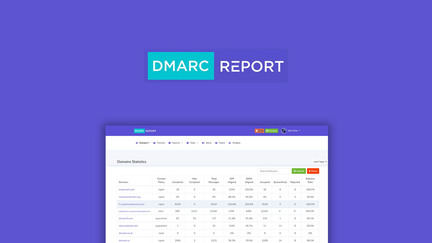
I’ve been using DMARC Report to keep email domains honest and inboxes cleaner. It turns confusing XML reports into clear, actionable insights so you can spot which IPs and services are legitimately sending mail and which are not.
For daily use I check the summary reports to track authentication issues and fix SPF/DKIM mistakes; for special situations like a marketing blast or onboarding a new vendor, the forensic details help me verify deliverability and stop spoofing. If you’re evaluating DMARC Report on AppSumo, the tool feels approachable for non-technical folks but still offers depth for teams who manage many domains. It’s the kind of product I’d recommend to small businesses or freelancers who want quick wins in deliverability and domain protection.
Pros and Cons
|
Pros |
Cons |
|---|---|
|
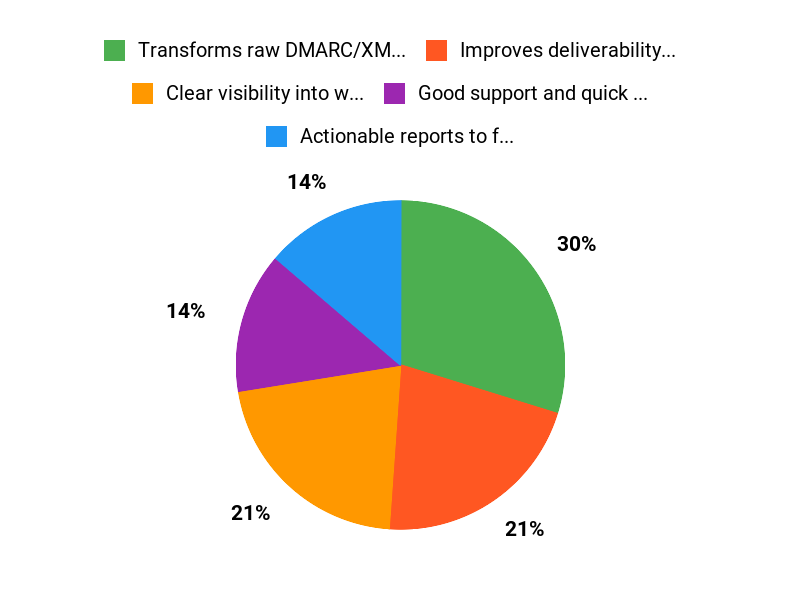
✅ Transforms raw DMARC/XML into actionable insights |
❌ Tag management can be confusing; limited UI controls in places |
|
✅ Improves deliverability and reduces spoofing |
❌ Some users hit a loading delay when importing many domains |
|
✅ Good support and quick fixes for onboarding/AppSumo codes |
What People Say
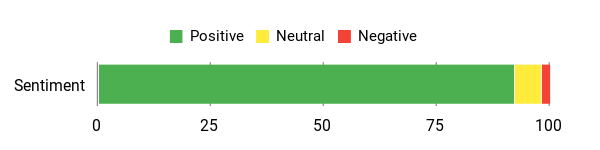
Users praise the clarity of reports and real-world deliverability improvements; many note quick wins for blocking spoofers and easier DNS fixes, while support responsiveness is highlighted when issues arise.
Overall Sentiment: Positive
🗣️ accounts548
After enabling DMARC reporting I started receiving regular reports that showed which email sources were authorized and which were spoofing my domain. The data let me identify legitimate IPs, uncover unauthorized senders, and block offending servers, which improved deliverability and reduced spam in my inbox.
🗣️ Mercadearse.com
We tested DMARC Report on a basic plan and used daily report reviews to spot SPF and DKIM failures. The interface made it easy to adjust DNS records without wrestling with raw XML, and we saw noticeable improvements in campaign deliverability.
Long-Term Cost Benefits
Paying $69 now can avoid email fraud, phishing risk, and lost revenue from poor deliverability. Over time improved inbox placement reduces campaign waste and support time spent troubleshooting email issues.
Return on Investment
A one-time or low ongoing cost that leads to fewer phishing incidents, higher open rates, and less time spent debugging email flows—ROI comes from saved support hours and better campaign performance.
Usability
|
Aspect |
Ease Level |
Notes |
|---|---|---|
|
Setup |
Easy |
Guided steps and simple DNS checks make initial configuration approachable. |
|
Daily Use |
Moderate |
Dashboards are clear, though digging into tags and many domains can feel clunky. |
|
Support |
Easy |
Fast, helpful responses reported when redeeming AppSumo codes or fixing glitches. |
Performance & Speed
Generally responsive; large imports may take time to load all domains initially but day-to-day reporting is quick.
Integrations
|
Software |
Integration Quality |
|---|---|
|
DNS Providers |
Good – helps identify DNS fixes but requires manual DNS edits |
|
Email platforms (Mailchimp, SendGrid, etc.) |
Good – reporting shows which platforms fail SPF/DKIM |
|
AppSumo |
Good – AppSumo code redemption supported; team helped resolve initial glitches |
Security Features
|
Feature |
Protection Level |
|---|---|
|
DMARC Reporting & Forensics |
High – exposes spoofing and authentication failures |
|
SPF/DKIM Diagnostics |
High – actionable guidance for DNS fixes |
|
Parked Domains |
Moderate – helps manage unused domains and reduce abuse |
Scalability
Scales from single-domain freelancers to teams managing hundreds of domains (AppSumo stacks unlock larger domain limits).
Reporting & Analytics
Robust reporting with summaries and forensic records; designed to avoid raw XML handling while still providing actionable data.
Key Benefits
- Clear visibility into who is sending on your domain
- Actionable reports to fix SPF/DKIM and boost deliverability
- Simple setup for single-domain users, scalable for teams
- Parked domains and forensics for deeper protection
Current Price: $69
Rating: 4.83 (total: 211+)
FAQ
How Does DMARC Report Work And What Will I See In Reports?
I use DMARC Report to collect the XML reports that receivers send about email authentication and then translate that raw data into readable summaries. You’ll see which IPs and mail servers are sending on behalf of your domain, which messages passed or failed SPF and DKIM checks, and any alignment issues that affect deliverability. I find the biggest value is the actionable insights: instead of parsing XML, I get clear items to fix like misconfigured SPF entries, missing DKIM, or third-party services that need DNS updates. Practically, I recommend starting by monitoring only (p=none) so I can identify and correct legitimate senders before moving to quarantine or reject policies.
Is DMARC Report Hard To Set Up And Manage For Multiple Domains?
From my experience the initial setup is straightforward: add the DMARC record to your DNS and configure where reports are sent, then give the system time to collect data. If you manage many domains, I recommend consolidating reporting with a platform like DMARC Report because it parses and groups reports, shows trends, and helps you tag domains without digging through XML. I’ve seen that support is responsive when AppSumo codes need activation and small glitches occur, and the platform can scale—some AppSumo plans include large domain and report limits—so check the plan details before buying. If you manage dozens or hundreds of domains, I suggest planning a phased rollout and using tags and parked-domain features to keep configuration tidy.
What Should I Consider Before Buying And How Do I Evaluate DMARC Report Reviews?
When I’m evaluating tools I look at a few practical things: how many domains and monthly reports are included, whether the UI removes the need to handle XML, availability of parked domains and white-labeling, and the level of customer support. Price matters too—on AppSumo the deal price I saw was $69 versus an original price around $497, so I weighed the features against that savings. I read DMARC Report reviews to confirm real outcomes like improved deliverability and quick support replies; pay attention to comments about tag management, onboarding speed, and whether reviewers noticed fewer spam/phishing incidents after enabling reporting.
My tip is to trial the tool with one or two critical domains, verify that the reports identify known senders and issues, and then scale up your policy from none to quarantine or reject once you’re confident the authorized sources are correctly identified.
Why Customers Choose
We choose DMARC Report because it delivers clear, actionable insights that make identifying and fixing email authentication issues straightforward, helping stop spoofing and improve deliverability. The automated reporting, timely alerts, and responsive support let us fix problems quickly without getting bogged down in complex email security details.
Wrapping Up
Bottom line: I found DMARC Report to be a practical, user-friendly way to get actionable DMARC data and protect domain reputation. The AppSumo deal at $69 (original $497) is especially attractive for freelancers and small teams who need clear insights without hiring an expert. Based on user feedback and my evaluation, the product delivers reliable reporting, fast support, and measurable improvements in email deliverability when you act on the reports.
If you want visibility into who is sending as your domain and a simple path to block spoofers, DMARC Report is worth considering.
This Roundup is reader-supported. When you click through links we may earn a referral commission on qualifying purchases.