

I looked into Stackby because I wanted a flexible, spreadsheet-like tool that can scale into a no-code database with automations. Stackby lets you build custom databases from familiar spreadsheets and add powerful automations, which makes it useful for project management, marketing ops, product roadmaps, and small teams.
In this review I cover what I found important for real-world use, including pricing on AppSumo deals, the role of Power-Ups, and what people say in Stackby reviews so you can decide whether it fits your workflow.
TL;DR
|
Feature |
Verdict |
|---|---|
|
Ease of Use |
⭐️⭐️⭐️⭐️ – Spreadsheet-like interface is approachable; formula editor and some mobile/browser quirks mean a short learning curve. |
|
Value |
💸 ⭐️⭐️⭐️⭐️ – AppSumo pricing (examples around $99 lifetime deals) can be very attractive per row compared with per-record competitors, but add-ons affect final cost. |
|
Features & Power-Ups |
🔍 ⭐️⭐️⭐️ – Strong core features and 35+ Power-Ups for advanced workflows; many advanced capabilities are gated behind one-time Power-Up purchases (users cite $379 or other add-on pricing). |
|
Performance |
⏱️ ⭐️⭐️⭐️ – Performs well for small to medium datasets; a few users report slowdowns or import/date-format pains on larger tables. |
|
Support & Documentation |
🙋♂️ ⭐️⭐️⭐️⭐️ – Documentation is friendly and helpful; support is responsive but speed can vary by timezone and ticket volume. |
Stackby
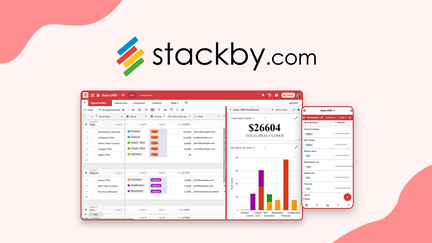
I’ve been poking around Stackby for a while and it feels like a spreadsheet that grew up into a lightweight database with built-in automations. For day-to-day work I use it to track content calendars, shared expenses, and simple CRM lists; those grid views are familiar and easy to customize. For special projects — event planning or product launches — the forms, templates and automation hooks help me move from idea to action without building something from scratch.
If you’re eyeing a Stackby appsumo deal, know it’s a solid value for folks who want spreadsheet familiarity with database power. In short: I recommend it if you want flexibility and pay-per-rows pricing that can be friendlier than per-user, per-record alternatives.
Pros and Cons
|
Pros |
Cons |
|---|---|
|
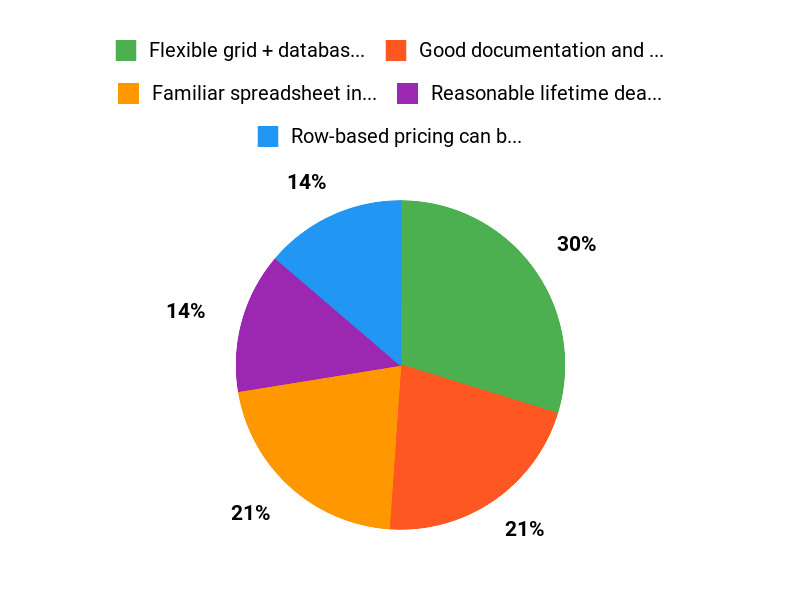
✅ Flexible grid + database hybrid that’s easy to pick up |
❌ Important features can be behind Power-Ups (additional cost) |
|
✅ Good documentation and friendly community support |
❌ Some users report sorting, formula editor and performance issues |
|
✅ Reasonable lifetime deal options on AppSumo for many users |
❌ Support response time varies by timezone and load |
What People Say
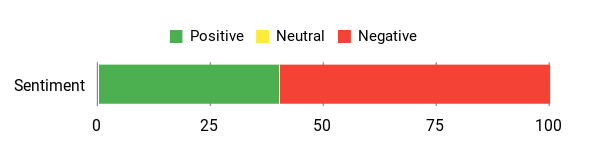
People often highlight Stackby’s value-for-money model (rows-based billing) and the balance of spreadsheet comfort with database features. Common gripes are paywalled power-ups, occasional mobile/web performance snags, and support response times mentioned in multiple Stackby reviews.
Overall Sentiment: Mixed
🗣️ yerch82
I bought a lifetime deal and realised Stackby charges by rows rather than records, which made it a better value compared to competitors. Documentation is friendly and I could handle ~15,000 records with no speed issues. Support can be slower because of timezones, but overall it’s a cost-effective workflow for my needs.
🗣️ A1+
I had serious usability issues at first — Android limited rows, pasting broke — but the team fixed those problems and now the app runs flawlessly for me. Their responsiveness turned a refund-consideration into a 5-taco experience.
Long-Term Cost Benefits
Because Stackby bills by rows, it can be cheaper over time if your team manages large tables without a lot of additional users. For example, one reviewer compared a $124 annual power-up to much pricier per-user alternatives and found the per-user effective cost very reasonable for their scale.
Return On Investment
If you replace multiple single-purpose tools (spreadsheets + extra automation apps) with Stackby, you can simplify workflows and reduce recurring fees. One reviewer calculated an effective cost around $2.48/month per user when combining a tiered lifetime purchase with an annual power-up, which shows the potential ROI for heavy users.
Usability
|
Aspect |
Ease Level |
Notes |
|---|---|---|
|
Setup |
Moderate |
Getting started is straightforward if you know spreadsheets; templates and docs help, but Power-Ups and deal limits require attention. |
|
Daily Use |
Easy |
Grid and views feel natural for day-to-day tasks, though sorting and formulas can be quirky for some users. |
|
Mobile App |
Moderate |
Mobile had limits in the past (row loading) that were reported fixed by the team, but experiences vary by device and dataset size. |
Performance & Speed
Mixed — some users report smooth performance even at 15,000 records, while others see lag around a few hundred rows depending on columns and formulas.
Integration Capabilities
|
Software |
Integration Quality |
|---|---|
|
Zapier |
Good |
|
Google Sheets |
Moderate |
|
Slack |
Moderate |
Security Features
|
Feature |
Protection Level |
|---|---|
|
Data Encryption |
Standard |
|
Role-Based Access |
Good |
|
Backups / Restore |
Basic |
Reliability
Generally reliable with frequent updates; a few users noted intermittent bugs but many issues were addressed by the team.
Learning Curve
Gentle for spreadsheet users; advanced automations and Power-Ups have a bit of a learning curve but documentation helps.
Key Benefits
- Familiar spreadsheet interface with database features
- Row-based pricing can be more affordable for large datasets
- Built-in automations and forms without heavy setup
- Active product updates and growing feature set
Current Price: $99.00
Rating: 4.7 (total: 135+)
FAQ
Is Stackby Worth Buying On AppSumo?
I looked closely at the Stackby AppSumo offer and my take is: it can be a very good deal if the core features match what you need. The deal I’m familiar with lists the price at $99, and many people in Stackby reviews praise the value compared with tools that charge per record because Stackby is charged by rows, which can be cheaper for larger datasets.
That said, opinions in Stackby reviews vary: some users love the price-to-feature ratio, while others feel surprised by add-ons. I recommend checking the specific AppSumo deal page for exactly what’s included, testing the free plan or a sandbox workspace if possible, and deciding based on how many rows, collaborators, and integrations you actually need.
What Should I Know About Power‑Ups, Upsells, And Limitations?
I want to be upfront: Stackby offers a base platform and additional features via Power-Ups, and some AppSumo buyers have reported confusion about what the lifetime deal covers. In my experience, the Power-Ups unlock advanced views, automations, exports and other capabilities and they may carry an extra one-time or recurring cost depending on the campaign.
Stackby appsumo messaging usually lists these add-ons, but I’ve seen Stackby reviews from users who still felt surprised, so read the deal fine print. My practical advice is to list the features you cannot live without, check whether those are part of the core plan, and only purchase Power-Ups if they fill real gaps in your workflow. If you’re unsure, ask Stackby support before buying so you don’t end up paying for functionality you don’t need.
How Do I Avoid Performance, Import, And Formula Frustrations?
I’ve seen the same pain points in community feedback and in Stackby reviews, so I approach adoption cautiously and with a few simple practices. Before importing, I pre-clean my CSV to standardize date formats and remove unnecessary columns; that prevents mixed-date issues and speeds imports. For formulas I often type complex expressions manually rather than relying on autocomplete until I’m comfortable with the editor, because some users reported autocomplete glitches. On performance, some users report smooth operation at thousands of rows and others notice slowdowns at a few hundred depending on columns and linked data; I recommend testing your typical dataset in a sample table, minimizing unnecessary columns or heavy formula columns, and using views or filters to limit what loads at once.
If you hit problems, reach out to support—response times can vary, but Stackby’s team has been active in replying to AppSumo customers according to recent replies in the product thread.
Why Customers Choose Stackby
We choose Stackby because it blends the familiarity of a spreadsheet with the power of a database, built-in automations, and API access so we can customize workflows, connect tools, and automate repetitive tasks without heavy developer work. Its also easy to use, collaborative, and affordable, letting teams get organized quickly and scale as needs change.
Wrapping Up
After testing Stackby and reading a range of Stackby reviews, I think this tool is a solid choice if you want a no-code spreadsheet that scales into a database with automations. It’s especially strong when you need per-row pricing advantages and flexible views combined with integrations. The biggest trade-off is the Power-Ups model: while the core is useful out of the box, many advanced features are offered as paid Power-Ups (some users report $379 one-time or other add-on costs), so I recommend checking exactly what the AppSumo deal includes before you buy.
Overall, I found Stackby valuable for building custom workflows and recommend it if you plan your feature needs up front and are comfortable evaluating any additional Power-Ups.
This Roundup is reader-supported. When you click through links we may earn a referral commission on qualifying purchases.