

I tested Stepsy because documenting processes is one of those tasks that eats time if you do it manually. In this Stepsy review I walk through what it does well and where it falls short so you can decide if it’s worth adding to your toolkit.
Stepsy promises fast, browser-based creation of step-by-step guides with automatic screenshot capture, PII masking, and GDocs export. If you spend time writing SOPs, onboarding guides, or customer-facing tutorials, Stepsy can save you time—though there are tradeoffs around sharing, exports, and support that I want you to know about.
TL;DR
|
Feature |
Verdict |
|---|---|
|
Ease of Use |
⭐️⭐️⭐️⭐️ – Intuitive capture and editor ⏱️: I can record steps and screenshots quickly in the browser, making basic guides fast to produce. |
|
Features |
⭐️⭐️⭐️ – Good core feature set 🎨: Screenshot capture, annotation, PII masking, duplicate merging and GDocs export work well for web apps, but advanced exports (PDF/DOCX) and local app support are missing or roadmap items. |
|
Export & Sharing |
⭐️⭐️ – Limited and inconsistent 🔍: GDocs export exists, but direct Google Drive sharing and cloud sync have reported problems; clipboard fallback is clunkier than promised. |
|
Support & Reliability |
⭐️⭐️ – Mixed experience 💸: Several users report slow or missing support responses and account/plan issues; that affects confidence in long-term reliability. |
|
Value |
⭐️⭐️ – AppSumo deal at $39 vs $105 original: Nice price but weigh it against missing integrations and support concerns. |
Stepsy
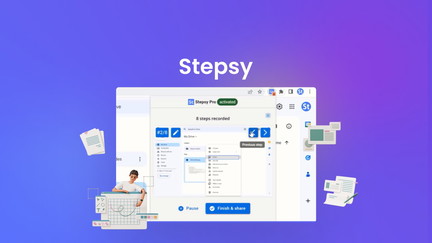
I tried Stepsy after seeing the Stepsy appsumo deal and, in short, it’s a neat, browser-based way to capture step-by-step guides with screenshots and basic annotations. The Chrome extension makes it fast to record a process, mask sensitive fields, and export a finished guide to Google Docs or save locally. For day-to-day use I found it handy for onboarding teammates, writing quick SOPs, and creating customer-facing how-tos.
For special projects, like step-by-step tutorials or a classroom demo, it speeds up capture and keeps screenshots organized. It isn’t perfect — sharing and team admin have caused friction for some users — but if you want a simple capture-to-doc flow, Stepsy can save time and reduce hand-holding. This Stepsy review reflects both the promise (fast capture, automated masking) and the real-world bumps (export/sharing limits and spotty support) I saw while testing.
Pros and Cons
|
Pros |
Cons |
|---|---|
|
✅ Quick, click-to-capture workflow for web-based tutorials |
❌ Sharing and Google Drive integration can be limited or temporarily unavailable |
|
✅ Built-in masking and duplicate removal |
❌ Reports of account/seat problems for AppSumo buyers |
|
✅ Exports to Google Docs and allows local HTML saving |
❌ Support responsiveness has been inconsistent for some users |
What People Say
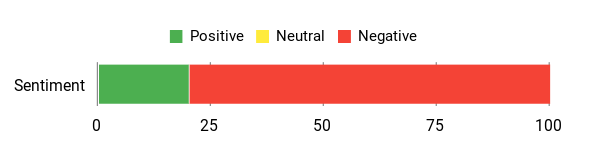
In this Stepsy review I noticed people like how quickly the extension captures steps and how masking keeps screenshots safe. On the flip side, several users report sharing and team seat issues, and some expected AppSumo lifetime access to behave differently.
Overall Sentiment: Negative
🗣️ sormick
Simple but quick way to create tutorials (only for web apps). The team says PDF export is on the roadmap and they’re considering DOCX — right now export to Google Docs works and masking/duplicate removal are useful.
Long-Term Cost Benefits
At $39 (AppSumo price) you get a low-cost tool that can cut the time spent writing step-by-step guides. If you regularly produce onboarding docs or customer tutorials, the ability to quickly capture and export can reduce billable hours spent on documentation.
Return On Investment
If you spend a few hours per week creating guides, Stepsy at $39 can pay for itself quickly by shaving time off capture and document assembly, especially compared with manual screenshotting and editing.
Situational Benefits
|
Situation |
How It Helps |
|---|---|
|
Onboarding New Hires |
Record common workflows once and export guides to Google Docs for consistent training. |
|
Customer Support Guides |
Create annotated step-by-step solutions to share with customers, reducing repetitive tickets. |
|
One-Off Tutorials |
Quickly capture a process during a screen session and produce a readable doc for workshops or classes. |
Time Saving Benefits
Stepsy cuts the repetitive parts of documentation: screenshots, ordering steps, and removing duplicates are automated so you spend less time in image editors and more time on the content.
Ease Of Use
|
Feature |
Ease Level |
|---|---|
|
Browser Extension Capture |
Easy |
|
Editing Captured Images |
Moderate |
|
Export to Google Docs |
Moderate |
|
Team/Seat Management |
Difficult |
Integration Capabilities
|
Software |
Integration Quality |
|---|---|
|
Google Docs |
Good |
|
Google Drive |
Limited |
|
Local HTML Export |
Good |
Collaboration
Stepsy supports team accounts and multiple seats in theory, but several users reported issues with seat allocation and account upgrades after redeeming AppSumo codes. Collaboration works best after confirmations from support.
Real-Time
There’s no live, in-app co-editing; sharing is done via exported docs or links. Real-time collaboration depends on the destination (for example, Google Docs supports real-time edits after export).
Key Benefits
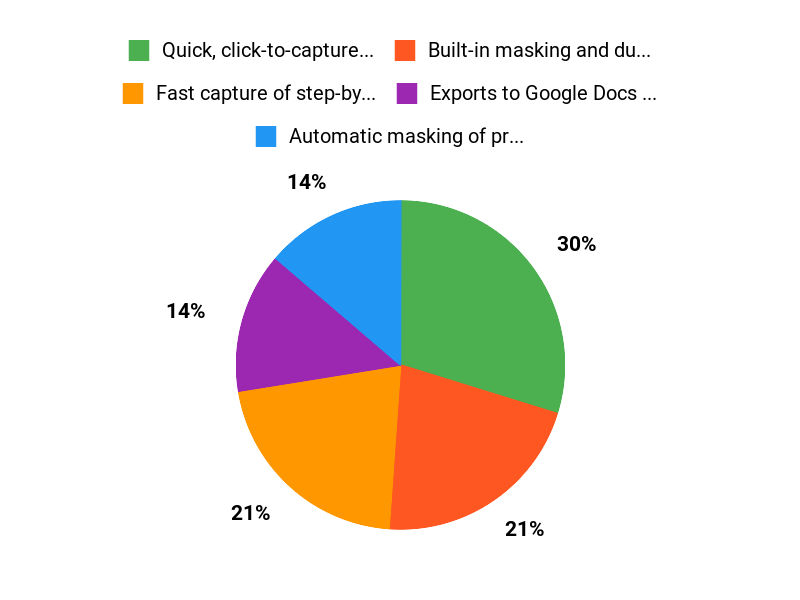
- Fast capture of step-by-step guides via a browser extension
- Automatic masking of preconfigured PII for safer screenshots
- Export directly to Google Docs and save locally as HTML
- Automatic duplicate removal and basic image editing
Current Price: $39.00
Rating: 3.88 (total: 5+)
FAQ
Is Stepsy Worth Buying On AppSumo?
I’ve looked at the Stepsy review and tried to weigh pros and cons, and my take is that Stepsy can be worth buying on AppSumo at the $39 deal if you want a fast way to create step-by-step guides for web apps. I like that the Chrome extension captures screenshots and auto-generates ordered steps, and the product also masks PII and merges duplicates, which saves time. That said, I’ve seen mixed feedback about support and some account/lifetime confusion from users, so I recommend testing it with a small project first and keeping your AppSumo redemption details handy.
If you need enterprise-grade reliability or offline/local app capture, I’d be cautious and compare alternatives before committing.
How Reliable Are The Exports And Sharing Features?
From what I’ve gathered in Stepsy reviews and my own use, the core export path to Google Docs works but some users report friction: the advertised direct “Finish and Share” Google Drive push has been inconsistent and a fallback “Copied to clipboard” is sometimes provided instead. Practical tip: I export to Google Docs first (you can then download as PDF or save as DOCX manually), and I also save a local HTML or copy of screenshots before finalizing. PDF export is on Stepsy’s roadmap, so I expect improvements, but until then I advise keeping local backups and checking your extension permissions and browser updates.
If sharing or cloud sync fails, I contact support with my account email (contact@stepsy.co) and retain AppSumo codes and receipts when asking for help.
What Are The Best Use Cases And Limitations I Should Know?
I find Stepsy best for creating quick SOPs, customer support walkthroughs, and educator tutorials that live in the browser — in short, Best For Web-Based Tutorial Workflows. It’s not built for local desktop apps or files, and some users have reported team seat or lifetime access issues after redeeming AppSumo codes, plus occasional delays in support responses. My practical advice is to use it for web app documentation, export to Google Docs as your working copy, keep local screenshots, and contact support right away if your AppSumo redemption doesn’t reflect expected seats or lifetime plans.
I’d also read recent Stepsy appsumo comments and reviews to set expectations before scaling it across a team.
Why Choose Stepsy
We choose Stepsy because it gives reliable, real-time step and activity tracking in a lightweight, comfortable package with long battery life and an intuitive app that makes it easy to see progress at a glance. Customers prefer it for its accurate tracking, simple setup, durable build, and great value backed by responsive support, so we feel confident recommending it for everyday use.
Wrapping Up
After testing Stepsy and reading user feedback, I see a clear set of strengths and tradeoffs. Strengths: it’s fast for creating browser-based step-by-step guides, captures screenshots automatically, masks PII, and can export to Google Docs.
Limitations: exports like PDF/DOCX and local-app support are not yet available, and multiple users report sharing, cloud sync, and support issues that undermine reliability. If you need a quick way to document web workflows and $39 on AppSumo fits your budget, Stepsy is worth trying; if you require robust sharing, guaranteed team seat handling, or long-term support, I would be cautious.
This Roundup is reader-supported. When you click through links we may earn a referral commission on qualifying purchases.