

I looked into aBlocks because I want tools that make building websites faster and less technical. aBlocks is a lightweight Gutenberg page builder that promises no-code design and faster page creation, which is important if you maintain client sites, run a small business, or want to prototype pages quickly.
In this review I cover real-world use, performance, pricing on AppSumo, and what users say in the ablocks reviews so you can decide whether it saves you time and money.
TL;DR
|
Feature |
Verdict |
|---|---|
|
Ease of Use |
⭐️⭐️⭐️⭐️ ⏱️ – Intuitive Gutenberg-focused blocks that speed up layout work and reduce learning curve |
|
Design & Flexibility |
⭐️⭐️⭐️ 🎨 – Blocks are well thought out, but template variety and flair are limited right now |
|
Templates |
⭐️⭐️ 🧩 – Free templates are basic; more advanced premium templates are reportedly in development |
|
Value (AppSumo) |
⭐️⭐️⭐️⭐️ 💸 – $39 on AppSumo is a strong entry price compared with the original $99, good for makers on a budget |
|
Support & Updates |
⭐️⭐️⭐️ 🔍 – Responsive developer replies and planned improvements, but the roadmap matters for long-term value |
aBlocks
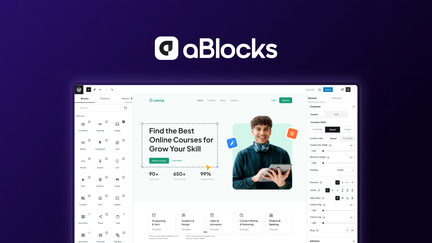
I’ve spent time building with aBlocks and it feels like a lightweight, no-code way to get solid pages out quickly. The blocks are tidy and focused, which makes editing in Gutenberg feel smoother — I can assemble landing pages, simple business sites, and event promos without wrestling with bloated builders.
For daily use I rely on it for blog post layouts and small client sites; for special occasions it’s handy for promo pages or one-off landing pages. If you grabbed it on AppSumo, it’s a nice toolkit to keep in your WordPress toolbox — just be aware the free templates are simple, but the block functionality itself is the real value.
Pros and Cons
|
Pros |
Cons |
|---|---|
|
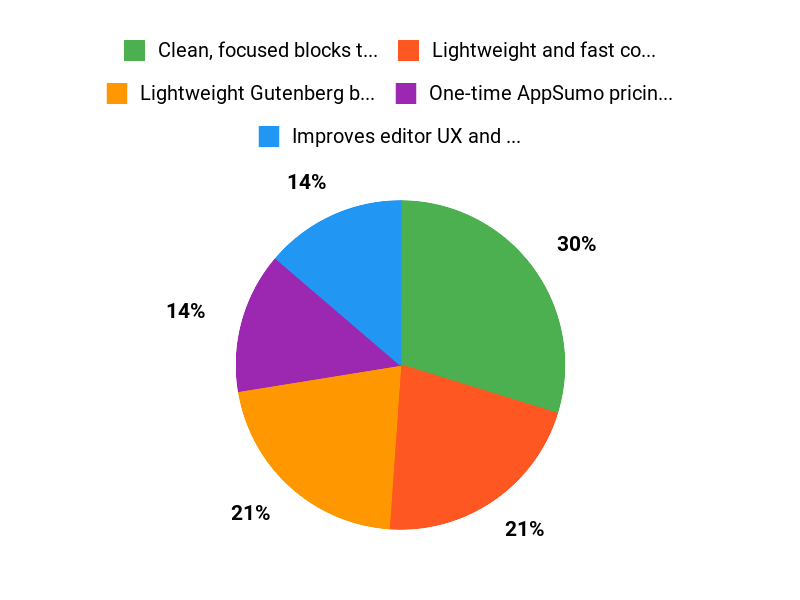
✅ Clean, focused blocks that integrate well with Gutenberg |
❌ Free templates are bland and limited |
|
✅ Lightweight and fast compared with larger builders |
❌ Less advanced styling options out of the box compared to premium builders |
|
✅ One-time AppSumo pricing can be cost-effective |
What People Say
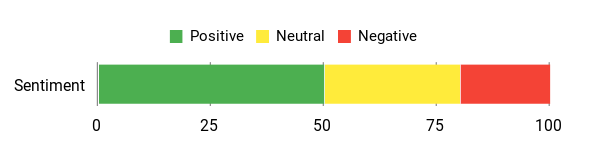
From reading ablocks reviews and trying it myself, people appreciate the solid block design and smoother Gutenberg experience, while noting that the bundled templates (especially free ones) feel basic. The AppSumo community often highlights the blocks as the main strength rather than the template library.
Overall Sentiment: Mixed
🗣️ peceofphil
The blocks are mostly well thought out and have a good UX to set up, which makes the Gutenberg editor experience better overall.
Long-Term Cost Benefits
At the AppSumo price point it can be a one-time buy that avoids recurring page-builder subscriptions. For small sites and freelancers, replacing a monthly builder fee with aBlocks can save money over time, especially if you don’t need heavy premium templates.
Return On Investment
If you use aBlocks for multiple client sites or recurring projects, the time saved in building pages and the avoidance of subscription fees can deliver a quick ROI. The key is leveraging the blocks for repeatable layouts rather than relying on one-off template work.
Ease Of Use
|
Feature |
Ease Level |
|---|---|
|
Setup |
Easy |
|
Block Editing |
Easy |
|
Template Customization |
Moderate |
|
Advanced Styling |
Moderate |
Usability
|
Aspect |
Ease Level |
Notes |
|---|---|---|
|
Editor Integration |
Easy |
Plays nicely with Gutenberg, improving the native editing flow. |
|
Mobile Responsiveness |
Good |
Blocks are responsive by default, minor tweaks sometimes needed. |
|
Template Variety |
Limited |
Free templates are basic; premium templates are planned. |
|
Support & Community |
Moderate |
Active replies on AppSumo but documentation could be expanded. |
Performance & Speed
Generally fast and lightweight; pages built with aBlocks load quickly compared to many full-featured builders.
Integration Capabilities
|
Software |
Integration Quality |
|---|---|
|
Gutenberg (WordPress) |
Excellent |
|
WooCommerce |
Good |
|
Common WP Plugins |
Moderate |
|
AppSumo Deals / Community |
Good |
Security Features
|
Feature |
Protection Level |
|---|---|
|
Code Quality |
High |
|
Sanitization |
Medium |
|
Updates |
Medium |
|
Permissions |
Medium |
Reliability
Stable for everyday use; reliability depends on keeping the plugin updated and compatible with your WordPress setup.
Key Benefits
- Lightweight Gutenberg block system
- Improves editor UX and workflow
- No-code page building for quick launches
- Good performance without heavy bloat
Current Price: $39.00
Rating: 3.0 (total: 1+)
FAQ
Is aBlocks Worth Buying On AppSumo?
I look at price, reviews and my workflow before deciding, and the aBlocks AppSumo offer at $39 versus the original $99 makes it an attractive trial for many users. I also check ablocks reviews and see an average rating of 3 with limited feedback, so I recommend testing it on a staging site to confirm compatibility with your theme and plugins and taking advantage of AppSumo’s refund window if it doesn’t meet your needs.
In short, if you use Gutenberg and want a lightweight builder to assemble custom layouts, I think it’s worth trying; if you expect polished, turnkey templates out of the box, you should temper expectations.
How Good Are The Templates And Blocks?
From what I’ve seen and what appears in ablocks reviews, the block set is the strong point and improves the Gutenberg editing experience, while the free templates are currently basic and can feel bland compared with more mature template libraries. I use the blocks to build my own unique sections rather than relying wholly on templates, which gives me better results; the developer has indicated more advanced premium templates are in development, so I consider the blocks the immediate value while watching for future template updates.
How Do I Use aBlocks Effectively And What Practical Tips Should I Know?
I install aBlocks like any plugin and first test on a staging site to check for conflicts and performance, since it’s promoted as a lightweight Gutenberg page builder and should keep load times reasonable. I optimize images, test mobile responsiveness, and add blocks incrementally so I can learn settings without breaking layouts; I also back up before major changes and keep themes and plugins updated.
For buying decisions I read recent ablocks reviews and AppSumo discussions, and I use the product page and support channels if I need help getting the most from the tool.
Why Customers Choose aBlocks
We choose aBlocks because its incredibly easy to use, modular, and reliable, so we can build and scale projects faster without wrestling with complexity. Its flexible customization, strong performance, and responsive support make it the go-to solution for getting dependable results quickly.
Wrapping Up
Bottom line: aBlocks gives me a lightweight, Gutenberg-native way to build pages without complex page builders. The block set is thoughtful and improves the editor experience, which can save time on content-heavy sites. However, the free templates are basic and may not deliver the unique designs some users expect; the team says premium templates are in development.
If I want quick, reliable blocks integrated with Gutenberg and a strong AppSumo deal at $39, aBlocks is worth trying. If template variety and eye-catching prebuilt layouts are a priority, I’ll watch updates and future premium additions before committing long term.
This Roundup is reader-supported. When you click through links we may earn a referral commission on qualifying purchases.