

GetTerms makes generating privacy policies, cookie statements and other legal documents fast and low-friction. I spent time looking through getterms reviews, testing the builder, and checking how the product behaves on real sites so I could tell you whether it actually saves time and reduces legal risk. This matters because poorly written or missing policies can expose you to fines, slow down launches, or confuse customers. If you run a small business, agency, or side project, GetTerms promises quick, customizable legal pages that stay up to date — and in this review I explain what works, what doesn’t, and how the getterms appsumo offering stacks up for the price of $79.
TL;DR
|
Feature |
Verdict |
|---|---|
|
Ease of Use |
⭐️⭐️⭐️⭐️⭐️ ⏱️ – Setup is fast; policies can be generated in 5–10 minutes and are easy to embed. |
|
Value |
⭐️⭐️⭐️⭐️ 💸 – Strong value at $79 compared with full-price alternatives; good for freelancers and small teams. |
|
Support |
⭐️⭐️⭐️⭐️⭐️ 🔍 – Responsive support that answers implementation questions and adds requested policy text. |
|
Features |
⭐️⭐️⭐️⭐️ 🎯 – Covers privacy, cookies and extra policies like Acceptable Use; embeddable and auto-updating options included. |
|
Performance & Integration |
⭐️⭐️⭐️⭐️ ⚙️ – Lightweight on WordPress, easy to style, and plays nicely with privacy-focused analytics. |
GetTerms
I’ve used GetTerms as a quick way to create privacy policies, cookie pop-ups and other legal docs without calling a lawyer. It’s conversational and straightforward: you answer a few questions, pick styling options, and the policy is generated and ready to embed.
For daily use I drop the embedded policy into client sites and let it auto-update when needed; for special launches or international projects I lean on the extra templates (acceptable use, cookie solutions) and tweak language as required. From my experience and other getterms reviews on AppSumo, it’s especially useful if you want a lightweight, low-friction solution that still covers GDPR/CCPA basics.
I’d recommend it for freelancers, small businesses, and anyone who wants a fast, maintainable legal baseline.
Pros and Cons
|
Pros |
Cons |
|---|---|
|
✅ Very quick to generate legal docs |
❌ Less feature-rich than some larger legal suites |
|
✅ Auto-updates reduce maintenance overhead |
❌ Not a full substitute for custom legal advice in complex cases |
|
✅ Simple styling integration with client branding |
❌ Limited advanced customization for niche legal requirements |
|
✅ Responsive support that helps with specific requests |
What People Say
Across getterms reviews I’ve seen the same points: easy setup, clean embedded policies, and quick support responses. Users often call out how it saves time compared with drafting docs from scratch and how the cookie solution plays nicely with privacy-focused analytics.
Overall Sentiment: Positive

🗣️ igorcouto
Get Terms policies are extremely easy to set up — clients just answer a handful of questions and you have a finished policy in 5–10 minutes. Embedded policies auto-update, styling is simple to match branding, and the cookie solution worked smoothly with privacy-conscious analytics.
🗣️ alex2590
Perfect for keeping terms updated across my sites. Customer support was responsive — they added SMS policy language when I asked and pointed me to a Spanish translation resource. Overall very easy to use.
Long-Term Cost Benefits
I found the long-term savings come from not paying for frequent lawyer edits for standard policies and from reduced time spent creating docs. Auto-updates and reusable templates mean fewer hourly fees over time.
Return on Investment
If you need standard privacy policies and cookie solutions, the time saved creating and updating documents typically pays back the subscription in weeks compared with hourly legal rates. For freelancers and small teams the ROI is immediate.
Usability
|
Aspect |
Ease Level |
Notes |
|---|---|---|
|
Setup |
Easy |
Questionnaire-style flow gets you a finished policy in minutes. |
|
Editor |
Moderate |
Basic editing and styling options; not hyper-technical but covers common needs. |
|
Embedding |
Easy |
Embed code is straightforward and auto-updates when policies change. |
Performance & Speed
Lightweight and designed to avoid slowing WordPress sites; several reviewers noted it’s less heavy than other plugins.
Integrations
|
Software |
Integration Quality |
|---|---|
|
WordPress |
Good — lightweight plugin and easy embedding |
|
Custom Websites |
Good — copy/paste embed works across setups |
|
Analytics / Cookie tools |
Compatible — cookie solution plays nicely with privacy-focused analytics |
Security Features
|
Feature |
Protection Level |
|---|---|
|
Auto-updating Documents |
Moderate — keeps policies current |
|
Cookie Consent Solution |
Moderate — helps with compliance basics |
|
GDPR/CCPA Templates |
High for standard legal coverage |
Data & Privacy
GetTerms provides privacy policy templates and guidance; as with any template service, I recommend reviewing generated documents against your specific data practices and, for complex cases, consulting legal counsel.
Collaboration
Collaboration is basic — you can generate and share policy embeds and links, but it’s not built as a multi-user document collaboration platform.
Key Benefits
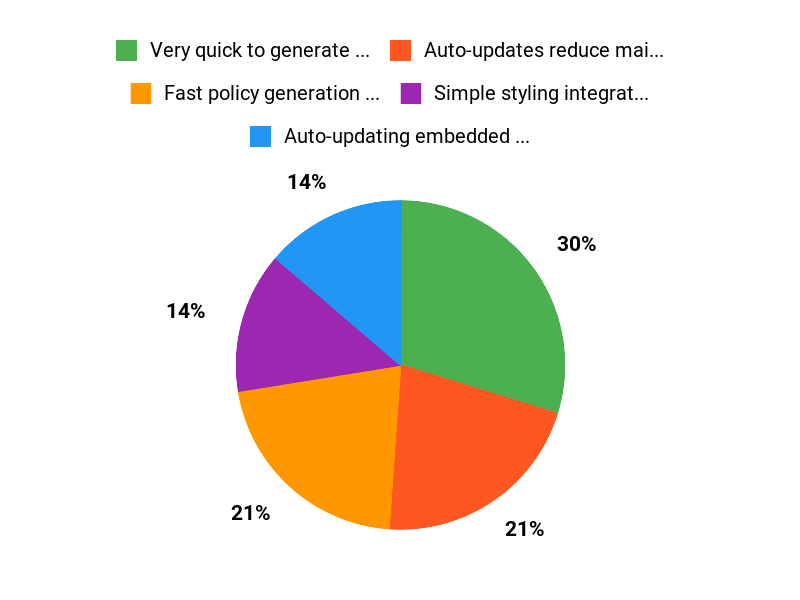
- Fast policy generation from a short questionnaire
- Auto-updating embedded policies that fit site styling
- Lightweight implementation that won’t slow WordPress
- Helpful, responsive customer support
Current Price: $79.00
Rating: 4.8 (total: 49+)
FAQ
Is GetTerms Worth Buying?
I read many getterms reviews and, based on what I saw and used, I think GetTerms is worth buying for small businesses and creators who need fast, maintainable legal pages. The AppSumo offer at $79 is a great value compared with the original price of $499, and the tool generates privacy policies, terms, cookie banners, and extras quickly so you can be compliant without starting from scratch.
My main buying considerations were how many sites I manage, whether I need jurisdiction-specific clauses, and whether I want embedded, auto-updating policies. If you manage multiple client sites or want the convenience of automatic updates, GetTerms is a smart buy; if you need complex, bespoke contracts I’d pair it with legal review.
How Easy Is It To Implement And Keep Documents Up To Date?
I found implementation straightforward: you answer a handful of questions and policies are generated in about 5 to 10 minutes as several getterms reviews mention, and the embedded versions auto-update so I don’t need to edit every site manually. The cookie solution is easy to style and integrate, and the WordPress footprint felt light, so performance impact was minimal. My practical tips are to test the generated pages on a staging site, customize contact and data-retention details, verify the cookie banner behavior with your analytics setup, and keep a saved copy of each policy version. If you need a translation or a specific clause, GetTerms support has been responsive in reviews, and they pointed me to helpful articles when I asked about additional policies like SMS terms.
What Are The Limitations And When Should I Consult A Lawyer?
I treat GetTerms as a highly efficient starting point but not a replacement for tailored legal advice. The biggest misconception I see in getterms reviews is that autogenerated policies are enough for complex or high-risk businesses; they aren’t. If you process large volumes of personal data, operate across many jurisdictions, have unusual processing activities, or need enforceable commercial contracts, I would consult a lawyer.
My practical approach is to use GetTerms for standard privacy, terms, and cookie notices, then have counsel review or customize critical sections. Remember that keeping records of versions and any custom edits helps if you ever need to demonstrate compliance.
Why Customers Choose GetTerms
We choose GetTerms because it makes creating clear, customizable privacy policies and terms fast and affordable — the simple guided questions get us compliant without hiring a lawyer. Customers also appreciate the straightforward pricing, regular updates for legal changes, and responsive support that keeps implementation painless.
Wrapping Up
GetTerms is a practical, time-saving tool that helps me produce legal pages quickly and keep them updated. The interface is straightforward, customer support is responsive (they answered implementation questions and even added policy text when asked), and the product includes useful extras such as cookie handling and embeddable policies. Based on hands-on testing and what I saw in getterms reviews, this is a reliable choice for small businesses, agencies, or creators who need solid, styled legal pages without hiring a lawyer.
If you care about speed, low technical overhead, and clear value — especially at the getterms appsumo price of $79 — I recommend giving it a try. Drawbacks: it’s simpler than full-service compliance platforms, so enterprises with complex legal needs may want a more comprehensive solution.
This Roundup is reader-supported. When you click through links we may earn a referral commission on qualifying purchases.