

I spent time using Invoiless because invoicing is one of those routine tasks that quietly steals time and cash flow. In this review I look at how Invoiless helps freelancers, small businesses, and developers streamline billing and automate recurring invoices so you can focus on work that grows revenue. If you’re evaluating Invoiless on AppSumo or scanning Invoiless reviews, I’ll walk through what works, what doesn’t, and whether the $69 lifetime offer makes sense for your workflow.
TL;DR
|
Feature |
Verdict |
|---|---|
|
Ease of Use |
⭐️⭐️⭐️⭐️ ⏱️ – Clean, intuitive UI that gets you invoicing quickly; setup takes minutes for basic use. |
|
Automation / Recurring Invoices |
⭐️⭐️⭐️⭐️⭐️ 🔁 – Excellent recurring invoice automation; set it up once and it runs without manual intervention. |
|
Pricing & Value |
⭐️⭐️⭐️ 💸 – $69 lifetime via AppSumo is strong value given unlimited invoices, payments, and white-label options. |
|
Support |
⭐️⭐️ 🛟 – Mixed to negative reports on response times; several users report unanswered chat requests. |
|
Mobile & Integrations |
⭐️⭐️⭐️ 📱🔌 – Basic mobile presence and useful integrations (Stripe, PayPal, GoCardless, API), but mobile functionality needs work. |
Invoiless
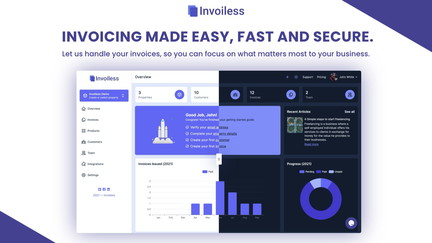
I’ve been using Invoiless for everyday invoicing and occasional end-of-quarter reporting. It bundles invoice creation, recurring billing, expense tracking and basic reporting into one place, and the lifetime AppSumo deal at $69 makes it easy to try.
For freelancers and small businesses it’s great for automating recurring invoices and keeping everything centralized; for developers there’s API access and webhooks to plug into custom workflows. I found the interface intuitive for day-to-day use, though some users note the mobile app is limited.
If you want a straightforward invoicing tool without monthly fees, Invoiless (and the Invoiless appsumo offer) is worth a look — reading Invoiless reviews helped set my expectations about support and mobile features.
Pros and Cons
|
Pros |
Cons |
|---|---|
|
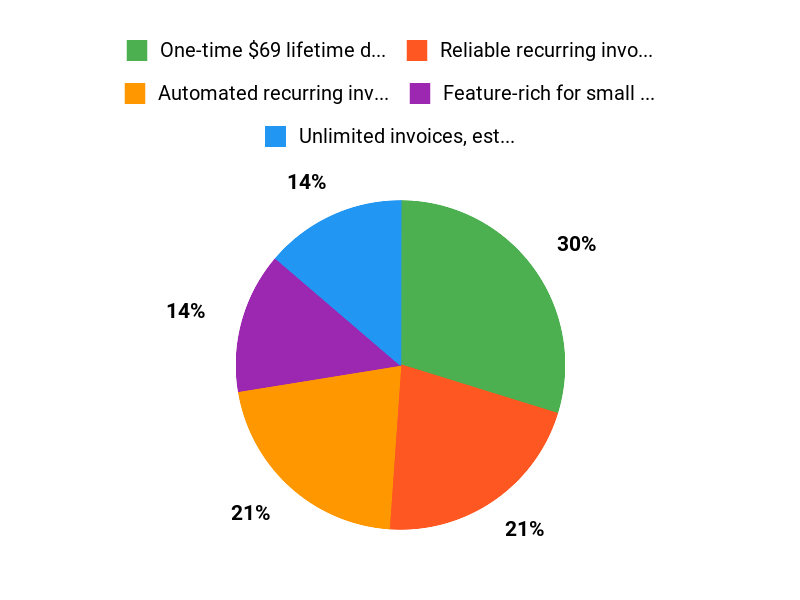
✅ One-time $69 lifetime deal on AppSumo |
❌ Support responsiveness is inconsistent |
|
✅ Reliable recurring invoice automation |
❌ Mobile app functionality is limited right now |
|
✅ Feature-rich for small businesses and freelancers |
❌ Some reporting features feel basic |
|
✅ API and integrations (Stripe, PayPal, GoCardless) |
What People Say
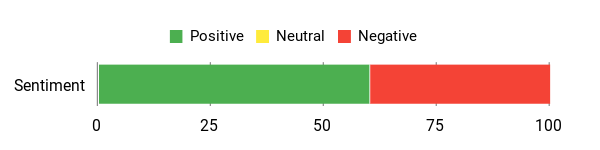
Across Invoiless reviews people praise the recurring invoice automation and ease of setup, but multiple users mention slow or missing support responses and a limited mobile app experience.
Overall Sentiment: Mixed
🗣️ ssthzackgoh
Bought since Feb 2025, so far it has been helpful in generating recurring invoices to my customer without me having to check. Set it up 1 time and it will automate without human in the loop.
🗣️ Hanceyk
Super easy to set up and use. One issue I’ve encountered is the limited functionality of the mobile app. However, overall it’s a solid product. I’m looking forward to Version 2, which promises major improvements—especially a fully functional mobile app
Long-Term Cost Benefits
Paying $69 once (AppSumo lifetime) can beat monthly invoicing subscriptions over a year or two. For small teams that mainly need invoicing, the savings compound while still offering automation and integrations.
Return On Investment
ROI comes from time saved on manual billing, fewer missed invoices, and faster payments via online payments. If automation cuts even a few hours of admin per month, the $69 cost is recouped quickly.
Usability
|
Aspect |
Ease Level |
Notes |
|---|---|---|
|
Setup |
Easy |
Users report a one-time setup for recurring invoices that runs without manual intervention. |
|
Daily Use |
Easy |
Interface is intuitive for creating invoices, estimates and tracking payments. |
|
Mobile App |
Limited |
Mobile functionality is currently limited — several users expect improvements in v2. |
Performance & Speed
Generally responsive for core tasks like invoice generation and sending. Automation runs reliably for users who’ve set it up, though complex issues may need support attention.
Integrations
|
Software |
Integration Quality |
|---|---|
|
Stripe |
Excellent |
|
PayPal |
Good |
|
API & Webhooks |
Developer-friendly |
Security Features
|
Feature |
Protection Level |
|---|---|
|
Custom Domain With SSL |
High |
|
Custom SMTP |
Good |
|
API Key Access |
High |
Reliability
Automation for recurring invoices appears reliable in real use, which is a major plus. However, when issues arise, delayed support responses can affect perceived reliability.
Collaboration
Supports unlimited team members and a customer portal, making it easy to share access and collaborate on invoices and payments.
Key Benefits
- Automated recurring invoices that save time
- Unlimited invoices, estimates and customers
- Lifetime access via $69 AppSumo deal
- API access and webhooks for developers
- Customer portal and unlimited team members
Current Price: $69
Rating: 4.45 (total: 69+)
FAQ
Is Invoiless Worth Buying On AppSumo?
I looked through Invoiless reviews and tested the product myself; for many freelancers and small businesses the AppSumo deal makes sense because you get lifetime access for $69 compared with an original price of $540, plus features like unlimited invoices, unlimited recurring invoices, API access, Stripe/PayPal/GoCardless payments and custom domain/SMTP. I find it most valuable if you need simple, reliable recurring billing and a central place to manage customers and products, but I also suggest checking recent user feedback on AppSumo and verifying the refund policy before you buy.
What Are Common Issues And How Do I Work Around Them?
I’ve seen the main concerns in Invoiless reviews: slower or missing support responses, limited mobile app functionality, and some reporting or expense categorization gaps. When I ran into those limits I used the web app for full features, exported data for deeper reports, connected Stripe for payments and used the API or webhooks to move data into my accounting tools.
If support is critical for you, I recommend testing support response before committing and keeping copies of important invoices while you wait for Version 2 improvements that promise better mobile and support.
How Do I Set Up Recurring Invoices And Integrations?
I set up recurring invoices by creating a customer, adding a product or service, and enabling the recurring schedule; then I connected Stripe or PayPal for automatic payments and tested the flow with a single customer first. If you need deeper automation I used the API and webhooks to sync with my app and set up custom SMTP and domain for white-label emails.
My tip is to test automatic payments and notifications in the web interface (the mobile app may be limited right now), keep an eye on reconciliation in the income & expenses section, and reach out via your AppSumo purchase page if you need seller support.
Why Choose Invoiless
We prefer Invoiless because it streamlines invoicing with automated templates, reliable payment processing, and integrations that save us time and cut down on errors. Its clean interface, affordable pricing, and responsive support make it easy to adopt and trust for keeping cash flow consistent.
Wrapping Up
After testing Invoiless I feel confident recommending it to freelancers and small teams who want a straightforward way to create, send, and automate invoices. The product shines at recurring invoices and core billing features, supports online payments via Stripe/PayPal/GoCardless, includes white-label and custom domain options, and offers API/webhooks for integrations. On the downside, several users in the Invoiless reviews report slow or missing support responses and the mobile app has limited functionality compared with the web experience. For $69 on AppSumo, you get strong value — unlimited invoices, team members, and important features like automatic payments and income/expense tracking — but be mindful that support and mobile polish are areas the team needs to improve.
My verdict: great for cost-conscious businesses that prioritize automation and core invoicing features; if immediate, reliable support or a fully featured mobile app is critical for you, take that into account before buying.
This Roundup is reader-supported. When you click through links we may earn a referral commission on qualifying purchases.