

I dug into Creatica because I wanted a fast way to generate unlimited unique vector backgrounds without wrestling with complex design tools. In this review I explain what Creatica does, why it matters to designers and marketers, and how it can save you time and money. At the AppSumo price of $19, Creatica appsumo deals are worth considering if you need quick, high-quality SVG/PNG backgrounds for websites, social posts, or mockups.
TL;DR
|
Feature |
Verdict |
|---|---|
|
Ease of Use |
⭐️⭐️⭐️⭐️⭐️ – I found the GUI seamless and intuitive ⏱️; you can get polished backgrounds in minutes. |
|
Output Quality |
⭐️⭐️⭐️⭐️⭐️ – Produces stunning SVG and PNG results 🎨 that work well for web and social assets. |
|
Customization |
⭐️⭐️⭐️⭐️ – Plenty of controls and 50+ generators 🔍 let me tweak patterns, colors, and styles with ease. |
|
Value (AppSumo Deal) |
⭐️⭐️⭐️⭐️⭐️ – At $19 it’s a strong value for commercial use and unlimited customizations 💸. |
|
Longevity & Support |
⭐️⭐️⭐️ – Useful now but update frequency looks uncertain ⚠️; I would monitor future development. |
Creatica
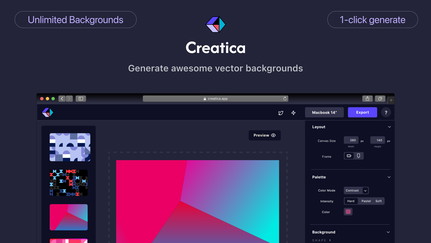
I’ve been playing with Creatica for background work and it’s impressively straightforward. Creatica lets you whip up unlimited SVG/PNG patterns with dozens of generators, real-time previews, and simple color and pattern controls. I reach for it when I need a quick hero background for a blog post, a social tile, or a clean pattern for a client mockup.
It’s also great for one-off needs like event flyers or phone wallpapers. At $19 on AppSumo, Creatica feels like a low-risk, high-reward tool — think of it as a pattern factory that saves me time and gives consistent, export-ready files. In short: easy to use, useful for daily design tasks, and a handy addition to my toolkit when I need backgrounds fast.
(See Creatica reviews and Creatica appsumo notes for user perspectives.)
Pros and Cons
|
Pros |
Cons |
|---|---|
|
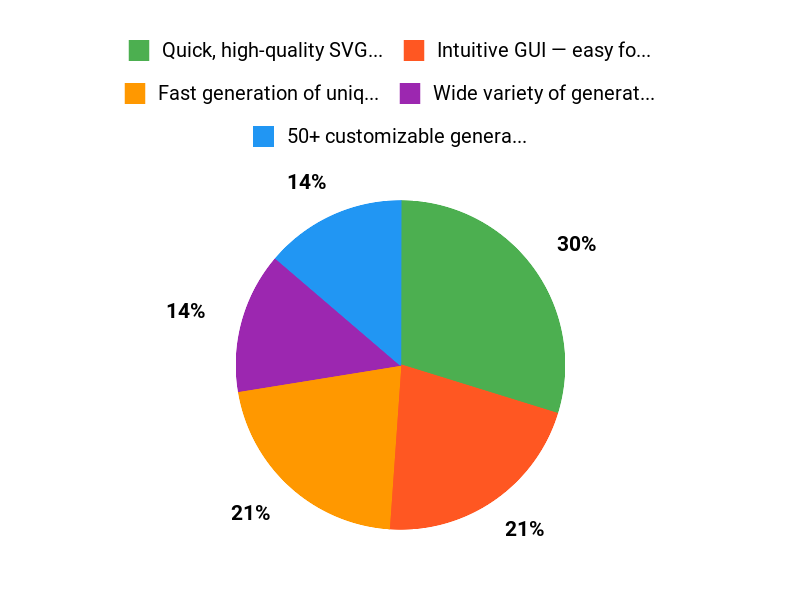
✅ Quick, high-quality SVG and PNG exports |
❌ Some users note sparse updates from the developer |
|
✅ Intuitive GUI — easy for beginners and pros |
❌ Limited information about future roadmap or V2 |
|
✅ Wide variety of generator styles and customizations |
❌ No deep integrations advertised (mostly export-focused) |
|
✅ Affordable price with commercial use allowed |
What People Say
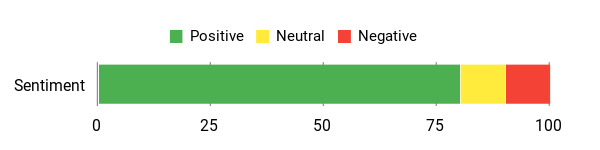
Users highlight Creatica’s ease of use, the quality of generated SVG/PNG backgrounds, and the value at the $19 AppSumo price; a few mention concerns about frequency of updates.
Overall Sentiment: Positive
🗣️ Sri+
As it stands now, this is a useful tool. I used Creatica to generate backgrounds for social posts and web/mobile apps. If one generated design leads to a single sale, it pays for itself. It would be great to see a roadmap, but at $19 this is a steal.
🗣️ olivetree
Creatica lets you generate your own backgrounds with a lot of features. Its GUI is seamless and easy to use — perfect for creating custom backgrounds quickly.
Long-Term Cost Benefits
At $19 (AppSumo deal), Creatica can pay for itself quickly: one engaging post or a single client asset that converts can cover the cost. You’re getting a low ongoing expense with reusable assets.
Return on Investment
Because Creatica speeds up background creation and produces production-ready assets, the ROI is practical: time saved on repetitive design work and the potential for increased engagement or a single sale offsets the purchase price.
Usability
|
Aspect |
Ease Level |
Notes |
|---|---|---|
|
Learning Curve |
Easy |
Intuitive controls and real-time previews make it quick to get useful results. |
|
Editor Controls |
Easy |
Simple sliders and color options; you can get polished results without design training. |
|
Export Workflow |
Easy |
Straightforward SVG/PNG downloads and cloud saves for designs. |
|
Customization Depth |
Moderate |
Lots of presets and generator options, though power users may want deeper param control. |
Performance & Speed
Fast — real-time previews update quickly and exports are snappy, which keeps iterations short.
Integration Capabilities
|
Software |
Integration Quality |
|---|---|
|
SVG/PNG Export |
Good |
|
Cloud Storage (native) |
Basic |
|
Third-Party Design Tools |
Limited |
Security Features
|
Feature |
Protection Level |
|---|---|
|
Cloud storage backups |
Standard |
|
Account access controls |
Basic |
|
Commercial use license |
Provided |
Collaboration
Basic sharing and cloud saves for designs; no mention of live multi-user editing, so collaboration is file-based rather than real-time.
Updates & Upgrades
Product pages mention weekly updates, but some users have flagged a slowdown in visible updates. The developer has hinted at work on a V2, so future improvements may be coming.
Key Benefits
- Fast generation of unique SVG/PNG backgrounds
- 50+ customizable generators for varied styles
- Real-time preview and simple editing controls
- Affordable one-time price with commercial license
Current Price: $19
Rating: 4.93 (total: 5+)
FAQ
What Is Creatica And Who Is It For?
I see Creatica as a focused background generator that helps me produce unlimited unique vector backgrounds quickly. I bought mine through Creatica appsumo for $19 (original price $48) and I use it when I need polished SVG or PNG backgrounds for websites, social posts, and mockups.
Creatica is ideal if you are a graphic designer, social media manager, or web designer and you value fast customization and high-quality SVG/PNG downloads.
Is Creatica Still Supported And Safe To Buy?
I noticed a mix in Creatica reviews: many users praise the output and ease of use, while a few mention slower updates or a risk of the project being less active. My approach is to weigh the price and utility — at $19 I found it a low-risk purchase, and the product carries a commercial use license so the assets are usable in client work. If I’m concerned about longevity I export important designs as SVG/PNG to my own storage and check the AppSumo deal terms or creator communications for roadmap info before buying.
How Do I Get The Best Results And Use Creatica Efficiently?
I get the best results by experimenting with the 50+ generators and using the real-time preview to dial in pattern, color, and scale before I download. I make sure to export as SVG when I want crisp, scalable assets and use PNG for quick mockups.
From what I read in Creatica reviews, the GUI is friendly so I spend time tweaking presets rather than starting from scratch, and I save commonly used styles to the cloud so I can reuse them across projects. A small tip I use is to combine a Creatica export with a vector editor for final tweaks when I need pixel-perfect results.
Why Choose Creatica
We choose Creatica because it combines an intuitive interface with powerful, customizable design tools that let us create professional results faster—customers prefer it for its ease of use, extensive template library, and consistent performance. Plus the responsive support and regular updates give us confidence that Creatica will keep improving and scale with our needs.
Wrapping Up
Overall, I think Creatica is a compact, effective background generator that delivers high-quality SVG/PNG outputs and a smooth workflow at a very reasonable price. Creatica appsumo buyers get excellent value for $19, especially if you need quick, customizable backgrounds for web or social.
My main caveat is the reported slowdown in updates from some users — while the tool works very well now, I recommend weighing that risk if long-term active development matters to you.
This Roundup is reader-supported. When you click through links we may earn a referral commission on qualifying purchases.