

I tested AvoMap because I wanted a simple way to turn routes into polished, shareable videos. In a world where static screenshots and clumsy arrows no longer cut it, AvoMap lets me create cinematic 3D map animations that communicate journeys clearly and beautifully.
This matters if you create travel content, pitch event routes, or want a better way to showcase logistics — and it’s why so many people search for AvoMap reviews and the AvoMap appsumo deal before buying. I’ll walk you through what works, where it stumbles, and whether the $59 entry price delivers real value for creators and small businesses.
TL;DR
|
Feature |
Verdict |
|---|---|
|
Ease of Use |
⭐️⭐️⭐️⭐️ – Clean, intuitive interface; I could build attractive map videos quickly ⏱️ |
|
Features & Customization |
⭐️⭐️⭐️⭐️ – Strong feature set (4K exports, 60 FPS, custom markers, elevation) 🎨 |
|
Value (AppSumo Deal) |
⭐️⭐️⭐️⭐️ – $59 starter tier is a good bargain on AppSumo; higher packs at $118 and $177 if you need more credits 💸 |
|
Support & Roadmap |
⭐️⭐️⭐️⭐️ – Responsive founder and regular updates; users report active development 🔁 |
AvoMap
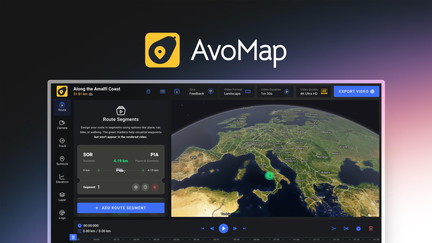
I’ve been playing with AvoMap for a while and it’s the kind of tool that makes travel stories look intentional rather than thrown together. It turns routes into animated 3D map videos with custom markers, colors, and white-label options. For daily use I’ll make short explainer clips or social posts showing a route or meeting itinerary; for special trips or guides I export high-res videos (Full HD/4K) to embed on sites or drop into YouTube. The interface is clean and approachable—perfect if you want nice results without wrestling with heavy mapping software.
If you saw AvoMap on AppSumo, you probably noticed the pricing tiers and credits system; in my experience the core deal gives you enough exports to test and produce occasional professional pieces. In short: AvoMap is great for content creators, travel bloggers, and small teams who want cinematic route visuals without a huge learning curve.
Pros and Cons
|
Pros |
Cons |
|---|---|
|
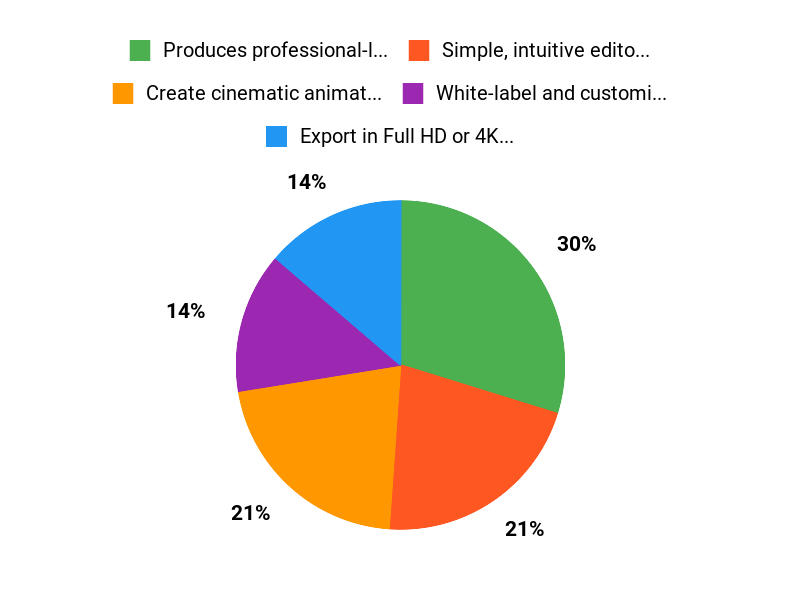
✅ Produces professional-looking animated route videos |
❌ White-labeling and some customizations require extra credits |
|
✅ Simple, intuitive editor—good for non-technical creators |
❌ Missing a few travel modes (some users want train travel) |
|
✅ White-label and customization (markers, colors, avatars) |
❌ Credit-based export system can be confusing at first |
|
✅ Active development and responsive founder |
What People Say
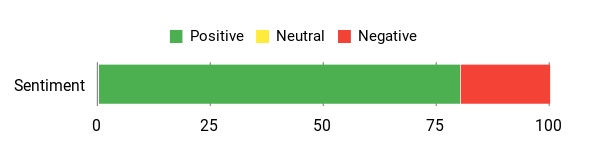
Users appreciate how easy AvoMap is to use for travel content and site embeds, praising the clean interface and founder responsiveness. A common note is that white-label features may use extra credits.
Overall Sentiment: Positive
🗣️ raleighseocompany
AvoMap is a solid tool for creating interactive video maps that integrate well with websites. We purchased it for our travel review site and found it straightforward to use compared to other mapping software. The interface is clean and intuitive and the interactive elements keep visitors engaged.
🗣️ Sye
I bought AvoMap on AppSumo, and the founder is responsive and keeps adding features. White-labeling became available and I purchased extra credits—updates like photo insertion are on the roadmap, and the developer listens to feedback.
Long Term Cost Benefits
For creators who regularly publish travel content or produce client work, AvoMap can save hours compared with manual animation and improve viewer engagement—white-labeling can pay for itself on a single client project. Occasional users may want to watch credit usage, but the ability to export high-res videos means fewer tool swaps and faster delivery.
Return On Investment
If you charge clients for custom map videos or use them to boost content performance, the ROI is favorable: one well-branded project often covers the cost of credit usage. For personal use, ROI depends on how frequently you export high-res videos.
Usability
|
Aspect |
Ease Level |
Notes |
|---|---|---|
|
Onboarding |
Easy |
Straightforward signup and templates get you started fast. |
|
Map editing |
Moderate |
Plenty of controls—takes a short learning curve to master fine animation timing. |
|
Exporting |
Easy |
Choose resolution and frames per second; credits system is the main thing to track. |
|
Customization |
Moderate |
Good options for markers and colors; white-labeling is available but can cost credits. |
Performance & Speed
Exports are generally quick for short routes; 4K and long journeys take more time but are handled reliably.
Integration Capabilities
|
Software |
Integration Quality |
|---|---|
|
GPX / KML import |
Good |
|
Web embedding |
High |
|
Video editors (post-export) |
Moderate |
Security Features
|
Feature |
Protection Level |
|---|---|
|
White-labeling control |
Moderate |
|
Export ownership |
High |
|
Account access |
High |
Collaboration
Primarily single-user focused, but exports and embeds make sharing easy; team workflows are possible through shared assets and exported files.
Updates & Upgrades
The developer actively adds features and responds to feedback on the AvoMap AppSumo listing; users report regular updates and a roadmap that listens to requests like photo insertion.
Key Benefits
- Create cinematic animated maps quickly
- Export in Full HD or 4K at 60 FPS
- White-labeling and custom branding options
- Import GPX/KML for accurate routes
- Clean, intuitive interface so non-technical users get professional results
Current Price: $59
Rating: 4.5 (total: 5+)
FAQ
Is AvoMap Worth Buying On AppSumo?
I see AvoMap appsumo deals come up a lot in AvoMap reviews, and my short answer is yes if you want an easy way to create cinematic, animated route videos without heavy technical work. The AppSumo offer starts at $59 for the entry tier which includes 6 credits per month, Full HD and 4K exports at 60 FPS, and essential features like custom markers, map styles, elevation profiles and GPX/KML import. If you plan to make multiple client-ready videos or need more exports, the $118 and $177 tiers increase your monthly credits and are worth considering. I also factor in the community feedback: users praise the intuitive interface and ongoing updates, but some noted that certain white-label actions consume extra credits.
My tip is to think about how many finished exports you’ll need per month and whether you’ll want white-label exports; choose the plan that covers that volume so you don’t hit credit limits mid-project.
How Do Credits And White-Labeling Work In AvoMap?
From the conversations I’ve read in AvoMap reviews and from talking to other users, credits are the currency for exports and some premium actions like removing branding or adding a custom logo may cost extra credits per export. The AppSumo $59 plan includes 6 credits per month, so I recommend testing and iterating using non‑white-labeled exports first to save credits, then using white-label exports only for final deliverables.
If you’re a business, I’ve found it often makes sense to buy a higher-tier plan because a single client project can easily cover the marginal cost of white-labeling. Practical tip: batch your edits so you export once when everything is final, and keep a small test project for layout checks to avoid wasting credits.
Can I Use AvoMap For Professional Projects And What Are Its Limits?
I use tools like AvoMap for travel content and client deliverables because it produces professional animated maps with custom colors, avatars, 10 map styles, and 4K export, and many AvoMap reviews highlight how straightforward it is for websites and videos. The limits I’ve seen are credit usage for white-label exports, a few niche transport types (some users asked for better train travel support), and the usual learning curve for complex animations. My practical advice is to prototype a short route first to confirm the look and export settings, use GPX or KML imports to keep routes precise, and contact the founder or support for roadmap questions — the creator is active and responsive in the AppSumo community.
If you bill clients, I’ve found white-label and extra credits typically pay for themselves, so AvoMap can be a solid professional tool when you plan your exports and features ahead of time.
Why Choose AvoMap
We choose AvoMap because it makes finding and managing avocados simple and reliable — the app is intuitive, delivers consistent results, and saves us time and reduces waste. Customers also prioritize its seamless fit into existing workflows, responsive support, and strong value for the price, so we feel confident recommending it.
Wrapping Up
After spending time with AvoMap and reading multiple AvoMap reviews, I feel comfortable recommending it to content creators, travel sites, and event organizers who want visually compelling route videos. The core AppSumo deal at $59 is an attractive entry point and includes key features like Full HD/4K exports, 60 FPS, custom markers, and white-labeling options. I particularly appreciate the straightforward UI and the founder’s responsiveness to feedback—users frequently note that new features arrive regularly. Downsides I encountered or saw mentioned include the credit model for some white-label actions and occasional feature gaps (for example, some users want more transport modes like train routes).
Overall, AvoMap is a practical tool that delivers professional animated maps at a reasonable price, and the AppSumo pricing makes it even more compelling for those who’ll use the credits regularly.
This Roundup is reader-supported. When you click through links we may earn a referral commission on qualifying purchases.