

I tested Watermarkup because protecting and branding images is a repetitive pain point for many creators and small businesses. Watermarkup promises fast, batch watermarking without quality loss, and you can find plenty of Watermarkup reviews and deals listed as Watermarkup appsumo. I’ll walk you through what it does, why it matters, and whether it’s worth the $15 price tag for your workflow.
TL;DR
|
Feature |
Verdict |
|---|---|
|
Ease of Use |
⭐️⭐️⭐️⭐️ – Intuitive, minimal learning curve; great for quick batch jobs 🙋 |
|
Speed / Performance |
⏱️ – Fast processing for dozens to a couple hundred images, preserves original quality |
|
Features & Customization |
🎨 – Solid basics (opacity, position, tiling) but missing precise sizing/templating for advanced workflows |
|
Value |
💸 ⭐️⭐️⭐️ – At $15 (vs $49 original) it’s a strong value for simple batch watermarking |
|
Support & Roadmap |
🔍 – Responsive developer replies and active updates, so feature gaps may improve |
Watermarkup
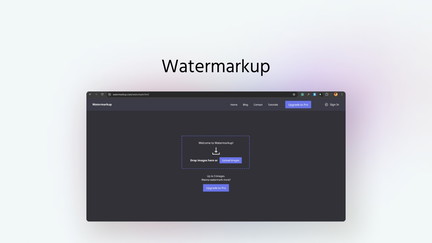
I tried Watermarkup after seeing the AppSumo listing and a bunch of Watermarkup reviews. It’s a web tool built for batch watermarking — you can process up to ~150–200 images at once while keeping the original quality.
I like that you can adjust opacity, position, and even tile a logo across images for extra protection. For everyday needs (social posts, ecommerce listings, blog images) it’s quick and low-friction; for special projects (client galleries, product shoots) it saves time compared with watermarking images one-by-one. On AppSumo the price was a nice value, and the app feels purpose-built rather than overloaded with features.
Watermarkup.
Pros and Cons
|
Pros |
Cons |
|---|---|
|
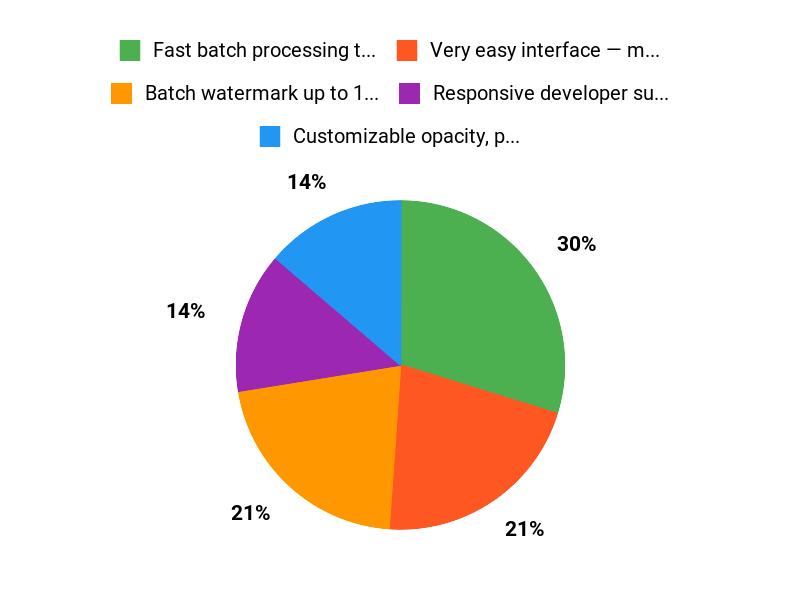
✅ Fast batch processing that preserves image quality |
❌ No precise pixel-based positioning or saved templates yet |
|
✅ Very easy interface — minimal learning curve |
❌ Web-based workflow requires upload/download (not a local editor) |
|
✅ Responsive developer support and frequent updates |
❌ Limited advanced editing features compared with dedicated batch editors |
What People Say
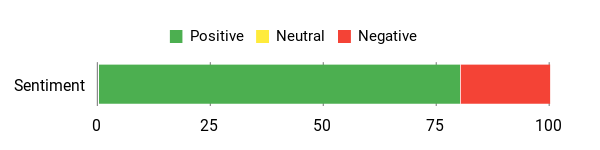
Reading Watermarkup reviews and trying the Watermarkup appsumo deal, I found a consistent theme: people love the speed and simplicity for batch watermarking, while some power users miss advanced positioning and template saving.
Overall Sentiment: Positive
🗣️ nemokali
Support was fast and responsive — I submitted a feature request and it was implemented within a couple of months. The developer clearly listens to users.
🗣️ Sumoling_Number_1
Very fast and easy to use: uploaded 13 photos, added text, and within seconds all photos were watermarked and ready to download. Zero learning curve, web-based so no installs.
Long-Term Cost Benefits
At $15.00 on AppSumo, Watermarkup can be a cost-effective tool for creators who regularly watermark images. Over time, the hours saved on manual watermarking and the protection against image theft can outweigh the small one-time cost.
Return On Investment
If you routinely process dozens or hundreds of images, the time savings alone make the tool pay for itself quickly. For small businesses and bloggers, fewer stolen images and consistent branding add indirect value as well.
Usability
|
Aspect |
Ease Level |
Notes |
|---|---|---|
|
Upload & Setup |
Easy |
Drag-and-drop uploads are straightforward; I was able to queue many images in minutes. |
|
Creating Watermarks |
Easy |
Text and logo watermarks are simple to add and adjust for opacity and position. |
|
Batch Processing |
Easy |
Processing dozens of images at once is fast and preserves quality. |
|
Template Saving |
Limited |
You can reuse uploaded logos, but saving precise templates or exact pixel positions isn’t available yet. |
Performance & Speed
Processing is quick — small batches complete almost instantly and larger batches finish in a short time depending on file sizes. Users reported fast turnaround for 10–100+ images.
Integrations
|
Software |
Integration Quality |
|---|---|
|
Google Drive |
Manual (upload/download) |
|
Dropbox |
Manual (upload/download) |
|
API / Zapier |
Not available / No direct integrations |
Security Features
|
Feature |
Protection Level |
|---|---|
|
GDPR Compliance |
High |
|
Temporary File Storage |
Moderate |
|
Account Access Controls |
Moderate |
Reliability
Overall the app is reliable for standard batch watermarking tasks. A few reviewers noted occasional feature gaps, but uptime and core processing are consistent.
Learning Curve
Very low — most users can start watermarking in minutes. Advanced needs (templates, pixel-precise positioning) require workarounds or waiting for feature updates.
Key Benefits
- Batch watermark up to 150–200 images while preserving original quality
- Customizable opacity, position, and tiling for stronger brand protection
- No local installs or browser extensions — works in the browser
- Simple UI that gets you from upload to download quickly
Current Price: $15.00
Rating: 4.69 (total: 32+)
FAQ
How Does Watermarkup Work For Batch Watermarking?
I upload multiple images to the web app, add my logo or text watermark, adjust opacity, position and tiling, then apply the watermark to all selected files and download the results. I like that Watermarkup preserves image quality and that the AppSumo plan lets you process large batches — you can expect to watermark around 150 to 200 photos in minutes depending on file size and connection. From reading Watermarkup reviews and my own tests, the interface is straightforward and fast, though remember it’s designed specifically for watermarking rather than full image editing.
Is Watermarkup Worth Buying On AppSumo?
I think it can be a good value if you need quick, reliable watermarking: the AppSumo deal lists Watermarkup at $15 versus an original price of $49, and many users rate it positively for speed and ease of use. I’ve looked through Watermarkup reviews and seen a mix of rave comments about simplicity and a few requests for advanced features, so I recommend trying it with a small set of images first and taking advantage of AppSumo’s purchase protections if you need a refund. I also appreciate that the product is GDPR-compliant and that the developer replies to feedback, which tells me they’re actively improving the app.
What Are The Limitations And Practical Tips For Using Watermarkup?
I’ve noticed a few limitations mentioned in reviews: precise pixel-level positioning and saving text templates are not fully supported yet, and because it’s web-based you need to upload and download files rather than edit locally. My practical tips are to prepare a transparent PNG logo, keep a few test images with different aspect ratios to preview how the watermark scales, use the tiling option for stronger protection, and upload in moderate-sized batches if you have very large files to avoid timeouts. If you run into issues I contact support — the team is responsive — and keep an eye on the roadmap since the developer has indicated plans to add more batch-editing features. I find the app best for bloggers, ecommerce sellers and small businesses who want fast, reliable batch watermarking without losing image quality.
Why Choose Watermarkup
We choose Watermarkup because it makes adding and managing watermarks effortless — the interface is intuitive, customization options are powerful, and it handles large batches quickly. On top of that, consistent output quality and responsive customer support give us confidence that our images stay protected without extra hassle.
Wrapping Up
After using Watermarkup and reading a range of Watermarkup reviews on the Watermarkup appsumo page, I found it to be a practical tool for creators who need quick, reliable batch watermarking without compromising image quality. It shines for speed, simplicity, and price (currently $15 vs $49 original), but if you need pixel-perfect positioning, saved templates, or advanced local batch editing, you may find the feature set limited.
Overall, I see it as a strong, budget-friendly solution for bloggers, e-commerce sellers, and small businesses who want to protect and brand many images fast.
This Roundup is reader-supported. When you click through links we may earn a referral commission on qualifying purchases.