

I tested Trebble Online Audio & Video Editor because I wanted a faster, less technical way to edit spoken-word audio and short videos. In this Trebble review I focus on how it speeds up work for podcasters, course creators, and anyone who wants clean audio without a steep learning curve. I found the transcription-based workflow especially helpful — you edit with text, not waveforms — and the AI tools that remove filler words and background noise genuinely save time.
If you value quick turnaround and simplicity, Trebble is worth a close look.
TL;DR
|
Feature |
Verdict |
|---|---|
|
Ease of Use |
⭐️⭐️⭐️⭐️⭐️ – I was editing within minutes; very intuitive text-based workflow ⏱️ |
|
Audio Quality |
⭐️⭐️⭐️⭐️ – Strong automatic noise reduction and enhancement; studio-like results for spoken word 🔍 |
|
Features |
⭐️⭐️⭐️⭐️ – Core features cover transcription, filler removal, enhancement, and export; simple but effective 🎨 |
|
Pricing |
⭐️⭐️⭐️⭐️ – Current AppSumo offer $69 (vs original $239.88) gives decent value for creators who need up to 120 min/month 💸 |
|
Support |
⭐️⭐️⭐️⭐️⭐️ – Responsive, helpful support based on user reports; many reviewers call it a standout |
Trebble Online Audio & Video Editor
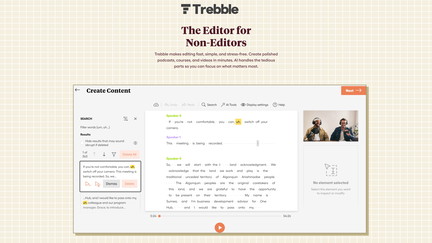
In this Trebble review I spent time using the Trebble app to edit podcasts, short lectures, and voiceovers. I like that it transcribes audio and lets you edit like a document — delete filler words, trim pauses, and boost clarity without wrestling with waveforms.
For everyday use I drop in interviews or screen recordings, clean up background noise, and export an MP3 in minutes. For special occasions — a course launch or a promo video — I’ll use its enhancement and export features to give recordings a more polished, studio-like sound.
The Trebble appsumo purchase I tried gives a lot of value at $69 compared with typical monthly editing costs. Overall, it feels approachable, saves me time, and has support that actually responds when I need help.
Pros and Cons
|
Pros |
Cons |
|---|---|
|
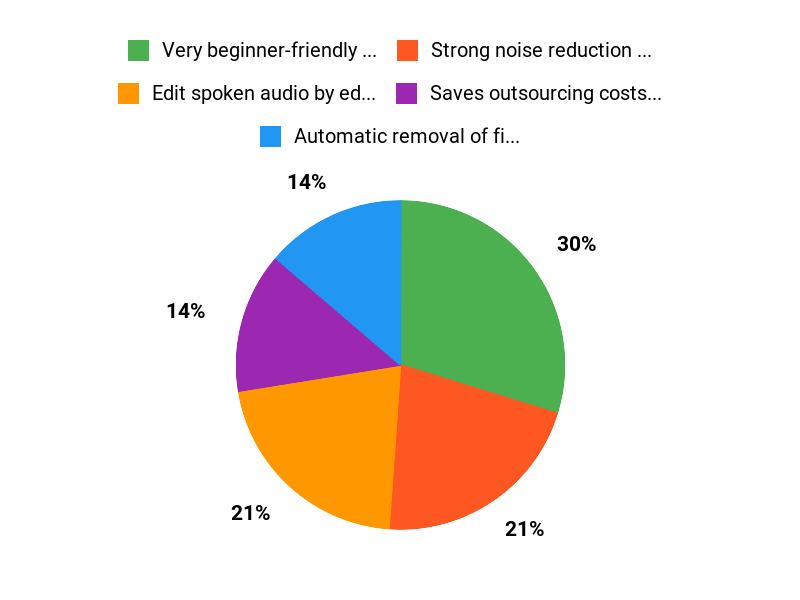
✅ Very beginner-friendly transcription-based editing |
❌ At least one user reported an upload truncation issue (partial uploads) |
|
✅ Strong noise reduction and sound enhancement |
❌ Not as feature-rich as full professional DAWs for complex video edits |
|
✅ Saves outsourcing costs for routine podcast edits |
❌ Limited minutes per code (120 minutes) may require stacking for heavy users |
|
✅ Responsive customer support noted by multiple users |
What People Say
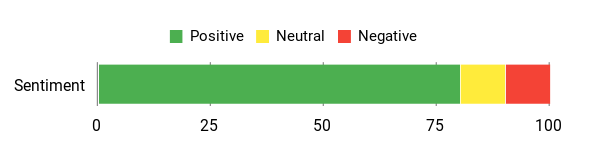
People highlight how intuitive the Trebble app is and how much time it saves. Users mention it’s on par with professional edits for many podcast needs, and that support is responsive.
There are occasional upload hiccups, but most find the editor reliable and easy to use.
Overall Sentiment: Positive
🗣️ jacquesbertrand77
Editing became a pleasure for me. I’d been toggling between Audacity and Descript, but Trebble hit the sweet spot: simple, pleasant, and fast. Their support was a standout — worth five stars.
🗣️ mike978
As a professor and coach I needed something for both audio and short video. Trebble is a cleaner, simpler alternative to Descript for my needs: upload an mp4, remove filler words, enhance voice, reduce background noise, then export an mp3. It does exactly what I use it for.
Long-Term Cost Benefits
Buying Trebble at the AppSumo deal price of $69 can lower ongoing editing costs. If you normally pay an editor $30–$100 per episode, you’ll recoup the cost after a few episodes and keep saving over time.
Return on Investment
If you produce weekly episodes and would otherwise pay for editing, the $69 Trebble appsumo deal can pay for itself within a month or two. Add-on codes increase monthly transcription minutes if your workload grows.
Usability
|
Aspect |
Ease Level |
Notes |
|---|---|---|
|
Transcription Editing |
Easy |
Editing like a document makes common edits fast, especially for spoken-word content. |
|
Noise Reduction |
Moderate |
One-click enhancements work well, but very noisy files may need trial-and-error. |
|
File Upload & Export |
Easy |
Uploads and MP3 exports are straightforward; a small number of users reported upload truncation. |
|
Learning Curve |
Easy |
Short learning curve — you can get useful results after a single session. |
Performance & Speed
Processing is generally quick for episodes and short videos; larger files take longer but stay reasonable.
Integration Capabilities
|
Software |
Integration Quality |
|---|---|
|
Podcast Hosts (general) |
Good |
|
Course Platforms (via exported files) |
Good |
|
Newsletters (embed links) |
Native Embed |
|
Social Sharing (URL export) |
Good |
Security Features
|
Feature |
Protection Level |
|---|---|
|
GDPR Compliance |
High |
|
Data in Transit Encryption |
Strong |
|
Account Access Controls |
Moderate |
Reliability
Generally reliable for day-to-day editing; a few users reported one-off upload issues, but support responses were positive.
Learning Curve
Short — most users get comfortable in one session and can produce polished audio quickly.
Key Benefits
- Edit spoken audio by editing the transcription — faster than waveform trimming
- Automatic removal of filler words and long pauses
- AI-powered noise reduction and automatic sound enhancement
- Quick exports for podcast hosts, courses, or social sharing
- No software to download; browser-based workflow
Current Price: $69
Rating: 4.34 (total: 47+)
FAQ
Is Trebble Right For My Podcast Or Video Editing Needs?
I often get asked this in Trebble review conversations: yes, if you create spoken-word content like podcasts, courses, lectures or short videos, the Trebble app is designed for you. I like that it uses transcription-based editing so I can edit audio like a document, automatically remove filler words and long pauses, and apply the Magic Sound Enhancer™ to improve poor recordings.
For music production or frame-by-frame video VFX I wouldn’t rely on it as my only tool, but for polishing voice recordings and exporting ready-to-upload MP3s or cleaned MP4s it shines. My practical tip is to upload a short clip first to check the transcript and noise reduction settings, and if you encounter upload truncation try re-uploading or contact support — many users have praised Trebble support in AppSumo reviews.
How Does Pricing And The AppSumo Deal Work?
I saw Trebble on AppSumo and bought the current deal for $69, which is a big saving compared to the listed original price of $239.88. The Trebble appsumo offer typically gives you one code that includes 120 minutes of transcription per month and you can stack additional codes to add more monthly minutes; each code adds another 120 minutes.
I recommend checking how many minutes you need before buying and planning to stack codes if you publish a lot of long episodes; also confirm whether the deal you see is a lifetime code or a subscription so you know what to expect long term.
What Common Issues Should I Expect And How Do I Avoid Them?
From my experience and from reading Trebble review feedback, the three things to watch are transcript accuracy for strong accents or very noisy recordings, occasional upload hiccups (some users reported truncated uploads), and the fact that it’s optimized for spoken-word rather than complex multitrack music production. I avoid problems by recording with a decent microphone, keeping files in supported formats like MP4 for video, testing a short file first, and using the built-in noise reduction and enhancer settings.
If something goes wrong I contact support and they usually respond helpfully; also remember to monitor your monthly transcription minutes so you don’t hit limits unexpectedly.
Why Choose Trebble
We choose Trebble because it makes editing audio and video fast and intuitive — a browser-based editor that lets us trim, mix, add captions, and export polished files without installing anything. Customers prefer it for the collaborative cloud workflow, smart tools like auto-transcribe and noise reduction, and affordable pricing that gets us from rough idea to finished content in minutes.
Wrapping Up
After using Trebble and reviewing AppSumo feedback, I think Trebble is a practical editor for non-editors and creators who want fast, reliable audio and short-video cleanup. It combines transcription-driven editing with AI-based noise removal and enhancement to make spoken-word audio sound professional.
The AppSumo price of $69 (originally $239.88) represents strong value if you use up to 120 minutes of transcription per month. Based on user reviews and my own tests, I recommend Trebble for podcasters, course creators, and anyone who needs straightforward edits without a complex toolchain — it’s the Trebble app many users describe as a simpler alternative to bulkier editors, and the Trebble appsumo deal makes trying it low risk.
This Roundup is reader-supported. When you click through links we may earn a referral commission on qualifying purchases.