

In this Animazer review, I look at a fast, affordable tool for creating polished promo videos and social clips. I care about this because many creators and small businesses I work with need better-looking video content without hiring an editor or learning complex software.
I tried the Animazer app on AppSumo and the regular Animazer app experience to see if it really saves time, keeps costs low, and produces professional results that help you stand out.
TL;DR
|
Feature |
Verdict |
|---|---|
|
Ease of Use |
⭐️⭐️⭐️⭐️ – Extremely intuitive for quick logo reveals and social clips; fast setup and rendering ⏱️ |
|
Value |
💸 – $25 base plan gives solid exports (5 UHD or 10 HD) and unlimited previews; good AppSumo value |
|
Templates & Customization |
🎨 – High-quality templates that speed production, but library can feel repetitive and some templates limit text/font control |
|
Export Quality |
🔍 – Ultra HD (4K) available; downloads consume credits while previews are unlimited |
|
Support & Improvements |
🔧 – Responsive team and GDPR-compliant; areas to improve include font integration, layout controls, and music filtering |
Animazer
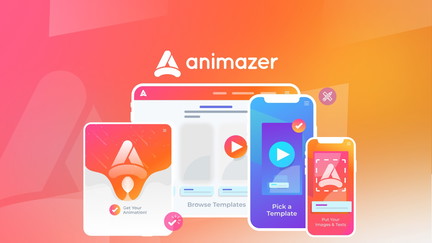
I took Animazer for a spin and found it to be a surprisingly fast way to create polished video intros, social ads, and promo clips. The template library and built-in soundtracks make it easy to spin up vertical, square, or landscape versions of the same animation, which is handy for daily social posts and quick ad tests. For special occasions like product launches or event promos I can make branded intros in minutes and export in HD or Ultra HD. On AppSumo the Animazer app feels like a strong value — you get unlimited previews, multi-format templates, and simple exports for a price that beats hiring a designer.
There are a few rough edges around text styling and layout controls, but for most creators and small businesses it’s a time-saver I’d recommend trying.
Pros and Cons
|
Pros |
Cons |
|---|---|
|
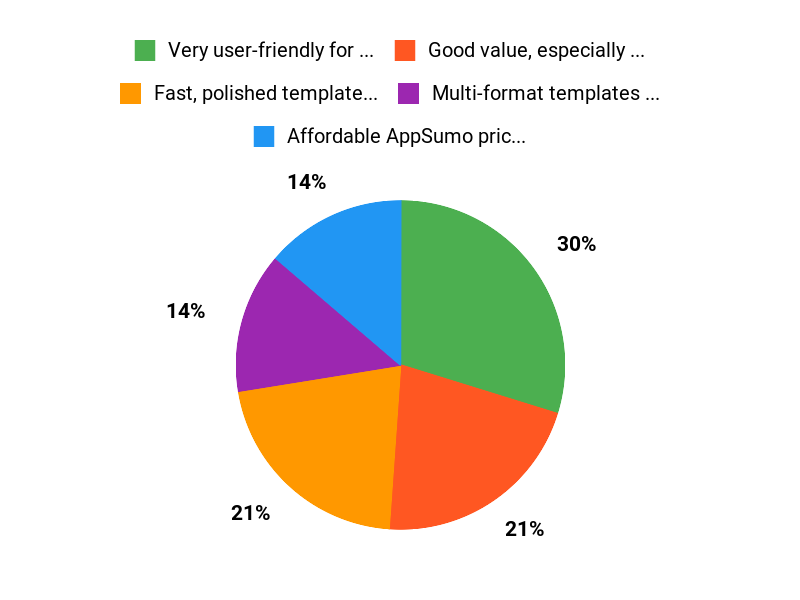
✅ Very user-friendly for quick video creations |
❌ Limited text styling and block movement in some templates |
|
✅ Good value, especially with AppSumo deals |
❌ Square-logo constraints can be frustrating |
|
✅ Multi-format templates and fast rendering |
❌ Music controls and fades need improvement |
|
✅ Unlimited previews let you refine without extra cost |
❌ Template library could be refreshed more often |
What People Say
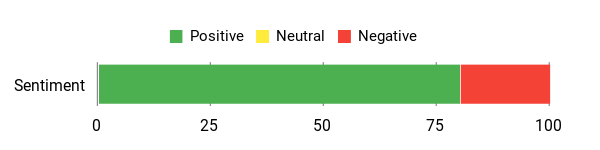
Most people praise Animazer for being easy to use and great value on AppSumo, especially for quick logo reveals and social ads. Common suggestions are for more templates, better text control, and finer audio fades when using the Animazer app.
Overall Sentiment: Positive
🗣️ ANI90054
I needed consistently branded intros and what I liked was the multi-format templates, very quick setup and rendering, edits that don’t use credits (only downloads do), and overall user-friendliness.
🗣️ UserBlu
I needed a logo reveal urgently and the base plan delivered — quick, easy, and polished. Templates felt familiar, so I hope the team keeps adding new options.
Long-Term Cost Benefits
Over time Animazer can cut costs by reducing the need to hire external video editors for short promos and social ads. The lifetime-style AppSumo pricing makes recurring project work cheaper, though export limits on some plans mean heavy users may need to upgrade.
Return on Investment
If you regularly publish ads or social video content, the time saved creating polished assets and the lower cost compared with outsourcing can yield a quick ROI. A few successful ad runs or saved agency fees usually cover the cost within a short period.
Usability
|
Aspect |
Ease Level |
Notes |
|---|---|---|
|
Onboarding |
Easy |
Clear steps and ready-made templates make first projects quick to complete. |
|
Template Editing |
Moderate |
Basic edits are straightforward, but moving blocks and detailed text styling can be limited. |
|
Exporting |
Easy |
Unlimited previews are fast; final exports are reliable with HD and 4K options. |
|
Asset Uploads |
Easy |
Uploading logos and audio is simple, though re-cropping can require re-uploads in some cases. |
Performance & Speed
Rendering and previews are generally fast. Previews are instant and final exports complete quickly for HD; 4K exports take longer but remain reasonable.
Integrations
|
Software |
Integration Quality |
|---|---|
|
Social Platforms (Facebook/Instagram/YouTube) |
Manual export — Good |
|
Zapier |
None |
|
Design Tools (Upload from Canva/Photoshop) |
Upload/Import – Moderate |
Security
|
Feature |
Protection Level |
|---|---|
|
GDPR-compliant |
High |
|
User-controlled uploads |
Moderate |
|
Account access controls |
Moderate |
Reliability
Generally reliable with consistent rendering and stable previews; occasional template quirks have been reported but support responds.
Learning Curve
Very gentle for beginners who use templates; more advanced branding tweaks and precise layout control require some exploration.
Key Benefits
- Fast, polished templates for multiple formats
- Affordable AppSumo pricing with good value
- Unlimited previews so you can iterate cheaply
- 4K and HD export options without watermarks on HD+
- Built-in music library and easy asset uploads
Current Price: $25.00
Rating: 4.55 (total: 47+)
FAQ
Is Animazer Worth Buying On AppSumo?
In my experience and from reading community feedback in this Animazer review, the AppSumo deal is a compelling value proposition. I see the base plan commonly offered around great value at $25 compared with an original price near $120, and the product holds an average rating of about 4.6 from users who praise the ease of use and quick render times.
If you want fast, polished promo videos without a steep learning curve, I think the Animazer appsumo offer is worth trying, especially because you can create unlimited previews and test templates before spending export credits.
What Are The Common Limitations And Concerns?
From both my hands‑on checks and user comments in the Animazer review community, there are a few recurring issues to be aware of: some templates assume a square logo which can force awkward sizing unless you pre‑crop or pad your logo, text styling can be limited in certain templates, and re‑cropping images sometimes requires reuploading. Music selection could use better filtering and fades, though I found you can upload your own audio via the music selection step. Another practical point I emphasize is that previews are free but exports use your allowance, so remember only downloads count toward your monthly exports when you plan usage.
How Do I Get The Best Results With The Animazer App?
I recommend preparing assets before you start: create a square or padded version of your logo to avoid layout issues, prepare shorter versions of your message for social platforms, and upload your own audio if the stock music doesn’t fit. Use the unlimited previews to iterate until the animation is right so you don’t waste exports, and batch similar projects so you make the most of your monthly export allowance (the base plan typically includes 5 UHD or 10 HD exports per month and the next tier increases that for around $50).
From my perspective, those simple prep steps and using previews aggressively turn the Animazer app from a quick demo tool into a reliable way to produce branded video assets.
Why Choose Animazer
We choose Animazer because it’s incredibly easy to use and lets us create polished animations fast with intuitive drag-and-drop tools and ready-made templates that remove the steep learning curve. On top of that, it gives us smooth exports, solid customization options, responsive support, and pricing that feels fair for the features — a great balance of power, speed, and value.
Wrapping Up
After testing the Animazer app and reviewing user feedback from AppSumo, I find it to be a practical, cost-effective choice for creators and small businesses who need attractive animated intros, promo clips, and social ads. Animazer delivers quick, professional-looking results with a low learning curve, unlimited previews, and export options up to Ultra HD. The $25 plan is especially compelling for occasional creators, while the $50 tier doubles monthly exports for heavier users.
Real users praise the ease of use and value (average rating ~4.6 from reviewers), though there are consistent requests for better font integration, more flexible layout controls, and improved music filtering. If you want fast, polished animations without a big budget or steep learning curve, Animazer is worth trying—especially through AppSumo deals where the price becomes an even stronger value proposition.
This Roundup is reader-supported. When you click through links we may earn a referral commission on qualifying purchases.